3uTools is a free, all-in-one iOS device management tool that lets you do things with your iPhone or iPad that Apple’s own software simply won’t allow, from flashing firmware and managing files directly on your PC, to checking whether a second-hand phone has genuine components before you hand over your money. Developed by Shenzhen Aidapu Network Technology Co., Ltd. and first released in 2015, it has been updated continuously ever since, with the latest Windows version (V6.0.3) released in March 2026 and a macOS version (V9.01) released in December 2025. Millions of iPhone owners, mobile repair technicians, and power users around the world rely on it daily, and the overwhelming majority of them have never seen it mentioned by Apple.
What makes 3uTools worth understanding in detail is the combination of its cost (nothing) and what it delivers: a toolbox of capabilities that would cost you $30 to $50 per year on paid alternatives like iMazing. That said, it also comes with genuine limitations and safety considerations that vary significantly depending on which features you use. This guide gives you a complete, honest picture of the tool (what it does, how to use it safely, what poses real risk and what doesn’t, and how it compares to alternatives), so you can decide whether it belongs in your toolkit.
What Is 3uTools?
3uTools is a Windows and macOS desktop application that connects to your iPhone, iPad, or iPod Touch via a USB cable and provides a comprehensive management interface that goes far beyond what iTunes or Apple’s Finder offers. It was developed by Shenzhen Aidapu Network Technology Co., Ltd., a Chinese software company whose digital signature is verifiable in the software’s properties, and evolved from an earlier Chinese product called the “i4 phone assistant,” which gave the development team deep expertise in the iOS system before 3uTools was built for international use. The tool is completely free to download and use, with revenue generated through in-app advertising rather than user subscriptions or data monetization.
On the operating system front, the Windows version remains the most feature-complete and stable option; it has existed since 2015 and covers every capability the tool offers. The macOS version (V9.01, released December 2025) is a significant milestone for Apple desktop users, available in both Intel Chip and Apple Silicon variants, though some advanced features, such as in-depth firmware flashing, are still being refined on Mac and remain more stable on Windows.
If you’re a Mac user looking for iOS management tools specifically, our Windows for Mac guide is worth reading alongside this. Running Windows via virtualization is still how some Mac users access 3uTools’ full feature set.
How 3uTools Works
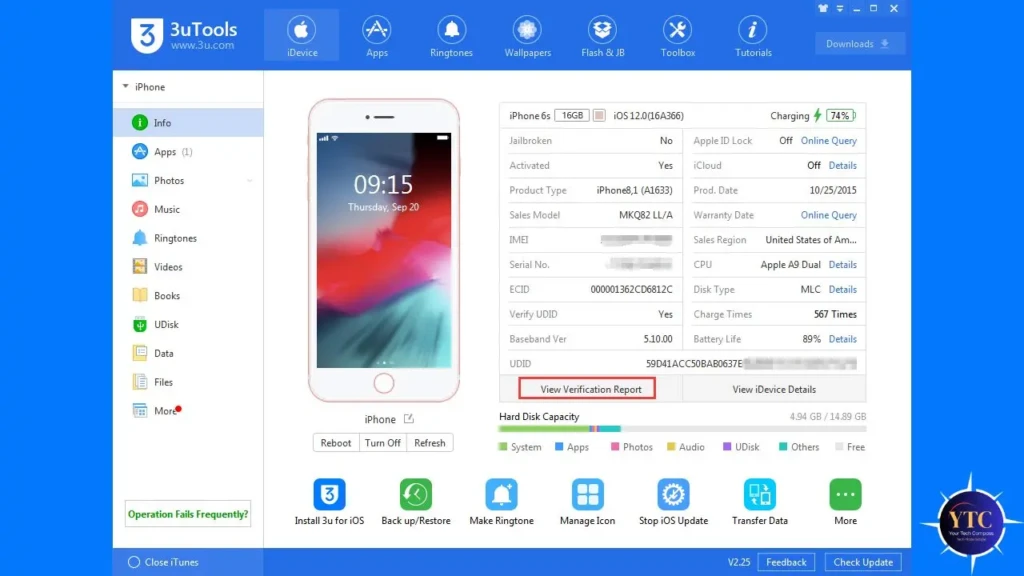
When you connect your iPhone to your PC via USB cable and open 3uTools, you’ll see an immediate prompt on your phone asking you to “Trust This Computer.” Tap Trust, and 3uTools will scan your device comprehensively within seconds.
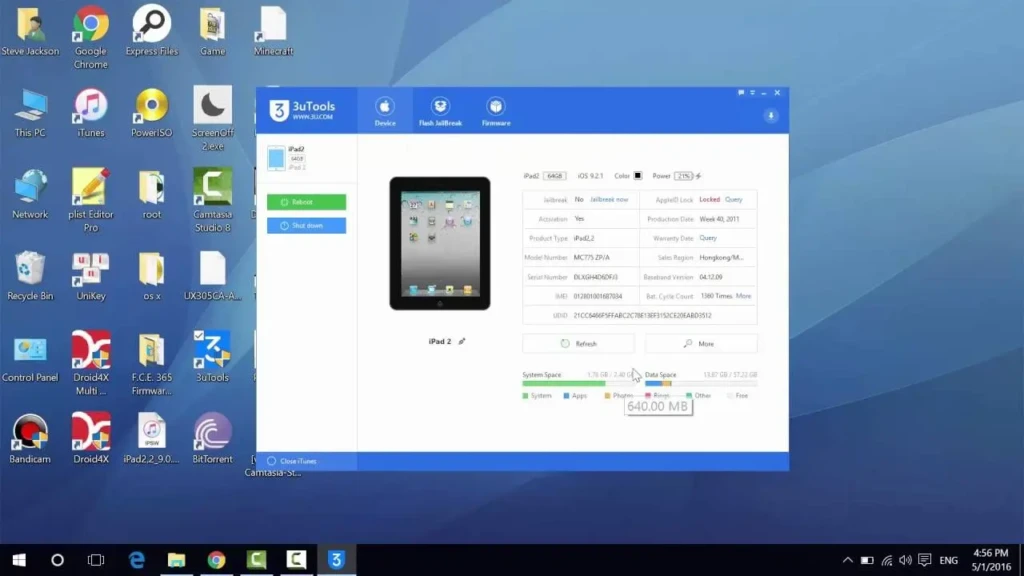
The main dashboard displays a complete picture of your device: model number, iOS version, IMEI, serial number, storage breakdown by category, battery health percentage, activation status, iCloud lock status, jailbreak status, and whether any components have been replaced with non-genuine parts. That level of device information on one screen is something Apple’s own tools don’t provide, and it’s the feature that makes 3uTools indispensable for secondhand iPhone buyers.
From the dashboard, the interface is organized into clearly labeled tabs covering every major function: Apps, Files, Photos & Videos, Music, Flash & JB (firmware and jailbreak), Toolbox, and iDevice Verification. Each tab opens its own dedicated management interface, so managing your photos looks and feels different from flashing firmware, which reduces the chance of accidentally navigating into a high-risk operation when you only wanted to transfer a file.
3uTools Key Features
Device Information Dashboard
The dashboard is the most immediately useful feature for most users, and the first thing you should look at every time you connect a device. You get model, iOS version, IMEI, storage breakdown, battery health, activation status, iCloud lock status, and genuine vs non-genuine component detection, all in a single view that takes seconds to read.
The iDevice Verification feature specifically scans for non-Apple screens, batteries, cameras, and other components with approximately 85% detection accuracy. It’s not perfect, but it provides far more information than you’d get from a seller’s description or a visual inspection.
Firmware Flashing
Firmware flashing is 3uTools’ most powerful and most consequential feature. It lets you flash, restore, upgrade, or downgrade iOS firmware directly from your PC.
The tool offers two modes: Retain Data (attempts to preserve your data during the flash, works in most standard restore scenarios) and Deep Clean (a full wipe, used when the device needs a completely fresh start). Additionally, the intelligent DFU rescue system is particularly valuable for users with iPhones stuck on the Apple logo, a white screen, or in a boot loop.
3uTools automatically detects the issue, guides you into recovery mode step by step, and executes the flash without requiring technical expertise.
iOS Downgrade
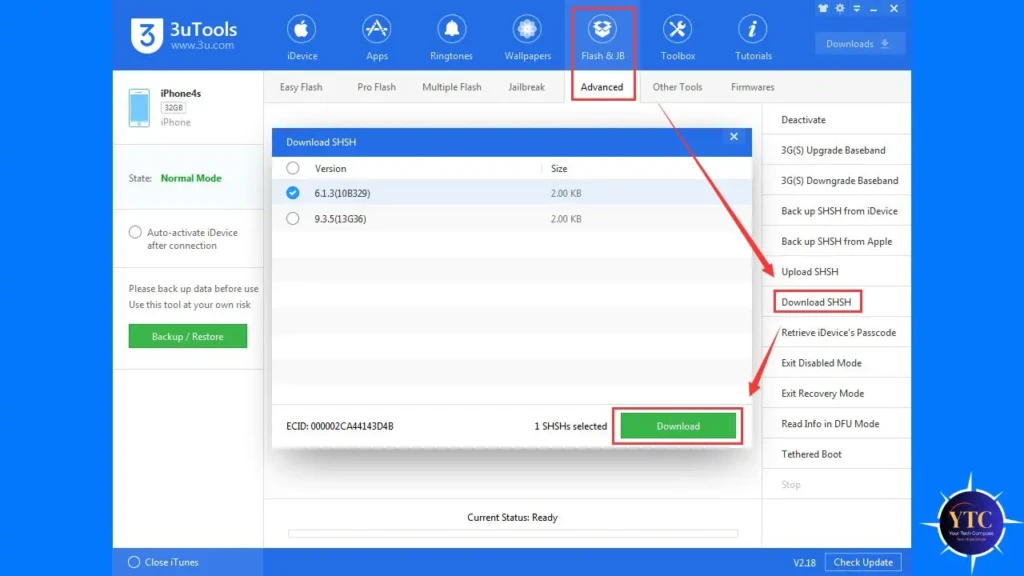
When Apple is still cryptographically “signing” an older iOS version, meaning the signing window is still open, 3uTools lets you downgrade to that version. This is relevant when a new iOS update causes problems on your device, and you want to roll back, or when certain features you rely on are removed in an update.
But there’s a timing constraint you should know about. Once Apple closes the signing window for a version (typically within a few weeks of a new iOS release), downgrading to that version becomes impossible through any tool.
If you’re running iOS 26 and want to understand what changed and whether a downgrade makes sense, our iOS 26 guide and iOS 26.3 beta features breakdown give you the full picture of what’s in the current release.
App Management and Sideloading
3uTools gives you a built-in app library where you can download and install apps directly on your iPhone (including IPA files not available on the App Store) without an Apple ID. In addition, every app in the 3uTools library is verified through its digital signature before installation, which is a meaningful safety layer. Beyond the library, you can back up, manage, and uninstall any app on your device directly from your PC, without touching the phone itself.
File Management
The file management interface lets you browse, transfer, and organize photos, videos, music, contacts, ringtones, books, and documents on your iPhone directly from your PC, treating your device more like a USB drive than the walled garden Apple prefers. Unlike iCloud, which requires an internet connection and a subscription for meaningful storage, 3uTools file transfers happen entirely locally over USB with no internet required. This is the most straightforward and lowest-risk feature in the entire toolkit; no device modifications, no firmware changes, just direct file access.
Ringtone Maker
The Ringtone Maker lets you convert any audio file into an iPhone ringtone and transfer it directly to your device without iTunes. You select your audio file, trim the segment you want (up to 40 seconds), and 3uTools handles the conversion and transfer in one step.
This is one of the most commonly used features among everyday iPhone owners who aren’t interested in advanced capabilities. It’s genuinely useful, genuinely free, and carries zero meaningful risk to your device.
Virtual Location
Virtual Location lets you set a fake GPS location on your iPhone by entering coordinates for anywhere in the world, and have your phone report that location to apps. Use cases include testing location-based apps in development, accessing region-restricted content, and location-specific gaming.
The honest caveat worth knowing: Virtual Location has become less reliable on newer iOS versions as Apple has tightened GPS integrity controls, and users on iOS 16 and above report inconsistent results, sometimes requiring a device restart or switching to a different map provider (Mapbox instead of Google Maps) to get it working.
Screen Mirroring and Recording
The companion 3uAirPlayer tool (available as a separate download from the same official site) lets you mirror your iPhone screen to your Windows PC wirelessly via AirPlay or via USB, and record that screen with no time limit. For content creators, teachers, and developers who regularly need to capture iPhone screen footage on a PC, this is a genuinely useful free alternative to paid screen recording software.
The wireless version requires your phone and PC to be on the same Wi-Fi network. On the other hand, the USB version is more reliable in environments with unstable Wi-Fi.
Backup and Restore
3uTools creates full device backups stored locally on your computer, such as contacts, photos, videos, messages, app data, and more. Unlike iCloud backups (which require an internet connection, count against your storage quota, and involve Apple’s servers), 3uTools backups happen entirely on your machine over USB, making them faster and more private.
The one honest limitation: restoring from a 3uTools backup to a different device may encounter compatibility issues due to an iOS version mismatch between the backup and the target device.
How to Download and Install 3uTools Safely
The single most important rule with 3uTools is this: only download from the official website at 3u.com. And this is not a precaution you can skip. This is because there are dozens of fake, modified, and malware-laced versions of 3uTools circulating on third-party download sites, mirror sites, and download aggregators.
The legitimate software from 3u.com is digitally signed by Shenzhen Aidapu Network Technology Co., Ltd. You can verify this by right-clicking the installer, selecting Properties, and checking the Digital Signatures tab before running anything.
Once you’ve downloaded the legitimate installer, the installation process is straightforward: run the installer, follow the prompts, connect your iPhone via USB, and tap “Trust” on your phone when prompted.
Windows Defender and some third-party antivirus programs occasionally flag 3uTools as a potential threat. This is a false positive caused by the deep system-level access the tool requires, not evidence of malicious code. However, if you downloaded from 3u.com and verified the digital signature, you can add an exception in your antivirus software without concern.
3uTools is compatible with Windows 10 and Windows 11 (both 32-bit and 64-bit), and the macOS version supports both Intel and Apple Silicon Macs. Remember to read each screen during installation carefully; the installer occasionally bundles third-party software offers that you should decline unless you specifically want them.
Is 3uTools Safe?
The safety question has two distinct layers, and most articles mix them up in ways that are genuinely unhelpful to you. The first layer is whether the software itself is safe; the second is whether the operations you perform with it are safe for your device. These are very different questions with very different answers.
On the Software Itself
A legitimate 3uTools downloaded from 3u.com is not malware. It is not widely classified as malicious by any major security vendor; it has been used by millions of users for years without any systematic incidents, and its digital signature traces to a verifiable Chinese software company.
The data privacy picture is more nuanced. Some Reddit users and security researchers have raised concerns that device data may be transmitted to Chinese servers, though this has not been definitively confirmed. The practical guidance for privacy-conscious users is: if you’re handling a device with highly sensitive personal or professional data, a paid alternative developed outside China (like iMazing) removes that ambiguity entirely.
On What You Do with It
Most features carry no meaningful device risk. File management, ringtone creation, screen mirroring, app management, and the device information dashboard are all low-risk operations that don’t modify your device’s system software. However, firmware flashing and iOS downgrade carry real risk, specifically, the risk of a bricked device if the flash is interrupted (by a USB disconnect, power loss, or incorrect firmware selection). Therefore, always ensure your device is fully charged, use the correct firmware for your exact model and iOS version, and never disconnect the cable during a flash operation.
Jailbreaking introduces a different category of risk: it voids your Apple warranty, removes important security protections on your device, and increases your device’s vulnerability to malware if you subsequently install unverified tweaks or apps.
3uTools vs Competitors
Feature | 3uTools | iTunes | iMazing | AnyTrans | Finder (Mac) |
Price | Free | Free | $34.99 one-time | $39.99/year | Free |
Windows Support | ✅ Full | ✅ Yes | ✅ Yes | ✅ Yes | ❌ No |
Mac Support | ⚠️ V9.01 (still maturing) | ❌ Removed 2019 | ✅ Full | ✅ Yes | ✅ Native |
Firmware Flashing | ✅ Full | ✅ Basic only | ⚠️ Limited | ❌ No | ❌ No |
File Management | ✅ Full | ❌ Limited | ✅ Full | ✅ Full | ⚠️ Basic |
App Sideloading | ✅ Yes | ❌ No | ⚠️ Limited | ❌ No | ❌ No |
Virtual Location | ✅ Yes (iOS-dependent) | ❌ No | ❌ No | ❌ No | ❌ No |
Device Diagnostics | ✅ Comprehensive | ❌ Minimal | ⚠️ Basic | ❌ No | ❌ No |
iCloud Lock Check | ✅ Yes | ❌ No | ❌ No | ❌ No | ❌ No |
Genuine Parts Check | ✅ ~85% accuracy | ❌ No | ❌ No | ❌ No | ❌ No |
Safety Rating | ✅ Safe | ✅ Apple-certified | ✅ Highest trust | ✅ Trusted | ✅ Apple-native |
3uTools vs iTunes
iTunes handles authorized backups and App Store syncing, but is feature-thin compared to 3uTools in every other way. In addition, iTunes doesn’t check genuine parts, doesn’t show battery health, can’t create ringtones, can’t sideload apps, and offers no virtual location capability.
The one area where iTunes holds an advantage is Apple’s official certification. This is because if something goes wrong during an iTunes restore, Apple will help you. However, if something goes wrong during a 3uTools flash, you’re on your own.
3uTools vs iMazing
iMazing is the premium, privacy-first alternative, developed in Switzerland, fully GDPR-compliant, with a cleaner interface and strong Mac support. It costs $34.99 as a one-time purchase and doesn’t include firmware flashing, sideloading, or virtual location.
If data privacy is your primary concern and you primarily need file management and backup, iMazing is worth the cost.
3uTools vs AnyTrans
AnyTrans charges $39.99 per year, focuses on file transfer and media management, and lacks the firmware flashing and device diagnostics that distinguish 3uTools.
For a broader look at iOS and productivity app comparisons across categories, our apps and tools section covers the full landscape in useful detail.
Real-World Use Cases
Checking a Second-hand iPhone
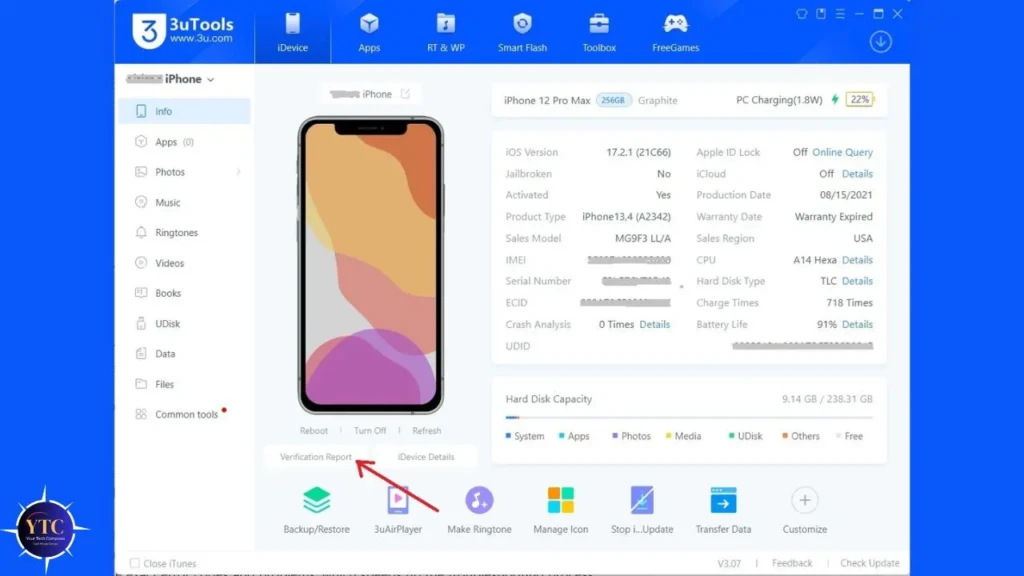
Checking a second-hand iPhone before buying is the most universally useful application of 3uTools, and the one that can save you the most money. Therefore, before purchasing any used iPhone, connect it to 3uTools and check: iCloud lock status (if it’s locked to a previous owner, you can’t use it), battery health percentage, genuine vs non-genuine screen and battery (non-genuine parts significantly affect resale value and performance), activation status, and whether the device has been jailbroken. That 60-second check tells you more about the phone’s history than the seller’s description ever will.
Fixing a Bricked or Boot-Looped iPhone
This is where 3uTools has earned its strongest reputation among power users. Trustpilot reviews include multiple documented cases of users fixing iPhones stuck on the Apple logo or in DFU mode after local repair shops declared the devices unrecoverable, with 3uTools’ intelligent DFU rescue system completing the fix without data loss. That outcome is not guaranteed in every case, but for a free tool, the capability to attempt a firmware rescue that a repair shop would charge $50 to $100 for is genuinely valuable.
Managing iPhone Storage from a PC
This is the most friction-free everyday use case. If you’ve ever needed to transfer 400 photos off an iPhone without using iCloud, or wanted to add music files without going through iTunes’ sync restrictions, 3uTools’ file management tab handles both operations in minutes with a simple drag-and-drop interface.
Beyond that, creating custom ringtones is the single most popular beginner use case. Import any MP3, trim the segment you want, and 3uTools installs it as a ringtone in under 30 seconds.
Limitations and Honest Drawbacks
The macOS Version Is Still Maturing
Released in December 2025, it covers core functionality well, but advanced operations like in-depth firmware flashing are more reliable on Windows. If you’re on a Mac and need full 3uTools functionality right now, running it in a Windows virtual machine remains the more stable path until the macOS version catches up with additional updates.
Device Information Accuracy Isn’t Perfect
3uTools occasionally displays incorrect storage capacity, iOS version, or battery health readings, particularly on heavily modified or refurbished devices. The iDevice Verification feature has approximately 85% accuracy in detecting genuine parts, which is meaningful but not a substitute for professional device inspection when you’re making a high-value purchase decision.
The Interface Feels Dated
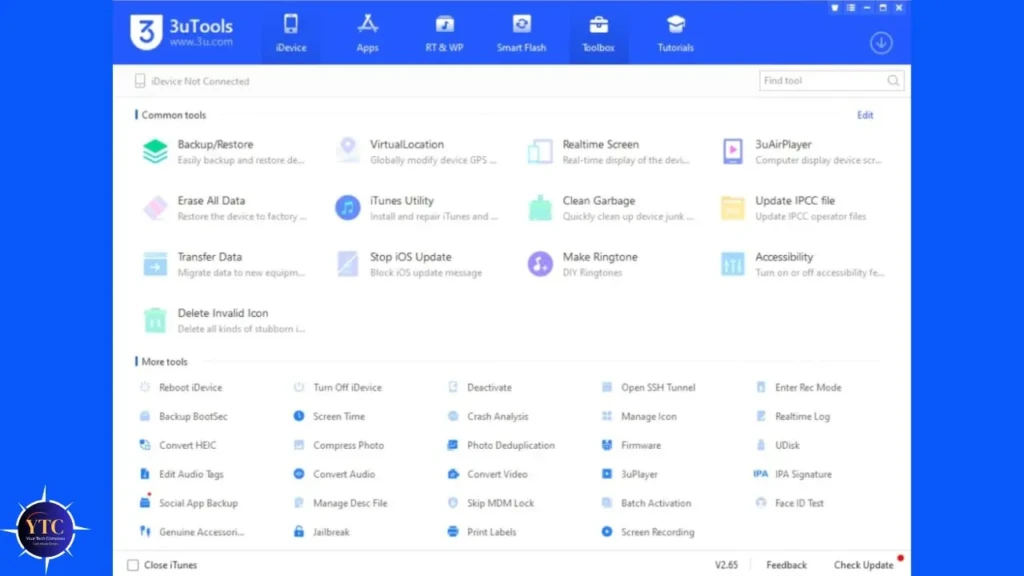
The interface feels dated and can overwhelm first-time users with the sheer volume of options presented across the tabs. In addition, there’s no guided “start here” onboarding experience.
You’re dropped into a dense dashboard immediately, and understanding which features are safe for casual use versus which require more caution takes time to learn. Additionally, the installer bundles third-party software offers that you need to actively decline during setup, a practice consistent with how 3uTools generates revenue on the free model, but one that requires your attention during installation.
FAQs
Yes, 3uTools is completely free to download and use. All core features, including file management, firmware flashing, device diagnostics, ringtone creation, and app management, are available at no cost. Revenue comes from in-app advertising.
Downloaded from the official website at 3u.com, 3uTools is not malware and is safe for everyday use. Risk varies by feature: file management, ringtone creation, and diagnostics carry no meaningful risk; firmware flashing and jailbreaking carry real risk if performed incorrectly. Never download from third-party sites.
Yes, an official macOS version (V9.01) was released in December 2025 for both Intel and Apple Silicon Macs. Core features are available; some advanced functions are still more stable on the Windows version, while the Mac release continues to be updated.
No, 3uTools can check whether an iPhone is iCloud locked, but it cannot remove or bypass Activation Lock. Any tool claiming to unlock iCloud-locked iPhones should be treated with extreme skepticism.
No, the vast majority of 3uTools features work on any iPhone without jailbreaking. Jailbreaking is one specific feature within the tool, not a requirement for using it.
The most common use cases are: checking a second-hand iPhone before buying, fixing boot-looped or bricked devices via firmware flash, managing files and photos on a PC, creating and installing custom ringtones, backing up iPhone data locally, and checking battery health and genuine component status.
Final Thoughts
3uTools is one of the most capable free tools available for iPhone and iPad management, and for anyone who regularly buys second-hand devices, manages large amounts of iPhone media on a PC, or needs to rescue a device that official Apple tools can’t fix, it earns a permanent place in your toolkit. The device diagnostics alone (iCloud lock check, genuine parts detection, battery health, activation status) make it worth having installed even if you never touch the firmware or jailbreak features. Downloaded from the official site at 3u.com, the tool is safe for everyday use, with all non-advanced features.
The features that carry real risk (firmware flashing, iOS downgrade, and jailbreaking) are genuinely powerful, but they require you to understand what you’re doing before you start. Always back up your device before any firmware operation, use the correct firmware for your exact model, never disconnect the USB cable mid-flash, and skip the jailbreak feature entirely unless you have a specific, well-understood reason to use it. Approach 3uTools as the powerful toolkit it is, rather than a one-click solution, and it will serve you well across a wide range of iOS management tasks that Apple’s own tools simply won’t touch.
For more tech guides and honest reviews, visit YourTechCompass.