
If you write code for a living, or even occasionally, GitHub Copilot is one of the most practically useful AI tools you can add to your workflow right now. Built by GitHub in partnership with OpenAI and now powered by a rotating roster of frontier models, including GPT-4.1, Claude Sonnet 4.6, and Claude Opus 4.6, Copilot goes well beyond basic autocomplete. It suggests full functionality, translates plain-English comments into working code, reviews your pull requests, and operates as an autonomous coding agent that can plan and execute multi-step tasks without you having to direct every step. As of early 2026, over 20 million developers use it as their primary AI coding assistant.
What makes Copilot worth understanding in detail is that it has grown significantly more complex and capable since its launch. The pricing structure now has five distinct tiers, a premium request system that can incur unexpected costs, and a set of agentic capabilities that put it in direct competition with tools like Cursor and Claude Code. This guide walks you through exactly how it works, what every feature actually does, what you’ll pay, and whether it’s worth it at your level of use.
A note before we begin: every YTC score is earned, never negotiated. If you want to understand exactly how we evaluate apps & tools and how we handle affiliate relationships, our Review Methodology lays it all out.
What Is GitHub Copilot?
GitHub Copilot is an AI-powered coding assistant built by GitHub, a Microsoft subsidiary, in collaboration with OpenAI. It’s designed to work inside your code editor, reading the context of what you’re writing and suggesting completions ranging from a single line to an entire function or module. Rather than replacing you as a developer, Copilot is built to handle the repetitive, boilerplate, and pattern-driven parts of coding so you can focus on the logic and architecture that actually require creative problem-solving.
What separates Copilot from the basic autocomplete that has long existed in IDEs is the depth of context it understands. It reads your current file, related files in your project, variable names, function signatures, and even comments written in plain English, and uses all of that context to generate suggestions that match your intent rather than just your syntax. That shift from syntax-matching to intent-reading is what makes it feel qualitatively different from any IDE tool you’ve used before.
How GitHub Copilot Works
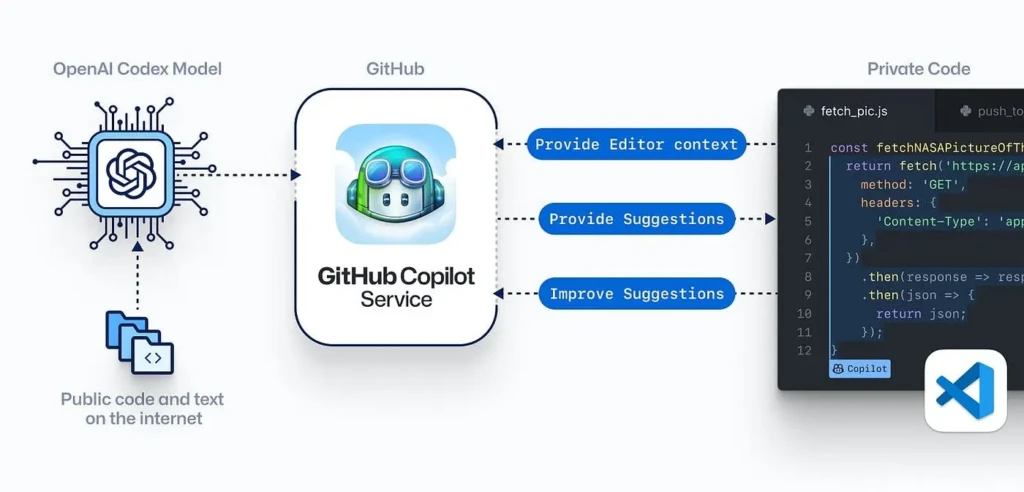
At its core, Copilot uses large language models, the same class of AI behind ChatGPT and Claude, but fine-tuned specifically on code rather than general text. When you’re writing in your editor, Copilot continuously ingests the context of your open file and relevant surrounding files, sends that context to the model, and receives one or more suggested completions, which it displays inline in your editor. You accept a suggestion with Tab, dismiss it with Escape, or cycle through alternatives if multiple options are available.
The technical mechanism behind this is “next token prediction” applied to code tokens rather than prose. In addition, the model predicts which code is most likely to come next, given everything it can see about your current project.
Beyond inline suggestions, Copilot Chat adds a conversational interface directly inside your IDE where you can ask questions like “Why is this function returning null?” or “Write me a unit test for this method” and get a direct, contextualized answer. That combination of inline suggestions and conversational assistance has a greater impact on daily workflow than either feature alone.
Key Features of GitHub Copilot
Code Autocompletion
Copilot’s foundational feature is inline code completion. As you type, it predicts and suggests everything from the next word to a complete block of logic. What’s genuinely useful here is that the suggestions are context-aware: if you’re writing a function that handles user authentication, Copilot understands that context and suggests code consistent with that purpose rather than generic syntax.
On paid plans, code completions are unlimited and don’t consume premium requests. This is important to understand when you’re evaluating the cost structure.
Comment-to-Code Generation
You write a plain-English comment describing what you want, for instance, // validate email format and return a boolean, and Copilot generates a working implementation beneath it. This is particularly valuable when you’re working in a library or framework you’re less familiar with, because you can describe the intended behavior in natural language and let Copilot translate it into the correct syntax and API calls. Therefore, the quality of what you get back is directly tied to how specific and well-framed your comment is.
Copilot Chat
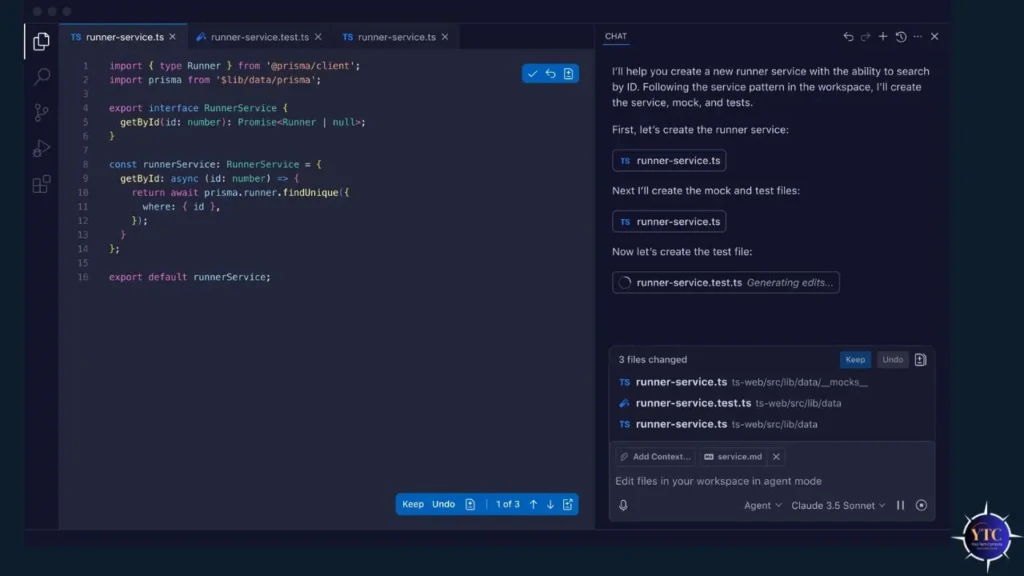
Copilot Chat is a conversational AI assistant embedded directly inside your IDE. It’s available in VS Code, Visual Studio, JetBrains, Eclipse, and Xcode.
You can ask it to explain a function, debug an error, suggest a refactor, generate test cases, or walk you through an unfamiliar codebase, all without leaving your editor. Additionally, each Chat interaction counts as a premium request against your monthly allowance, which is the primary cost variable to watch if you’re on a lower-tier plan.
Agent Mode
Agent Mode is Copilot’s most powerful and most recently matured feature. It turns Copilot from a suggestion tool into an autonomous collaborator capable of planning and executing multi-step coding tasks.
You describe what you want accomplished, and Copilot creates a plan, writes the code, runs tests, reads the error output, and iterates until the task is complete, all without you directing each individual step. Agent Mode sessions consume multiple premium requests as the agent works through steps, so it’s the feature most likely to exhaust your monthly allocation quickly on lower tiers.
Pull Request Code Review
On Business and Enterprise plans, Copilot can automatically review pull requests by reading the diff, identifying potential issues, suggesting improvements, and summarizing what the PR does and why. For teams doing high-volume code review, this reduces the bottleneck of waiting for human reviewers on straightforward PRs and surfaces issues before they reach a senior developer’s queue. Each automated review consumes premium requests from the organization’s allocation.
Multi-Language Support
Copilot supports a wide range of programming languages: Python, JavaScript, TypeScript, Go, Ruby, Java, C#, C++, and more. JavaScript and Python have the strongest suggestion quality because they’re the most heavily represented in the training data. In addition, languages with smaller open-source footprints yield less consistent suggestions, which is worth knowing up front if your primary language is niche.
GitHub Copilot Pricing and Plans
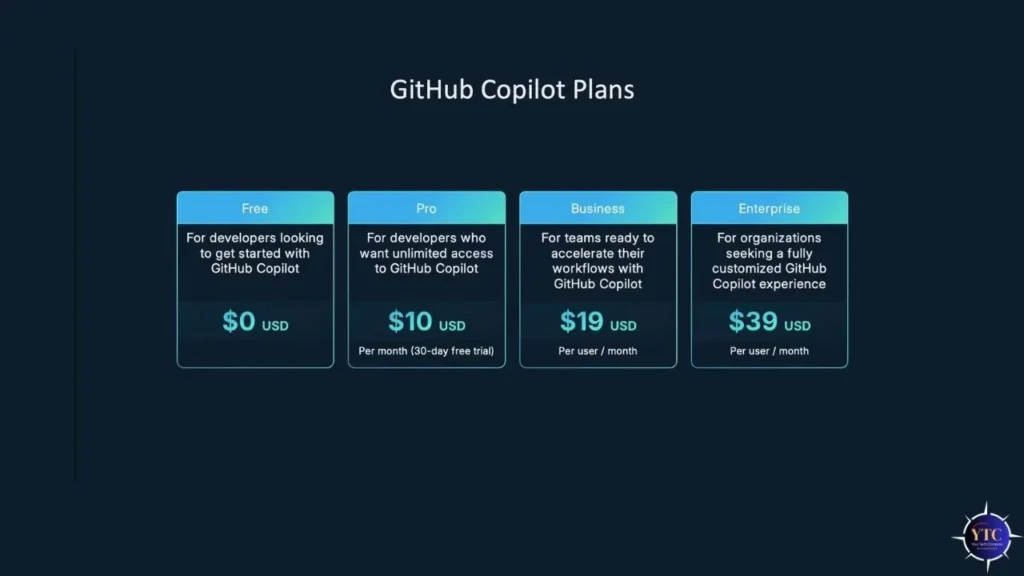
Plan | Price | Completions | Premium Requests | Best For |
Free | $0/month | 2,000/month | 50/month | Light testing; 1–2 hrs coding/day |
Pro | $10/month ($100/year) | Unlimited | 300/month | Individual developers and daily use |
Pro+ | $39/month ($390/year) | Unlimited | 1,500/month | Power users and full model access (Opus 4.6, o3) |
Business | $19/user/month | Unlimited | Standard allocation | Teams, centralized management, and IP indemnity |
Enterprise | $39/user/month + $21 GitHub Enterprise Cloud | Unlimited | 1,000/user/month | Large orgs, custom models, and codebase indexing |
The most important thing to understand about Copilot’s pricing is the premium request system, introduced in 2025, which surprises most users. Basic code completions (Tab autocomplete) are free on all paid plans and don’t consume premium requests. Everything else (Chat conversations, Agent Mode sessions, pull request reviews, and selecting specific models) counts against your monthly allowance.
When you exhaust your allocation, additional requests cost $0.04 each. On the free tier, 50 premium requests amount to roughly 2–3 Chat interactions per day, which is useful for testing but not enough to rely on for daily development work.
Pro at $10/month is the right tier for most individual developers. 300 premium requests cover 10–15 Chat or Agent interactions per day, which is sufficient for typical daily use.
Pro+ at $39/month is worth the jump, specifically if you need access to the most powerful models, such as Claude Opus 4.6 and OpenAI o3, which are locked behind Pro+, or if you regularly exhaust the 300 Pro request limit.
Worth flagging for Enterprise buyers: the $39/user/month Enterprise price doesn’t include the GitHub Enterprise Cloud subscription required to use it. Adding that $21/user/month prerequisite brings the real total to $60/user/month, which catches teams off guard when they first see the bill.
What GitHub Copilot Is Best Used For

Copilot delivers the clearest, most immediate value in three scenarios. The first is boilerplate and repetitive code, getters, setters, API call patterns, test scaffolding, configuration files, and data-parsing logic that follow predictable patterns but still take time to write correctly. Copilot handles these tasks almost perfectly and saves a meaningful number of daily keystrokes for tasks that don’t require creative problem-solving.
The second is working in unfamiliar libraries or frameworks. When you’re using an API or library you haven’t worked with before, Copilot can suggest the correct method calls, handle the required imports, and show you how the library expects to be used, all within the flow of writing rather than requiring a context switch to documentation. That’s genuinely faster than repeatedly alt-tabbing to read docs.
The third is writing tests; generating unit tests for existing functions is one of Copilot’s most consistently strong use cases, and it’s one of the most time-consuming manual tasks in any development workflow.
GitHub Copilot for Beginners
If you’re new to coding, Copilot can feel like having a patient tutor available whenever you’re writing. When you’re unsure how to structure a function, which method to call, or how a particular syntax works, Copilot’s suggestions often show you the correct approach in context, which is faster and more immediately applicable than looking up a tutorial.
That said, the most important habit to build as a beginner using Copilot is reading every suggestion before accepting it, rather than treating Tab as a shortcut to working code. Accepting code you don’t understand creates bugs you can’t diagnose, and that habit slows your learning more than it helps.
GitHub Copilot for Professional Developers
For experienced developers, Copilot primarily functions as a productivity multiplier for the parts of your job you find least engaging. The reduction in cognitive load for boilerplate code, test generation, and pull request review frees up mental energy for architectural decisions and complex problem-solving. Beyond that, Agent Mode is the feature most worth the time to learn.
Once you’re comfortable framing tasks in a way that Copilot can execute autonomously, the time savings on well-defined coding tasks are substantial.
The caution worth maintaining as a professional is around security-critical and business-logic-critical code. Copilot-generated code can contain security vulnerabilities that aren’t obvious on first review, and it doesn’t always handle edge cases correctly in complex conditional logic. The practical rule is: the more consequential the code, the more carefully you should review Copilot’s suggestions before merging.
For a developer-focused take on which AI tools genuinely save time versus which are overhyped, SIOY’s honest breakdown is worth reading. In addition, if you’re thinking about how to roll out AI tools responsibly across a team or organization, this guide by Savia Learning on what employees actually need in AI training in 2026 is one of the most practical breakdowns available.
GitHub Copilot vs Competitors
Feature | GitHub Copilot Pro | Cursor Pro | Claude Code | Tabnine |
Price | $10/month | $20/month | Usage-based API | $59/user/month (Enterprise only) |
IDE | Stays in your existing IDE | Separate IDE (VS Code fork) | CLI + VS Code / JetBrains | IDE extension |
Agent Mode | ✅ Yes | ✅ Yes (stronger agentic UX) | ✅ Best-in-class agentic | ❌ Limited |
Model Access | GPT-4.1, Claude Sonnet/Opus, o3 | Claude Sonnet, GPT-4o | Claude Sonnet 4.6 / Opus 4.6 | Private models only |
Free Tier | ✅ 2,000 completions / 50 requests | ✅ Limited | ❌ No | ❌ No (discontinued April 2025) |
Self-Hosted Option | ❌ No | ❌ No | ❌ No | ✅ Only vendor offering this |
IP Indemnity | ✅ Business+ only | ❌ No | ❌ No | ✅ Yes |
Best For | Staying in your current IDE | Agentic coding; full IDE replacement | Maximum coding capability | Compliance-first enterprises |
The most important comparison for most developers is Copilot vs Cursor. Cursor positions itself as a full IDE replacement built around agentic AI. It’s a VS Code fork with AI deeply integrated throughout the interface rather than added as an extension.
If you’re comfortable replacing your IDE entirely and want the tightest possible agentic workflow, Cursor’s UX is genuinely better for that use case. However, if you want AI assistance within the IDE you already use at no transition cost, Copilot wins on convenience and price.
Claude Code is the strongest option for raw coding capability among developers comfortable with a CLI-first workflow, but it requires more setup than either Copilot or Cursor. Tabnine, on the other hand, is the only option if your legal or compliance team requires a self-hosted deployment with data residency guarantees, but at $59/user/month with no free tier, it’s a specialized choice for a specific compliance need.
Accuracy, Security, and Code Quality Concerns

Copilot is not a source of truth; it’s a probabilistic suggestion engine, and you should treat every suggestion as a starting point for review rather than a finished product. The most common accuracy issue is subtle logical errors in complex conditional code.
Copilot gets the structure right but mishandles edge cases that only become visible under specific input conditions. For instance, boilerplate and pattern code are highly accurate, but nuanced business logic requires more careful review.
The security concern is more serious and warrants serious attention. Copilot has been documented as suggesting code with known vulnerability patterns (insecure SQL query construction, insufficient input validation, deprecated cryptographic methods), particularly when working in older codebases where those patterns are prevalent in the surrounding context it reads. GitHub has implemented filters to reduce this risk, but the practical advice is clear: never merge Copilot-generated code in security-sensitive contexts without an explicit security review, regardless of how clean it looks on first pass.
Legal, Ethical, and Copyright Considerations
The core legal question around Copilot is whether its suggestions can reproduce licensed code from the open-source repositories it was trained on, and the honest answer is that this remains unresolved. GitHub is facing a class action lawsuit over this issue, which doesn’t resolve the underlying IP question but signals that the risk is real enough that GitHub chose to settle rather than litigate.
The IP indemnity available on Business and Enterprise plans is Copilot’s practical answer to this risk for commercial use. GitHub will defend you legally if a third party claims your Copilot-generated code infringes on their IP, provided you’re on an eligible plan.
For organizations, data handling is equally important. Copilot does not use your code to train its models on any paid plan. This is because prompts and suggestions are not retained beyond the immediate session. On the free tier, however, GitHub’s terms allow the use of prompt data for product improvement, so if your code contains anything proprietary or sensitive, the free tier is the wrong environment for that work.
Is GitHub Copilot Worth It?

At $10/month for Pro, Copilot is one of the easiest value calculations in developer tooling. At a $75/hour blended developer rate, it pays for itself if it saves you just 8 minutes per month, and most regular users report saving significantly more than that on boilerplate, test generation, and documentation tasks alone.
The free tier is a genuinely good starting point to verify that it fits your workflow before committing. In addition, the 2,000 monthly completions cover light daily use, and the 50 premium requests provide enough Chat interactions to meaningfully evaluate the conversational features.
The value calculation becomes more nuanced at the Pro+ and Enterprise tiers. Pro+ at $39/month is worth it if you need access to Claude Opus 4.6 or OpenAI o3, the most powerful models available in Copilot, and regularly exhaust Pro’s 300 premium requests per month. Enterprise makes sense for teams that need centralized management, IP indemnity, and a codebase-trained private model, but factor in the $21/user/month GitHub Enterprise Cloud prerequisite, which brings the total to $60/user/month before committing at scale.
FAQs
Yes, GitHub Copilot has a free tier with 2,000 code completions and 50 premium requests per month. Students and qualifying open-source maintainers get free Pro access (a $10/month value). The free tier is enough to evaluate the product, but too limited for daily professional use.
There are five tiers: Free ($0), Pro ($10/month), Pro+ ($39/month), Business ($19/user/month), and Enterprise ($39/user/month, requires GitHub Enterprise Cloud at $21/user/month additionally). Extra premium requests beyond your plan’s allocation cost $0.04 each.
No, and it’s not designed to. Copilot handles repetitive, pattern-driven coding tasks and accelerates development workflows. Architectural decisions, complex business logic, security review, and creative problem-solving still require human judgment. Think of it as a capable assistant that removes drudgery, not a replacement for expertise.
On paid plans, your code is not used to train Copilot’s models, and prompts are not retained beyond the session. On the free tier, GitHub’s terms allow the use of prompt data for product improvement. For sensitive or proprietary code, use a paid plan and review GitHub’s current data handling documentation before starting.
Copilot supports VS Code, Visual Studio, JetBrains IDEs (IntelliJ, PyCharm, WebStorm, etc.), Eclipse, Xcode, Vim, Neovim, and Azure Data Studio. Chat functionality is available in VS Code, Visual Studio, and JetBrains. The free tier added support for JetBrains in December 2024.
Final Thoughts
GitHub Copilot has earned its position as the most widely used AI coding assistant in the world, and at $10/month for Pro, it’s one of the strongest value propositions in developer tooling. The combination of unlimited code completion, 300 monthly premium requests, access to GPT-4.1 and Claude Sonnet 4.6, and Agent Mode in your existing IDE covers the majority of what daily development use requires. Start with the free tier to verify the workflow fit, upgrade to Pro when the 50 monthly premium requests start to feel limiting, and evaluate Pro+ only if you specifically need access to the most powerful model or regularly exhaust the Pro allocation.
The limitations are real: probabilistic suggestions require human review, security-critical code needs explicit validation, and the premium request system adds a cost variable that rewards monitoring, but none of them change the fundamental calculus. For any developer who writes code regularly, Copilot on the Pro tier is a tool that pays for itself within the first month of genuine use.
For more tech guides and honest reviews, visit YourTechCompass.