Most AI video tools make you choose between quality and simplicity; you either get a powerful desktop platform with a steep learning curve, or you get a mobile app that produces generic-looking clips you’d never actually post. Higgsfield AI solves that problem by building a genuinely cinematic video-generation platform around a mobile-first workflow that anyone can pick up in minutes. Founded by a team of ex-Snap engineers, which explains the deliberate prioritization of mobile creation over desktop complexity. Higgsfield aggregates 15+ premium AI video models, including OpenAI’s Sora 2, Google Veo 3.1, and Kling 2.6, on a single platform, then layers professional-grade camera controls, lip-sync, and character consistency tools on top. The result is a platform that lets you direct AI-generated video with the kind of intentionality that first-generation tools never offered.
What positions Higgsfield specifically in the crowded AI video market is its focus on Cinema Studio, a suite of 70+ camera movement presets covering crash zooms, dolly shots, 360-degree orbits, crane shots, and bolt-cam angles that transform generated clips from passive AI output into directed visual content. That focus on camera control, combined with multi-model flexibility and a mobile app called Diffuse that handles the entire workflow from prompt to finished video on your phone, makes Higgsfield a different kind of tool from Runway, Pika, and Sora individually. This review covers exactly what Higgsfield does, what each pricing tier genuinely delivers, how it compares to the alternatives, and who gets the most value from it, so you can make an informed decision before spending anything.
A note before we begin: every YTC score is earned, never negotiated. If you want to understand exactly how we evaluate apps & tools and how we handle affiliate relationships, our Review Methodology lays it all out.
What Is Higgsfield AI?
Higgsfield AI is a multi-model AI video and image generation platform that consolidates the best available AI video models (OpenAI Sora 2, Google Veo 3.1, Kling 2.6, WAN 2.6, Seedance 1.5 Pro, and more) into a single workspace, with professional camera controls and production tools layered on top. Rather than building a proprietary model from scratch and competing with OpenAI and Google on raw model quality, Higgsfield took a different strategic approach: aggregate the best models that already exist, then differentiate through the interface, controls, and features that those models don’t provide on their own. That means when you use Higgsfield, you’re accessing the same underlying AI that powers Sora and Veo 3.1, but with camera motion control, lip sync, character consistency tools, and a mobile app that those standalone platforms don’t offer.
The company launched its Cinema Studio and core platform in 2024, completed a Series B funding round in 2025, and reached a valuation of approximately $1.3 billion, signaling serious institutional confidence in its multi-model aggregation strategy. The platform is available through the Diffuse mobile app on iOS and Android, as well as through the Higgsfield web platform.
The mobile app is where the platform’s design philosophy is most visible: the entire workflow from account creation to finished video to social sharing happens on your phone without touching a desktop. That mobile-first approach is a direct reflection of the team’s Snap background and a deliberate positioning decision in a market where the most powerful AI video tools still require desktop workflows.
For a broader understanding of where Higgsfield sits in the AI video landscape, our AI video editor guide covers the full range of tools worth evaluating alongside it.
How Does Higgsfield AI Work?
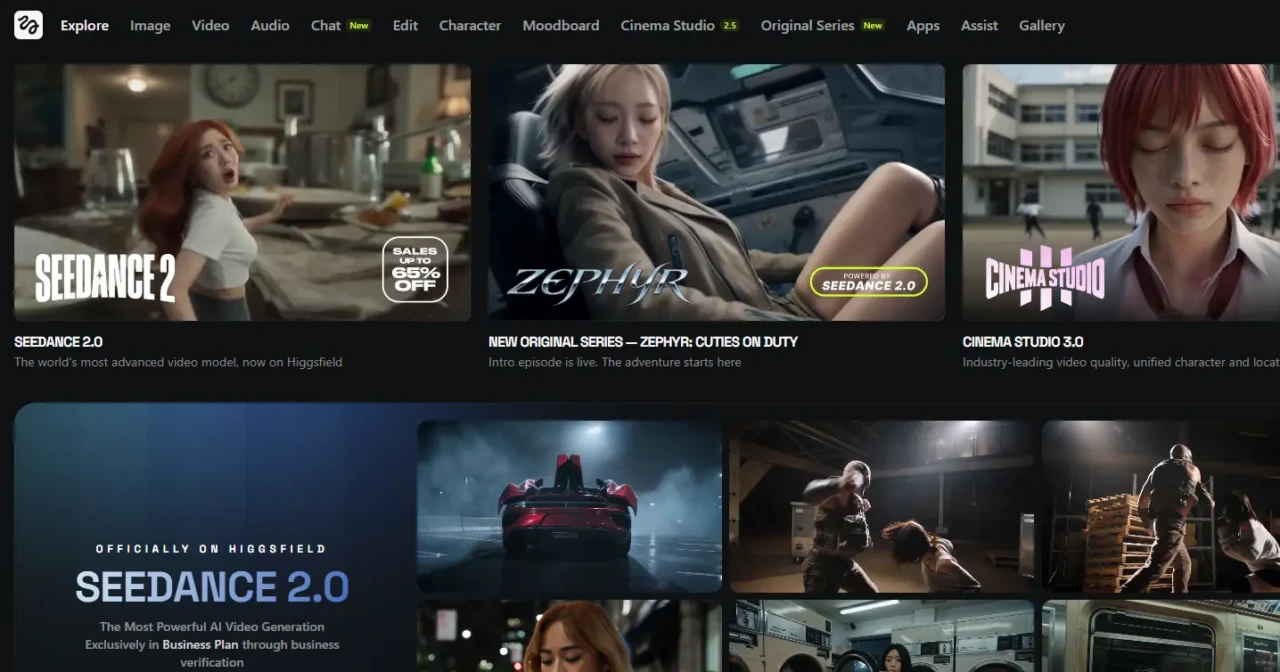
The workflow is more straightforward than the feature list suggests. Here’s exactly what happens from signing up to generating your first video.
Step 1: Create Your Account
Sign up at higgsfield.ai or download the Diffuse app from the App Store or Google Play. Account creation via Apple, Google, or Microsoft takes approximately 30 seconds.
The free tier activates immediately; no credit card required. Most users generate their first video within five minutes of signing up.
Step 2: Choose Your Creation Mode
Higgsfield offers several input modes. They include:
- Text-to-Video: It generates a clip from a written prompt that describes the scene, mood, camera movement, and action.
- Image to Video: This mode animates a still photo (a portrait, a product shot, or a landscape) into a video clip.
- Character Video: Uses a reference photo of a person to generate video content featuring that character across different scenes, with Higgsfield’s Motion DNA technology attempting to maintain consistent facial features and body language across clips.
Step 3: Select Your AI Model
This is where Higgsfield’s multi-model approach becomes practical. Each model has distinct strengths: Sora 2 for cinematic realism, Veo 3.1 for photorealistic audio output, Kling 2.6 for motion control, and Seedance 1.5 Pro for multi-shot storytelling.
Higgsfield labels models with “TOP” and “NEW” badges to help you prioritize. The important thing to understand here is that each model consumes a different number of credits.
Premium models like Sora 2 and Veo 3.1 consume 40–70 credits per video, while standard models consume 15–25 credits. Knowing this before you start prevents your monthly credit allocation from depleting faster than expected.
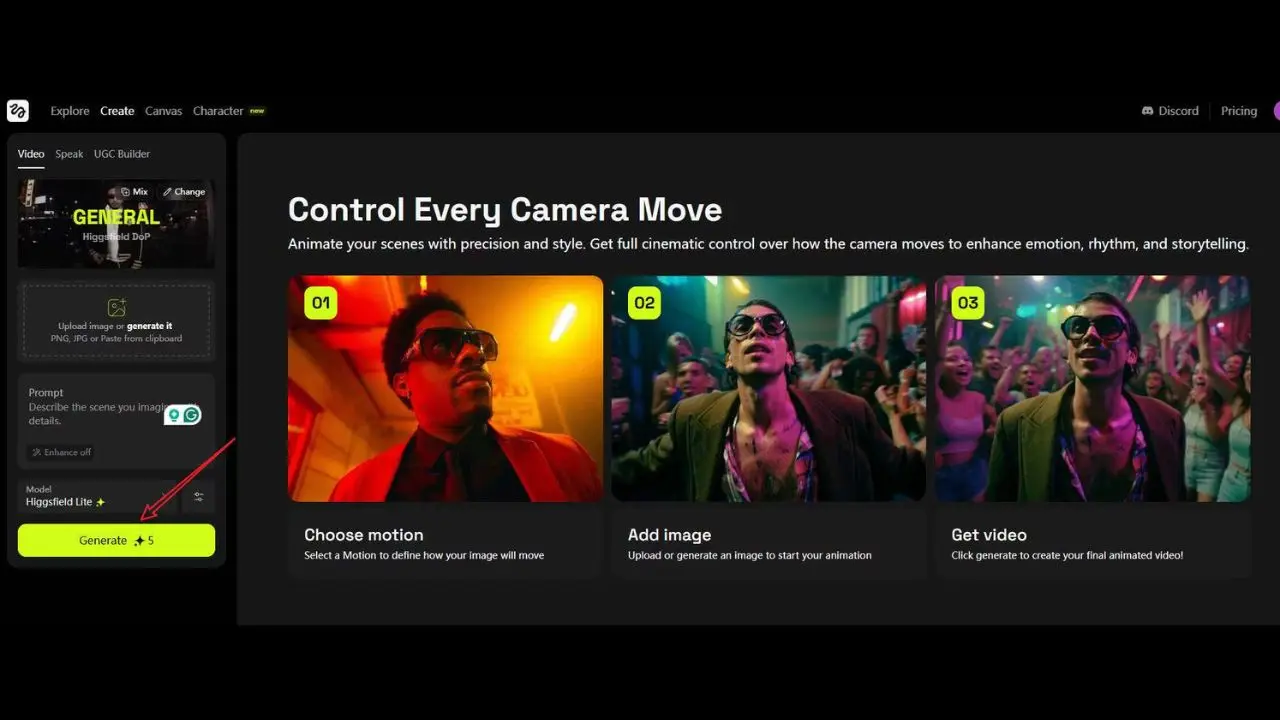
Step 4: Apply Cinema Studio Controls
After selecting your model and writing your prompt, you choose camera movements from Higgsfield’s 70+ preset library. For instance:
- A dolly shot pushes the camera smoothly toward the subject.
- However, a crash zoom creates a rapid, dramatic zoom effect.
- A 360-degree orbit sweeps around the subject in a circular arc.
- A crane shot lifts the camera vertically, revealing a sweeping view.
Applying these controls before generation means your clip has built-in directorial intent, not just random AI-generated motion.
Step 5: Generate and Iterate
Generation time varies by model and queue load. Standard models generate quickly; premium models like Sora 2 can take longer, especially on lower-tier plans without priority rendering.
Therefore, review the output, adjust your prompt or camera controls if needed, and regenerate. Complex generations with character consistency or advanced effects typically require 2–3 iterations to land the exact result you want.
Step 6: Download and Share
Download the finished clip directly to your device at your plan’s resolution (720p free, 1080p for Creator and Pro, 4K for Business). Share directly to Instagram, TikTok, YouTube Shorts, or any social platform from the app.
Higgsfield AI Key Features
Cinema Studio (Camera Movement Controls)
Cinema Studio is Higgsfield’s clearest technical differentiator among AI video platforms in its price range. The library of 70+ camera movement presets covers crash zooms, dolly pushes and pulls, 360-degree orbits, crane shots, bolt-cam tracking angles, handheld simulation, and more. What makes this genuinely valuable, rather than just impressive on a feature list, is that camera movement is one of the primary signals distinguishing professional from amateur video.
A clip that slowly pushes in on a subject as the action unfolds reads as cinematic. In addition, a static clip of the same scene reads as a screen recording.
Cinema Studio gives you directorial control over that distinction without needing to understand cinematography theory. You pick the movement, apply it before generation, and the AI executes it as part of the video rather than adding it in post-production.
The most advanced Cinema Studio feature is Popcorn AI. This is a tool that lets professional users specify camera parameters at the level of actual film production: ARRI Alexa sensor simulation, specific lens focal lengths and aberrations, film stock aesthetics, and lighting angle.
For creators who want outputs that are genuinely indistinguishable from traditionally filmed footage rather than obviously AI-generated, Popcorn AI offers that level of control. It requires more technical knowledge than the standard preset library but produces results that justify the complexity for professional use cases.
Multi-Model Access (Sora 2, Veo 3.1, Kling 2.6, and More)
Higgsfield’s aggregation of 15+ AI video models into a single subscription is its most commercially compelling feature for serious creators. Subscribing to Sora, Veo, and Kling individually would cost significantly more than Higgsfield’s consolidated plans. Higgsfield claims 4x the number of generations as competitors at the same budget for its mid-tier plans.
Each model is suited to different types of content: Sora 2 for cinematic narrative scenes; Veo 3.1 for photorealistic output with native audio (covered in depth in our Veo 3.1 review); Kling 2.6 for realistic human motion; and Seedance 1.5 Pro for multi-shot storytelling sequences. Additionally, having all models in one workspace eliminates the friction of switching platforms that creators experience when different projects require different model strengths.
For a comparison of Seedance’s performance as a standalone platform, our Seedance 2.0 review covers its specific capabilities in depth.
LipSync Studio
LipSync animates a character’s mouth movements to match spoken audio. Upload an audio file, record directly in the app, or type a script for text-to-speech generation, and Higgsfield synchronizes the character’s lip movements to the words. The practical value for creators is significant: you can generate a talking-head video, a product spokesperson clip, or a dubbed version of existing content without filming anything.
The Creator plan includes basic lip sync; the Pro plan adds emotion control, which adjusts facial expressions and tone to match the script’s emotional register rather than just the phonetics. For marketers producing UGC-style ad content at scale, LipSync Studio eliminates the need for actors and filming setups entirely.
Motion DNA and Character Consistency
Motion DNA is Higgsfield’s proprietary approach to capturing and reproducing realistic human body language in AI-generated video. Where most AI video tools produce characters that stand rigidly still while their mouths move, Motion DNA incorporates micro-movements, such as slight head tilts, natural hand gestures, breathing motion, and weight shifts, that make the generated video feel genuinely inhabited rather than artificially posed.
The character consistency feature builds on this by attempting to maintain a character’s facial features, hair, and overall appearance across multiple generated clips based on the same reference photo. The honest assessment is that character consistency is impressive for a mobile AI platform, but remains imperfect.
Significant changes in scene, lighting, or prompt can cause the character’s appearance to drift between clips. Therefore, expect to generate 2–3 takes to find clips that work cohesively together in a sequence.
Text to Video and Image to Video
Text-to-Video generates clips from written prompts that describe the scene, mood, action, camera angle, and lighting. More specific prompts produce more controlled outputs.
A prompt specifying “golden hour lighting, slow dolly push toward subject, cinematic 2.39:1 aspect ratio” produces a fundamentally different result than one specifying “person walking outside.” Image-to-Video animates still photographs into motion clips; a portrait blinks and has moving hair; a product shot rotates slowly; and a landscape features shifting clouds and light. The UGC Builder feature, powered by Google Veo 3, generates hyper-realistic talking-head video for advertising and testimonial content from text prompts or uploaded photos, making it the most commercially oriented generation mode on the platform.
VFX Library and Effects
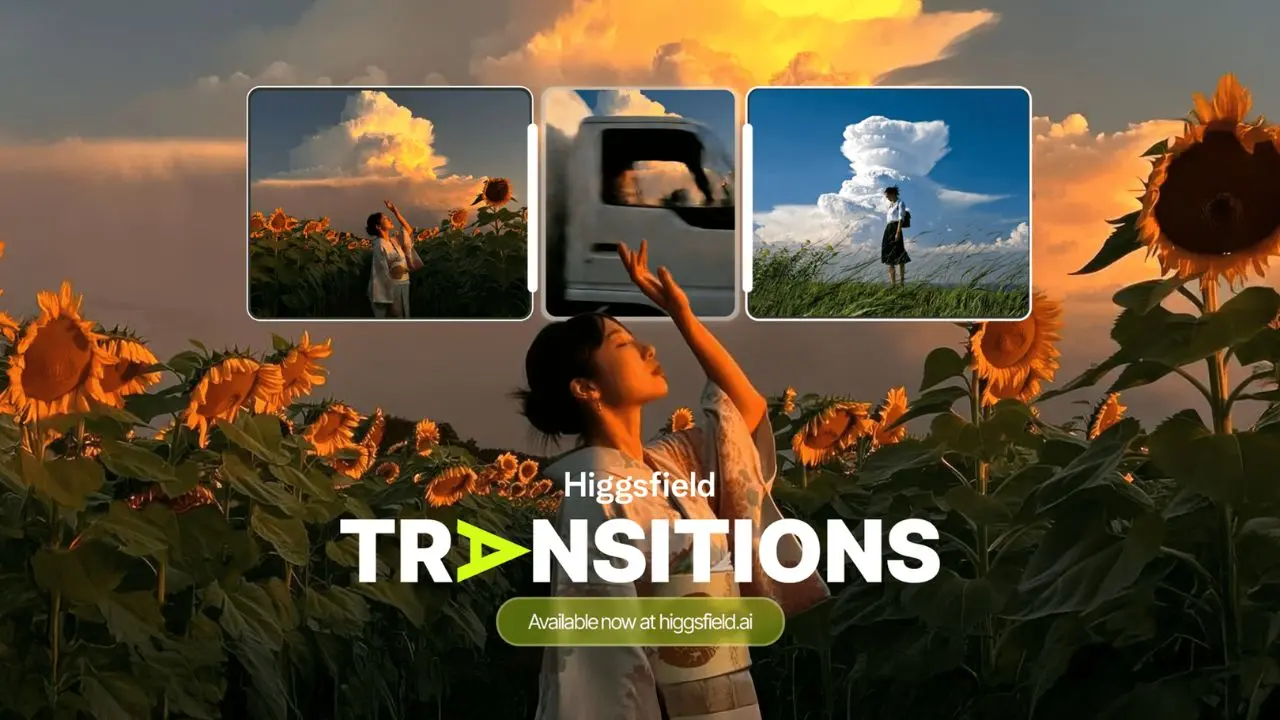
Higgsfield’s VFX library adds post-production effects (including explosions, style transfers (including a Ghibli anime-style treatment), bullet-time effects, seamless transitions, and speed ramps) directly in the app. These effects add production value that would otherwise require separate editing software. The bullet-time effect, for example, is a 360-degree freeze-frame rotation around the subject, technically complex to produce in traditional video production but achievable in Higgsfield with a single preset selection.
Higgsfield AI Pricing
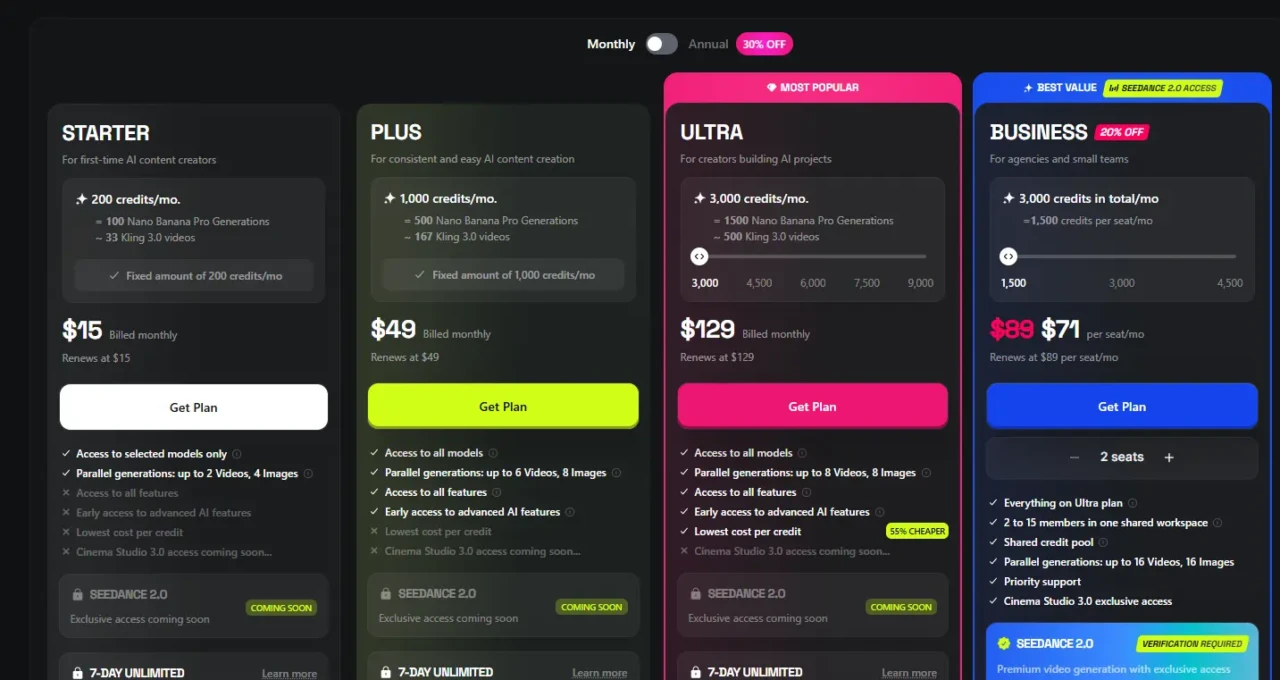
Plan | Monthly Cost | Credits/Month | Resolution | Key Features |
Free | $0 | 50 credits | 720p | Watermarked; limited models; core features |
Starter | ~$15/month | 200 credits | 1080p | No watermark; 3 custom avatars; basic lip sync |
Plus | ~$49/month | 1000 credits | 1080p | 10 avatars; advanced lip sync with emotion control; priority rendering; API access (beta) |
Ultra | ~$129/month | 3000 credits | 4K | Unlimited avatars; multi-avatar scenes; commercial license; dedicated support |
The credit consumption context is critical to understanding the real cost of Higgsfield. Standard models consume 15–25 credits per video. Premium models like Sora 2 and Veo 3.1 consume 40–70 credits per video, meaning a single Sora 2 generation on the Basic plan’s 150 credits could consume a third of your monthly allocation in one video.
On the Starter plan’s 200 credits, expect approximately 15–25 standard videos or 7–12 premium model videos per month. However, the Plus plan’s 1,000 credits support approximately 70–100 standard videos, enough for a consistent daily posting schedule with room for iteration. Additional credits are available as one-time packs (approximately 80–100 credits for $5) that expire after 90 days.
The honest pricing assessment: the free tier’s 50 credits are enough to meaningfully test the platform before committing. This is because you can generate 5–8 standard videos and evaluate output quality against your specific use case.
The Starter plan at $15/month is the right entry point for individual creators who post regularly. On the other hand, the Pro plan makes sense for creators who need high-volume daily posting, advanced lip-sync, and priority rendering.
The Business plan is positioned for agencies and marketing teams producing commercial video content at scale. However, always verify current pricing directly at higgsfield.ai before subscribing. This is because pricing on AI video platforms changes frequently.
Higgsfield AI vs Competitors
Feature | Higgsfield | Runway | Pika | Kling AI | Sora (standalone) |
Mobile App | ✅ Diffuse app | ⚠️ Limited | ⚠️ Limited | ⚠️ Limited | ❌ No |
Multi-Model Access | ✅ 15+ models | ❌ Own model only | ❌ Own model only | ❌ Own model only | ❌ Own model only |
Camera Controls | ✅ 70+ presets | ✅ Advanced | ⚠️ Basic | ✅ Good | ⚠️ Basic |
Lip Sync | ✅ Yes | ⚠️ Limited | ⚠️ Limited | ⚠️ Limited | ❌ No |
Character Consistency | ✅ Motion DNA | ⚠️ Limited | ⚠️ Limited | ⚠️ Limited | ⚠️ Limited |
Free Tier | ✅ 50 credits | ✅ Limited | ✅ Limited | ✅ Limited | ❌ No |
Best For | Social media & multi-model workflow | Professional VFX | Creative effects | Realistic motion | Long-form realism |
Starting Price | ~$15/month | ~$15/month | ~$8/month | ~$10/month | ~$20/month |
Higgsfield vs Runway
Runway Gen-3 is the industry standard for professional video creators and VFX artists. It produces the highest-quality outputs for complex scenes and offers the deepest editing timeline among AI video platforms.
However, Runway requires a desktop workflow and has a significantly steeper learning curve than Higgsfield. Consequently, the right choice depends entirely on your output requirements: if you need maximum output quality for complex narrative scenes, Runway leads; if you need cinematic social media content produced quickly on a mobile device, Higgsfield is more practical for that specific workflow.
Higgsfield vs Pika
Pika targets a similar creator audience and is also mobile-accessible. Additionally, Pika’s strengths are its text-to-video quality and its Pikaffects feature for specific visual effects.
Higgsfield’s advantages over Pika are multi-model access (you’re not locked into a single-generation model), a 70+ camera preset library, and lip-sync capability. The two are close competitors, and many creators use both depending on the specific content type.
Higgsfield vs Sora standalone
Sora excels at generating hyper-realistic long-form scenes and is the most technically impressive single model available. However, Sora, as a standalone platform, lacks Higgsfield’s camera motion controls, lip-sync, mobile app workflow, and multi-model flexibility. Additionally, accessing Sora through Higgsfield, alongside 14 other models at comparable prices, generally offers better value than subscribing to Sora on its own.
For a deeper look at how Sora works as a platform, our Sora AI explained guide covers its specific capabilities and limitations in full.
Higgsfield AI Honest Strengths
The multi-model aggregation is Higgsfield’s most commercially compelling advantage for creators who currently subscribe to multiple AI video platforms. Accessing Sora 2, Veo 3.1, Kling 2.6, and 12+ other models under one subscription eliminates platform-switching friction and subscription sprawl, and at $49/month for the Pro plan, provides access to models that would cost significantly more to subscribe to individually. That consolidation makes Higgsfield particularly valuable for professional creators and agencies who regularly need different model strengths for different project types.
The Cinema Studio camera controls genuinely elevate output quality in ways that are visually meaningful. The difference between a static AI clip and one with a deliberate dolly push or orbital camera movement is immediately apparent.
Camera intentionality is one of the primary signals that distinguish professional video production from amateur content, and Cinema Studio provides that intentionality without requiring knowledge of cinematography. In addition, the mobile-first Diffuse app delivers on its promise: the workflow from prompt to shareable video is genuinely complete on a phone, serving social media creators who live in a mobile-first content-creation workflow.
Higgsfield AI Honest Limitations
Credit Consumption on Premium Models Is the Most Significant Practical Limitation
A single Sora 2 or Veo 3.1 video consumes 40–70 credits, meaning a Creator plan’s 500 monthly credits can be depleted in 7–12 premium model generations. For creators who regularly want to use Sora 2 and Veo 3.1, the Pro plan at $49/month with 2,000 credits is a more realistic minimum than the Creator plan. Without careful credit management, monthly allocations are used up faster than the plan pricing suggests.
Character Consistency Is Strong But Imperfect
Motion DNA produces notably more natural character movement than most competing mobile AI video tools, but maintaining visual consistency across multiple clips with significantly different scenes or lighting still requires multiple generation attempts. The honest expectation is 2–3 takes per clip in a multi-scene character sequence, which is impressive by AI video standards but not the seamless one-take consistency the feature name implies.
Video Clip Length Has a Practical Ceiling
Generated clips typically run 10–30 seconds for standard models, sufficient for social media but insufficient for product explainers, tutorial content, or any format requiring narrative continuity beyond a short clip. Therefore, building longer content requires generating and editing multiple clips together outside the app, adding workflow complexity that undermines Higgsfield’s core proposition of mobile-first simplicity.
For AI tools that handle longer video formats, our guide to AI video editors covers the broader landscape of options.
Generation Queue Speed Varies
Priority rendering is only included with the Pro plan and higher. Creator plan users may experience slower generation times during peak usage periods, which disrupts time-sensitive content creation workflows. Additionally, customer support responsiveness has been flagged in user reviews as an area needing improvement, which matters when credit consumption or billing issues arise.
Who Is Higgsfield AI Best For?
Social Media Content Creators
Social media content creators are the clearest fit for Higgsfield’s entire design philosophy. If your primary output is short-form video for TikTok, Instagram Reels, or YouTube Shorts, and you want cinematic-quality AI video generation from your phone without a desktop editing workflow, Higgsfield is purpose-built for exactly that use case.
The Diffuse app, Camera Studio presets, and direct social sharing integration all point to this audience as the platform’s primary design target. You can also check out tools like Indzu Social, which help streamline social media management and post-production content distribution.
Marketing Teams and Agencies

Marketing teams and agencies that produce video content at scale benefit from multi-model access and LipSync Studio’s spokesperson-generation capabilities. Generating a polished talking-head video for a product launch, a market, or a campaign without filming anyone or hiring actors is a genuine commercial use case that Higgsfield’s Business plan addresses with commercial licensing included.
Personal Brand Builders
Personal brand builders and AI influencer creators get the most from Higgsfield’s character consistency and Motion DNA features. The ability to build recognizable visual content around a consistent AI character across multiple videos is a specific capability that most competing platforms don’t attempt to match at the same level of sophistication.
Who Should Look Elsewhere?
- Professionals who need 60-second+ video output with a full editing timeline (Runway or traditional production tools serve this better).
- Users who prioritize absolute photorealism over cinematic style (Luma Dream Machine or Kling AI standalone perform better for pure realism).
- Desktop-first creators who prefer working with a full timeline interface rather than a mobile-centric prompt-and-generate workflow.
FAQs
Yes. Higgsfield offers a free tier on the Diffuse app and web platform, including 50 credits per month. That’s enough for approximately 5–8 standard model videos. Output from the free tier is watermarked and limited to 720p resolution. Paid plans start at approximately $19/month for the Creator tier, which removes the watermark, increases resolution to 1080p, and provides 500 monthly credits.
Yes. The Diffuse app is available on both iOS (App Store) and Android (Google Play). The full web platform is also accessible through any mobile or desktop browser. The mobile app is where the platform’s mobile-first workflow is most fully realized, but the web platform offers the same generation capabilities on a larger screen.
Yes, for the core features, from account creation to first video generation, it takes approximately five minutes, and the style preset library and model badges make selecting a starting point straightforward. The learning curve applies to advanced features such as Cinema Studio’s full camera-control range and Popcorn AI’s professional cinematography parameters, but beginners can produce genuinely impressive content using the preset library before touching any advanced controls.
Runway is the stronger choice for professional VFX work, complex narrative scenes, and desktop-based editing workflows where maximum output quality is the priority. Higgsfield is the stronger choice for mobile-first social media content creation, multi-model access without platform switching, and cinematic style consistency at a faster production pace. The two tools serve overlapping but distinct audiences. Serious creators often use both.
Conclusion
Higgsfield AI earns its reputation in the AI video market by solving a genuine problem that most competing platforms don’t address: giving social media creators and marketing teams access to multiple premium AI models with professional camera controls in a mobile-first workflow that doesn’t require a desktop or a video production background. The Cinema Studio’s 70+ camera presets, the multi-model access spanning Sora 2, Veo 3.1, and Kling 2.6, the LipSync Studio, and the Motion DNA character consistency tools collectively make Higgsfield a more complete production environment than any single-model AI video platform at a comparable price point. The free tier’s 50 credits are enough to genuinely evaluate the platform before spending anything, and that evaluation is worth doing if cinematic social media content or an AI spokesperson video is part of your content workflow.
The limitations are specific and manageable rather than fundamental. Credit consumption on premium models requires careful planning; character consistency still requires multiple takes for complex sequences; and clip length remains capped at 30 seconds for current models. None of those constraints undermine what Higgsfield does exceptionally well for its core audience. For a broader view of the AI video tools worth understanding alongside Higgsfield, our Veo 3.1 review and Sora AI explained guide cover the two most powerful individual models that Higgsfield aggregates. Understanding them individually helps you appreciate exactly what Higgsfield’s multi-model wrapper adds.
For more tech guides and honest reviews, visit YourTechCompass.