Replit is a browser-based platform that lets you write, run, and deploy code entirely in your browser; no software to install, no environment to configure, no deployment pipeline to wire up separately. Originally launched in 2016 by Amjad Masad and Haya Masad as a collaborative coding environment for learners, it has since grown into one of the most significant platforms in the vibe coding movement, a shift where non-technical founders, designers, and operators use AI agents to build working applications from plain English descriptions. By early 2026, Replit hosts over 35 million developers and learners globally, and its AI Agent generates real, deployable applications from text prompts in a single browser tab.
What makes Replit genuinely different from Cursor, GitHub Codespaces, and every other AI coding tool is the all-in-one architecture. You don’t write code locally and then deploy it elsewhere; you write, run, test, collaborate, and deploy all within the same interface on any device, including a tablet or Chromebook. That combination of zero setup, built-in hosting, and a capable AI agent makes it the most accessible path from idea to live app that currently exists, and the most significant overhaul in February 2026 (the new Pro plan and revised pricing structure) makes this the right moment to understand exactly what you’re getting.
What Is Replit?
Replit is a cloud-based development platform (part IDE, part deployment host, part AI app builder) accessible entirely through your browser at replit.com. Founded in 2016 by Amjad Masad and Haya Masad in San Francisco, it was built on the belief that software creation shouldn’t require specialized training or a powerful local machine; that anyone with an idea should be able to build something real. Each project on the platform is called a Repl, a self-contained workspace with its own file system, code editor, runtime environment, terminal, and deployment configuration all in one place.
Beyond the browser IDE, Replit is available as a dedicated iOS and Android app, meaning you can genuinely write and run code from a phone, not as a gimmick, but as a functional coding environment that syncs instantly with your browser sessions. The platform supports over 50 programming languages, including Python, JavaScript, TypeScript, HTML/CSS, Java, C++, Ruby, Go, and Rust, all running in containerized cloud environments that Replit spins up automatically without you having to configure anything. For learners, especially, that zero-configuration starting point is the difference between writing your first line of code in 60 seconds versus spending an afternoon troubleshooting a local Python installation.
How Replit Works
When you create a new Repl, Replit spins up a containerized cloud environment specifically for your project, giving it dedicated compute resources (4 vCPUs and 8 GiB of RAM on Core), an isolated file system, and a pre-configured runtime for whichever language you’ve selected. You code in the left-hand editor pane, see your app running live in the right-hand output pane, and have full terminal access in the bottom pane, all in the same browser tab without switching between windows or tools. In addition, every change you make saves automatically, and your project is accessible from any device the moment you log back in.
The multiplayer feature turns your Repl into a real-time collaborative coding environment. This means that multiple people can edit the same files simultaneously, see each other’s cursors, and chat inline, in a way that feels exactly like Google Docs for code.
For teams, classrooms, and pair programming sessions, this eliminates the friction of sharing code via Git commits or screen-sharing calls. Beyond that, the Deployment system publishes your project as a live, publicly accessible app in one click, choosing between Static Deployments (for frontend-only projects), Reserved VM Deployments (always-on, predictable cost), and Autoscale Deployments (scales with traffic, usage-based billing).
Replit Agent: Building Apps With Plain English
Replit Agent, now in its fourth generation (Agent 4) as of 3rd March 2026, is the feature that has driven most of Replit’s recent growth and is the primary reason non-technical founders are choosing the platform. You describe what you want to build in plain English, for instance, “Build me a customer waitlist app with an email signup form, a confirmation email, and an admin dashboard showing signups,” and Agent 4 scaffolds the files, writes the code across multiple files, installs the necessary dependencies, connects the database, and deploys it, all without you writing a single line of code manually. The whole process from prompt to live URL typically takes between 2 and 10 minutes, depending on complexity.
What separates Replit Agent from GitHub Copilot and Cursor is the scope of its capabilities. Those are coding assistants that help developers write and improve code. They assume you already have a development environment, a deployment pipeline, and the technical context to direct them.
Replit Agent is an end-to-end app builder; it handles the full stack from file creation to live deployment, making it genuinely usable by someone with no coding background. The iterative workflow is equally important: you don’t need to get the prompt perfect the first time; you describe, review what was built, and refine with follow-up instructions, treating each revision like a conversation.
Replit Key Features
Browser-Based IDE
The core editor is a full-featured IDE (syntax highlighting, autocomplete, multi-file navigation, built-in debugging, and a complete terminal), all running in your browser without installing anything. On Core and above, your workspace gets 4 vCPUs and 8 GiB of RAM, which is sufficient for most web apps, APIs, bots, and data pipelines at prototype and early production scale. What you lose compared to a local VS Code setup is deep IDE customization; multi-file navigation gets clunky with 8 or more files open simultaneously, a consistently mentioned limitation in developer reviews.
Replit AI (Ghostwriter)
Beyond Agent Mode, Replit’s inline AI assistant provides code completion, code explanation, error debugging, and a conversational chat interface embedded in the editor. On Core and above, you get full access to Agent 4’s capabilities and the latest underlying models. The free Starter tier, on the other hand, provides basic AI access that expires after a trial period.
If you’re learning to code, the code explanation feature is particularly useful. It allows you to highlight any block of code, ask Replit to explain what it does line by line, and get an accessible plain-English answer without leaving your editor.
Replit DB
Every Repl has access to Replit DB, a built-in key-value database available with no setup, no connection string to configure, and no separate service to spin up. And for simple persistent storage needs (user sessions, app state, configuration data), Replit DB eliminates the need to connect to an external database on small projects. For more complex data requirements, Replit also supports PostgreSQL, which consumes credits based on usage volume.
Secrets Management
Replit has built-in environment variable management. You store API keys, database credentials, and sensitive configuration values in the Secrets tab, and they’re automatically injected into your project’s runtime environment. That means you never need to manage a .env file manually or worry about accidentally committing credentials to a public repository. For beginners, especially, this removes one of the most common security pitfalls in early project development.
Replit Bounties
The Bounties marketplace lets you post paid coding tasks, such as build this feature, fix this bug, create this tool, and other Replit developers complete them for payment. Payouts range from a few dollars for small fixes to several hundred dollars for complete features.
In addition, for non-technical founders who need specific work done without hiring a full developer, Bounties provides direct access to talent within the ecosystem they’re already using.
Replit for Beginners and Learners
If you’re learning to code, Replit removes the single biggest barrier that keeps most beginners from writing their first line: setting up a development environment. The frustration of installing Python, configuring a virtual environment, installing VS Code, and troubleshooting PATH errors before writing a single program has ended the coding journeys of millions of learners, and Replit eliminates it entirely. You open a browser tab, select your language, and your environment is ready in under 60 seconds.
Replit also offers a structured 100 Days of Code curriculum built into the platform, a guided learning path that takes you from zero to building real projects in Python, JavaScript, and web development. For teachers, Replit Teams for Education enables assignment distribution, real-time monitoring of students’ code as they write it, and collaborative grading, all within the same interface students use to code.
If you’re starting with Python, our “How to learn Python” guide covers the foundational concepts you’ll be applying on the platform. In addition, our “How to learn JavaScript” guide is equally relevant for web-focused learners building their first frontend projects.
The community dimension matters more for beginners than it might initially seem. Every public Repl is forkable. You can find a project that does something similar to what you want to build, copy it with one click, and modify it rather than starting from scratch.
Learning by modifying working code is one of the most effective approaches to skill development, and Replit’s public project ecosystem makes that process frictionless. For grounding in the concepts you’ll encounter as you explore those projects, our basic coding concepts guide is a practical companion reference.
Replit for Professional Developers
For professional developers, Replit’s strongest use case is rapid prototyping, getting from an idea to a working, shareable demo faster than any local environment setup allows. When you need to show a stakeholder a working concept, validate a technical approach, or test an integration before committing to a full build, Replit’s combination of zero setup and one-click deployment compresses the time from “I have an idea” to “here’s a live URL” more than any other platform. That speed of iteration is what makes Replit a place in a professional toolkit alongside a primary local environment.
For production deployment, the honest assessment is more nuanced. Replit’s Autoscale and Reserved VM deployments reliably handle early-stage applications and internal tools. A small app with light traffic runs for $5 to $10 per month in deployment fees beyond plan credits, which is competitive with Vercel or Railway for simple use cases.
For resource-intensive applications, high-traffic production systems, or anything requiring predictable cost at scale, AWS, Google Cloud, or Vercel are more appropriate targets. Replit’s usage-based billing becomes less predictable as traffic grows.
For workflows that require deeper AI coding capabilities on local projects, our Cursor AI review covers the tool that most professional developers pair with or choose over Replit for complex local development. Additionally, for AI-powered automation workflows connecting to the apps you build in Replit, our Gumloop review covers a complementary no-code automation layer worth knowing about.
Replit Pricing and Plans
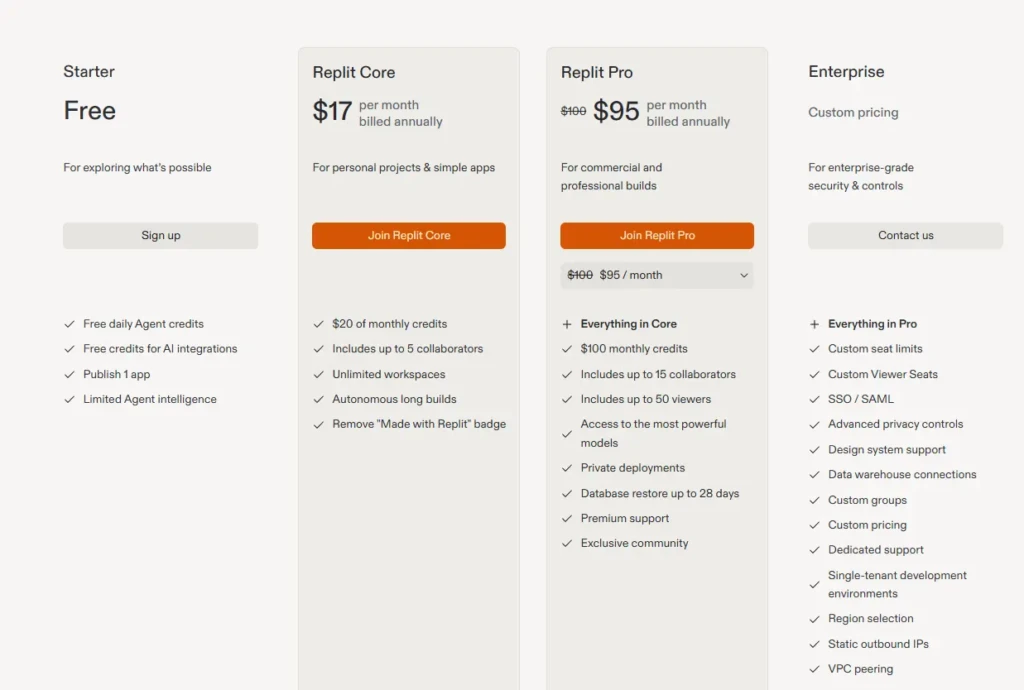
Plan | Price | Monthly Credits | Compute | Best For |
Starter | Free | Daily limit (trial) | 1 vCPU / 2 GiB RAM | Learning, experimentation, and public projects |
Core | $17/month (annual) | $20 included | 4 vCPU / 8 GiB RAM | Solo developers, freelancers, and small apps |
Pro | $100/month | Tiered ($100–$4,000) | Enhanced + Turbo Mode | Teams up to 15, production apps, and agencies |
Enterprise | Custom | Custom | Custom | Large orgs, SSO/SCIM, compliance, and VPC |
The most critical thing to understand about Replit’s pricing before you commit is the credit system, specifically, how quickly credits disappear under real Agent use. Core’s $25 monthly credit inclusion sounds meaningful until you realize that heavy Agent 3 usage on a complex app build can consume that allocation in a single session, after which Replit switches to pay-as-you-go billing.
Community reports of spending $100 to $300 per month beyond the base Core subscription are consistent and credible. Therefore, budget accordingly when you’re estimating real-world costs for Agent-heavy workflows.
The February 2026 Pro plan at $100/month for up to 15 builders replaces the old Teams plan (which was $40/user/month, a significant saving for teams of more than two people). Pro includes credit rollover (unused credits carry forward to the next month, unlike Core, where they expire), Turbo Mode for access to the most capable AI models, priority support, and tiered bulk credit discounts from $100 to $4,000/month. Old Teams subscribers are being automatically upgraded to Pro at no additional cost for the remainder of their current subscription term; new Pro pricing applies at next renewal.
Replit vs Competitors
Feature | Replit | Cursor | GitHub Codespaces | Glitch | Bolt.new |
Browser-Based | ✅ Full IDE in browser | ❌ Local app | ✅ VS Code in browser | ✅ Yes | ✅ Yes |
AI Agent (App Builder) | ✅ Agent 4 (full-stack) | ⚠️ Coding assistant only | ❌ Copilot only | ❌ No | ✅ Yes |
Deployment Built-in | ✅ One-click | ❌ Separate deployment | ❌ Separate deployment | ✅ Yes | ⚠️ Limited |
Free Tier | ✅ Public projects + trial | ✅ 2,000 completions | ✅ 60 hrs/month | ✅ Unlimited | ✅ Limited |
Real-Time Collaboration | ✅ Multiplayer | ⚠️ Limited | ✅ Via GitHub | ⚠️ Limited | ❌ No |
Languages Supported | 50+ | 50+ (local) | 50+ | Primarily JS/Node | JS/TypeScript focus |
Mobile App | ✅ iOS + Android | ❌ No | ❌ No | ❌ No | ❌ No |
Best For | Beginners, prototyping, and education | Professional AI coding | Dev teams on GitHub | Simple web projects | Quick web prototypes |
Starting Price | Free / $20/month | Free / $16–$20/month | Free / $0.18/hr | Free | Free / $20/month |
Replit vs Cursor

This is the most important comparison for developers evaluating both. Cursor is for professional developers who want the best AI coding experience inside a full local IDE with deep codebase context and multi-agent parallel execution. Replit, on the other hand, is for anyone who wants to get from idea to live app in a browser tab without configuring anything.
The use cases overlap during prototyping but diverge quickly beyond that. For daily professional development on complex codebases, Cursor wins decisively; for zero-setup app building, deployment, and education, Replit wins just as decisively.
Replit vs GitHub Codespaces
Both are cloud IDEs, but Codespaces brings VS Code to the browser with full GitHub integration and more predictable compute-based billing, while Replit adds deployment hosting, a built-in AI app builder, and a simpler setup, but at the cost of less GitHub-native tooling.
Replit vs Bolt.new
Both are vibe coding tools for building web apps from text prompts, but Bolt.new focuses narrowly on JavaScript/TypeScript web apps while Replit supports 50+ languages and includes a full IDE for iterating on the code after Agent generation.
Replit Limitations and Honest Drawbacks

Credit Cost Unpredictability
This is the most significant real-world concern, and it’s the feedback that dominates community discussions, honestly. The effort-based pricing model means the Agent charges based on the computational work performed, not on flat rates, and users consistently report that the Agent sometimes gets stuck in loops, consuming credits on failed attempts before succeeding.
The practical mitigation is to use specific, well-scoped prompts, break complex builds into smaller sessions, and monitor credit consumption during your first month before scheduling anything automated.
Performance Limitations
Performance limitations compared to a local setup are real and worth acknowledging. Multi-file projects with 8 or more open files navigate more slowly than a local VS Code instance. In addition, complex builds push against the container’s resource ceiling on Core.
Internet dependency is absolute; there is no offline mode, and if your connection drops, your coding session pauses entirely. For developers accustomed to the speed of a local machine with Cursor, Replit will feel sluggish on anything beyond moderate-complexity projects.
Free Tier Limitations
Free tier limitations are more restrictive than those of some competitors. All Starter tier projects are public by default. This means that your code is visible to anyone on the internet, which matters if you’re building anything with proprietary logic, client work, or sensitive business information.
Private projects, on the other hand, require Core or above. Additionally, the Agent trial on the free tier expires relatively quickly, pushing you toward a paid plan faster than tools like Cursor or GitHub Codespaces, which offer more generous free-tier allocations for non-AI features.
Is Replit Worth It?
For beginners learning to code, Replit is unambiguously the best starting environment available; zero setup, instant feedback, a structured curriculum, a forkable public project library, and an AI agent that can show you working examples on demand. Start on the free tier, write your first Python or JavaScript programs, and upgrade to Core only when you need private projects or heavier Agent use.
For non-technical founders and operators wanting to build internal tools, dashboards, and MVPs without hiring a developer, Replit Agent at the Core tier ($20/month) is the most accessible path to a live, working application currently available. Factor the $25 credit inclusion carefully for complex builds; budget an additional $25 to $75 per month for overage in the first few months while you calibrate your typical usage patterns.
For professional developers, Replit earns a place in your toolkit for rapid prototyping and client demos, not as a replacement for a local environment with Cursor for complex daily development work. Start on the free tier with a real project, run Agent 3 through the full process of building and deploying it, and evaluate the output and cost directly against your workflow needs.
FAQs
Yes, the Starter plan is free with limited daily Agent credits, up to 10 development apps, and 1,200 development minutes per month. All free-tier projects are public. Core starts at $20/month (annual billing) for private projects and full Agent access.
Yes, it’s the best starting environment for beginners precisely because there’s nothing to install or configure. You write your first line of code in under 60 seconds, the built-in AI explains any code you don’t understand, and the 100 Days of Code curriculum provides a structured learning path on the platform itself.
Yes, Replit supports Static, Reserved VM, and Autoscale deployments. Small apps with light traffic cost $5 to $10 per month in deployment fees beyond plan credits. For high-traffic production systems requiring cost predictability, AWS, Vercel, or Railway are more appropriate at scale.
Replit supports 50+ programming languages, including Python, JavaScript, TypeScript, HTML/CSS, Java, C++, Ruby, Go, and Rust. Python and JavaScript are the most commonly used and have the strongest Agent 3 support.
Agent 4 is genuinely capable of building working full-stack applications from text descriptions. The honest limitation is the unpredictability of costs under effort-based pricing, and the Agent occasionally consumes credits on failed attempts. For straightforward, well-scoped builds, the output quality is strong.
VS Code is a local IDE with deeper customization, better performance on complex projects, and no internet dependency. Replit trades those advantages for zero setup, built-in hosting, real-time collaboration, and an AI agent that builds and deploys entire apps, making it stronger for beginners, prototyping, and education, while VS Code remains better for professional daily development.
Conclusion
Replit is the most accessible path from idea to live app that currently exists, and for the right user, that accessibility is worth more than any feature comparison. If you’re a beginner who has been putting off learning to code because of setup friction, a non-technical founder who needs a working prototype without hiring a developer, or a teacher running a coding class on a limited budget, Replit at the Core tier solves your problem better than any alternative. The Agent 3 capability, zero-setup environment, multiplayer collaboration, and built-in deployment in one browser tab represent a genuinely different category of tool.
For professional developers, the honest verdict is more targeted: Replit earns a permanent spot in your toolkit for rapid prototyping and client demos, but not as a replacement for a local environment for daily complex development work. Start on the free tier with a real project you want to build, run Agent 4 through the full process of building and deploying it, and evaluate the output and credit cost directly against your actual workflow. That single real-world session will tell you more than any review article can.
Ready to explore more? Visit YourTechCompass for hands-on reviews, buying guides, and how-to articles that cut through the noise and give you exactly what you need.