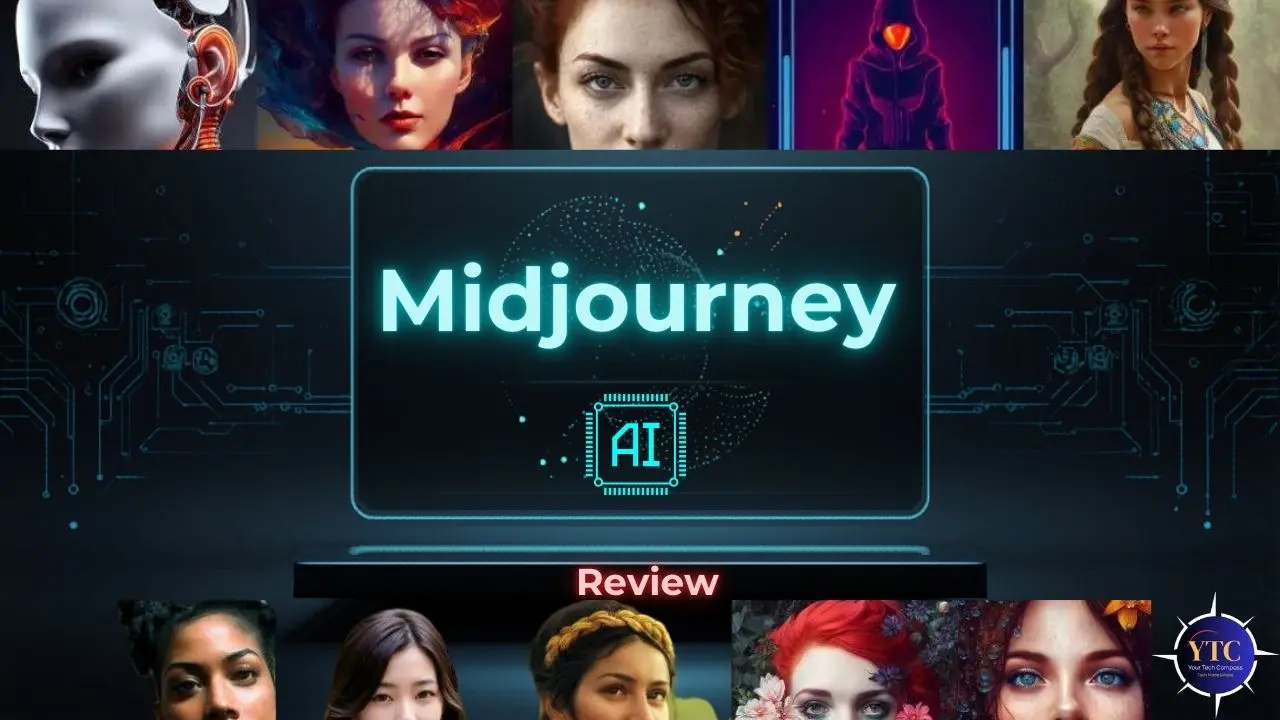
If you’ve ever scrolled through a jaw-dropping piece of digital art online and wondered, “Did a human even make that?” there’s a good chance Midjourney AI had something to do with it. Since its debut in 2022, Midjourney has gone from a quirky Discord experiment to one of the most powerful and widely used AI image generation platforms on the planet, serving over 50 million creators across industries ranging from marketing and game design to film and fashion. It has fundamentally reshaped what’s possible for individual creatives, small businesses, and enterprise teams alike, and it keeps getting better with every model update.
In this in-depth review, I’m going to walk you through everything you need to know about Midjourney AI, what it is, how it works, what’s new, how to use it effectively, how it compares to competitors, and whether it’s worth your money. Whether you’re an experienced designer exploring AI-powered workflows or a complete beginner curious about AI-generated art, this guide is written specifically for you. Let’s get into it.
What Is Midjourney AI?
Midjourney AI is a generative AI platform that generates high-quality, artistic images from natural-language prompts. In simple terms, you type a description of what you want to see, and Midjourney transforms your words into a stunning visual in seconds. It was created by Midjourney, Inc., an independent research lab founded by David Holz, co-founder of Leap Motion, and is entirely self-funded and community-driven.
What makes Midjourney stand out from the crowd is its remarkable emphasis on aesthetics, artistic quality, and visual coherence. While other AI image tools might prioritize literal accuracy or ease of use, Midjourney has always leaned into the idea that AI art should feel inspired, atmospheric, cinematic, and emotionally resonant. That philosophy has made it the go-to tool for concept artists, graphic designers, marketers, and anyone who needs visuals that genuinely stop the scroll.
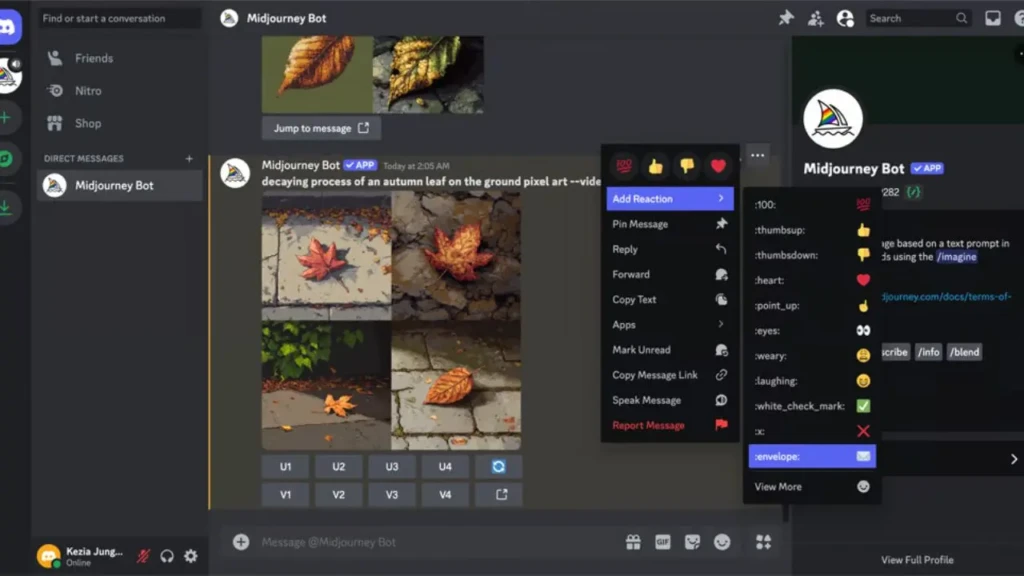
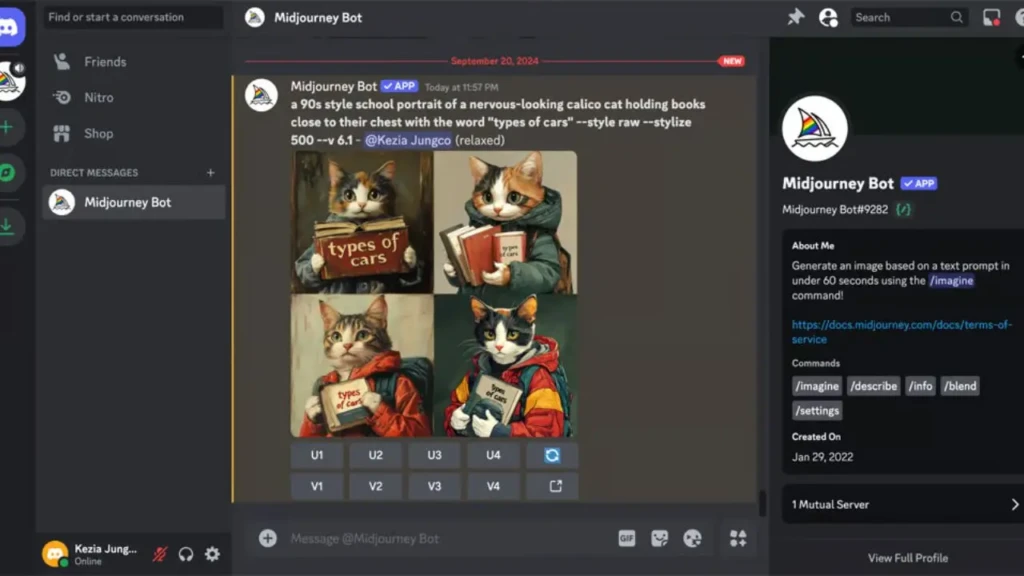
Originally, you could only access Midjourney through Discord, but that’s no longer the case. Today, Midjourney offers a fully functional web interface at midjourney.com, making it far more accessible to users who don’t want to navigate the Discord ecosystem. The platform has evolved into a complete creative suite, and with the launch of Version 7 (V7) as the default model, it’s now better than ever at producing images that look less like AI-generated content and more like the work of a professional photographer or concept artist.
How Does Midjourney AI Work?
At its core, Midjourney AI uses a class of machine learning technology called diffusion models. Without going too deep into the technical weeds, here’s how it works in plain language: the model starts with a field of random noise (think of it like static on a TV screen) and gradually refines that noise, step by step, until it resolves into a coherent image that matches your text description. This process typically happens across 20 to 50 denoising steps per generation.
To make this work, Midjourney also relies on natural language processing (NLP) to interpret your prompt. When you type something like “misty mountain valley at golden hour, aerial drone shot, cinematic,” the model encodes that description into a vector that guides the entire image generation process. It understands context, mood, artistic style references, camera terminology, and even art history, which is why prompts like “in the style of Art Nouveau” or “shot on 35mm film” produce such dramatically different results.
One technical efficiency worth knowing about is that Midjourney operates in what’s called latent space, a compressed, lower-dimensional representation of images, rather than manipulating pixels directly. This approach allows the model to generate images significantly faster than older, pixel-by-pixel methods, while maintaining the high visual quality you’d expect from a professional tool.
What’s New in the Latest Version of Midjourney AI?
The most significant recent update to Midjourney AI is Version 7 (V7), released in alpha on April 3 and becoming the default model on June 17. According to Midjourney CEO David Holz, V7 is built on an entirely new architecture; it’s not an incremental update to V6, but a complete rebuild from scratch with new training data and new systems. Holz himself described it as “a totally different architecture,” and the results speak for themselves.
The headline improvement in V7 is dramatically better photorealism and coherence. Where V6 could sometimes produce slightly waxy skin textures or oddly proportioned hands, V7 delivers richer textures, more natural anatomy, and far better spatial coherence across complex scenes. Paired with smarter prompt understanding for both text and image inputs, the model now interprets your creative intent far more accurately, especially for longer, more complex prompts.
Two standout new features in V7 deserve special mention. First, Draft Mode generates images approximately 10 times faster and at half the standard cost, making rapid creative iteration genuinely practical for the first time.
Second, Midjourney introduced a Personalization System, where you rate about 200 images on the platform (taking roughly 15–20 minutes), and the model builds an aesthetic profile of your preferences, subtly tuning every future generation to match your creative taste. Additionally, Midjourney launched its V1 Video Model alongside V7, which lets you animate any static image into a 5–21 second video clip, a major step toward multimodal creative output. If you want to understand how AI video generation is evolving in parallel, take a look at this detailed Seedance 2.0 review for a close look at how ByteDance is approaching the same challenge.
Key Features of Midjourney AI
1. Unmatched Image Quality and Artistic Style
Midjourney AI has held the crown for artistic quality in the AI image generation space consistently since its early versions, and V7 cements that position. The outputs regularly resemble professional concept art, editorial photography, or fine art illustration, with a distinct “soul” and visual intentionality that reviewers across the industry consistently note is absent from competing tools. If you need visuals that genuinely impress, Midjourney is the benchmark.
2. Style Reference (–sref)
The –sref parameter lets you upload a reference image and use its visual aesthetic, color palette, brushwork, mood, and atmosphere as a guide for your generation, without copying the actual subject matter. This is invaluable for maintaining brand consistency across large creative projects. Pair it with –sw 1000 for maximum style influence, or dial it back for subtler aesthetic guidance.
3. Character Reference (–cref)
The –cref parameter solves one of the biggest historical headaches with AI image generation: character consistency. By referencing a previously generated or uploaded image of a character, you can lock in their face, features, and general appearance across multiple scenes and settings. This has become an industry standard for AI-driven graphic novels, marketing campaigns, and branded character work where visual identity must remain stable across hundreds of generations.
4. Omni Reference
Building on the foundation of style and character references, Omni Reference is Midjourney’s most advanced consistency tool, allowing you to reference specific objects, logos, mugs, animals, and more with greater fidelity than ever before. Instead of just capturing the “vibe” of a reference, Omni Reference maintains precise visual details of specific items across different scenes and contexts. This is particularly powerful for product visualization and e-commerce applications.
5. Pan, Zoom, and Outpainting
Midjourney’s Pan and Zoom tools let you expand your canvas outward in any direction, turning a portrait into a full-body shot, or a tight cityscape into a sweeping aerial view. The model’s context window is now wide enough to maintain perfect compositional logic and consistent lighting even as the canvas expands dramatically. Combined with Vary Region (inpainting), which lets you select and reprompt any specific area of an image without touching the rest, you have a genuinely powerful suite of non-destructive editing tools built right into the platform.
6. Multiple Upscaling Options
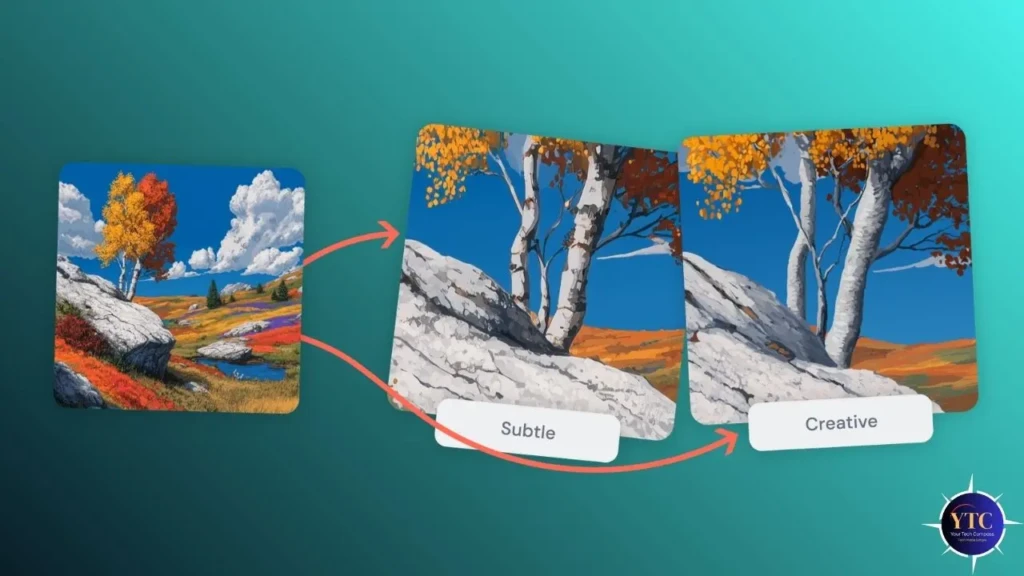
When you’re ready to finalize an image, Midjourney gives you two distinct upscaling paths: Subtle Upscale, which adds resolution and fine detail while faithfully preserving the original structure, and Creative Upscale, which reinterprets textures and surface details for a more cinematic, polished look. Both options now support resolutions up to 8K, making Midjourney outputs suitable for large-format print, billboard advertising, and professional production pipelines.
7. Draft Mode and Turbo Mode
Speed has historically been Midjourney’s Achilles heel compared to faster, cheaper alternatives. V7 addresses this head-on with Draft Mode (10x speed, half cost) for rapid prototyping and creative exploration, and Turbo Mode for when you need standard-quality results as fast as possible. Relax Mode, meanwhile, queues your generations for slower processing without consuming any of your monthly Fast GPU hours, a useful budget-stretching tool for Standard, Pro, and Mega plan subscribers.
8. Aspect Ratio Control and Multi-Format Output
You have complete control over aspect ratio through the –ar parameter. Common presets include –ar 16:9 for widescreen, –ar 9:16 for vertical social content, –ar 1:1 for square formats, and –ar 21:9 for cinematic ultra-wide. This flexibility means you can generate platform-ready assets for YouTube, Instagram, LinkedIn, print, and even cinema without any post-generation cropping.
9. Personalization System
This feature is genuinely unlike anything available in competing tools. After rating approximately 200 images in the Midjourney gallery (a process that takes 15–20 minutes), the platform constructs a detailed aesthetic profile unique to you. From that point forward, every image you generate is subtly tuned to your personal visual preferences, lighting styles, color palettes, and compositional choices that consistently resonate with you, without any additional prompting.
10. Video Generation (V1 Video Model)
Launched alongside V7, the V1 Video Model allows you to select any Midjourney-generated image, click “Animate,” and receive four 5-second video variations within 3–5 minutes. You can extend these clips up to 21 seconds by stitching multiple segments, and you have direct control over motion intensity and direction. While this feature is image-to-video rather than text-to-video, it meaningfully expands Midjourney’s utility for creators who need both still and motion assets from a single platform. This kind of multimodal creativity is also where generative AI as a whole is heading, converging text, image, and video in unified creative workflows.
How to Use Midjourney AI: A Step-by-Step Guide
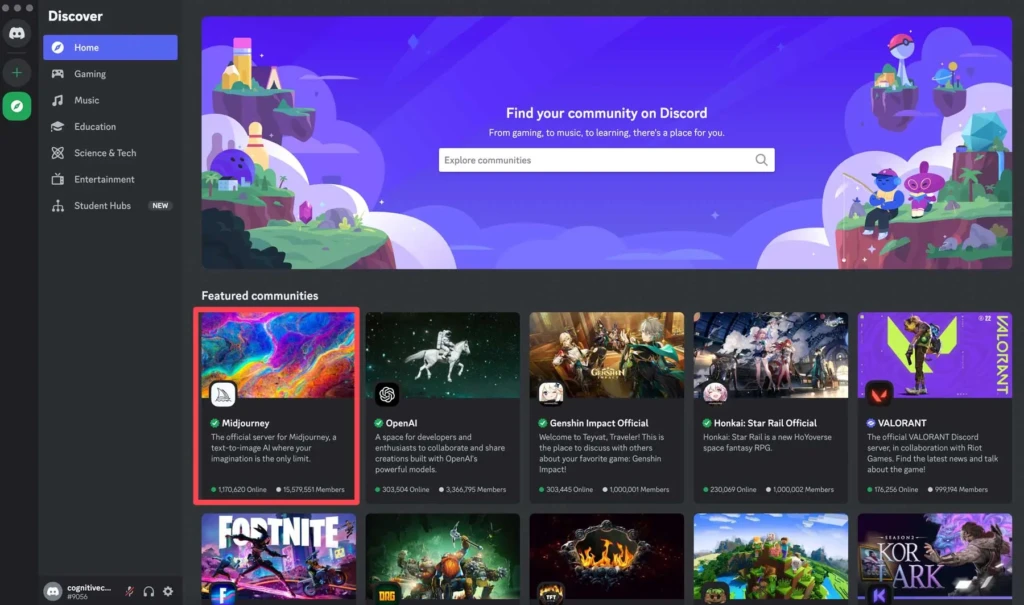
Getting started with Midjourney is straightforward, but knowing the right workflow from the start will save you significant time and frustration. Here’s exactly how to go from zero to your first AI-generated image:
Step 1: Create Your Account
Visit midjourney.com and sign up using your Discord or Google account. You no longer need to use Discord to generate images; the web interface is now fully mature and the preferred access point for most users. Note that there is currently no free tier; you’ll need to choose a paid subscription plan before generating your first image.
Step 2: Choose Your Plan
Select the subscription tier that matches your expected usage: Basic ($10/month) for light experimentation, Standard ($30/month) for regular creative work, Pro ($60/month) for professional or client-facing projects, or Mega ($120/month) for high-volume production. We’ll cover the plans in detail in the pricing section below.
Step 3: Write Your First Prompt
Navigate to the Imagine bar on the Midjourney web interface (or type /imagine in Discord) and start with a descriptive, specific prompt. A good basic structure is: [Subject] + [Setting/Context] + [Style/Mood] + [Technical Parameters]. For example: “Close-up portrait of a weathered sea captain, storm clouds in the background, dramatic chiaroscuro lighting, oil painting style, –ar 4:5 –v 7.”
Step 4: Review and Iterate
Midjourney generates four image variations per prompt by default. Review them, and use the U (upscale) buttons to enhance your preferred image, or the V (variation) buttons to generate four new versions that riff on a specific result. If none of the four hit the mark, hit the refresh icon to regenerate entirely.
Step 5: Use Editing Tools
Once you’ve upscaled an image, use the Vary Region tool to select and reprompt specific areas that need refinement. Use Pan or Zoom to expand the canvas if your composition needs more breathing room. Use –sref or –cref if you need the next generation to match a specific style or character from your previous work.
Step 6: Export Your Final Image
Download your finished image directly from the web interface in full resolution. Paid subscribers can generate and download images for commercial use, just ensure your plan aligns with your company’s revenue (Pro or Mega plans are required for companies earning over $1 million annually).
Midjourney AI Prompt Tips: How to Get Better Results
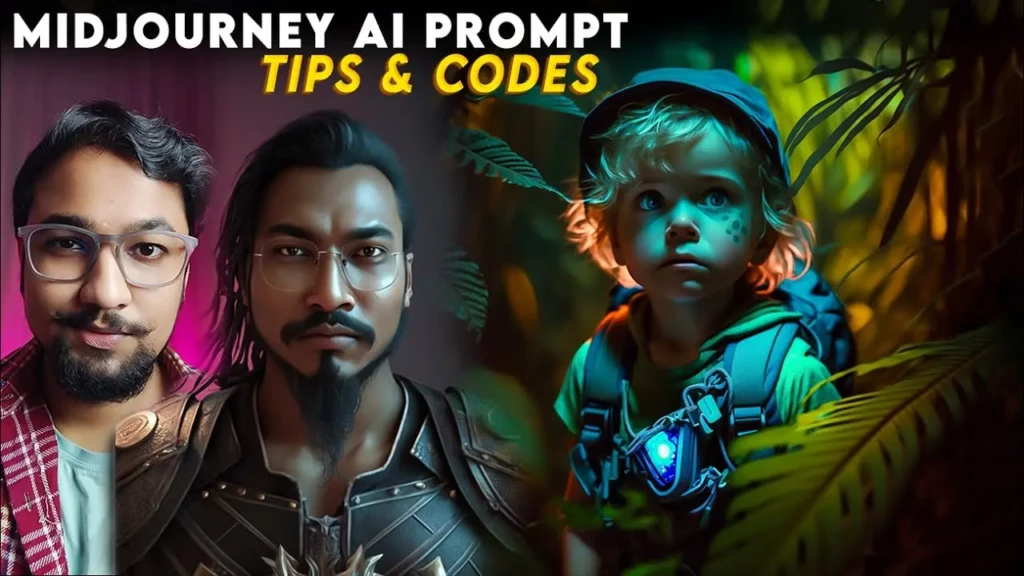
Writing effective Midjourney prompts is genuinely a learnable skill, and the difference between a mediocre output and a stunning one often comes down to how well you craft your description. Here are the most impactful techniques to elevate your results right away.
1. Be Specific and Descriptive
Vague prompts like “a cool city” produce generic results. Instead, try “rain-slicked downtown Tokyo at midnight, neon reflections on wet pavement, low-angle shot, cyberpunk aesthetic.” The more specific you are about mood, lighting, perspective, and style, the closer the output will be to your vision.
2. Use Photography and Art Terminology
Midjourney responds exceptionally well to technical creative vocabulary. Terms like “shallow depth of field,” “bokeh background,” “shot on 50mm lens,” “golden hour lighting,” and “rule of thirds composition” all meaningfully influence the output. Similarly, referencing art movements (“Art Nouveau,” “Bauhaus,” “Impressionist”) or specific visual styles (“editorial fashion photography,” “cinematic film still”) gives the model clear stylistic guidance.
3. Leverage the –stylize Parameter
The –stylize value (abbreviated –s) controls how strongly Midjourney applies its own artistic interpretation to your prompt. A low value (e.g., –s 50) keeps the output closer to your literal description. A high value (e.g., –s 750 or –s 1000) gives Midjourney creative latitude to produce more dramatic, aesthetically opinionated results. Experiment with this parameter; it can transform a flat output into something genuinely striking.
4. Use Negative Prompting with –no
If there are elements you want to exclude from your image, use the –no parameter. For example, –no text, watermark, blurry, distorted hands tells Midjourney what to actively avoid. This is especially useful for cleaning up common AI artifacts.
5. Reference Other Images with –sref for Style Consistency
If you’ve found an image that captures exactly the aesthetic you’re aiming for, upload it as a style reference. This is far more efficient than trying to describe a specific visual mood in words, and produces far more consistent results when you need to maintain a coherent look across multiple generations.
Midjourney AI Performance: Quality, Speed, and Consistency
When it comes to real-world performance, Midjourney V7 is a genuine step change from its predecessors. On the quality front, the outputs regularly cross the line into territory where non-experts can no longer reliably distinguish them from professional photography or hand-crafted illustration, particularly for portraits, landscapes, concept art, and product imagery.
Speed has improved meaningfully with the introduction of Draft Mode and Turbo Mode. Standard generations in V7 typically complete in 30–60 seconds, while Draft Mode can produce results in under 10 seconds for rapid iteration cycles. That said, if you’re on a lower-tier plan during peak hours, Relax Mode queue times can stretch from 1 to 10 minutes, which can feel slow when you’re deep in a creative flow.
Consistency is where V7 makes its most significant leap forward. Previous versions of Midjourney were brilliant at producing stunning individual images, but inconsistent when you needed the same character, object, or visual style across multiple generations.
The combination of V7’s rebuilt architecture, the –cref and –sref systems, and the new Personalization feature addresses this weakness far more comprehensively than any previous version. The remaining weak spots, accurate text within images and complex hand rendering, are known limitations shared across virtually all AI image generation platforms, not unique to Midjourney.
Midjourney AI Pricing and Plans
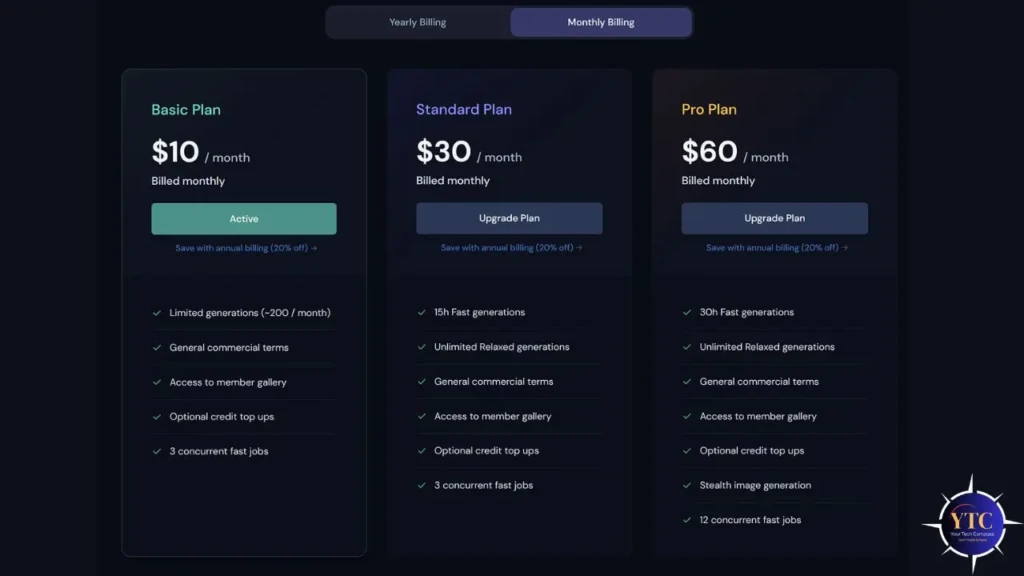
Midjourney operates on a subscription-only model; there is no permanent free tier, though the platform occasionally offers “Open House” weekends when the web interface is free for all registered accounts. Here’s a clear breakdown of all four subscription tiers:
Plan | Monthly Price | Annual Price (per month) | Fast GPU Hours | Relax Mode | Stealth Mode | Max Concurrent Jobs |
Basic | $10/month | ~$8/month ($96/yr) | 3.3 hours (~200 images) | ❌ | ❌ | 3 |
Standard | $30/month | ~$24/month ($288/yr) | 15 hours (~900 images) | ✅ Unlimited | ❌ | 3 |
Pro | $60/month | ~$48/month ($576/yr) | 30 hours (~1,800 images) | ✅ Unlimited | ✅ | 12 |
Mega | $120/month | ~$96/month ($1,152/yr) | 60 hours (~3,600 images) | ✅ Unlimited | ✅ | 12 |
A few key things you need to understand before choosing your plan.
- Fast GPU Hours are your primary currency; they determine how many images you can generate at full speed.
- Relax Mode (available on Standard and above) allows unlimited slower-paced generations that don’t consume your Fast Hours, making the Standard plan a much better deal than its price suggests.
- Stealth Mode (Pro and Mega only) keeps your generated images private and out of Midjourney’s public community gallery, essential for confidential client work, unreleased product development, or any situation where privacy matters.
On the commercial use side, all paid plans include commercial licensing rights, but if your company earns more than $1 million in annual gross revenue, you are required to subscribe to the Pro or Mega plan. You can save 20% on any plan by choosing annual billing. Unused Fast GPU hours do not roll over from month to month, so it’s worth choosing a plan that reflects your realistic monthly usage rather than your aspirational one.
Which Plan is Right for You?
If you’re just starting out or generating images occasionally, the Basic plan at $10/month is a low-risk entry point. If you create content regularly, the Standard plan at $30/month is the sweet spot. Relax Mode alone makes it an exceptional value.
For client-facing work or confidential projects, the Pro plan at $60/month is the real threshold. And if you’re running a design studio or large-scale content operation, the Mega plan at $120/month is built for you.
Midjourney AI vs Competitors
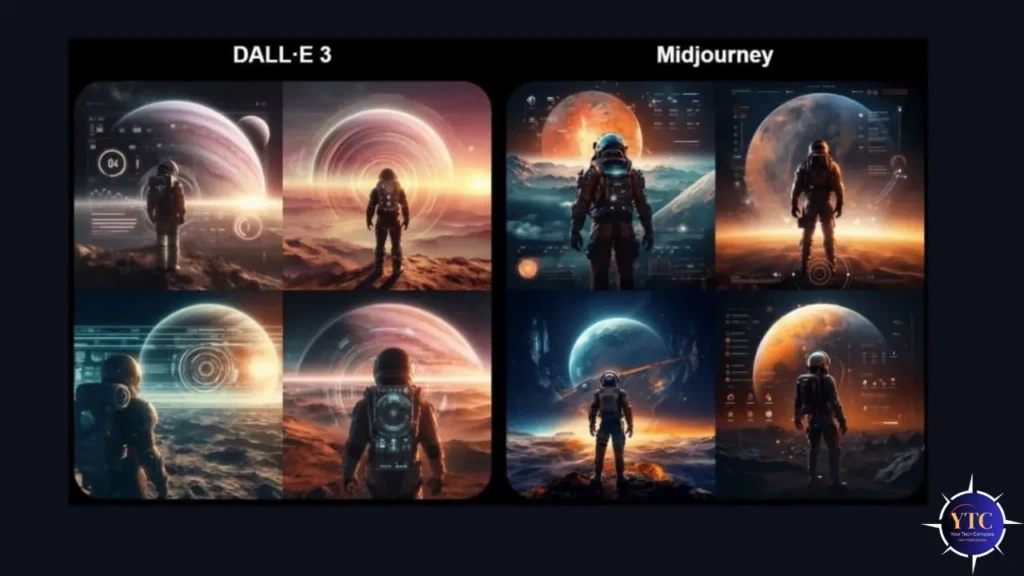
The AI image generation landscape in 2025 and into 2026 is the most competitive it has ever been. Let’s look at how Midjourney stacks up against its three main rivals.
Midjourney vs DALL·E 3 (OpenAI)
DALL·E 3, integrated into ChatGPT, is the easiest AI image tool to use. You describe what you want in natural language, and it reliably delivers something close to your literal description. That’s its strength: precise, accurate, prompt execution.
However, where DALL·E 3 trades accuracy for artistry, Midjourney trades accuracy for artistry. If you need a masterpiece that looks like it was shot by a professional photographer or painted by a skilled concept artist, Midjourney wins, and it isn’t particularly close. Most professionals use DALL·E 3 for rapid ideation and Midjourney for final, polished assets.
Midjourney vs Stable Diffusion
Stable Diffusion is the only major option that’s completely free and open source, which makes it immediately attractive to budget-conscious creators and developers. It also allows fine-tuning on custom datasets, meaning you can train it specifically on your brand’s visual library for highly consistent outputs.
The trade-off is a steep technical learning curve and the need to manage your own infrastructure. For creators who want the best quality with the least friction, Midjourney wins. For those who need total customization and have the technical skills to manage it, Stable Diffusion is in a class of its own.
Midjourney vs Adobe Firefly
Adobe Firefly has one major, decisive advantage: it’s trained exclusively on licensed Adobe Stock images and public domain content, making it the safest option for commercial use from a copyright perspective. It also integrates seamlessly with Photoshop, Illustrator, and the rest of Creative Cloud, a massive workflow advantage for designers already embedded in the Adobe ecosystem.
However, Firefly’s output quality, while strong and commercially reliable, doesn’t match Midjourney’s artistic flair or emotional depth. For brand-safe enterprise work, Firefly is excellent. For maximum creative impact, Midjourney remains the benchmark.
A Quick Comparison Snapshot
Feature | Midjourney V7 | DALL·E 3 | Stable Diffusion | Adobe Firefly |
Image Quality | ⭐⭐⭐⭐⭐ Best-in-class artistic quality | ⭐⭐⭐⭐ High accuracy, less artistic | ⭐⭐⭐⭐ Highly customizable | ⭐⭐⭐⭐ Commercial-grade realism |
Ease of Use | ⭐⭐⭐ Moderate learning curve | ⭐⭐⭐⭐⭐ Extremely beginner-friendly | ⭐⭐ Technical, complex setup | ⭐⭐⭐⭐⭐ Seamless Adobe integration |
Pricing | $10–$120/month | Included with ChatGPT Plus ($20/mo) | Free (self-hosted) | ~$9.99/month or with Creative Cloud |
Commercial Use | ✅ All paid plans | ✅ Yes | ✅ Yes (check model license) | ✅ Yes (legally safest) |
Free Tier | ❌ No | ✅ Limited (via ChatGPT free) | ✅ Yes (self-hosted) | ✅ Yes (watermarked) |
Style Consistency | ⭐⭐⭐⭐⭐ CREF + SREF system | ⭐⭐⭐ Moderate | ⭐⭐⭐⭐ With fine-tuning | ⭐⭐⭐ Style presets |
Video Generation | ✅ V1 Video Model (image-to-video) | ❌ No | ⚠️ Community tools | ❌ No |
Best For | Artistic quality, professional creative work | Beginners, quick literal results | Technical users, customization | Commercial teams, Adobe users |
Pros and Cons of Midjourney AI
Being honest about a tool’s shortcomings is just as important as celebrating what it does well. Here’s a straightforward assessment:
The Pros
- Unmatched artistic quality and visual sophistication, consistently the benchmark for aesthetic output.
- Powerful style and character consistency tools (–sref, –cref, Omni Reference) that enable professional production workflows.
- Draft Mode makes rapid iteration genuinely fast and cost-effective for the first time.
- Personalization System tailors outputs to your unique aesthetic preferences over time.
- V1 Video Model expands the platform into motion content without needing a separate tool.
- Multiple upscaling options with support up to 8K resolution.
- Commercial licensing is included with all paid plans.
The Cons
- No free tier (you must subscribe before generating a single image).
- Text rendering within images and hand anatomy remain weak spots (though both improved in V7).
- The learning curve is real, and mastery takes meaningful time investment.
- Images are public by default; Stealth Mode (for privacy) is available only on the Pro and Mega plans.
- Clip length is capped at 21 seconds for video output, making it unsuitable for long-form video production.
Who Should Use Midjourney AI?
Midjourney AI isn’t a perfect fit for every situation, but it’s an exceptional fit for a wide range of creators and professionals. Here’s who will get the most value from it.
1. Graphic Designers and Visual Artists
Graphic designers and visual artists will find Midjourney to be a powerful idea accelerator. The ability to generate dozens of mood boards, concept explorations, or fully realized design directions in the time it used to take to sketch one is genuinely transformative. Many designers now use Midjourney for early-stage ideation, then bring their favorite concepts into Illustrator or Photoshop for finalization, and this hybrid workflow is increasingly the industry norm.
2. Marketing and Advertising Teams
Marketing and advertising teams can use Midjourney to slash the cost and turnaround time of creative production. Campaign visuals, ad creative, social media assets, and product lifestyle imagery can all be generated, refined, and approved in a fraction of the time it would take through traditional production channels. If you’re curious about how AI is transforming enterprise workflows more broadly, you might find this overview of AIOps and AI-driven automation useful context for understanding the bigger operational picture.
3. Game Developers and Concept Artists
Game developers and concept artists will appreciate Midjourney’s ability to rapidly generate environment concepts, character designs, creature illustrations, and UI inspiration. The –cref system is particularly valuable here, maintaining visual consistency for characters across multiple scene types and angles. For a look at how AI is changing visual creation tools at a foundational level, check out NVIDIA Canvas, another powerful tool for artists working in AI-assisted workflows.
4. Writers, Authors, and Content Creators
Writers, authors, and content creators can use Midjourney to bring their worlds and characters to life visually, creating book covers, chapter illustrations, character portraits, and atmospheric scene images that enhance storytelling and audience engagement. Even bloggers and newsletter writers benefit from having a library of custom, AI-generated header images that are uniquely theirs.
5. Educators and Researchers
Educators and researchers can leverage Midjourney to create visual teaching aids, concept illustrations, infographics, and presentation assets that are both original and visually compelling. The ability to specify historical artistic styles also makes it a useful tool for humanities education and for research on visual communication.
6. Entrepreneurs and Solopreneurs
Entrepreneurs and solopreneurs who need professional-looking visuals but don’t have the budget for a dedicated design team will find Midjourney transformative. From landing page hero images to social media content to brand moodboards, it delivers agency-quality output at a fraction of the cost. If you’re also exploring AI tools for presentations and business communication, our Tome AI review is worth reading alongside this one.
FAQs
As of now, Midjourney does not offer a permanent free tier. You need a paid subscription starting at $10/month to generate images. That said, Midjourney occasionally runs “Open House” weekends where the web interface is free for all registered accounts, so it’s worth keeping an eye on their official announcements if you want to try before committing.
The Basic plan at $10/month is the safest starting point if you’re new to the platform. It gives you approximately 200 fast-mode image generations per month and full access to V7 and all core features. Once you find yourself wanting more speed or unlimited relaxed-mode generation, the Standard plan at $30/month becomes the clear upgrade.
Yes. Commercial use rights are included with all paid Midjourney subscription plans. The one important exception is that if your company earns more than $1 million in annual gross revenue, you must be on the Pro or Mega plan to use the images you generate commercially.
No. Not anymore. While Midjourney originally operated exclusively through Discord, the midjourney.com web interface is now the primary, fully functional access point for all subscription tiers. You can log in using Discord or Google SSO and generate, edit, organize, and download images entirely through the web UI. Discord is still available as an option, but it’s no longer required.
Draft Mode is a new-generation speed setting introduced in V7 that produces images approximately 10 times faster than standard mode and at roughly half the GPU-hour cost. The trade-off is slightly lower detail and refinement compared to full-quality generations. It’s ideal for rapid creative exploration when you’re iterating through many prompt variations before committing to a final direction.
Conclusion
Midjourney AI is, without question, one of the most powerful and creatively sophisticated AI image generation tools available today, and Version 7 cements its position at the top of the market for artistic quality, consistency, and professional-grade output. From the rebuilt architecture that delivers stunning photorealism and better anatomy, to the Personalization System that learns your unique aesthetic preferences, to the V1 Video Model that extends the platform into motion content, V7 represents the most significant leap forward in Midjourney’s history. If you care about the quality and artistry of your visual output, and not just speed or price, there is simply nothing else that competes at this level.
That said, it’s important to be honest with yourself about what you actually need. If you’re a beginner who needs fast, accurate, no-frills image generation without a subscription, DALL·E 3 or Adobe Firefly might be a better starting point. But if you’re a creator, designer, marketer, or business owner who’s ready to invest in a tool that will genuinely elevate the visual quality of everything you produce, Midjourney AI is worth every cent. Start with the Basic plan, spend a weekend learning the prompt structure and parameters, and I promise you, the results will speak for themselves.
At Your Tech Compass, we publish practical guides and honest tech reviews to help users make smarter decisions.