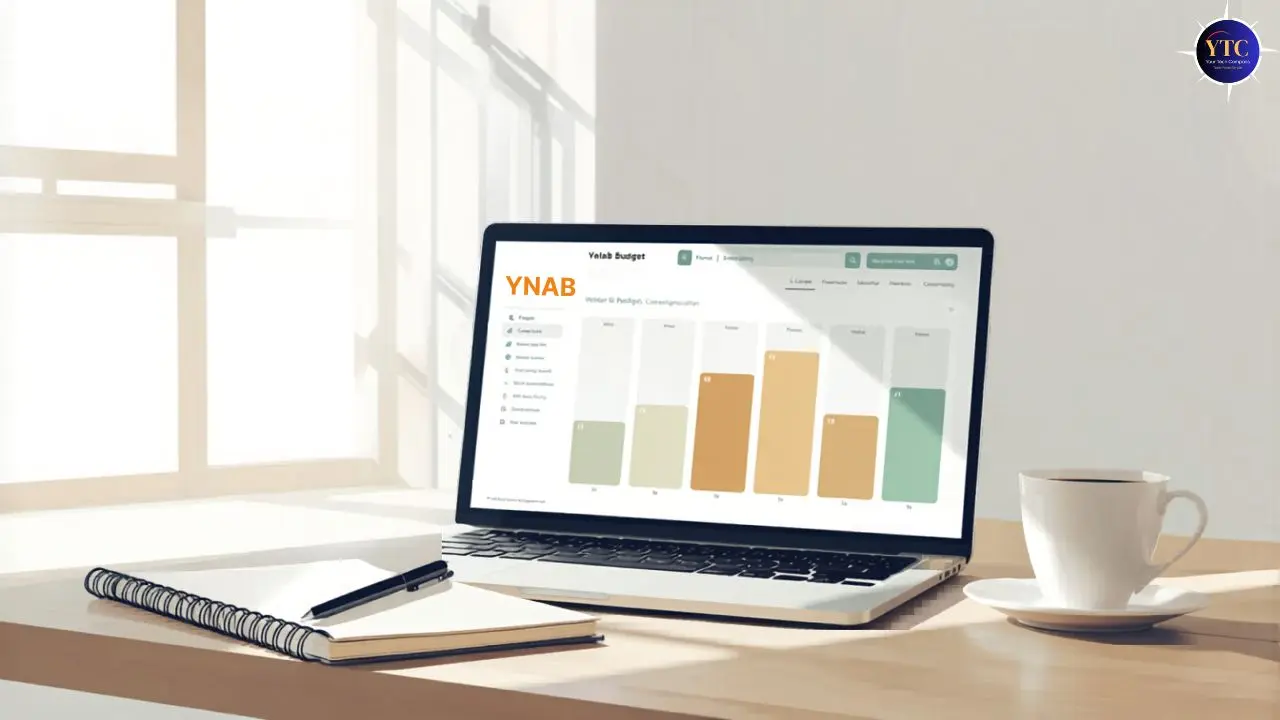
Most people who try YNAB and quit within two weeks make the same mistake; they use it like a tracking app. They connect their bank accounts, wait for transactions to import, and expect YNAB to show them where their money went. That’s not what YNAB is. YNAB is a forward-looking behavioral system where you decide where every dollar goes before you spend it. If you approach it like Mint or a spending tracker, the experience will feel confusing, demanding, and pointless within days. The frustration isn’t a product problem. It’s a mindset mismatch that disappears the moment you understand what YNAB is actually asking you to do.
This guide explains exactly how to use YNAB correctly, from the four rules that make the methodology work, to the step-by-step setup process, to what daily use actually looks like once the system is running. You’ll also get the specific mistakes that most beginners make, plus the habits that make YNAB feel natural by month three. Whether you’ve just started your free trial or you set up an account months ago and still feel confused, this is the complete picture you need.
What Makes YNAB Different From Every Other Budgeting App
Before any setup step makes sense, you need to understand the fundamental difference between YNAB and every other personal finance app on the market. This distinction is why YNAB users report saving an average of $600 in the first two months and $6,000 in the first year, and it’s also why beginners who miss it get frustrated and give up.
Most budgeting apps, including Monarch Money and PocketGuard, are rearview-mirror tools. They connect to your accounts, categorize what you’ve already spent, and show you a breakdown of your past spending. That information is interesting, but it doesn’t change what you do next.
YNAB is fundamentally different: it’s a forward-looking system where you assign every dollar to a specific job before you spend it. You’re not tracking history; you’re making decisions in advance. Consequently, YNAB only works if you actively engage with it.
It doesn’t monitor your spending and alert you after the fact; it asks you to be intentional about money before the transaction happens. And if you’re evaluating how YNAB compares to the most popular tracking alternatives, our YNAB vs Monarch Money guide covers the philosophical differences in full detail.
The mindset shift is this: YNAB users don’t ask “where did my money go?” They ask, “Where do I want my money to go?” and then they make it happen. That’s a genuinely different relationship with money. Additionally, it’s worth setting a realistic expectation: YNAB typically takes two to four weeks to feel natural. The first month is always the hardest. Users who push through the initial learning curve consistently report that it becomes one of the most powerful financial decisions they’ve ever made.
YNAB’s Four Rules: What They Actually Mean
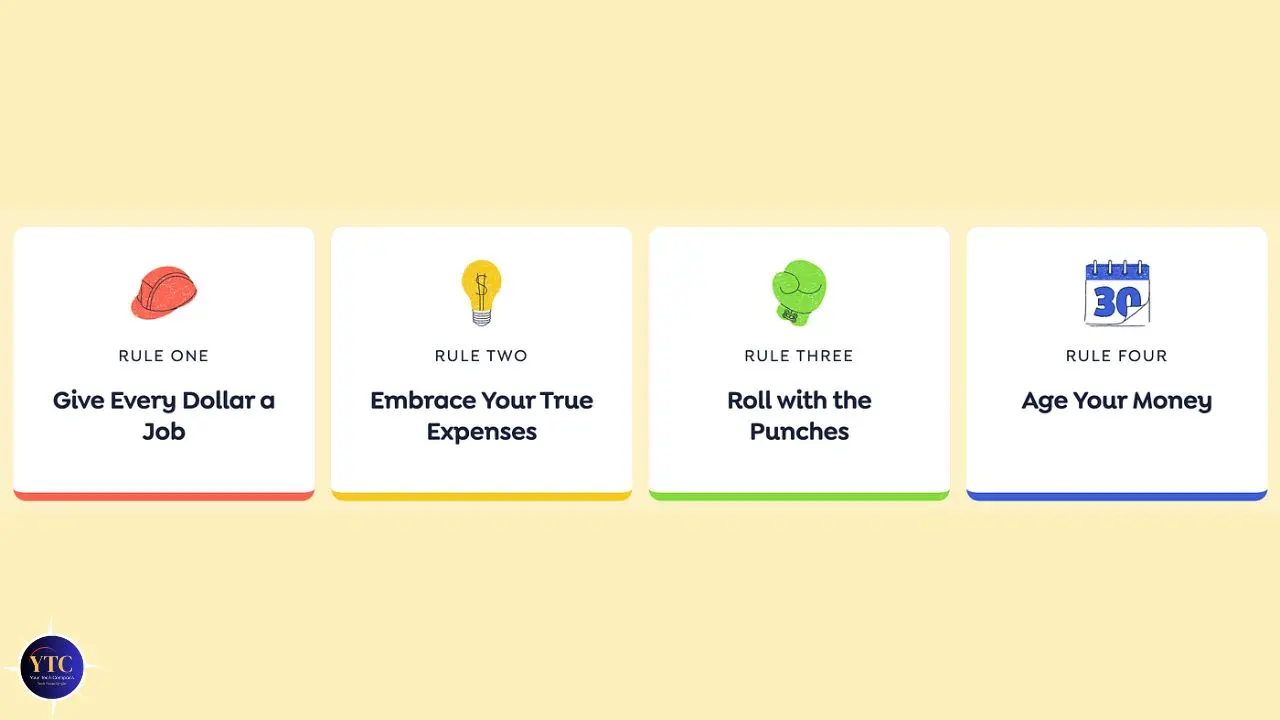
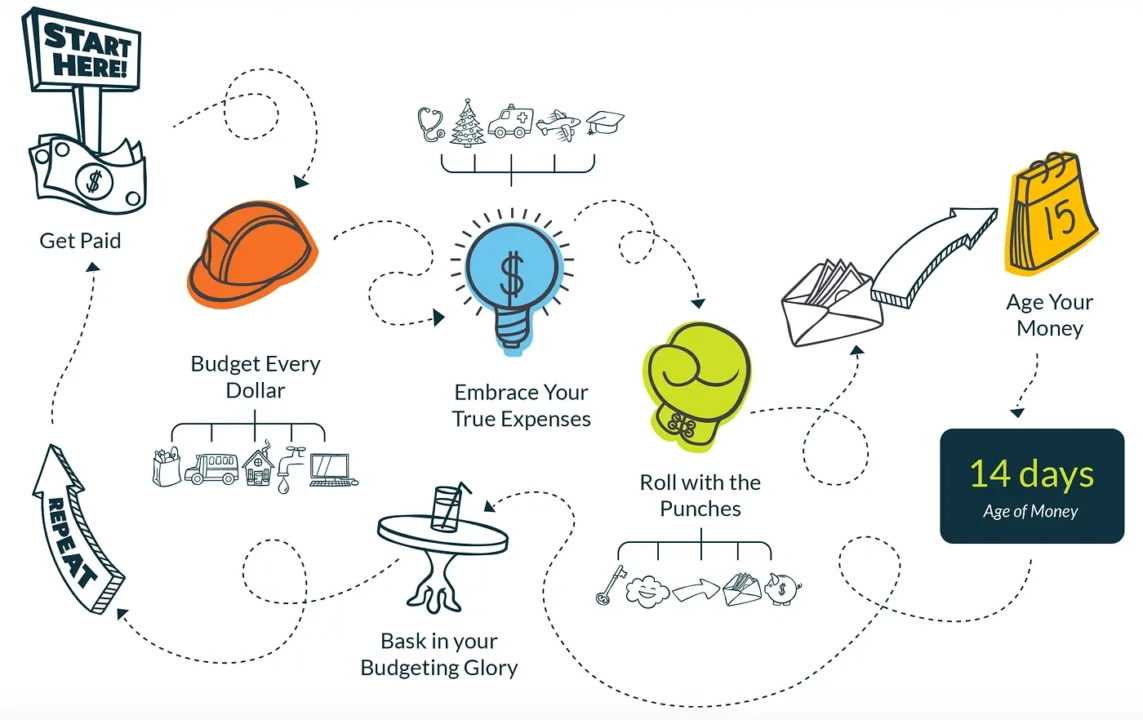
The four rules are YNAB’s entire methodology. Most articles mention them without explaining what they look like in real daily life, so here’s each one in plain, practical terms.
Rule 1: Give Every Dollar a Job
Every dollar you currently have in your accounts needs a destination (a specific category with a specific purpose) before you spend any of it. Therefore, when money arrives (a paycheck, a freelance payment, a tax refund), you open YNAB and assign every dollar to a category immediately. Categories can be anything that reflects your real life: rent, groceries, car insurance, emergency fund, vacation savings, coffee shops, whatever matters to you.
The critical detail that trips up almost every beginner: you assign money you actually have right now, not money you expect to receive next week. Therefore, if you have $1,800 in your checking account today, you have $1,800 to assign. That’s it.
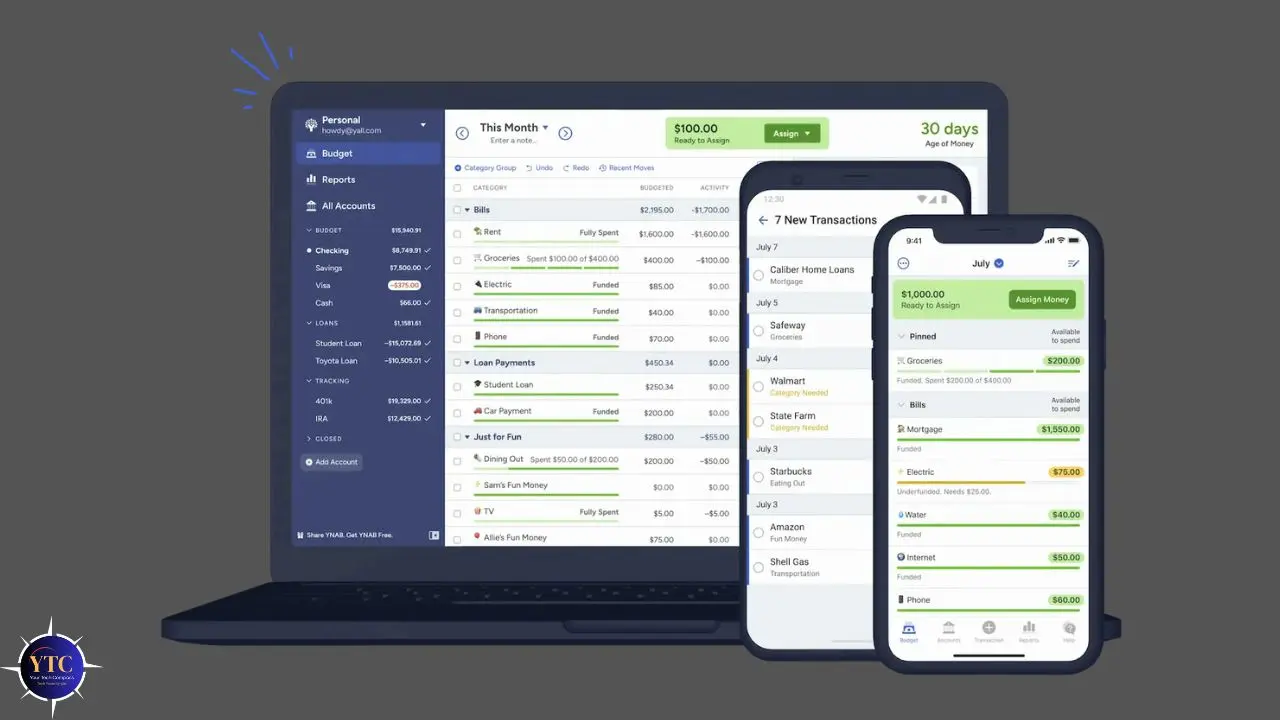
YNAB calls this “Ready to Assign,” the total of all unassigned money across your accounts. Your job is to get that number to zero by giving every dollar a category. Furthermore, if your categories add up to more than the money you actually have, YNAB immediately makes that gap visible, forcing a real conversation about priorities rather than letting you pretend the math works out.
Rule 2: Embrace Your True Expenses
Large, irregular expenses, such as car registration, holiday gifts, annual insurance premiums, medical appointments, and home repairs, destroy budgets when they’re treated as surprises. They feel like emergencies because they aren’t built into your monthly plan, even though they’re entirely predictable. YNAB’s solution is straightforward: take every irregular expense you can think of, divide it by the number of months until it’s due, and fund that category by that amount every month.
For example, if your car insurance renews in six months and costs $900, you put $150 into your “Car Insurance” category every month. When the bill arrives, the money is already sitting there. This single rule eliminates the financial anxiety caused by large bills appearing out of nowhere. Consequently, building your Rule 2 categories during setup (listing every irregular expense you can think of and creating monthly funding goals) is the single most behavior-changing thing you can do in YNAB’s first week.
Rule 3: Roll With the Punches
You will overspend a budget category. Everyone does it every month because life is genuinely unpredictable. YNAB doesn’t punish you for this; it asks you to make a conscious trade-off.
When you overspend on groceries by $35, open YNAB, find $35 in your entertainment or dining category, and move it to cover the grocery overspend. The budget stays balanced, and you’ve made a deliberate decision about a real trade-off, rather than just watching a number turn red and moving on.
This rule is what makes YNAB flexible rather than rigid. The goal is not a perfect budget that never changes; it’s a living budget that reflects real life and real decisions. Additionally, Rule 3 removes the guilt spiral that causes people to abandon budgets entirely after one bad spending week. In YNAB, an overspent category is a prompt to adjust, not a reason to quit.
Rule 4: Age Your Money

The long-term YNAB goal is to spend money that is at least 30 days old, meaning you’re no longer spending this month’s paycheck on this month’s bills. Instead, you’re spending last month’s income on this month’s expenses, which means an unexpected expense doesn’t trigger financial panic because you’re not dependent on the next paycheck arriving on time.
YNAB tracks this with a metric called “Age of Money,” which you can see directly in the app. When you first start, your Age of Money might be 3 to 7 days, meaning you’re spending money almost immediately after earning it.
As you follow the first three rules consistently over months, that number grows. Reaching 30 days is a milestone worth celebrating because it means you’ve genuinely broken the paycheck-to-paycheck cycle. That said, don’t chase this number in your first month; it’s a long-term indicator, not a first-week target.
How to Set Up YNAB: Step-by-Step
Setup takes one focused afternoon. Here’s exactly what to do.
Step 1: Start Your Free Trial
Go to ynab.com and sign up for the 34-day free trial; no credit card required. Download the YNAB mobile app on iOS or Android immediately, along with the web version.
The mobile app is not optional for daily use; it’s how you log transactions in real time, which is the single most important habit in the entire system. Additionally, if you’re a college student, YNAB offers a completely free 365-day trial through their College Program at ynab.com/college.
Submit proof of enrollment to get a full year at no cost.
Step 2: Add Your Accounts
Connect your checking, savings, and credit card accounts. YNAB uses Plaid to securely connect to bank accounts and automatically sync transactions from over 12,000 financial institutions.
If you prefer not to link your accounts, manual entry works just as well; you enter transactions as they happen. Neither approach is superior; the choice depends on your comfort level with privacy, not on YNAB functionality.
Additionally, for each account you add, enter the current balance as of today. This is your starting point and the money you’ll be assigning.
Step 3: Budget Only What You Have Right Now
After adding accounts, YNAB shows you “Ready to Assign”: the total money across all your accounts at this exact moment. Do not assign income you haven’t received yet.
Also, do not budget for a paycheck arriving next Friday. Only assign the money that currently exists in your accounts. This is Rule 1 in practice, and it’s the most important habit to build from day one.
Step 4: Create Your Budget Categories
YNAB provides default categories as a starting point. Customize these to match your real life. In addition, rename, delete, and add categories until the list reflects how you actually spend money.
A practical category structure for most people looks like this:
Category Group | Examples |
Fixed Monthly | Rent/mortgage, phone bill, subscriptions, and internet |
Variable Monthly | Groceries, gas, dining out, and personal care |
Irregular/Annual | Car registration, holiday gifts, vet bills, annual memberships |
Savings Goals | Emergency fund, vacation, new laptop, home down payment |
Debt Payoff | Credit card minimum payments, student loans, and car loans |
Start with 10 to 15 categories, not more. This is because too many categories in the first month create decision fatigue and make the daily workflow feel overwhelming. You can always add specificity later as you understand your actual spending patterns.
Step 5: Assign Money to Your Categories
Start with your fixed, non-negotiable expenses, such as rent, utilities, phone bill, and minimum debt payments. These get funded first because they’re not optional. Then move to essential variables, including groceries, gas, and transportation.
Next, fund your Rule 2 irregular expenses. For each annual or irregular cost, divide by the number of months remaining and assign that amount. Finally, any “Ready to Assign” balance remaining goes toward savings goals, debt payoff, or flexible spending.
It’s completely normal for your first budget to feel tight. YNAB is showing you your actual financial picture; it isn’t creating a problem (it’s revealing one that was already there). That discomfort is information, and it’s exactly where the behavior change begins.
Step 6: Set Up Credit Cards Correctly
Credit cards in YNAB work differently from debit accounts, and this is the single most common source of confusion for beginners. When you spend money on a credit card in YNAB, the app automatically moves the budgeted amount into a dedicated “Credit Card Payment” category. This represents money set aside to pay for that exact purchase when the bill arrives.
The Practical Result: If you budget every credit card purchase into its correct category, your credit card payment category grows automatically, and paying your bill each month becomes consequence-free. The most common mistake is treating credit card spending as separate from your budget and logging it only when the statement arrives, by which point you have no money set aside to pay it. Budget for the purchase the moment you make it, not when the bill shows up.
The Daily YNAB Workflow
This is the section most YNAB guides skip: what does actually using YNAB look like once everything is set up?
- Every Time You Spend Money: Log the transaction in YNAB immediately, ideally while you’re still at the store or by the end of the day. Open the mobile app, enter the amount, assign it to the correct category, and you’re done in under 30 seconds. If that category is now overspent, move money from another category right then. Don’t defer the decision.
- Every Time A Paycheck Arrives: Go to “Ready to Assign” and distribute the new income across your categories before spending any of it. This is the Rule 1 moment (the most important habit in the entire system). Your paycheck is not yours to spend until you have a job.
- Every Few Days: Reconcile your accounts and compare what YNAB shows against your actual bank balance to catch any missed transactions. YNAB’s reconciliation feature walks you through this in under five minutes.
- At the End of Each Month: Review what happened. Which categories did you consistently overspend? Which ones had money left over every month? Adjust your category amounts for next month based on what you actually learned, not what you hoped would happen. Leftover money in flexible categories like groceries or entertainment can either roll forward into next month or return to “Ready to Assign” for reallocation. Both approaches work; choose the one that matches your budgeting style.
The Most Common YNAB Mistakes (and How to Avoid Them)
These are the specific errors that most new users quit over, and each is preventable.
Budgeting Money You Don’t Have Yet
Assigning next week’s paycheck before it arrives means your budget is based on expected income rather than actual income. When the paycheck is late or smaller than expected, the budget collapses.
Fix: Assign only what’s currently in your accounts.
Not Logging Transactions in Real Time
Waiting until Sunday to log a week’s worth of purchases from memory means you made spending decisions all week without knowing your category balances. The budget can’t guide you if you don’t check it.
Fix: Log on your phone the moment you spend; it takes 15 seconds.
Setting Up the Budget and Never Reviewing It
Your first-month budget is a guess based on assumptions. Only real spending data reveals your actual patterns.
Fix: Review your budget at least once a week and adjust category amounts based on actual spending.
Treating Credit Card Spending As Separate

Running up a credit card without logging purchases in YNAB in real time creates exactly the debt YNAB is designed to prevent.
Fix: Every credit card purchase gets logged in YNAB immediately, assigned to the correct category, and the money is set aside automatically.
Quitting After An Imperfect Month
The first month is always messy. Categories are wrong, amounts are off, and the budget feels chaotic. This is normal; the system hasn’t had enough real data to reflect your life yet.
Fix: Commit to three full months before evaluating whether YNAB is working for you. Almost universally, the users who push through month one find the system feels natural by month three.
YNAB Tips That Speed Up the Learning Curve
- Use the Mobile App for Everything: The web version is for setup, review, and monthly planning. The mobile app is for real-life, logging transactions as they happen. This habit alone determines whether YNAB works for you.
- Watch YNAB’s Free Workshops: YNAB offers live and recorded workshops on every aspect of the methodology at no cost, available at ynab.com/workshops. The “Getting Started” and “Credit Cards in YNAB” workshops eliminate 80% of beginner confusion. They’re short, practical, and free.
- Start with Fewer Categories. Ten to fifteen categories are enough for your first two months. Add more specificity after you understand your real spending patterns, not before.
- Use the Age of Money Metric as Long-Term Motivation: Watching this number grow from 5 days to 15 days to 30 days over months gives you concrete evidence that the system is working, even when it doesn’t feel obvious in the day-to-day. That progress is real and measurable.
- Join the YNAB Community: The YNAB subreddit (r/ynab) is one of the most genuinely helpful personal finance communities available; questions are answered by experienced users who’ve been exactly where you are now.
For a broader look at the personal finance and budgeting apps worth knowing, our apps and tools section covers the full landscape.
Is YNAB Worth the Cost?
YNAB costs around $14.99/month or $109/year as of April 2026, with no free tier beyond the trial. The annual plan works out to approximately $9.08/month, which is 39% less than the monthly billing. A single subscription covers up to six people in the same household at no additional cost. Additionally, college students get YNAB completely free for 365 days through the College Program at ynab.com/college.
The honest ROI case is straightforward: YNAB’s own data show that the average new user saves $600 in the first two months. At $109/year, the app pays for itself in less than 3 weeks based on average savings.
For users carrying credit card debt, the behavioral change often redirects hundreds of dollars per month away from interest payments. However, for users living paycheck to paycheck, breaking that cycle has compounding financial value, making $109 look trivial in retrospect.
The Honest Caveat: YNAB only delivers that ROI if you use it actively every day. Paying $109/year to check the app once a month produces minimal results. And paying $109/year, logging transactions daily, assigning every paycheck, and adjusting your budget regularly produce the results the data reflects. However, the 34-day free trial is long enough to complete a full month’s cycle; use it seriously, and you’ll know whether the methodology resonates before you spend anything.
For a direct comparison between YNAB and other major budgeting apps, including Mint and Monarch alternatives, our Mint vs Rocket Money guide and YNAB vs Monarch guide both cover how the tools stack up for different financial situations. Additionally, our tech guides section covers the full range of productivity and finance tools worth knowing.
FAQs
YNAB has a real learning curve; it takes 2 to 4 weeks to feel natural. The four rules take time to internalize, and handling credit cards is confusing for most people at first. That said, YNAB’s free workshops and an active community at r/ynab address virtually every beginner question. The users who push through the first month’s friction consistently report that the system becomes automatic by month three.
Yes. YNAB works completely without bank linking. You can enter transactions manually through the web or mobile app. Many users prefer this approach for privacy reasons or because Plaid doesn’t support their bank. Manual entry also creates more mindful engagement with spending since you’re consciously logging every transaction yourself.
Most users notice meaningful behavioral change within 30 to 60 days. The first month is primarily setup and calibration, getting category amounts right based on real spending data. By month two, the system reflects your actual life, and your decisions become more intentional. YNAB’s own data suggests the average user saves $600 in the first two months and $6,000 in the first year of active use.
Yes. YNAB is specifically well-suited for variable and irregular income because the methodology is built around budgeting what you actually have rather than projecting future earnings. Freelancers, contractors, and gig workers budget each payment as it arrives rather than projecting a monthly salary. The Rule 4 goal of aging your money is particularly valuable for irregular-income earners because a buffer eliminates the anxiety caused by income variability.
Absolutely. YNAB’s value isn’t limited to debt payoff. For users who are debt-free, the methodology helps build savings faster, fund irregular expenses without stress, reach specific financial goals (down payment, sabbatical fund, investment account), and maintain the financial clarity that prevents debt from accumulating again. The paycheck-to-paycheck cycle affects people across income levels. YNAB addresses the behavioral root cause regardless of where you’re starting.
Conclusion

YNAB works because it changes your relationship with money from passive observation to active decision-making. The four rules aren’t features in a software product; they’re a framework for thinking about every dollar as a deliberate choice rather than an inevitability. Setup takes one focused afternoon, the daily habit of logging transactions and adjusting categories takes less than five minutes, and the users who succeed aren’t the ones who execute perfectly from day one; they’re the ones who use it imperfectly, adjust regularly, and keep going through the first month’s discomfort until the system becomes second nature.
The 34-day free trial is genuinely enough time to experience the methodology for real: one full budget cycle, one paycheck assigned, one overspent category moved, and one irregular expense funded on purpose instead of feared as a surprise. If that experience resonates with how you want to manage your money, the subscription pays for itself within weeks. If it doesn’t, you’ve lost nothing. Start the trial, follow the four rules, log your transactions daily, and give YNAB three months before you judge it.
Ready to explore more tools that make your financial and tech life work better? Everything worth knowing (reviewed honestly) lives at YourTechCompass.com, your compass for smarter decisions in a noisy world.