Productivity tools have become essential for managing both personal and professional workflows, especially as remote work, digital collaboration, and online businesses continue growing. Among the many available platforms, Trello and ClickUp are two of the most widely used project management tools. They help individuals and teams organize projects, optimize productivity, and maintain clarity in fast-paced environments.
However, choosing between Trello and ClickUp isn’t always straightforward. While both platforms are powerful, their designs, features, and complexity levels appeal to different types of users. In this detailed comparison, you’ll discover how Trello and ClickUp differ in functionality, automation, pricing, templates, integrations, and real-world use cases.
Trello vs ClickUp: Quick Comparison Table
Below is a quick, high-level comparison to give you an immediate sense of how each tool compares before we break it down further.
Feature | Trello | ClickUp |
User Experience | Simplified Kanban layout | Multiple views with advanced features |
Task Management | Boards, lists, and cards | Hierarchical: Spaces → Folders → Lists → Tasks |
Automation | Butler automation | Advanced automations with conditional logic |
Integrations | Power-Ups & app add-ons | 1000+ native & external integrations |
Templates | Simple workflow templates | Extensive industry-specific templates |
Time Tracking | No native support | Built-in time tracking & reports |
Best For | Beginners & light projects | Agencies, teams, and complex workflows |
Starting Price | Free; paid from $6/mo | Free; paid from $10/mo |
Trello Overview
What Is Trello?

Trello is a visually intuitive project management tool built around the Kanban system. With its board-and-card structure, Trello makes it extremely easy to track progress, move tasks through different stages, and stay organized at a glance. Because of its simplicity, the platform works exceptionally well for individuals, students, creators, and smaller teams who prefer a clean and straightforward interface.
Official website: https://trello.com
Key Features
Trello offers a set of features that prioritize ease of use, including:
- Boards, lists, and cards for simple task organization
- Butler automation for routine processes
- Power-Up integrations with apps like Slack, Google Drive, and Jira
- Card attachments for files, links, and notes
- Custom fields on higher-tier plans
- Mobile and desktop apps for seamless device switching
Strengths of Trello
One of Trello’s strongest advantages is how quickly new users can begin working without needing tutorials or a complex setup. Its drag-and-drop interface makes managing tasks intuitive, while its visual approach helps users instantly understand their workflow.
Trello’s flexibility allows you to structure your boards as you see fit, whether you’re planning content, coordinating a school project, or managing simple business tasks.
Limitations of Trello
Although Trello shines in simplicity, it can fall short for teams managing heavy workloads or multi-layered projects. It lacks native features like time tracking, deep automation, data reporting, and structured task hierarchies. As projects grow, relying on too many Power-Ups can also become expensive.
Who Should Use Trello?
Trello is best suited for:
- Individuals planning personal projects
- Students organizing assignments
- Small teams managing straightforward workflows
- Creatives mapping out ideas visually
- Beginners who want a minimal learning curve
If you’re looking for a lightweight productivity solution that doesn’t overwhelm with features, Trello is an excellent fit.
ClickUp Overview
What Is ClickUp?
ClickUp is an all-in-one productivity and project management platform designed for users who want everything in one place: tasks, documentation, goals, time tracking, automation, dashboards, and more. Due to its advanced feature set, ClickUp supports more sophisticated workflows, making it a top choice for teams, agencies, and remote workspaces.
Official website: https://clickup.com
Key Features
ClickUp’s features go far beyond basic task management:
- Hierarchical organization (Spaces → Folders → Lists → Tasks → Subtasks)
- Built-in time tracking & timesheets
- Custom dashboards for analytics and workload management
- Multiple view options, including Board, List, Gantt, and Calendar
- Automation with advanced logic
- Collaborative documents (ClickUp Docs)
- Over 1000 integrations
- Priority flags, dependencies, and goal tracking
Strengths of ClickUp
ClickUp’s strength lies in its versatility. Whether you’re managing editorial calendars, software sprints, marketing campaigns, or product development, ClickUp can adapt to almost any workflow. Additionally, its automation features reduce repetitive tasks, while its dashboards give decision-makers insights into productivity and performance.
For teams that rely on digital tools, pairing ClickUp with recommended apps from Best Productivity Apps for Remote Workers can create a significantly more efficient working environment.
Limitations of ClickUp
Because ClickUp offers more features, the software has a steeper learning curve. New users may feel overwhelmed by the number of options, settings, and customization features. Additionally, some features require time to set up properly, making it less ideal for people who want a plug-and-play solution.
Who Should Use ClickUp?
ClickUp is ideal for:
- Growing teams and startups
- Remote-first companies
- Agencies managing client projects
- Developers following Agile or Scrum methods
- Power users who want detailed control
If your work requires systems, automation, reporting, or cross-team collaboration, ClickUp delivers exceptional value.
Trello vs ClickUp: Feature-by-Feature Comparison
1. User Interface & Ease of Use
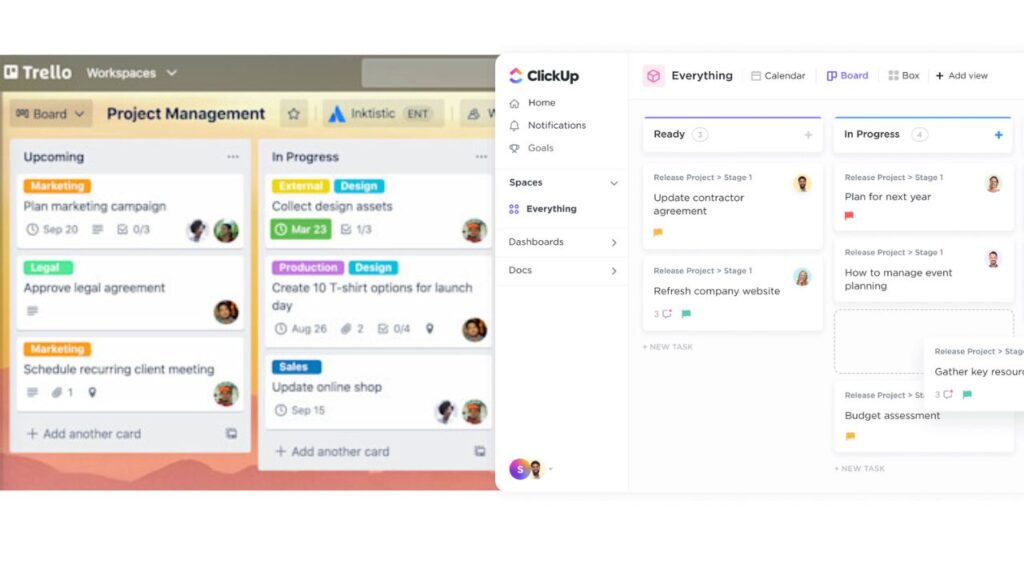
When comparing ease of use, Trello clearly takes the lead. Its minimalist, drag-and-drop board layout lets anyone start immediately. ClickUp, however, offers multiple views, such as Gantt charts, timelines, and dashboards, which introduces more complexity. Although this provides more power, it may not be ideal for casual users.
2. Task & Project Management
Trello organizes tasks visually using cards. While this is ideal for small projects, it becomes limiting when you need to work with deeper layers, such as subtasks or goals.
ClickUp, on the other hand, uses a structured hierarchy that allows granular control. As your projects grow, ClickUp’s detailed task architecture helps you stay organized without needing separate tools for notes, dependencies, or reporting.
3. Automation
Trello utilizes Butler, a simple automation system ideal for repetitive tasks such as moving cards or assigning labels.
ClickUp takes automation further by allowing:
- Conditional logic
- Multi-step triggers
- Time-based rules
- Automated reminders
- Workflow chaining
This makes ClickUp significantly more powerful for teams running complex processes.
4. Integrations & Compatibility
Trello utilizes Power-Ups to integrate with tools like Slack, Dropbox, and Google Workspace; however, many Power-Ups require paid plans.
ClickUp supports over 1,000 integrations out of the box, making it a better choice for teams that rely on a diverse tech stack.
5. Templates & Customization
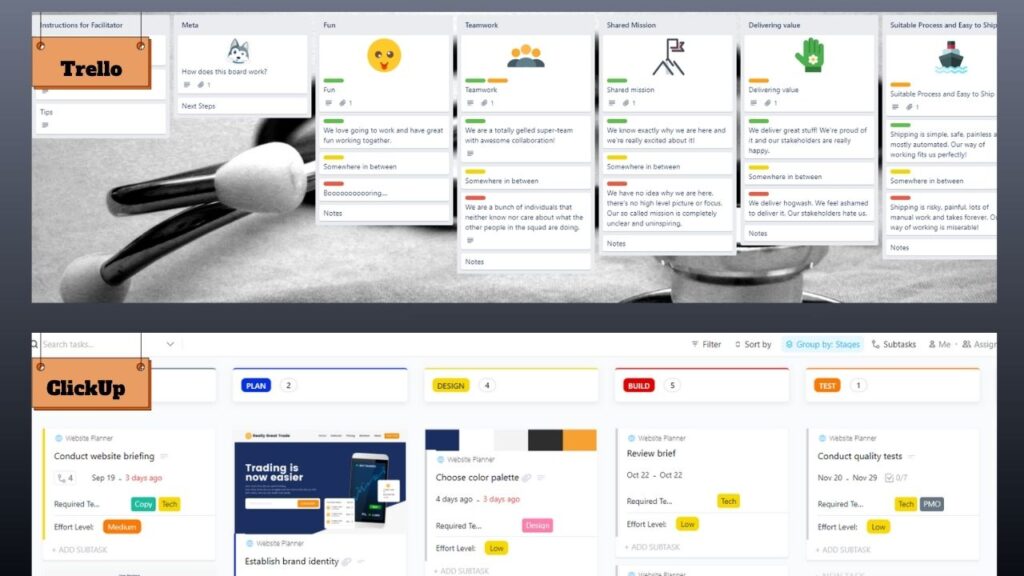
Trello’s templates are simple and fast to deploy. However, ClickUp offers a comprehensive library of templates designed for various purposes, including marketing, operations, engineering, HR, content creation, and more.
ClickUp’s customization options also allow you to build your own workflows from scratch, making it a much more scalable solution.
6. Collaboration Tools
Both tools support collaboration through comments, tags, and file sharing. However, ClickUp enhances collaboration through:
- Assigned comments
- Collaborative docs
- Team chats
- Goal setting
- Workload balancing
These features make ClickUp better suited for remote teams that require detailed communication systems.
7. Productivity & Time Management
ClickUp includes native time tracking, productivity insights, and dashboards that help teams measure performance.
Trello relies heavily on third-party integrations to achieve similar functionality. If you’re a creator or editor, pairing ClickUp with guides like “Best Mobile Photo Editor” or “Best Photo Editing Apps for iPhone Users” can further enhance your content workflow.
8. Mobile & Desktop Experience
Trello’s mobile app is extremely simple, making it easy to update tasks on the go. ClickUp’s mobile app offers more features, but its interface may feel overwhelming for users who prefer a more streamlined experience.
Trello vs ClickUp Pricing Comparison
Trello Pricing
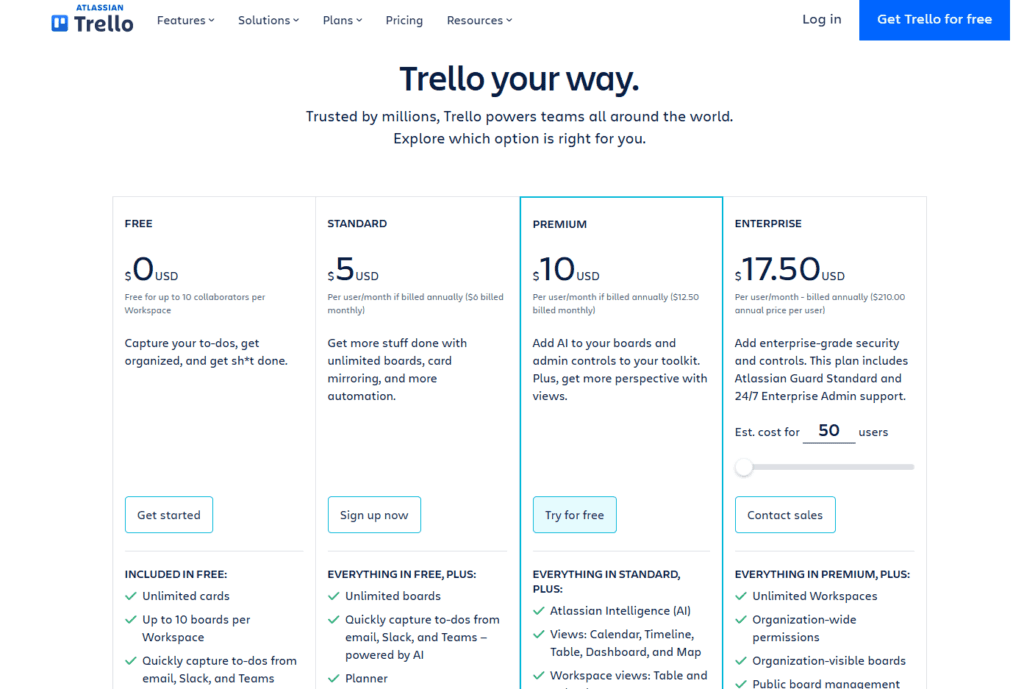
- Free
- Standard: $6/user/month
- Premium: $12.50/user/month
- Enterprise: Custom
ClickUp Pricing
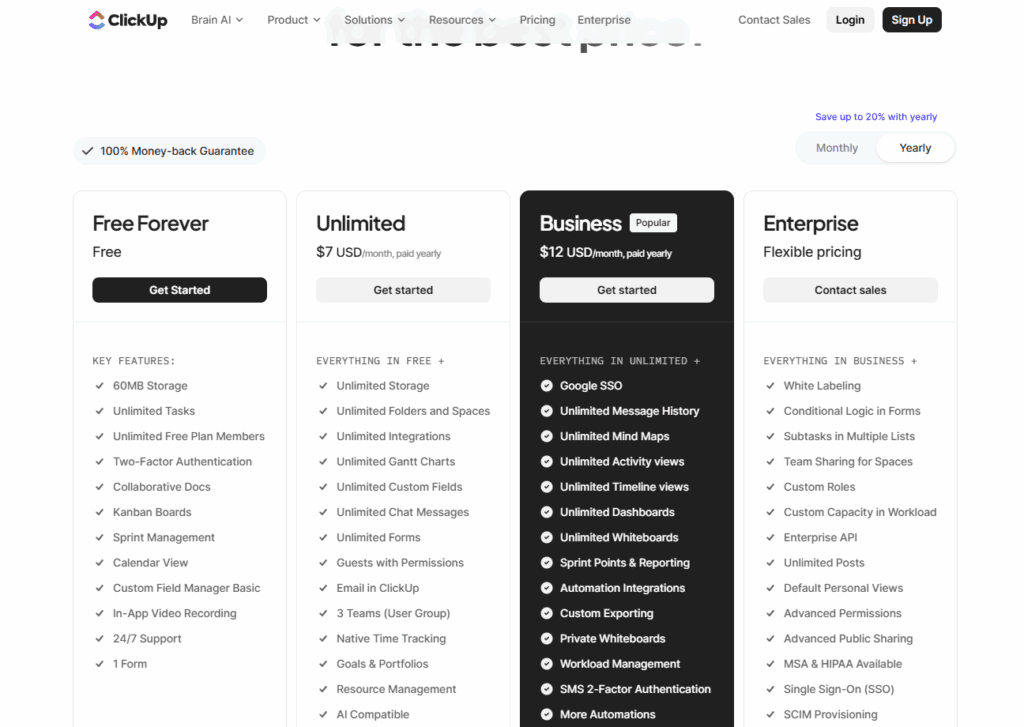
- Free
- Unlimited: $7/user/month
- Business: $12/user/month
- Enterprise: Custom
Overall, Trello is more affordable for simple tasks, while ClickUp offers better value for teams that need advanced features.
Trello vs ClickUp for Different Use Cases
- For Individuals: Trello wins because it’s simple, visual, and quick to set up.
- For Small Teams: Both tools work well, but ClickUp offers more features for scaling.
- For Agencies: ClickUp is ideal due to time tracking, dashboards, and automations.
- For Students and Educators: Trello is easier to learn and manage.
- For Software Development Teams: ClickUp supports Agile workflows more effectively.
Pros and Cons Summary
Trello Pros
- Beginner-friendly
- Clean UI
- Highly flexible boards
- Affordable
Trello Cons
- Limited advanced features
- No native time tracking
ClickUp Pros
- Extremely customizable
- Powerful automation
- Built-in time tracking
- Advanced collaboration
ClickUp Cons
- Steeper learning curve
- Higher pricing on advanced plans
Final Verdict: Trello or ClickUp?
Ultimately, the right choice depends on your workflow. If you’re looking for an easy-to-use tool for simple tasks, Trello is the better option. It’s clean, visual, and perfect for smaller projects or users who prefer simplicity. However, if you’re managing multiple teams, handling complex workflows, or relying heavily on automation and reporting, ClickUp offers unmatched flexibility and depth.
If you’re already using modern AI or productivity tools, such as those discussed in this Castmagic Review, ClickUp integrates seamlessly into a high-efficiency workspace. Ultimately, I’d choose the platform that not only supports my daily tasks but also scales with my long-term productivity goals.
At Your Tech Compass, we publish practical guides and honest tech reviews to help users make smarter decisions.