I want to tell you about the moment Castmagic genuinely surprised me. I uploaded a 47-minute podcast interview, one I’d been meaning to repurpose for three weeks but hadn’t touched because the thought of manually writing show notes, a blog post, a newsletter, and social captions from scratch felt like a second full-time job. Within about eight minutes of uploading the file, Castmagic handed me a timestamped transcript, a structured set of show notes, a long-form blog draft, five LinkedIn post options, a Twitter/X thread, and a list of pull quotes. Was every output perfect? No. Did any of it need editing? Yes. But the difference between staring at a blank document and editing a 70% draft is enormous, and that’s the actual value proposition Castmagic is selling.
This review is for you if you’re a podcaster who knows you should be repurposing your episodes but never has time, a coach or consultant who records sessions and then loses the insights inside an audio file, a content marketer drowning in post-production overhead, or anyone who creates long-form audio or video and wants to multiply its reach without multiplying the hours. I’ll walk you through exactly how Castmagic works, what each plan actually costs, where the tool genuinely delivers, and where it falls short.
A note before we begin: every YTC score is earned, never negotiated. If you want to understand exactly how we evaluate apps & tools and how we handle affiliate relationships, our Review Methodology lays it all out.
What Is Castmagic?
Castmagic is an AI-powered content repurposing platform launched in late 2022. Its founding premise is simple: you have already done the hard creative work by recording your podcast, webinar, interview, or coaching session.
The transcript is contained within that audio file. And the blog post and the social captions exist. Castmagic’s job is to extract all of that and return it to you in publish-ready formats within minutes, not hours.
Since its launch, Castmagic has processed over 10 million minutes of content for more than 75,000 creators, establishing itself as one of the most widely used tools in the content repurposing category. Furthermore, the platform has evolved significantly from its original podcast-only focus. In 2026, it handles coaching sessions, sales calls, webinars, YouTube videos, Zoom recordings, and other long-form spoken content, generating not just transcripts but a complete content suite from a single upload.
The core use cases break down into three categories:
- Creators and Podcasters: Turning episodes into blog posts, show notes, newsletters, social posts, and promotional assets that extend each episode’s reach well beyond the original upload.
- Coaches, Consultants, and Thought Leaders: Converting recorded sessions, workshops, and talks into shareable transcripts, client deliverables, course materials, and follow-up content.
- Marketing and Content Teams: Repurposing meetings, interviews, and long-form content into assets across multiple channels without the manual bottleneck of having someone write everything from scratch.
How Castmagic Works: The Actual Workflow
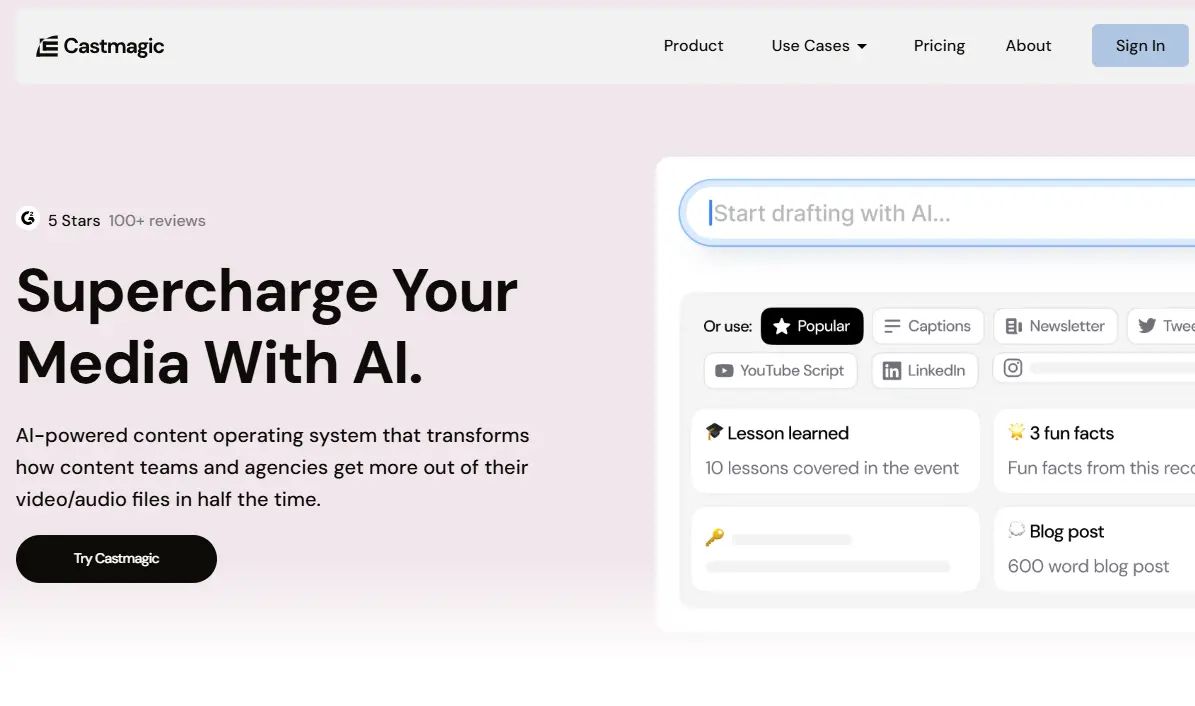
The process is more straightforward than most content tools. Here’s what happens from upload to finished asset:
Step 1: Upload Your Content
You can upload an MP3 or MP4 file directly, paste a YouTube or Vimeo URL, connect your RSS feed to import podcast episodes, or link directly from Zoom. Castmagic accepts audio and video from virtually any source you’re likely to be working with.
Step 2: Transcription with Speaker Identification
The AI transcribes your content with speaker separation (identifying different voices) and timestamps. In my testing, transcription accuracy for clearly recorded audio was approximately 90–95%, comparable to Otter.ai and meaningfully better than basic auto-transcription tools. Additionally, Castmagic supports transcription and content generation in 60+ languages, which makes it viable for non-English creators.
Step 3: Select Your Template or Preset
Castmagic organizes its output options by content type: podcast, meeting, coaching, webinar, sales call, and more. Each template generates a different set of outputs relevant to that context. Consequently, a podcast upload includes show notes, an episode summary, and social posts, while a coaching session upload includes a session summary, key takeaways, and a follow-up email draft.
Step 4: Content Generation
This is where Castmagic earns its subscription. From your single recording, the platform generates: long-form blog posts, show notes with chapters, episode summaries, email newsletter drafts, LinkedIn posts, Twitter/X threads, Instagram captions, pull quotes, timestamps, and a list of key topics and themes.
Step 5: Magic Chat and Refinement
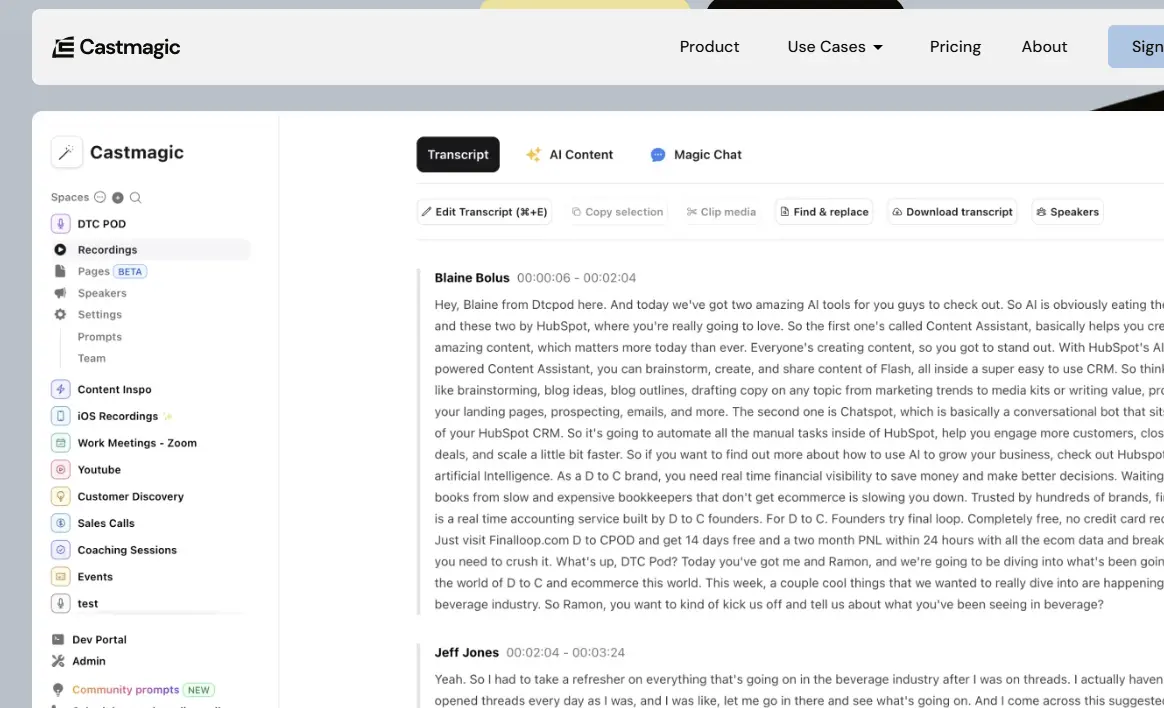
Once your content is processed, you can use Magic Chat (Castmagic’s GPT-4-powered conversational interface) to ask questions about your recording, request specific variations, or instruct the AI to rewrite sections in a specific tone or style. This is the feature that transforms Castmagic from a one-shot generator into an interactive content production partner.
Step 6: Export and Publish
Outputs can be exported as text, copied directly, or pushed to integrations. The platform integrates with Google Drive, Zapier, YouTube, Zoom, Vimeo, TikTok, and Instagram, giving you reasonable flexibility to push assets directly into the tools you’re already using.
Key Features in Detail
Magic Chat: Ask Your Recording Anything
Magic Chat is built on GPT-4 Turbo and operates as a context-aware AI assistant trained on the content of your specific recording. You can ask it to extract the five most quotable moments from your interview, rewrite the show notes in a more conversational tone, identify the key objections raised in a sales call, or generate a Twitter thread focused on one specific section of your podcast.
Furthermore, Magic Chat maintains the context of your recording throughout the conversation, so you’re not prompting a generic AI; you’re prompting an AI that has read everything your recording contains. This feature alone sets Castmagic apart from transcription-first tools like Otter.ai. Otter gives you text. In addition, Magic Chat gives you a working session with an AI editor who has already read the text.
Magic Templates: Automating Consistent Output
Magic Templates let you define a custom content structure that Castmagic applies to every upload. If you want every podcast episode to produce the same set of assets: a 600-word blog post in your brand voice, a 5-point LinkedIn summary, and a 3-email follow-up sequence, you set that template once, and it runs automatically on every new upload. Consequently, this is the feature that makes Castmagic most valuable for teams and agencies handling multiple clients: consistent, branded output without repeated manual configuration.
Content Pipeline
The Content Pipeline is Castmagic’s workspace for building multi-step workflows for content production. Rather than generating individual assets in isolation, you define a pipeline that processes your recording through a sequence of outputs, generating content blocks that can include both AI-generated text and manual additions.
Each block supports image attachments, keeping all relevant assets organized in one place. For agencies managing multiple brands or content strategists producing content at scale, this is the operational backbone that enables Castmagic to scale.
Workspace and Multi-Brand Support
Castmagic supports multiple workspaces within a single account, making it viable for agencies managing several clients or teams handling multiple brands. Each workspace can have its own brand voice guidelines, templates, and output preferences.
Therefore, the content Castmagic generates for Client A sounds nothing like that for Client B. Furthermore, team member access controls let you grant collaborators access to specific workspaces without sharing access to everything.
Integrations
Castmagic connects directly with Google Drive, Zapier, YouTube, Vimeo, Zoom, TikTok, and Instagram. The Zapier integration is the most powerful here; it connects to hundreds of downstream tools, enabling workflows such as auto-importing Zoom call recordings, generating a summary, and pushing the summary to Notion or Slack without manual steps. For teams already using Zapier-connected tooling, this integration significantly expands what Castmagic can automate.
Pricing: The Actual Numbers
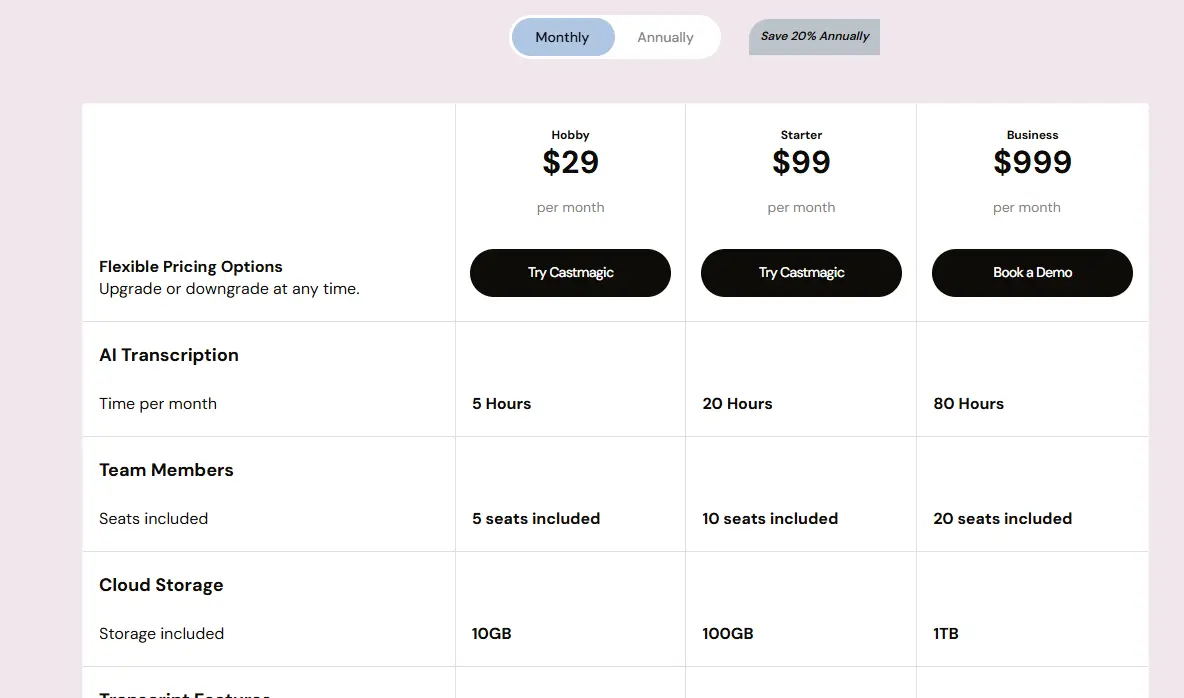
The original article on this site listed plans by name without prices, which isn’t useful to anyone making a real buying decision. Here’s the current pricing structure:
Plan | Monthly Price | Annual Price | Hours Included | Best For |
Hobby | $29/month | $21/month | 5 hours/month | Occasional creators, 1–2 episodes/week |
Starter | $99/month | $79/month | 20 hours/month | Regular podcasters, 2–4 hours/week |
Business | $999/month | $790/month | 80 hours/month | High-volume creators, agencies |
A free trial is available. In addition, no upfront credit card payment is required, giving you enough usage to evaluate whether the output quality justifies the cost before committing.
The Honest Pricing Context
Castmagic is not cheap. At $29/month for 5 hours, a podcaster releasing two 45-minute episodes per week hits their limit immediately. The Starter plan at $99/month is the more realistic entry point for anyone producing consistently.
However, the cost comparison puts these numbers in perspective: manual transcription costs $1–3 per audio minute, copywriting for a 600-word blog post costs $50–200, and social media management for the same content costs $500–2,000 per month. A single Starter plan that eliminates even 50% of that spend pays for itself quickly for any creator running at volume.
If you’re ready to try it, this is the affiliate link for Castmagic: try Castmagic. I earn a small commission if you sign up through it, at no extra cost to you.
Castmagic vs The Alternatives: An Honest Comparison
Castmagic doesn’t exist in a vacuum. Here’s how it stacks up against the tools most likely to be on your shortlist:
Castmagic vs Descript
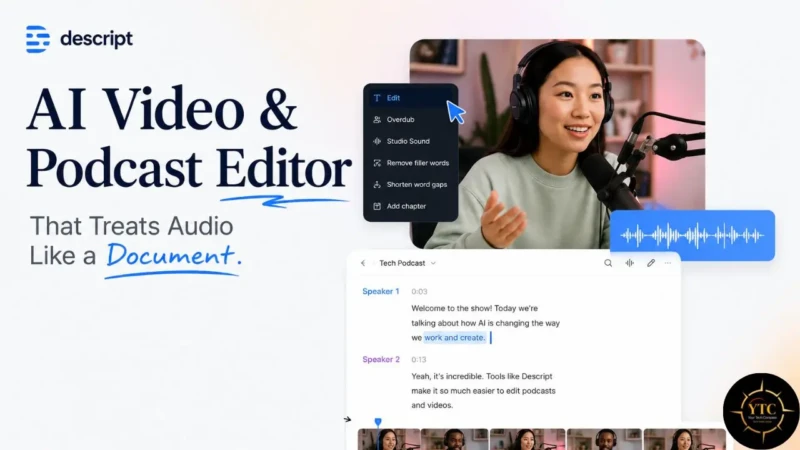
Descript is a video and audio editor first, with built-in transcription and some content generation. If your primary workflow involves editing the recording itself (cutting sections, adding B-roll, removing filler words from the audio), Descript’s editing-first interface is meaningfully better than Castmagic’s.
However, if your goal is content volume (getting blog posts, newsletters, and social posts from a recording with minimal manual work), Castmagic’s output breadth and structure are broader than Descript’s. Additionally, Descript’s content export features are more limited in both quantity and customization than Castmagic’s template system.
The Verdict: Use Descript if you’re editing the recording. Use Castmagic if you’re repurposing it.
Castmagic vs Otter.ai
Otter.ai excels at transcription, particularly for live meetings and real-time audio capture. Its accuracy is strong, its interface is clean, and its meeting summary features work well for business teams.
However, Otter is fundamentally a transcription and notes tool. It doesn’t generate blog posts, social captions, email newsletters, or marketing assets from your recordings.
Consequently, Otter is the right tool if you need a meeting transcript and action items. But Castmagic is the right tool if you need a transcript plus a publishable content suite.
The Verdict: Otter for meeting intelligence and notes. Castmagic for content production.
Castmagic vs Riverside.fm
Riverside is primarily a recording platform; it’s where you record your podcast with high-quality audio and video. It has some AI clip-generation features, but its content repurposing output is significantly more limited than Castmagic’s. The more natural workflow is to record in Riverside and repurpose in Castmagic, rather than choosing between the two.
The Verdict: These tools complement rather than compete with one another.
Full Comparison at a Glance

Tool | Primary Strength | Content Generation | Editing UI | Starting Price |
Castmagic | Audio → full content suite | ✅ Extensive (blog, social, email, notes) | ❌ Minimal | $29/month |
Descript | Video/audio editing | ⚠️ Basic | ✅ Strong | $24/month |
Otter.ai | Meeting transcription | ⚠️ Notes only | ❌ None | $16.99/month |
Riverside.fm | High-quality recording | ⚠️ Basic clips | ⚠️ Limited | $15/month |
Who Should Use Castmagic
Use Castmagic if you are a:
- Podcaster or YouTuber releasing content consistently and wants to stop leaving traffic on the table by not publishing the blog post, newsletter, and social content that should accompany every episode. One upload generates a week’s worth of supporting content.
- Coach or consultant who records sessions, workshops, or keynote talks and wants to convert those recordings into client deliverables, course materials, or thought leadership content without spending hours writing from scratch.
- A content marketer or agency handling multiple brands needs a scalable system for generating consistent, brand-aligned content from interviews, webinars, and internal recordings. For businesses looking to implement AI in their marketing workflows, this comprehensive guide to AI marketing tools by Webzley covers practical applications and tool recommendations.
- Solopreneur who knows content marketing matters but can’t afford to outsource it. Castmagic reduces the workload of a full content team to that of one person reviewing AI drafts.
Who Shouldn’t Use Castmagic

Consider alternatives if you:
- Create content only occasionally (one or two recordings per month), and the $39/month minimum entry point doesn’t make economic sense at that volume.
- Need heavy video editing alongside your content repurposing. Descript is more appropriate for edit-heavy workflows.
- Work primarily with live, real-time meeting capture, and your main need is accurate transcription and action items. Otter.ai serves that use case at a lower cost.
- Your content production workflow is already built around dedicated note-taking and writing tools, and you primarily need a transcription layer rather than a full content generation engine.
Honest Limitations: What Castmagic Doesn’t Do Well
Quality Requires Editing
The AI outputs are first drafts, not final copies. Show notes and social posts tend to come out closest to publish-ready.
Long-form blog posts typically need structural editing, fact-checking, and a stronger opening to hold up in competitive Google search. Expect to spend 20–40% of the time you’d spend writing from scratch on editing AI output, which is still a significant time-saver, but it’s not a one-click publish workflow.
Audio Quality Directly Affects Output Quality
Castmagic’s transcription and content generation are only as good as the audio it receives. Recordings with significant background noise, multiple overlapping speakers, heavy accents on unclear microphones, or very technical jargon will produce less accurate transcripts and, consequently, lower-quality content outputs. Invest in a decent recording before investing in Castmagic.
Cost Escalates Fast at Volume

The 5-hour Hobby plan at $29/month runs out quickly for any serious creator. A podcaster releasing two 45-minute episodes per week needs at least the Starter plan.
The Business plan at $999/month ($790 annually) is a real budget commitment for independent creators. The value calculation works, but it requires an honest assessment of your actual monthly minute volume before choosing a plan.
Limited Editing Interface
Castmagic is not a text editor. Once it generates an output, you’re expected to copy it into your existing writing or publishing tool to do final editing.
There’s no rich-text editor, no collaborative document workspace, and no direct publishing integration beyond the basic export and Zapier options. Consequently, Castmagic is a generation tool that sits alongside your content workflow, not a tool that replaces it.
No Real-Time Transcription
Unlike Otter.ai, Castmagic doesn’t capture live audio in real time. You must have a completed recording before uploading, which means it’s not useful for live meetings you want transcribed in real time.
FAQs
Yes. Castmagic offers a free trial without requiring a credit card upfront. The trial gives you enough processing minutes to evaluate whether the output quality and workflow fit your needs before committing to a paid plan. Paid plans start at $29/month or $21/month billed annually.
Castmagic accepts MP3, MP4, and most common audio/video formats via direct upload. It also accepts YouTube URLs, Vimeo URLs, RSS feeds (for podcast imports), and direct Zoom recording links. If your content is produced anywhere that supports standard audio or video files, Castmagic can almost certainly process it.
On clearly recorded audio with minimal background noise, Castmagic’s transcription accuracy is approximately 90–95%. Speaker identification and timestamps work well for standard podcast and interview formats. Accuracy drops on recordings with significant ambient noise, heavy accents, or highly technical terminology. The platform supports transcription in 60+ languages.
No, and Castmagic doesn’t claim otherwise. It generates strong first drafts that significantly reduce the time needed to produce publish-ready content. Expect to spend time editing outputs before publishing, particularly for long-form blog posts. Think of it as an AI writing assistant with deep context about your specific recording rather than a fully automated publishing system.
Yes, with the caveat that English performs best. Castmagic supports transcription and content generation in 60+ languages, and the platform has been used successfully by non-English creators. However, the AI’s content generation quality tends to be strongest in English, with variable quality in other languages depending on the content’s complexity and formality.
Castmagic integrates natively with Google Drive, YouTube, Vimeo, Zoom, TikTok, and Instagram. The Zapier integration extends this significantly, enabling automated workflows that connect Castmagic’s outputs to Notion, Slack, Airtable, HubSpot, or virtually any other tool in a Zapier-connected stack. For teams already running automated workflows, the Zapier connection is where Castmagic’s operational value multiplies considerably.
Final Thoughts
Castmagic solves a real problem, and it does so well enough to justify the investment for creators operating at a consistent volume. The gap between “I recorded a great conversation” and “I published everything I should have published from that conversation” is where most creators leak both reach and revenue. Furthermore, Castmagic closes that gap more effectively than any comparable tool I’ve tested, specifically because it prioritizes content-generation depth over editing features, a philosophical choice that makes it the right tool for some workflows and the wrong one for others.
The honest summary: if you’re publishing one or more long-form recordings per week and you’re not systematically repurposing each one into supporting content, Castmagic is worth trying immediately. The free trial costs you nothing except an hour of testing, and the ROI calculation for consistent creators is straightforward. If you’re creating occasionally or if your primary need is transcription rather than content generation, there are cheaper tools that better serve those narrower use cases. Start with the free trial, test it on one of your actual recordings, and let the output quality decide for you.
There are more AI tools worth knowing about across every category, from content creation to productivity to specialized business applications. Visit YourTechCompass.com for hands-on reviews, honest comparisons, and practical guides that help you build a smarter tool stack.