v0 is Vercel’s AI-powered development tool that converts plain English descriptions into production-ready React and Next.js UI components, rendered live in your browser, deployable to Vercel’s global infrastructure in a single click, and fully editable by any developer who wants to take the code further. It launched in beta in October 2023 as an experimental text-to-component tool and rebranded from v0.dev to v0.app in January 2026 to reflect a significant evolution: what started as a UI component generator has grown into a full development environment with a VS Code-style editor, Git integration, database connectivity, agentic workflows, and a sandbox runtime for complete applications. As of March 2026, over 6 million developers and 80,000 active teams use v0 globally, making it one of the fastest-growing products Vercel has ever shipped.
What makes v0 genuinely different from the broader field of AI coding tools isn’t its generation speed; it’s the quality of its output. The code v0 follows React best practices, includes accessibility features, uses responsive design by default, and generates components that professional developers would actually use in production codebases. This is not AI boilerplate with placeholder logic; it is code that matches how experienced Next.js engineers write by hand, styled with Tailwind CSS and the shadcn/ui component library that has become the de facto standard for modern React UIs. Whether you’re a frontend developer who wants to prototype in minutes instead of hours, a non-technical founder who wants to validate an idea without hiring, or a vibe coder building complete apps through conversational prompts, this guide covers exactly what v0 does, what it doesn’t, and whether it belongs in your workflow.
A note before we begin: every YTC score is earned, never negotiated. If you want to understand exactly how we evaluate apps & tools and how we handle affiliate relationships, our Review Methodology lays it all out.
What Is v0?
v0 is built and maintained by Vercel, the company behind Next.js, one of the most widely deployed React frameworks in production. That lineage matters more than it sounds. Because Vercel built v0 and also provides the infrastructure on which most Next.js apps run, v0’s generated code isn’t just syntactically correct; it’s architecturally optimized for the deployment environment it targets. The tight integration between generation and deployment is what separates v0 from general-purpose AI coding tools that produce code without caring where it runs.
The tool operates entirely in the browser at v0.app. You describe what you want (a pricing page, a dashboard layout, a multi-step form, a full SaaS application skeleton), and v0 generates a complete, rendered, interactive result using React, Next.js, Tailwind CSS, and shadcn/ui. Consequently, you see a live visual preview alongside the raw code, which means designers and non-developers can evaluate output without reading a single line of TypeScript.
Vercel described the February 2026 update this way: “AI lowered the barrier to writing code. Now we are raising the bar for shipping it.” That framing captures v0’s current ambition: not just to generate code faster, but to generate code that ships.
How Does v0 Work?
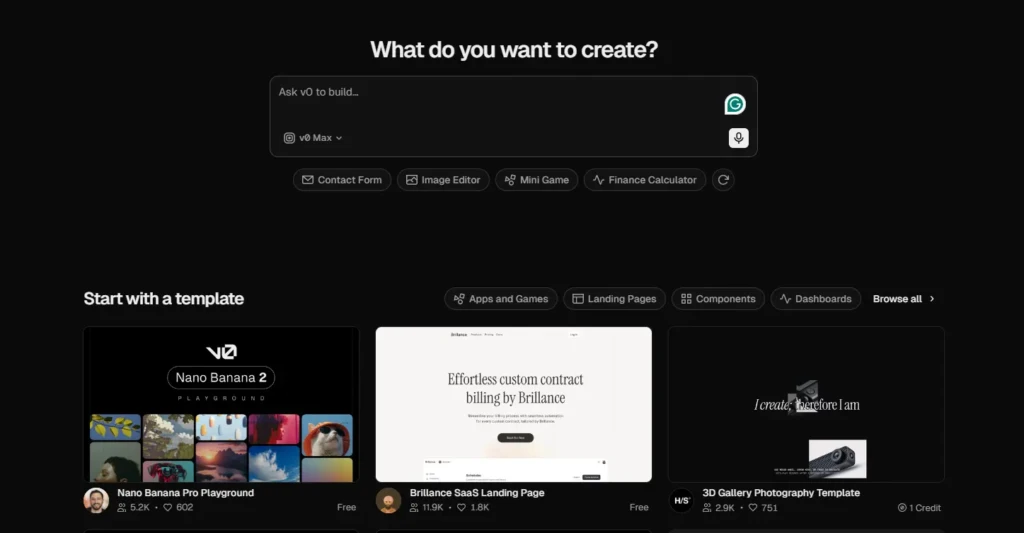
The workflow is genuinely straightforward, and its ability to remain simple even when generating complex outputs is one of v0’s most practically useful qualities.
Step 1: Go to v0.app and sign in with a GitHub or email account. The free tier is available immediately with no credit card required.
Step 2: Describe what you want to build in plain English. The more specific you are (purpose, audience, visual style, and specific components needed), the closer the first generation will land. A prompt like “build a SaaS landing page with a hero section, feature grid, pricing table with three tiers, and a footer using a dark color scheme” produces a far more useful starting point than “make a landing page.”
Step 3: v0 generates a complete, rendered UI with live preview. You see the visual output immediately alongside the code, so you’re evaluating what it looks like before you read a single line.
Step 4: Iterate through the conversation. One change per prompt yields better results than stacking multiple changes. “Make the header sticky,” “add a dark mode toggle,” “replace the pricing section with a comparison table.” Each prompt refines the output incrementally and keeps a version history, so you can roll back at any point.
Step 5: Fork, copy, or continue. You can take the generated code directly into your own project, continue iterating inside v0’s editor, connect it to your GitHub repository for branch creation and pull requests directly from the chat, or hand it off to a developer to extend in a traditional code editor.
Step 6: Deploy to Vercel in one click. v0 pushes the project live on Vercel’s global CDN with automatic SSL, serverless function configuration, and custom domain support; no DevOps setup, no CI/CD configuration.
What v0 Generates By Default
- React components with TypeScript
- Tailwind CSS for styling
- shadcn/ui component library
- Responsive layouts out of the box
- API routes via Next.js App Router
- Database integration (Neon, Supabase, AWS, Snowflake)
- Authentication patterns (NextAuth, Clerk)
v0 Key Features
Chat-Based UI Generation
You describe what you want in plain text and receive a fully rendered, interactive component or page; no file management, no terminal commands, no build configuration required for the generation loop itself. The conversational interface means the iteration cycle feels less like coding and more like directing a designer who speaks React fluently. Critically, v0’s AI models are fine-tuned specifically for frontend code generation, not general-purpose language models asked to produce UI, which is why the output quality consistently exceeds what you’d get from asking Claude or GPT-4 to generate the same component directly.
Live Preview
Generated code renders in real time as a visual preview alongside the code editor. You see the result before you read the syntax, which is genuinely transformative for non-developers who need to evaluate whether a generated UI matches their vision.
Designers, in particular, report that this feature alone changes the design-to-development workflow: instead of creating a Figma mockup, writing a spec document, handing it to a developer, waiting for implementation, and then reviewing it, you can iterate directly on the rendered output within minutes.
Image and Screenshot to Code
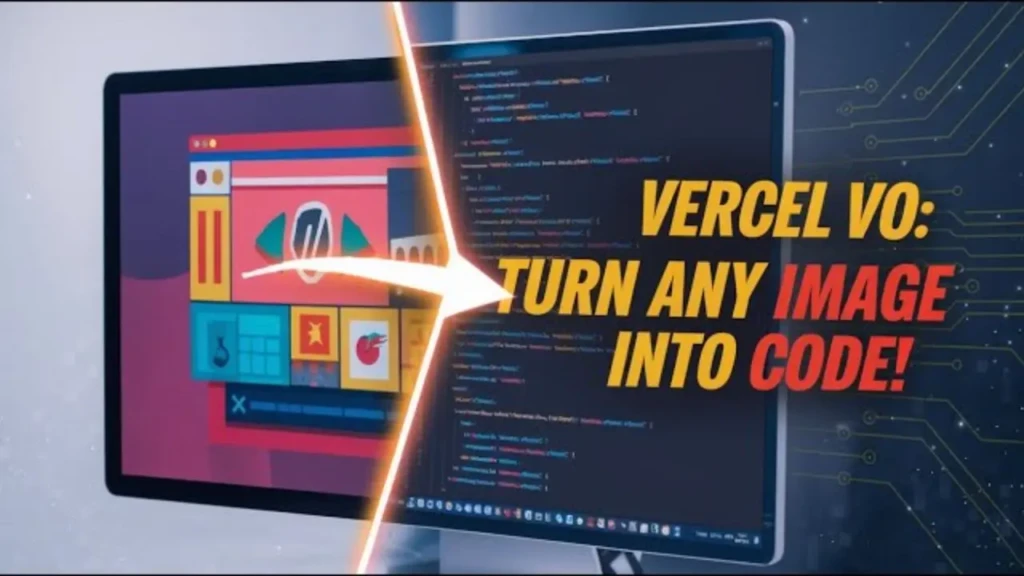
Upload a screenshot, Figma export, or any image of a UI you want to replicate, and ask v0 to generate code that matches the design. This visual-to-code workflow is one of v0’s most practically powerful capabilities (available on the Premium plan), and it closes the design-to-code gap more directly than any other tool in the category. Teams that use Figma for design and React for development now have a direct bridge between the two without manual translation.
Component Library Integration
v0 uses shadcn/ui by default, a widely adopted, professionally designed component library that ensures generated UIs look production-quality out of the box rather than like AI-generated prototypes with placeholder styling. Because shadcn/ui is the same component library used by thousands of production React applications, the generated components integrate naturally into real codebases without requiring a design overhaul.
Full-Stack Generation
Beyond components, v0 generates complete Next.js applications with API routes, database schemas, server actions, and authentication flows. The February 2026 update added a sandbox-based runtime that imports GitHub repositories, pulls Vercel environment variables, and builds complete applications inside a sandboxed environment. Consequently, v0 has evolved from a component generator into something closer to a complete browser-based development environment, though it remains tightly coupled to the React/Next.js/Vercel ecosystem.
Codebase Integration
Connect v0 to an existing GitHub repository and generate code that fits your existing architecture, naming conventions, and component patterns. v0 reads your codebase context (file structure, existing components, import patterns) and produces output that slots into your project rather than generating from a blank slate. The February 2026 Git panel addition allows branch creation and pull requests directly from the v0 chat interface, integrating the generation loop into professional Git-based workflows.
One-Click Vercel Deployment
Push any generated project live in one click. Vercel automatically handles SSL certificate provisioning, CDN distribution across its global edge network, serverless function configuration, and custom domain setup. Because Vercel built v0 and also operates the infrastructure, this integration is seamless in a way that competitors deploying to third-party hosting providers cannot match.
The deployment advantage is also the ecosystem lock-in. More on that, honestly, in the limitations section.
Versioning and History
Every iteration in a v0 session is saved and accessible. You can roll back to any previous version of your component or application with a single click, which makes the iterative prompting workflow significantly less risky than it might sound. If a prompt steers generation in an undesirable direction, you’re never more than one click away from the previous state.
v0 Pricing
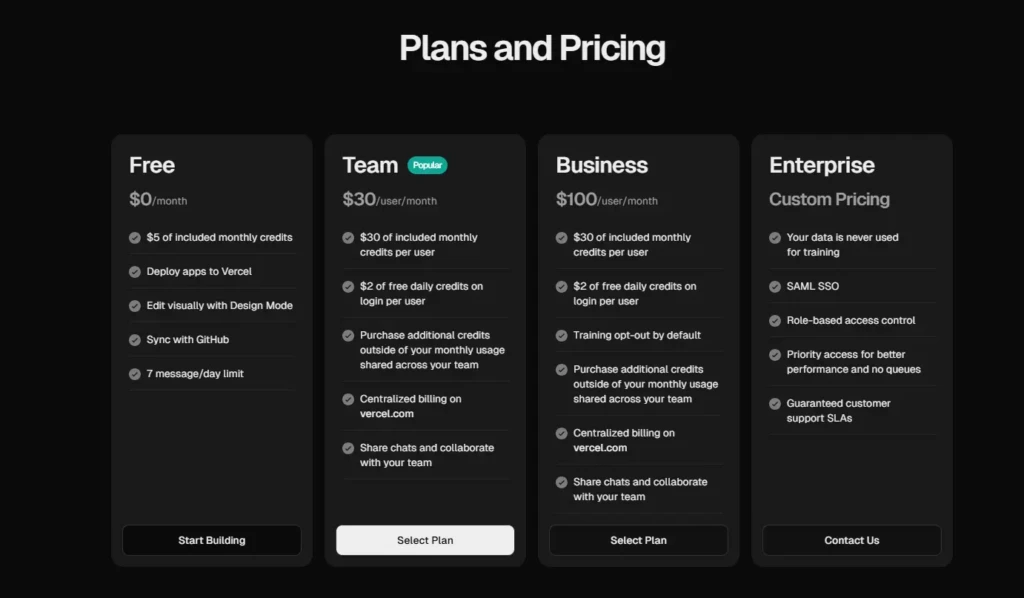
v0 uses a token-based pricing model as of early 2026. Each generation consumes a variable number of tokens depending on complexity. A simple button component costs far fewer tokens than generating a full-stack application. This replaced the previous fixed-credit system in May 2025, a change that generated significant backlash from the developer community at the time due to unpredictable cost scaling for complex prompts.
Plan | Monthly Cost | Credits Included | Key Features |
Free | $0 | $5 in credits | v0-1.5-md model, GitHub sync, Vercel deployment, public generations |
Premium | $20/month | $20 in credits | Figma import, image-to-code, API access, private generations |
Team | $30/user/month | Shared credit pool | Team workspace, shared credits, collaboration |
Business | $100/user/month | Higher limits | Advanced features, priority support |
Enterprise | Custom | Custom | Custom infrastructure, SLA, dedicated support |
The honest value assessment: for solo developers or non-technical founders building landing pages and UI prototypes, the free tier provides enough credits to genuinely evaluate whether v0 suits your workflow. For consistent daily use, generating multiple components per session, or building full application scaffolding, the Premium tier at $20/month makes financial sense compared to the alternative cost of developer time.
The Team tier’s per-user pricing adds up quickly for larger organizations; evaluate whether your team’s usage volume justifies the cost compared to alternatives. Always verify current pricing at v0.app/pricing, as the token model means effective cost varies with complexity.
v0 vs Competitors: How Does It Compare?
Tool | Primary Use | Frameworks | Deployment | Live Preview | Image-to-Code | Best For |
v0 | UI generation + React apps | React / Next.js only | Vercel (one-click) | ✅ Yes | ✅ Premium | React/Next.js dev, UI prototyping |
Bolt.new | Full-stack app building | Multi-framework | Multiple providers | ✅ Yes | ⚠️ Limited | Multi-framework prototyping |
Cursor | AI code editor | Any language | Any | ❌ No | ⚠️ Limited | Developer workflow enhancement |
Replit | Browser IDE + AI | Multi-language | Replit hosting | ✅ Yes | ❌ No | Learning, multi-language projects |
Full-stack app builder | React (Supabase) | Multiple | ✅ Yes | ⚠️ Limited | Full-stack MVPs, non-technical founders | |
GitHub Copilot | Inline code suggestions | Any language | Any | ❌ No | ❌ No | Developer workflow augmentation |
v0 vs Bolt.new
Bolt.new generates full-stack apps across a wider range of frameworks, not just React/Next.js, and runs the application in the browser with a built-in code editor. v0 produces higher-quality, more production-ready UI output by default, but is more tightly coupled to the Vercel ecosystem.
Bolt, on the other hand, is the stronger choice for quickly prototyping multi-framework apps or for a browser-based development environment; v0 is the stronger choice for React/Next.js production quality and Vercel deployment. One reported limitation of Bolt worth noting: heavy token usage on complex projects has led to significant cost surprises for some users.
v0 vs Cursor
These tools solve fundamentally different problems, and the comparison misrepresents what each does best. Cursor is an AI-powered code editor built on VS Code; it enhances an existing developer workflow inside a local development environment rather than generating complete components from scratch through a browser interface. Additionally, Cursor works with any language and any framework.
Many professional developers use v0 for initial UI generation, then Cursor for refinement, logic implementation, and integration into the broader codebase. They’re complementary tools, not competing ones.
v0 vs Replit
Replit is a browser-based IDE that supports dozens of programming languages and frameworks, making it far more versatile for backend-heavy, multi-language, or learning-oriented projects. v0 produces higher-quality React/UI output but is explicitly React-only. Replit’s Agent handles more general app building across a broader tech stack; v0 handles React UI generation at a quality level Replit doesn’t match. Therefore, choose Replit for language flexibility and learning; choose v0 for production UI in React/Next.js.
v0 vs GitHub Copilot
GitHub Copilot is an inline code-suggestion tool that works within your existing editor and workflow; it augments a developer already writing code, suggesting completions and generating small blocks based on context. v0 generates entire components and applications from plain-text prompts with no existing code required. They serve different stages of the development process and different types of users; a developer using Copilot in VS Code and a non-technical founder using v0 are solving different problems with different tools.
For more context on the tools reshaping the AI coding landscape, including OpenClaw and other emerging development platforms, our OpenClaw guide and AI Unboxed category provide in-depth coverage of the broader ecosystem.
What v0 Is Genuinely Good At
v0 delivers clear, measurable value in specific scenarios, and being specific about them matters more than a generic “it’s great” assessment.
Generating Professional Landing Pages and Marketing Sites

This is where v0’s output quality most consistently impresses. Prompting a detailed landing page with hero, features, pricing, and footer sections yields a result a competent front-end developer would be proud of: a landing page in under a minute, from a text description. For early-stage founders who need a credible web presence before hiring, this is the most immediately valuable use case v0 provides.
Screenshot and Figma-to-Code
Screenshot and Figma-to-code are the workflows that most people who try them find surprising. Upload a design, describe what you want matched, and receive React code that implements the layout, closing the design-to-development gap that has created friction between design and engineering teams for years. This alone justifies the Premium plan for design-heavy teams.
Rapid Saas Dashboard and Internal Tool Prototyping
Rapid prototyping of SaaS dashboards and internal tools is another area where v0 consistently delivers. Sidebar layouts, stat card grids, data tables, and form-heavy admin interfaces — these are exactly the patterns that take disproportionate time to scaffold manually, yet v0 generates with production-quality output in seconds.
For the full picture of what vibe coding and prompt-based app building look like in practice across different tools, our vibe coding guide details the workflow and philosophy.
Where v0 Has Limitations
Being honest about these limitations makes the rest of the guide trustworthy, and they’re real enough to help determine whether v0 is the right tool for your specific situation.
React and Next.js Only
This is the most important limitation and the one that disqualifies v0 for the largest number of potential users. If your project uses Vue, Angular, Svelte, Django, Laravel, Ruby on Rails, or any non-React frontend stack, v0 is the wrong tool for you. Full stop. There’s no option to generate output in another framework, and that’s a deliberate architectural choice rather than a gap that will be filled in the next update.
Complex Business Logic Has a Ceiling
v0 generates excellent UI and basic API routes, but deeply custom backend logic, multi-service architectures, complex authentication flows, and sophisticated database schemas require engineering that cannot reliably deliver iteration. Product Hunt reviewers consistently report that “state management, data wiring, and design fidelity” are the areas where v0 struggles most, meaning the UI skeleton arrives quickly, but the wiring that makes it functional requires developer attention.
Token-Based Pricing Is Unpredictable
The May 2025 shift from fixed credits to token-based billing made costs harder to forecast. Simple component generations consume minimal tokens, while full-stack application generations can consume a month’s worth of free-tier credits in just a handful of prompts. Heavy users on the free tier will hit limits quickly; the Premium tier’s $20 in credits is more sustainable for regular use, but it still requires monitoring for complex sessions.
Vercel Ecosystem Lock-In Is Real
The one-click deployment advantage works only within Vercel’s infrastructure. Teams using AWS, Google Cloud, or self-hosted infrastructure don’t get that seamless deployment experience, and the tighter the integration with Vercel-specific features (environment variables, serverless functions, edge config), the harder it becomes to migrate the generated codebase to another provider.
Who Is v0 Best For?
Frontend Developers

Frontend developers working in the React/Next.js ecosystem get the clearest ROI from v0. Generating UI scaffolding for a new feature in minutes rather than hours (and then refining the logic manually) dramatically accelerates frontend development velocity without removing developer control over the final output.
Non-Technical Founders
Non-technical founders who want to validate ideas, build MVPs, and ship landing pages without hiring a developer for every change will find v0 to be the most accessible path from concept to a deployed product in the React ecosystem. The live preview makes output evaluation possible without reading code, and Vercel deployment removes the DevOps barrier entirely.
Designers
Designers who want to convert mockups directly into working React code will find v0’s image-to-code capability transformative for closing the handoff gap between design tools and production implementation.
Vibe Coders
Vibe coders (people building complete applications through conversational prompts rather than traditional coding) will find v0 one of the strongest tools in the stack for front-end generation, used alongside tools like Cursor for logic and integration.
Who Should Look Elsewhere?
Developers working outside the React/Next.js ecosystem; teams whose infrastructure is not on Vercel and who want full deployment integration; beginners who need a more guided, multi-language learning environment where Replit serves the need better; and backend-heavy projects where full-stack builders like Lovable are more appropriate.
How to Get Started With v0
Getting useful output from v0 in your first session largely depends on prompt quality; the more specific your description, the closer the first generation will be to what you actually need.
Go to v0.app, sign in with GitHub or email, and start on the free tier to evaluate whether the tool fits your workflow. When writing your first prompt, include the purpose of the component (“a SaaS pricing page”), the visual style (“minimal, dark background, white text”), the specific sections needed (“three pricing tiers with feature lists and a CTA button”), and any framework or library preferences if you have them.
Iterate one change at a time rather than stacking multiple changes in a single prompt. v0 handles focused refinements more reliably than compound instructions.
Connect your GitHub repository once you’re building something real, use the Git panel to create branches directly from the chat, and deploy to Vercel when you’re ready to share or test. The entire loop, from the first prompt to a live-deployed URL, takes under 10 minutes for a standard landing page and is currently the fastest path from text to a production-deployed React application.
FAQs
Yes. v0 offers a free tier with $5 in monthly credits, access to the v0-1.5-md AI model, GitHub sync, and Vercel deployment. It’s enough to explore the platform and build simple prototypes. The Premium plan at $20/month adds $20 in credits, Figma import, image-to-code, API access, and private generations.
For simple use cases, such as landing pages, marketing sites, and basic UI prototypes, yes. For anything requiring logic wiring, data integration, or debugging unexpected output, some familiarity with React is highly beneficial. v0 is most powerful in the hands of someone who can review and refine generated code, not exclusively for users who can’t read it at all.
React and Next.js only. v0 does not generate code in Vue, Angular, Svelte, or any other frontend framework. If your stack isn’t React-based, v0 is the wrong tool for your project.
Yes, the generated code is yours. You can copy it directly into any React/Next.js project, fork it inside v0, connect it to your GitHub repository, or hand it to a developer to continue in any code editor. There are no licensing restrictions on generated output.
For React/Next.js UI quality and Vercel deployment, v0 is stronger. For multi-framework full-stack applications and browser-based development without a Vercel dependency, Bolt.new is more versatile. The right choice depends on your tech stack and deployment infrastructure.
You need a Vercel account to deploy from v0, but you can generate and iterate on components without deploying. Sign in with GitHub, GitLab, or email to access the generation features; Vercel deployment is optional but deeply integrated as a final step.
Conclusion
v0 is the best AI tool available for generating production-quality React and Next.js UI, and that specificity is the honest summary. It doesn’t try to be the best general-purpose app builder, the most versatile multi-language IDE, or the most powerful backend generator. It aims to be the fastest path from a plain-English description to a production-ready React component or application skeleton deployed on Vercel, and in March 2026, nothing else in the market does that job as well. The February 2026 update, with Git integration, a VS Code-style editor, database connectivity, and a sandbox runtime, moved v0 from a prototyping toy to a legitimate part of professional React development workflows.
The limitations are equally specific and equally worth naming clearly. React and Next.js only, Vercel ecosystem dependency, token-based pricing that rewards careful management, and a complex logic ceiling that requires human engineering beyond what prompt iteration reliably delivers. None of those are reasons to dismiss v0; they’re reasons to use it for what it genuinely excels at rather than expecting it to be something it was never designed to be. If you work in React and deploy on Vercel, v0 should be part of your workflow. If you don’t, a tool with broader framework support serves you better.
For more tech guides and honest reviews, visit YourTechCompass.