Vibe coding is a way of building software where you describe what you want and let an AI agent write the code, no syntax, no programming language, no development environment required. The term was coined by Andrej Karpathy, co-founder of OpenAI and former Senior Director of AI at Tesla, in a now-famous post on X on February 2, 2025. He described it as “fully giving in to the vibes, embracing exponentials, and forgetting that the code even exists.” That post went viral across the developer community, and gave a name to something millions of people were already beginning to feel: that building software was becoming less about knowing how to code and more about knowing what you want to build. By November 2025, Collins Dictionary had named “vibe coding” its Word of the Year.
What makes vibe coding genuinely significant and worth understanding clearly, whether you’re a developer or not, is what it changes about who can build software. Before vibe coding tools reached their current capability, building even a simple web app required understanding HTML, CSS, JavaScript, databases, and deployment pipelines. Today, a non-technical founder can describe an idea in a few sentences, watch an AI agent scaffold files, write logic, connect a database, and deploy a working app, all without touching a line of code. That shift is real, it’s accelerating, and it has meaningful implications for how you think about building products, internal tools, and side projects regardless of your technical background.
What Is Vibe Coding?
At its core, vibe coding is a software development approach in which you use natural-language prompts to instruct AI models to generate code, and then evaluate the output based on whether it works, rather than by reading every line of the implementation.
Karpathy described his own workflow vividly: talking to Cursor’s Composer mode via voice through SuperWhisper, asking for things like “decrease the padding on the sidebar by half” because he couldn’t be bothered to find the CSS himself, clicking “Accept All” on every AI-generated change without reviewing the diffs, and copy-pasting error messages directly into the chat with no explanation, just letting the AI figure out what was wrong. He acknowledged openly that “the code grows beyond my usual comprehension” and that it was suited for “throwaway weekend projects” rather than production systems.
The important distinction between vibe coding and simply using AI tools to code faster is the acceptance without review. Programmer Simon Willison captured this clearly: “If an LLM wrote every line of your code, but you’ve reviewed, tested, and understood it all, that’s not vibe coding in my book, that’s using an LLM as a typing assistant.”
Vibe coding specifically means letting the AI drive the implementation while you focus entirely on the outcome. That distinction matters because it defines both the approach’s power and its risk.
However, by early 2026, the numbers around vibe coding adoption are striking. For instance, 63% of active vibe coding users aren’t developers at all; they’re founders, product managers, and marketers building real products.
How Vibe Coding Works: The Basic Workflow
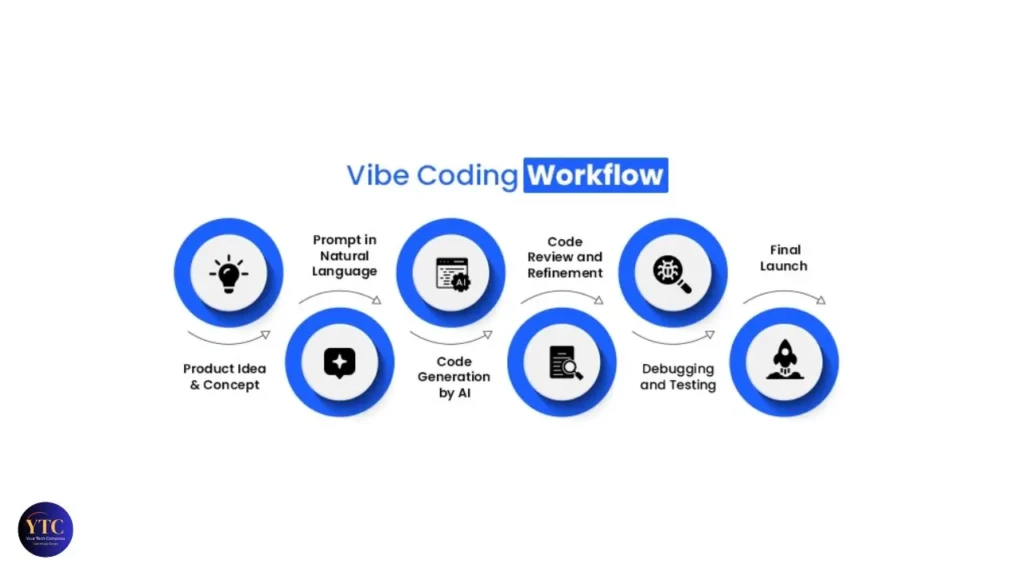
The vibe coding workflow has a consistent structure that you can follow regardless of which tool you use. You start by describing what you want to build as specifically as possible, not “build me an app,” but “build me a task management app where users can create projects, add tasks with due dates, mark tasks as complete, and filter by project.” The AI agent reads the description, plans the implementation, scaffolds the file structure, writes the code, installs dependencies, and typically delivers a working first version within minutes.
Once the initial build is ready, you run it, review the results, and identify what needs to change. This is where your role becomes most critical, not reading code, but applying product judgment: does this do what I wanted, does the layout feel right, is anything broken or missing?
You then describe the next change in plain English, for instance, “the button should be on the right side of the form,” “add a confirmation message when a task is deleted,” “the app breaks when I try to add a task without a due date,” and the AI revises. That iterative loop of describe, review, and refine continues until the app matches your vision.
The most important habit to build early is testing every single change before requesting the next one. The most common beginner mistake in vibe coding is stacking up multiple unverified changes in a single prompt, such as “change the color, add a login page, fix the error, and add email notifications,” and ending up with a version of the app that has four new problems instead of four improvements. Test incrementally, keep your prompts focused on one thing at a time, and describe errors to the AI exactly as they appear rather than trying to interpret them yourself.
The Tools That Make Vibe Coding Possible
Tool | Best For | Browser-Based | Free Tier | Deployment Built-In | Best Language |
Replit Agent | Beginners; zero setup | ✅ Yes | ✅ Yes (limited) | ✅ Yes | Python, JS, 50+ |
Cursor | AI-first IDE; power users | ❌ Local app | ✅ Yes | ❌ Separate | Any (50+) |
Bolt.new | Fast web prototyping | ✅ Yes | ✅ Yes (limited) | ⚠️ Limited | JavaScript/TypeScript |
Lovable | React MVPs; design quality | ✅ Yes | ✅ Yes (limited) | ✅ Yes | React/TypeScript |
v0 by Vercel | UI component generation | ✅ Yes | ✅ Yes | ⚠️ Via Vercel | React/Tailwind |
Windsurf | Cursor alternative; free | ❌ Local app | ✅ Generous | ❌ Separate | Any |
Claude Artifacts | Quick single-page tools | ✅ Yes | ✅ Yes | ❌ No | HTML/JS/React |
Replit Agent
Replit Agent is the right starting point for anyone new to vibe coding. You open a browser tab, describe what you want to build, and Agent 3 handles the code, dependencies, and deployment in a single interface, without installing anything. The tradeoff is credit-based pricing that can become unpredictable on complex builds, so start with something small.
Cursor

Cursor is where most developers who are already comfortable with coding land. It’s an AI-first VS Code fork with full codebase awareness, multi-agent mode, and the deepest AI coding capability available in a local IDE.
Our Cursor AI review covers it in full detail if you want to evaluate it seriously.
Bolt.new
Bolt.new is the fastest tool for JavaScript and TypeScript web app prototypes. In addition, it’s browser-based, requires no installation, and delivers high-quality output on standard React/Node stacks.
Lovable
Lovable has the strongest design output among vibe coding tools. If the visual quality of your app matters as much as its functionality, Lovable tends to produce cleaner, more polished UI than competitors at the same prompt quality.
V0 by Vercel
v0 by Vercel is more narrowly focused on UI component generation. This is because it’s less of a full app builder and more of a Tailwind/React component factory, making it most useful as part of a larger workflow rather than as a standalone build environment.
For a broader look at how AI coding assistants compare, including tools that sit between traditional coding and full-vibe coding, our GitHub Copilot guide and Blackbox AI review cover that middle ground well.
What Can You Actually Build With Vibe Coding?
Internal Tools and Dashboards
Internal tools and dashboards are the most consistently successful vibe coding category, including data tables, admin panels, reporting dashboards, and form processors that sit inside a company and don’t require high security standards or complex integrations. These are the apps where vibe coding delivers the most obvious ROI: tools that a small team would have paid a developer $2,000 to $5,000 to build can now be functional prototypes within an afternoon.
Landing Pages and Marketing Sites
Landing pages and marketing sites are well within current AI capabilities. Clean, functional, visually coherent pages that would take a designer and developer several days to produce can be generated from a detailed prompt in under an hour.
Web Apps and Saas MVPs
Web apps and SaaS MVPs at the early validation stage, user authentication, form submission, basic CRUD (create, read, update, delete) operations, and simple payment integration, are viable vibe coding territory for founders who want to test whether anyone wants what they’re building before investing in a proper codebase. The pattern for founders is usually: prototype fast with Lovable or Replit to validate the idea, then graduate to Cursor when the product needs to scale.
Bots and Automation Scripts
Discord bots, Slack integrations, email automation, and webhook processors are strong candidates for vibe coding because they’re typically self-contained, easy to test, and don’t require a polished UI.
Simple Browser-Based Games
Simple browser-based games have become a popular learning use case, particularly for people who want to understand what AI can build without the pressure of a real project. What vibe coding currently cannot reliably build: complex multi-system integrations at production scale, high-performance applications with real-world traffic requirements, security-critical systems handling sensitive user data, and large-scale codebases with multiple teams contributing over time.
Vibe Coding vs Traditional Coding
Dimension | Vibe Coding | Traditional Coding |
Speed to Prototype | ⭐⭐⭐⭐⭐ Hours to days | ⭐⭐ Days to weeks |
Code Control | ⭐⭐ AI decides implementation | ⭐⭐⭐⭐⭐ Full precision |
Debugging Ability | ⭐⭐ Limited without code knowledge | ⭐⭐⭐⭐⭐ Deep root-cause diagnosis |
Scalability | ⭐⭐ Accumulates technical debt | ⭐⭐⭐⭐⭐ Maintainable at scale |
Security | ⭐⭐ ~45% of AI code has flaws | ⭐⭐⭐⭐ Engineer-reviewed |
Skill Building | ⭐⭐ Product intuition | ⭐⭐⭐⭐⭐ Transferable technical skills |
Entry Barrier | ⭐⭐⭐⭐⭐ Anyone can start | ⭐⭐ Significant learning curve |
Long-Term Maintenance | ⭐⭐ Fragile at complexity | ⭐⭐⭐⭐⭐ Structured and predictable |
The comparison table makes the trade-off clear: vibe coding wins on accessibility and speed; traditional coding wins on everything that matters when software needs to grow, scale, or be maintained by a team. That’s not a dismissal of vibe coding; it’s a map of where each approach belongs.
One specific research finding worth knowing: a December 2025 analysis by CodeRabbit of 470 open-source GitHub pull requests found that AI co-authored code contained approximately 1.7 times more “major” issues than human-written code, with security vulnerabilities 2.74 times higher and misconfigurations 75% more common. That data point doesn’t mean you shouldn’t use vibe coding; it means you should use it with eyes open about what you’re trading away when you skip code review.
If you want to understand the foundational concepts that underpin what the AI is actually writing during a vibe coding session, our basic coding concepts guide gives you the vocabulary to evaluate AI output more intelligently without requiring you to become a full developer.
Is Vibe Coding Replacing Programmers?

The direct answer is NO, and the nuanced answer is more interesting.
Vibe coding is expanding who can build software, not replacing the people who build it well. What it does replace specifically is the need to hire a developer for simple internal tools, basic landing pages, and early-stage MVPs that don’t require complex system architecture. A non-technical founder can now build and deploy a working prototype without a technical co-founder, which is a genuine structural change in how early-stage products are built.
What vibe coding doesn’t replace is software architecture, security engineering, performance optimization, and the complex system design that underpins any software product serving real users at a meaningful scale. In July 2025, METR ran a randomized controlled trial involving experienced open-source developers and found that they were 19% slower when using AI coding tools, despite predicting they would be 24% faster and still believing afterward that they had been 20% faster.
That finding is a useful counterweight to the productivity claims. For experienced developers on complex tasks, AI tools don’t automatically make you faster; sometimes they make you slower.
The skill shift that’s genuinely happening is more subtle than “coding is dead.” Product thinking, prompt quality, and the ability to evaluate software output without reading code are becoming more valuable. Syntax knowledge is becoming less of a prerequisite for building things.
Karpathy himself acknowledged this evolution. By February 2026, he had introduced a new term, “agentic engineering,” to describe what professional AI-assisted development had evolved into: using agents with oversight and scrutiny, rather than fully giving in to the vibes. That’s a meaningful signal about where the practice is heading.
How to Get Started With Vibe Coding
If you’ve never built anything with code before, the right starting tool is Replit or Bolt.new, both browser-based, both requiring zero installation, and both capable of taking you from prompt to deployed app without any configuration. Open one, and your first project should be small and specific: not “build me a business app” but “build me a to-do list where I can add tasks, check them off, and delete them.” That scope is achievable in one session and gives you a complete loop of the vibe coding workflow without overwhelming complexity.
Write your prompts like you’re explaining the feature to a smart person who has never seen your idea before. The more specific you are, for instance, “the tasks should display newest first,” “show a red badge on the tab with the count of incomplete tasks,” the closer the output will be to what you actually want.
When something breaks, describe the error message exactly as it appears and ask the AI to fix it; don’t try to interpret the code yourself. In addition, test every change before requesting the next one. And when you find the AI breaking existing features while trying to add new ones, that’s your signal that the project has grown beyond what pure vibe coding can reliably handle. At that point, graduating to a tool like Cursor with proper codebase context management is the natural next step.
Vibe Coding Limitations and Honest Drawbacks
Security Vulnerabilities

Security vulnerabilities are the most serious documented concern, and it’s not theoretical. Approximately 45% of AI-generated code has security flaws.
For a personal tool or an internal dashboard with no sensitive user data, that risk is manageable. However, for any app that handles user authentication, payment information, personal data, or health records, vibe-coded security without expert review is a genuine liability risk that no productivity gain justifies.
Context Drift
Context drift is the practical limitation you’ll hit most often in longer sessions. After many exchanges, AI agents start to contradict earlier decisions, change variable names that other parts of the code depend on, remove functionality added earlier in the session, or generate code that works in isolation but conflicts with the existing structure. The mitigation is to keep sessions focused, break large builds into smaller, distinct sessions, and start fresh sessions when the agent seems to be losing track of the overall structure.
Technical Debt Accumulates Fast
Technical debt accumulates fast in vibe-coded projects; faster than most first-time builders expect. In September 2025, Fast Company reported that the “vibe coding hangover” is upon us, with senior software engineers citing “development hell” when working with AI-generated code.
Code produced quickly and working fine at the prototype stage often becomes expensive to modify as the project grows. This is because the AI didn’t structure it for maintainability, and because the builder doesn’t understand the implementation well enough to refactor it confidently. That ceiling is real, and planning for it from the beginning (by knowing when to bring in a developer or when to rebuild properly) is part of using vibe coding responsibly.
FAQs
No, that’s the core premise. You describe what you want in plain English, and the AI writes the code. Basic familiarity with how software works helps you write better prompts and evaluate output more accurately, but it’s not required to get started. The basic coding concepts guide is a useful primer if you want that foundational literacy without committing to a full programming course.
For complete beginners with no coding experience: Replit or Bolt.new. On the other hand, for developers who want AI-first coding inside a full IDE: Cursor. For founders building React/TypeScript MVPs with strong design output: Lovable. The right tool depends on what you’re building and how much technical context you already have.
For internal tools, prototypes, MVPs, and low-stakes applications: yes. For production software handling sensitive user data, high traffic, or complex business logic: only with proper code review and security assessment by experienced developers. The risk profile scales with the application’s stakes.
The key distinction is review and comprehension. AI-assisted coding means an experienced developer uses AI tools to write code faster while still reviewing, testing, and understanding every line. Vibe coding means accepting AI output without reviewing the implementation, “forgetting that the code even exists,” in Karpathy’s words. The first is a productivity technique; the second is a fundamentally different relationship with the code being produced.
Andrej Karpathy, co-founder of OpenAI and former Senior Director of AI at Tesla, coined the term in a post on X on February 2, 2025. Collins Dictionary named it Word of the Year for 2025.
Conclusion
Vibe coding is real, it works for the right use cases, and if you have an idea for an app, a tool, or a product, it’s worth trying right now. The barrier to getting a working prototype in front of real users has genuinely never been lower. Start with Replit or Bolt.new, pick one small, specific thing you want to build, and run it through the full cycle of describe, review, and refine. What you’ll discover in that first session is whether the vibe coding workflow matches how you think about building, and for most people with a clear product idea, it does.
The ceiling is equally real and equally worth respecting. Security vulnerabilities, context drift, technical debt, and the debugging gap are documented limitations that grow more consequential as your project grows more complex. Vibe coding is best understood as the fastest path from idea to a working prototype, not the final destination for software that must serve real users reliably over time. When your project outgrows what pure vibe coding can handle, graduating to more structured AI-assisted development with tools like Cursor is the natural next step, not a failure.
Found this helpful? Browse more in-depth tech guides, honest reviews, and step-by-step tutorials at YourTechCompass; your go-to resource for making smarter tech decisions.