In today’s content-driven world, transcription tools like Otter.ai and Notta have become essential for capturing speech, meetings, interviews, and ideas in searchable, usable text. Whether you’re a team capturing meeting notes, a creator transcribing podcasts, or a professional organizing interview transcripts, it’s worth understanding how these two platforms compare so you can choose the one that fits your workflow and budget.
I’ve looked at both tools from many angles: accuracy, language support, interface, integrations, and pricing, so this comparison gives you the practical side of Otter.ai vs Notta that actually matters in real use.
What Is Otter.ai?
Otter.ai is an AI-powered transcription platform that converts audio to text in real time and after recordings finish. It uses machine learning to identify different speakers, generate summaries, and provide collaborative notes that can be edited and shared.
Otter.ai integrates deeply with meeting platforms like Zoom, Microsoft Teams, and Google Meet to make live meeting recordings and notes more efficient. It also offers tools for editing, sharing, and organizing transcripts.
What Is Notta?
Notta is another AI transcription service focused on both real-time capture and post-event transcription. It stands out for its extensive multilingual support and translation features, making it a useful choice for international teams or multilingual workflows.
Notta offers capabilities for automatic transcription, meeting recording, and summary generation. It also integrates with many third-party tools and services and supports offline recordings on mobile devices.
Transcription Accuracy Comparison
Accuracy is one of the most important criteria for any transcription tool. Notta claims high transcription accuracy, up to around 98.86% in tests, especially in challenging audio conditions or with diverse accents. It also supports a wide range of languages and offers real-time translation. In contrast, Otter.ai’s exact accuracy is not formally published, but independent reviews suggest strong performance, particularly for English, with slightly lower precision when applied to accented speech or technical jargon.
Features and Functionality Comparison
Live Transcription and Recording
Both tools support real-time transcription and can capture audio during meetings or offline recordings. However, there are some subtle differences:
- Notta supports offline recording that syncs once an internet connection is available, and includes features like built-in screen recording.
- Otter.ai requires an internet connection for live features and does not currently support offline recording.
Editing, Summaries, and Search
Both services include tools for editing transcripts and automatically generating summaries or highlights. Otter.ai also includes advanced collaborative note tools and speaker identification, while Notta emphasizes multi-language support and translation.
Language Support and Translation
This is a clear differentiator:
- Notta supports transcription in 58 languages and translation for many of them, making it more flexible for international use.
- Otter.ai now supports English, Spanish, and French, but translation services are not built in.
Ease of Use and Interface
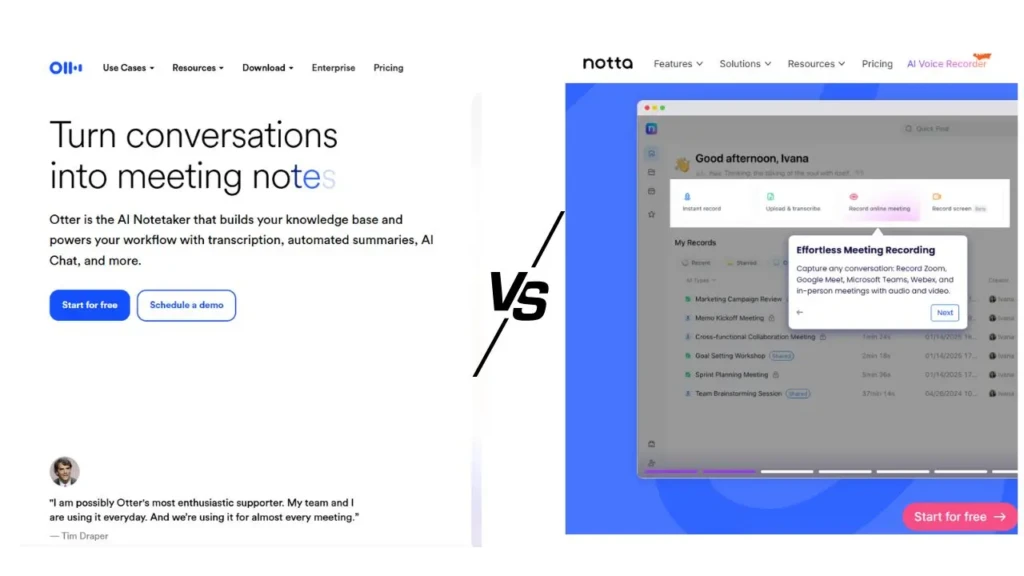
User experience matters just as much as raw features:
- Notta has a clean, straightforward interface that’s quick to learn, even for first-time users.
- Otter.ai is slightly more collaborative with folders, channels, and commenting tools, which makes it strong for team workflows, even if some users describe the interface as a touch cluttered.
Integrations and Workflow Support
Both transcription tools integrate with major virtual meeting platforms:
Platform | Otter.ai | Notta |
Zoom | ✓ | ✓ |
Microsoft Teams | ✓ | ✓ |
Google Meet | ✓ | ✓ |
Webex | Limited | ✓ |
Calendar Sync | ✓ | ✓ |
Slack | ✓ | ✓ |
Saleforce | Limited | ✓ |
These integrations make it easy to automate recording and summarizing meetings, which is especially helpful for teams. For even broader workflow support, cross-reference complementary productivity tools such as Unclutter App for organizing notes, or check out comparisons like Trello vs ClickUp to plan how transcripts fit into your project workflows.
Linking transcription tools to your productivity stack can be a real time-saver, especially if your team works remotely, as described in our best productivity apps for remote workers guide.
Pricing and Plans Comparison
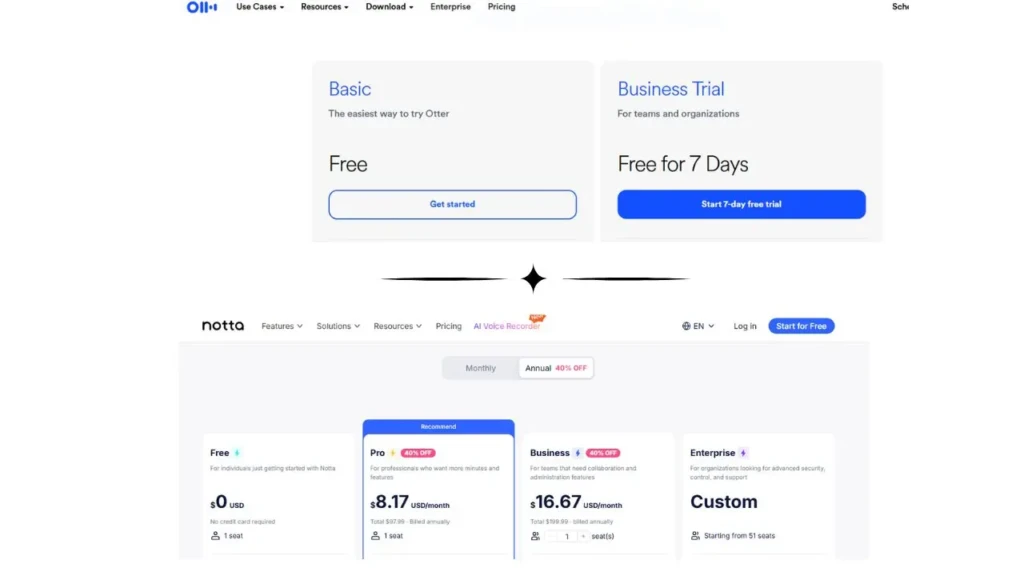
Price and plan flexibility often determine which tool fits your budget and usage pattern:
- Notta offers a freemium model with limited transcription time, with paid tiers that expand usage and features. Plans include offline features and AI support suitable for individuals, teams, or enterprises, and monthly pricing is generally competitive.
- Otter.ai also offers a free tier with a monthly limit, as well as paid tiers that increase transcription minutes, meeting features, and team collaboration options. Its pricing is slightly higher at comparable feature levels, but it also includes strong collaboration tools and meeting workflows.
Otter.ai vs Notta: Side-by-Side Comparison Table
Feature | Notta | Otter.ai |
Transcription Accuracy | Very high (~98.86%) | High (85–95%) |
Language Support | 58+ languages | English, Spanish, French |
Live Transcription | Yes | Yes |
Offline Recording | Yes | No |
Collaboration Tools | Moderate | Strong |
Screen Recording | Yes | No |
Free Plan Quota | Limited | 300 min/month |
Integrations | Broad (incl. Webex, Salesforce) | Strong (incl. Zoom, Teams, Slack) |
Who Should Use Otter.ai
Otter.ai is a great fit if you:
- Participate in frequent team meetings
- Want collaboration tools like shared folders and comment threads
- Prefer intuitive editing and meeting summaries
- Want easy integration with common calendars and conferencing platforms
Who Should Use Notta

Notta stands out if you:
- Work with multilingual teams or content
- Need offline recording support
- Want an accurate transcription for diverse audio sources
- Need built-in translation features
Pros and Cons Summary
Otter.ai Pros
- Strong collaboration and team features
- Easy integration with calendars and meeting platforms
- Useful AI summaries and meeting support
Otter.ai Cons
- Limited language support
- No offline recording
Notta Pros
- Excellent multilingual support and translation
- Offline recording and screen capture
- High accuracy even in noisy or accented audio
Notta Cons
- The free plan is limited
- Collaboration features are not as robust as Otter’s
Final Thoughts
Deciding between Otter.ai vs Notta ultimately comes down to your priorities. If your work revolves around meetings, collaboration, and shared context, Otter.ai’s robust teamwork features may be best suited to your needs. If you need high transcription accuracy across languages, offline use, and deep integration with global workflows, Notta offers a compelling alternative.
From my perspective, there’s no single “winner” for everyone; each pushes toward a slightly different set of problems. The best choice aligns with how you work and what aspects of transcription you rely on most. I encourage you to test both tools with your own audio and meetings to see which feels most natural for your team and workflow.
FAQs
Notta tends to offer higher overall transcription accuracy, especially in diverse audio conditions.
Yes. Otter.ai excels with live meeting features, collaboration tools, and deep integration with conferencing platforms.
Yes. Notta supports significantly more transcription languages and provides real-time translation.
Both platforms use encryption and standard security measures, but you should always review provider documentation for compliance and privacy specifics.
At Your Tech Compass, we publish practical guides and honest tech reviews to help users make smarter decisions.