I want to start with the moment that makes this comparison genuinely important. You’re in a 90-minute client call with six participants. Three people talk over each other at the 45-minute mark. One speaker has a strong accent. The conversation switches between technical product terminology and casual discussion. When the call ends, you open your AI transcription tool to write the follow-up email and discover that three action items were either misattributed or garbled beyond recognition. That’s not a hypothetical. It’s the real-world failure mode that separates a transcription tool that works in a demo from one that works in your actual meetings. Otter.ai and Notta are the two most commonly compared tools in this category, and the differences between them are more specific and consequential than most comparison articles acknowledge.
This review covers what actually matters for your decision: transcription accuracy under real conditions (not just clean audio demos), speaker identification in multi-participant meetings, pricing with real numbers, language support for global teams, and the privacy considerations that every Otter.ai evaluation in 2026 must address. I’ve researched both tools thoroughly, cross-referenced independent accuracy tests, verified current pricing from official sources, and built this comparison for the specific people choosing between these two tools: meeting-heavy professionals, content creators transcribing recorded audio, and distributed teams whose meetings don’t always happen in English.
A note before we begin: every YTC score is earned, never negotiated. If you want to understand exactly how we evaluate apps & tools and how we handle affiliate relationships, our Review Methodology lays it all out.
What Is Otter.ai?
Otter.ai is one of the longest-established AI transcription platforms, having launched its core product in 2016. It’s best known for OtterPilot, an AI bot that automatically joins your scheduled meetings, transcribes audio in real time, and generates summaries and action items after the call ends. Otter integrates deeply with Zoom, Microsoft Teams, and Google Meet, making it a familiar tool for professionals who live in video conferencing.
Beyond meeting transcription, Otter allows you to upload audio and video files for post-processing, supports collaborative transcript editing where team members can highlight and comment, and provides full-text search across all past transcripts. Otter.ai’s particular strength is its collaborative note environment: channels, shared folders, and commenting tools that make it more useful for team workflows than for individual transcription.
What Is Notta?
Notta is an AI transcription platform that has built its competitive position primarily on two capabilities: multilingual accuracy and post-meeting content transformation. It supports transcription in 58 languages, real-time translation in 42 languages, and bilingual transcription that handles meetings where two languages are spoken simultaneously, a feature that addresses a problem no other mainstream transcription tool solves with comparable reliability.
The most significant Notta development for 2026 is Notta Brain, its AI Meeting Execution Engine. Rather than simply producing a transcript and a summary, Notta Brain transforms meeting content into polished outputs: reports, presentation decks, infographics, email drafts, action item tables, and searchable knowledge records. This positions Notta not just as a transcription tool but as a meeting productivity platform, closer in ambition to Genspark or Fireflies.ai than to the original Otter.ai meeting notes model.
Transcription Accuracy: The Number That Actually Matters
Accuracy is the bedrock of any transcription tool, and it’s where the most significant gap between Otter.ai and Notta exists in 2026.
Notta claims up to 98.86% transcription accuracy in optimal conditions. Independent tests consistently report real-world accuracy of 95–98% on clean audio, with meaningful performance maintained under challenging conditions, including diverse accents, background noise, and overlapping speakers. Notta processes one hour of audio in approximately five minutes, faster than Otter’s seven-minute processing time for the same amount of content.
Otter.ai’s accuracy is not formally published on its official site. Independent reviews and user tests consistently report 85–90% accuracy in real-world conditions, with stronger performance in clear English-only conversations.
The accuracy gap narrows significantly in single-speaker scenarios with clean audio; both tools produce highly usable transcripts in those conditions. The meaningful difference appears in multi-speaker meetings, technical jargon-heavy discussions, and non-native English speaker scenarios; precisely the conditions that characterize most professional meetings.
Speaker Identification: The Accuracy Dimension Most Reviews Miss
For meeting notes, speaker diarization (correctly attributing each statement to the speaker) is arguably more important than raw word accuracy. A transcript that gets the words right but assigns them to the wrong person creates actively misleading records.
Notta’s speaker identification uses voiceprint analysis, calendar integration (preloading participant names from connected calendars), and user enrollment via short voice samples. In independent multi-speaker testing, Notta correctly identified speakers 96% of the time in two-speaker scenarios and 89% in eight-speaker scenarios.
Otter.ai uses voice fingerprinting, OtterPilot’s Zoom participant list integration, and stored voice profiles that improve with repeated interactions. In equivalent testing, Otter correctly identified speakers 94% of the time in two-speaker scenarios and 82% in eight-speaker scenarios.
The 70% point gap in 8-speaker identification is meaningful in practice: in a 60-minute meeting with eight speakers, an 82% identification rate means roughly one in five statements is attributed to the wrong person. At 89%, the error rate drops to roughly 1 in 9, making it more reliable for reference and action item attribution.
The Otter.ai Privacy Concern You Need to Know About
No Otter.ai evaluation in 2026 is complete without addressing this. A class-action lawsuit was filed in August 2025, alleging that Otter.ai’s services recorded, accessed, and utilized the contents of private conversations without obtaining adequate consent from all participants. This raised significant concerns about user privacy and data security within the AI transcription industry.
I’m not presenting this as a conclusion about Otter.ai’s practices; it is a legal allegation, not a verified finding. What I am telling you is that if you’re evaluating Otter.ai for sensitive business discussions, legal conversations, medical contexts, or any situation where participant consent and data handling are compliance requirements, you need to review Otter.ai’s current privacy documentation and make that judgment for your specific context. Don’t rely on a comparison article, including this one, to make that call.
Features Comparison: What Each Tool Actually Offers
Live Transcription and Meeting Bot
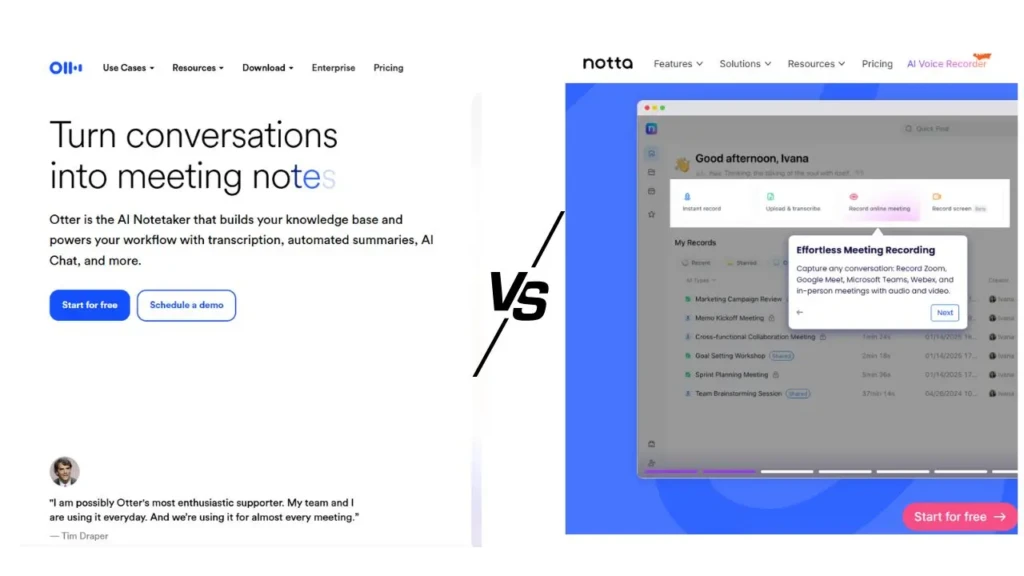
Both tools offer AI bots that join your meetings automatically and transcribe in real time. The key functional differences:
- Otter.ai’s OtterPilot supports Zoom, Microsoft Teams, and Google Meet. It provides live captions visible to participants during the call, useful for accessibility and for people who want to follow along in real time without a separate display.
- Notta’s meeting bot supports Zoom, Google Meet, Microsoft Teams, and Webex. It handles offline recording that syncs once an internet connection is available, includes built-in screen recording (Otter does not), and provides bilingual real-time transcription.
Post-Meeting Outputs
This is where the tools diverge most dramatically in 2026. Otter.ai produces a meeting transcript, an AI summary, an action item list, a searchable record, and a shared collaborative document. Notta produces all of the above, plus Notta Brain’s transformation layer, which includes reports, presentation decks, infographics, email drafts, and formatted tables.
If the transcript is where your process ends, both tools serve you. And if the transcript is where your deliverable process begins, Notta’s output layer compresses a significant amount of post-meeting work.
Language Support
This is the clearest single differentiator between the two tools:
- Notta: 58 languages for transcription, 42 languages for real-time translation, bilingual simultaneous transcription supporting 11 language pairs, including Japanese-English, Chinese-English, and French-English.
- Otter.ai: English primarily, with limited Spanish and French support. No built-in translation.
If your team operates in a single language and that language is English, this difference is irrelevant to your decision. If any part of your meeting workflow involves non-English conversations, Notta is the only viable choice of the two.
Collaboration Tools
Otter.ai leads in collaborative editing features: shared folders, comment threads on specific transcript sections, team channels, and real-time highlighting. G2 reviewers consistently rate Otter.ai’s ease of use and collaborative team environment as its standout strengths, particularly for teams with recurring meeting groups where voice profiles and shared workspace context build over time.
Notta’s collaboration features are more moderate, adequate for team use, but less developed than Otter’s specific focus on shared meeting intelligence.
Pricing: The Real Numbers
Otter.ai Pricing
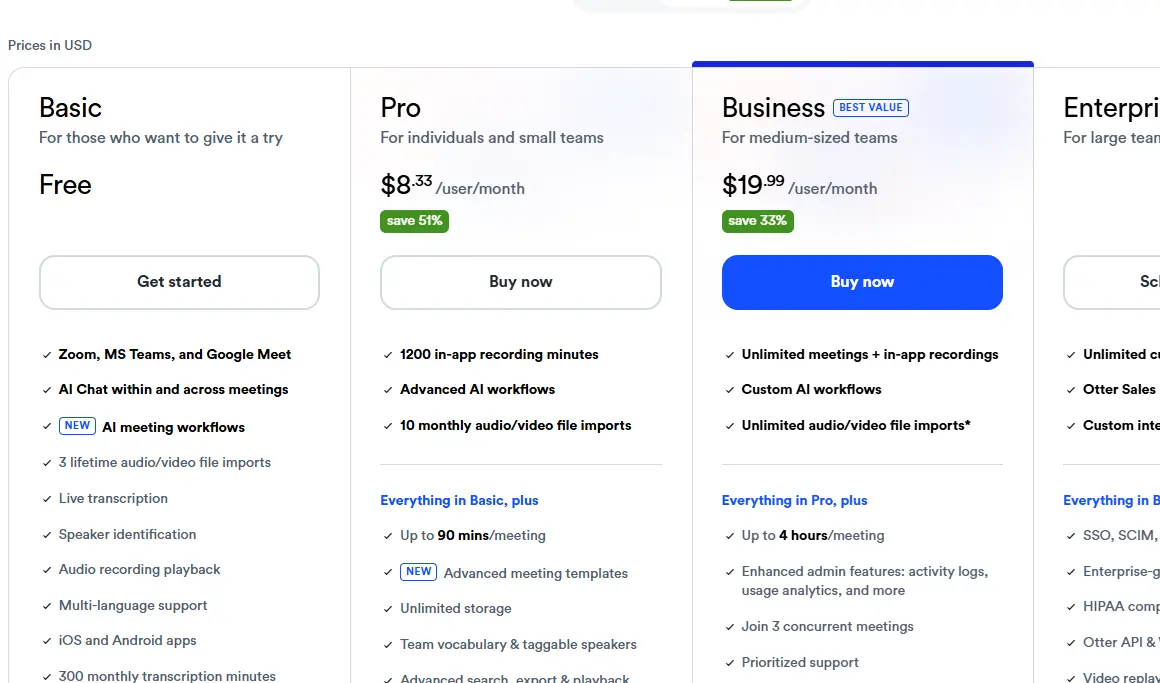
- Free: 300 minutes/month; 30 minutes per conversation; 3 file imports per month
- Pro: $8.33/month (billed annually) or $16.99/month; 1,200 minutes/month; 90 minutes per conversation; 10 file imports per month
- Business: $20/month (billed annually) or $30/month; 6,000 minutes/month; 4 hours per conversation
- Enterprise: Custom pricing; advanced security and admin controls
Notta Pricing
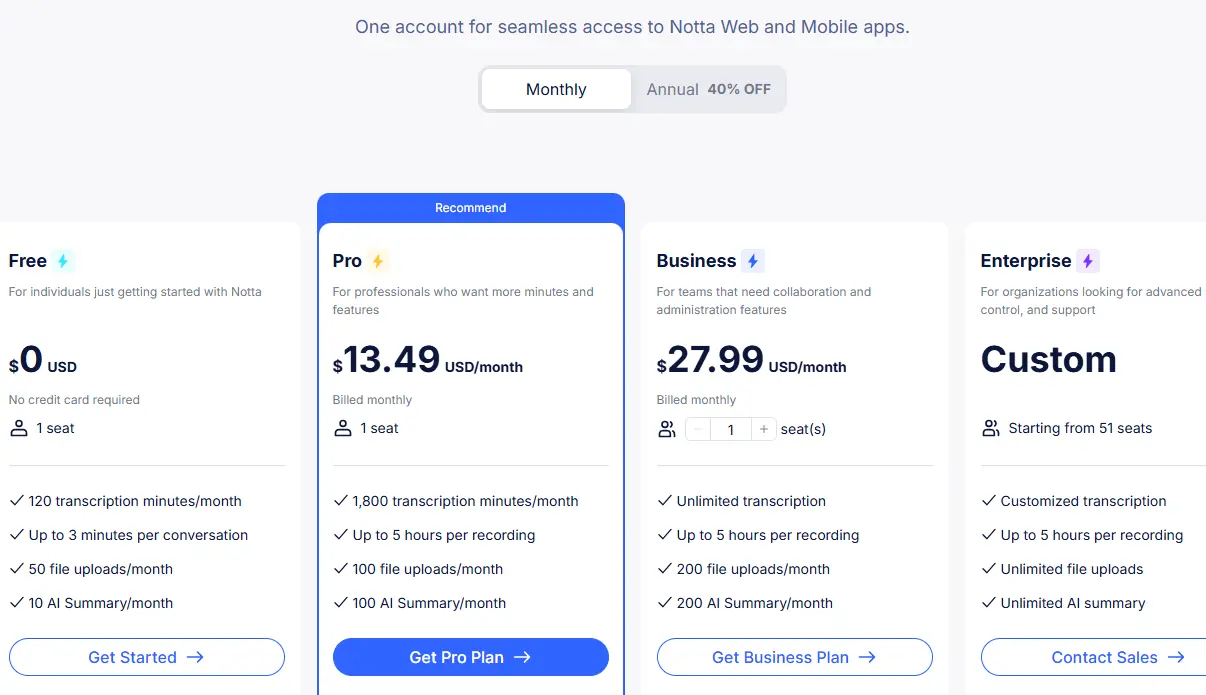
- Free: 120 minutes/month total; 3 minutes per recording (genuinely restrictive; primarily a trial)
- Pro: $13.49/month (billed annually) or $14.99/month; 1,800 minutes/month; unlimited minutes per recording
- Business: Unlimited transcription minutes at a lower per-user cost than Otter’s Business plan
- Enterprise: Custom pricing; 50% education discount available
The Honest Pricing Comparison
Plan | Otter.ai | Notta | Better Value |
Free Tier Minutes | 300 min/month | 120 min/month | Otter.ai |
Free Per-Session Limit | 30 min | 3 min | Otter.ai significantly |
Pro Monthly Price | $16.99/month | $14.99/month | Notta |
Pro Annual Price | $8.33/month | $13.49/month | Otter.ai |
Pro Minutes Included | 1,200 min | 1,800 min | Notta |
Per-Session Limit (Pro) | 90 min | Unlimited | Notta |
File Imports (Pro) | 10/month | Unlimited | Notta |
The free-tier comparison is straightforward: Otter.ai’s free plan is dramatically more useful, offering 300 minutes per month with a 30-minute per-session limit, whereas Notta’s free plan offers 120 minutes per month with a 3-minute per-session limit, which makes it essentially a demo rather than a functional tool. The tables turn at paid tiers: Notta’s Pro plan offers 1,800 minutes (vs. Otter’s 1,200), unlimited per-session recording (vs. Otter’s 90-minute cap), and unlimited file imports (vs. Otter’s 10/month), all at $14.99/month versus Otter’s $16.99/month on the same billing cycle.
Integrations and Platform Support
Both tools connect to major meeting platforms and the productivity ecosystem. The practical differences:
Integration | Otter.ai | Notta |
Zoom | ✅ | ✅ |
Microsoft Teams | ✅ | ✅ |
Google Meet | ✅ | ✅ |
Webex | ⚠️ Limited | ✅ |
Calendar Sync | ✅ | ✅ |
Slack | ✅ | ✅ |
Salesforce | ⚠️ Limited | ✅ |
Notion | ✅ | ✅ |
Google Drive | ✅ | ✅ |
Zapier | ✅ | ✅ |
Video Recording | ❌ No | ✅ Yes |
Offline Recording | ❌ No | ✅ Yes |
Screen Recording | ❌ No | ✅ Yes |
The three recording capability gaps: video, offline, and screen recording are where Notta has a structural product advantage that Otter.ai hasn’t addressed. For transcription workflows that extend beyond virtual meeting bots (recorded presentations, in-person sessions, screen-capture tutorials), these gaps matter.
Both tools work naturally alongside broader productivity and automation systems. For professionals building connected tool stacks that link transcription to project management, invoicing, or content workflows, our best productivity apps for remote workers guide provides broader ecosystem context. Our Unclutter App review and Trello vs. ClickUp guide cover tools that complement meeting transcription in a complete professional workflow.
Head-to-Head Summary

Dimension | Otter.ai | Notta | Winner |
Real-World Accuracy | 85–90% | 95–98% | Notta |
Speaker Diarization (8 Speakers) | 82% | 89% | Notta |
Processing Speed (1 Hr Audio) | ~7 min | ~5 min | Notta |
Language Support | English + limited ES/FR | 58 languages | Notta |
Real-Time Translation | ❌ No | 42 languages | Notta |
Free Plan Usefulness | 300 min; 30 min/session | 120 min; 3 min/session | Otter.ai |
Pro Plan Value | $16.99/mo; 1,200 min | $14.99/mo; 1,800 min | Notta |
Live Meeting Captions | ✅ Yes | ✅ Yes | Tie |
Collaborative Editing | ✅ Strong | ⚠️ Moderate | Otter.ai |
Video/Screen Recording | ❌ No | ✅ Yes | Notta |
Offline Recording | ❌ No | ✅ Yes | Notta |
Post-Meeting AI Outputs | Summary + action items | Summary + reports + decks | Notta |
G2 User Satisfaction | Higher volume of reviews | Strong accuracy ratings | Tie |
Privacy Concern (2025) | ⚠️ Active lawsuit (Aug 2025) | No current concerns | Notta |
Who Should Use Otter.ai
Choose Otter.ai if your team conducts most of its meetings in English and needs a proven, mature platform with robust collaborative editing features. It’s specifically the right choice when live caption visibility during meetings matters. Otter’s real-time captions are visible to all participants, which serves accessibility needs and teams that want to reference the transcript while the meeting is still happening.
Otter.ai also makes more sense if you’re evaluating both tools on a free plan; its 300-minute monthly allocation with a 30-minute per-session limit is genuinely usable, making it the right starting point for any beginner evaluation. Students, researchers, and solo professionals who occasionally make single-speaker recordings will find Otter’s free tier more practical than Notta’s restrictive 3-minute limit.
Who Should Use Notta

Choose Notta if any of the following describe your workflow: your team operates across multiple languages, your meetings regularly involve six or more speakers, you need offline or video recording capabilities, or you want post-meeting AI outputs beyond a summary and action item list. Notta’s 58-language transcription and 42-language real-time translation make it the only viable choice for multilingual teams in this comparison.
The difference in capability is not marginal; it’s categorical. Additionally, choose Notta’s paid tier if your meetings regularly run longer than 90 minutes.
Otter.ai’s Pro plan caps individual sessions at 90 minutes; Notta’s Pro plan has no per-session limit. For anyone whose client calls, webinars, or workshop recordings regularly exceed that threshold, Otter’s Pro plan creates friction that Notta’s doesn’t.
Pros and Cons Summary
Otter.ai
The Pros
- Generous free plan: 300 minutes/month with 30 minutes per session; the most usable free tier in this comparison.
- Strong collaborative features: team channels, comment threads, and shared folders.
- Excellent live meeting integration with real-time captions visible to participants.
- Established platform: 8+ years of product maturity with a large user base.
- Slightly lower annual Pro pricing at $8.33/month.
The Cons
- Accuracy trails Notta in real-world conditions (85–90% vs 95–98%).
- Speaker identification is weaker in large meetings (82% vs 89% in 8-speaker scenarios).
- Severely limited language support (English + limited Spanish/French).
- No video, screen, or offline recording.
- Active privacy lawsuit filed in August 2025; requires due diligence for sensitive use cases.
- 90-minute per-session cap on Pro plan.
Notta
The Pros
- Industry-leading accuracy (95–98% in real-world conditions; up to 98.86% in optimal conditions).
- 58 languages for transcription; 42 for real-time translation.
- Bilingual simultaneous transcription for 11 language pairs.
- Video, screen, and offline recording capabilities.
- Notta Brain transforms meetings into reports, decks, infographics, and email drafts.
- Better Pro value: more minutes, unlimited per session, and a lower monthly price.
- Stronger speaker identification in complex multi-speaker scenarios.
The Cons
- The free plan is too restrictive for meaningful evaluation (3 minutes per recording).
- Collaborative editing features are less developed than Otter’s team environment.
- Higher annual Pro price ($13.49/month vs Otter’s $8.33/month).
FAQs
Notta is consistently more accurate in real-world conditions. Independent tests report 95–98% accuracy for Notta versus 85–90% for Otter.ai. The gap is most significant in multi-speaker meetings, non-native English speaker scenarios, and technical jargon-heavy discussions. In single-speaker, clean-audio scenarios, both tools produce highly usable transcripts.
For English-speaking teams with collaborative editing needs and a preference for live caption visibility during calls, yes, Otter.ai’s collaborative features, team channels, and comment threading are stronger than Notta’s. However, for teams where accuracy matters most (legal, medical, client-facing) or for meetings involving six or more speakers, Notta’s accuracy advantage becomes more important.
Significantly more. Notta supports transcription in 58 languages and real-time translation in 42. Otter.ai supports English as its primary language, with limited Spanish and French functionality and no built-in translation. For any multilingual workflow, Notta is the only viable choice between these two tools.
In August 2025, a class-action lawsuit was filed alleging that Otter.ai recorded, accessed, and utilized the contents of private conversations without obtaining adequate consent from all participants. This is a legal allegation, not a confirmed finding, but it raises data privacy and consent questions that professionals handling sensitive, legal, or regulated conversations should address through Otter.ai’s current privacy documentation before committing to the platform.
Both use encryption and standard security measures. However, the August 2025 lawsuit against Otter.ai creates a specific due diligence requirement for sensitive use cases. Notta currently has no comparable legal concerns. Both platforms’ privacy policies should be reviewed against your specific compliance requirements before processing confidential information.
Otter.ai’s free plan is significantly more useful: 300 minutes per month with a 30-minute per-session limit. Notta’s free plan offers 120 minutes per month, with a 3-minute-per-recording limit, which essentially serves as a demo. If you’re evaluating both tools before committing to a paid plan, Otter.ai’s free tier gives you meaningful real-world testing capacity; Notta’s does not.
Final Thoughts
Choosing between Otter.ai and Notta ultimately comes down to one honest question: what actually breaks in your current meeting workflow? If the answer is accuracy (transcripts that garble multi-speaker conversations, struggle with accents, or misattribute action items), Notta is the clearer choice in 2026. Its 95–98% real-world accuracy, 89% eight-speaker diarization, 58-language support, and Notta Brain post-meeting transformation layer make it a stronger tool for most professional and team use cases. The privacy landscape in 2026 further strengthens that conclusion: Notta has no active legal concerns, while Otter.ai’s August 2025 lawsuit creates a due diligence requirement that some users will find disqualifying.
That said, I’d encourage you not to simply take this comparison’s word for either tool. Otter.ai’s collaborative features, mature platform, and generous free plan are genuine strengths, particularly for English-speaking teams with collaborative editing needs and no multi-speaker complexity. Its 300-minute free tier is specifically designed to let you test the tool on your real meetings before committing to a subscription. Notta’s free plan, conversely, is too restrictive to meaningfully evaluate. Consequently, the practical advice is: start with Otter.ai’s free plan for your actual meetings, then run a Notta paid trial (their free plan won’t tell you much) on the same meeting types and compare directly. Your specific audio environment, speaker count, and language needs will tell you more than any comparison article can.
There’s an expanding landscape of AI transcription and meeting intelligence tools worth understanding before you commit to a subscription. Head to YourTechCompass.com for hands-on reviews, honest comparisons, and practical guides that help you choose the tools that actually fit the way your team works.