If you’ve ever spent hours formatting slides instead of refining your ideas, you already understand the problem Tome AI is trying to solve. Presentation tools traditionally require you to structure content, design layouts, source visuals, and manually polish formatting. Tome AI flips that process. Instead of starting with blank slides, you begin with a prompt, and the platform generates a structured, visually organized presentation in seconds.
However, speed alone does not make a tool valuable. The real question is whether Tome AI actually improves your workflow, enhances storytelling, and delivers professional results without sacrificing control. In this detailed review, you’ll learn how Tome AI works, what it does well, where it falls short, and whether it makes sense for your specific use case.
What Is Tome AI?
Tome AI is an AI-powered storytelling and presentation platform designed to turn prompts into structured slide decks. Instead of building slides manually in PowerPoint or Google Slides, you describe your needs, and the AI automatically generates an outline, slide content, and visual formatting.
At its core, Tome AI uses generative AI models to transform natural language instructions into structured visual narratives. If you want a deeper understanding of how generative AI systems create content from prompts, this breakdown of what generative AI is explains the foundation behind tools like Tome.
Tome is particularly useful for:
- Startup founders creating pitch decks
- Marketers building campaign presentations
- Students preparing reports
- Teams generating strategy briefs
It focuses on storytelling rather than advanced design control.
How Tome AI Works
Tome AI operates on a prompt-based workflow. You describe your topic, such as “Create a startup pitch deck for a fintech app,” and the system generates:
- A structured slide outline
- Headings and bullet points
- Visual placeholders
- Suggested imagery
From there, you can refine text, regenerate sections, or manually edit content.
Because the platform relies on generative AI models similar to other large language systems, its output depends heavily on prompt clarity. If you’ve explored tools like Gemini or other advanced AI systems, you’ll notice similar prompt-response dynamics. This 👉 overview of how Gemini AI works provides useful context for understanding how AI interprets user instructions.
The key difference with Tome is that the output is visually structured for presentations rather than plain text.
Key Features of Tome AI
1. AI-Powered Slide Creation
You can generate entire presentations in seconds. Instead of building slide-by-slide, you refine what the AI produces.
2. Structured Storytelling Layouts
Tome focuses on narrative flow. Slides automatically follow a logical progression, which is particularly helpful if you struggle to organize ideas.
3. Multimedia Embedding
You can embed images, videos, and interactive elements directly into slides. For AI-generated visuals, you might also explore platforms that specialize in imagery. If you want to understand AI image generation better, this 👉 guide on Imagen AI explained offers a useful comparison.
4. Real-Time Collaboration
Teams can edit and comment simultaneously, making it suitable for remote collaboration.
5. Web-Based Sharing
Presentations are designed for online sharing rather than heavy offline export formats.
Tome AI Pricing and Plans
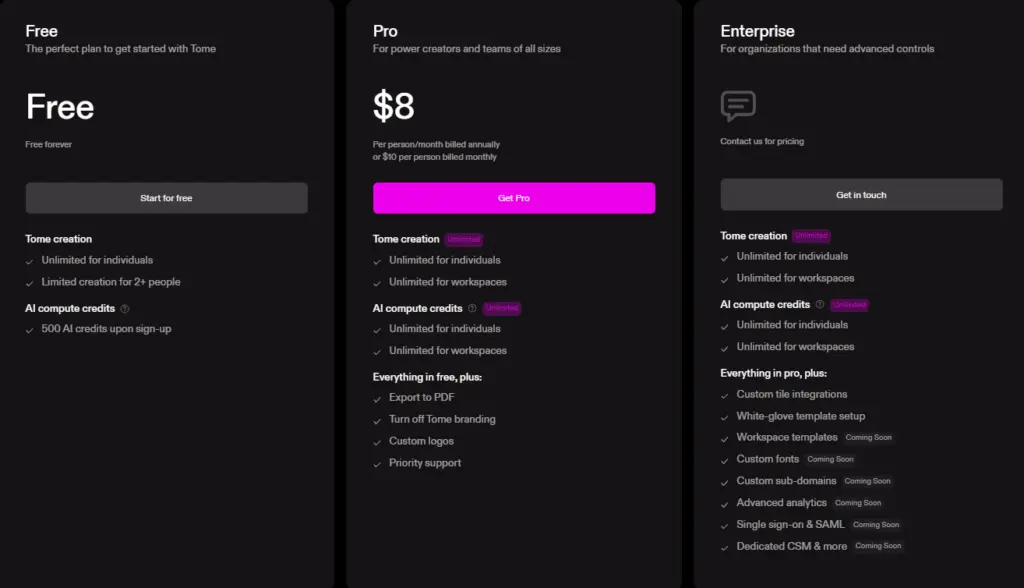
Tome AI typically offers a free tier with usage limits, along with paid plans that increase generation credits, collaboration tools, and customization options.
While pricing may change, the value proposition remains consistent: pay for speed, structure, and convenience.
Before upgrading, ask yourself:
- How often do you build presentations?
- Do you need advanced customization?
- Is time-saving worth the subscription cost?
Checking the official Tome website ensures you get up-to-date pricing details.
Tome AI Use Cases
Tome AI works best in situations where speed and structure matter more than pixel-perfect design. Some of its use cases include:
- Startup Pitch Decks: Founders can quickly create investor-ready outlines and then refine the messaging manually.
- Marketing Presentations: Campaign overviews, content strategies, and product launches can be drafted quickly.
- Educational Projects: Students benefit from an automated structure and idea expansion.
- Internal Reports: Teams can transform written strategy documents into presentation-ready formats.
If you’re comparing AI content tools more broadly, it helps to understand how other AI systems approach different tasks. For example, this 👉 DeepSeek vs ChatGPT comparison highlights how language models differ in content-generation style and accuracy.
Tome AI vs Traditional Presentation Tools
Feature | Tome AI | PowerPoint | Google Slides |
AI-generated Slides | Yes | Limited | Limited |
Manual Design Control | Moderate | High | High |
Speed of Creation | Very fast | Slower | Moderate |
Offline Access | No | Yes | Limited |
Collaboration | Yes | Yes | Yes |
Traditional tools give you full control but require time and design effort. Tome sacrifices some customization for speed and automation.
If your workflow depends on deep formatting control, PowerPoint may still be better. However, if your priority is fast ideation and structured storytelling, Tome AI offers a clear advantage.
Tome AI vs Other AI Presentation Tools
Compared to Gamma or Canva AI, Tome places stronger emphasis on narrative flow. Canva focuses more on visual design flexibility, while Gamma balances automation with structure.
The choice depends on what matters more to you:
- Design precision?
- Speed?
- Narrative assistance?
Tome leans toward structured storytelling over visual complexity.
Pros and Cons of Tome AI
The Pros
- Extremely fast presentation generation
- Clean, modern layouts
- Strong storytelling structure
- Good for early-stage drafts
The Cons
- Limited design customization
- AI-generated content may need fact-checking
- Less suitable for highly technical data-heavy decks
As with any generative AI platform, reviewing outputs carefully is essential. Accuracy can vary depending on prompt clarity.
Who Should Use Tome AI?
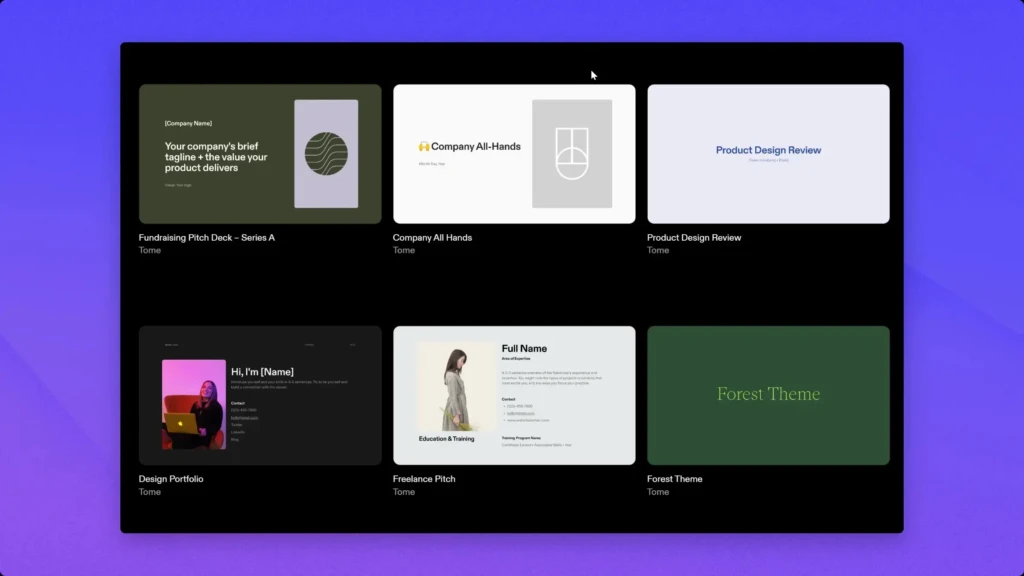
Tome AI is best suited for:
- Entrepreneurs needing fast pitch drafts
- Marketers preparing internal decks
- Students creating structured presentations
- Teams collaborating remotely
If you frequently convert written content into slides, Tome reduces friction dramatically.
Who Should Avoid Tome AI?
You may struggle with Tome AI if:
- You require precise design control
- You need complex data visualization
- You work offline frequently
- You rely on heavy custom branding
In those cases, traditional presentation software may serve you better.
Tips for Getting Better Results with Tome AI
- Write detailed prompts. The clearer your instructions, the better the output.
- Treat AI output as a first draft, not a final product.
- Refine the structure before adjusting visuals.
- Cross-check facts for accuracy.
For broader insight into how generative AI systems shape outputs, reviewing foundational AI concepts can strengthen your prompt-writing strategy.
FAQs
Yes, a limited free tier is available. Advanced features require a subscription.
It depends on your needs. Tome is faster for draft generation, while PowerPoint offers greater control.
Not entirely. It accelerates ideation but still benefits from human refinement.
No. It is web-based and requires an internet connection.
Conclusion
Tome AI is not designed to replace traditional presentation software entirely. Instead, it focuses on solving a specific problem: the time and effort required to structure and draft presentations. If your main bottleneck is organizing ideas and quickly generating a first version, Tome delivers meaningful value.
However, if your work demands advanced design precision, complex charts, or strict branding standards, you may still need traditional tools. Ultimately, Tome AI works best when you treat it as a powerful drafting assistant rather than a complete replacement. When used strategically, it can significantly reduce preparation time and help you focus on refining your message instead of formatting slides.