Every AI tool you’ve used so far (ChatGPT, Claude, Perplexity) operates on the same fundamental model: you ask, it answers, you ask again. You are the driver at every step. Manus AI breaks that model entirely. Instead of responding to your prompts and waiting for your next instruction, Manus takes a goal, builds a plan, and executes every step of that plan autonomously: browsing the web, writing and running code, managing files, filling out forms, and delivering a finished result, while you do something else entirely. VentureBeat described it as “a major advance” in autonomous AI agents when it launched in March 2025, and the platform went viral immediately, attracting over 2 million waitlist sign-ups within days of its public debut.
What makes that distinction genuinely significant, rather than just marketing language, is what it means for your actual workflow. A task that would take you 2–3 hours of manual research, writing, and formatting can be submitted to Manus as a single instruction and returned as a finished, downloadable document, allowing you to focus on something else. In December 2025, Meta acquired Manus for an estimated $2–3 billion, a figure that signals serious institutional confidence in autonomous AI agents as a category, not just in Manus as a single product. This review covers exactly what Manus does, how the autonomous agent architecture works in practice, what the pricing actually costs when you account for credit consumption on real tasks, how it compares to ChatGPT and Claude, and the honest assessment of where it genuinely delivers versus where its limitations show.
A note before we begin: every YTC score is earned, never negotiated. If you want to understand exactly how we evaluate apps & tools and how we handle affiliate relationships, our Review Methodology lays it all out.
What Is Manus AI?
Manus AI was developed by Butterfly Effect Pte Ltd (the Singapore-based startup behind Monica.im) and officially launched on March 6, 2025. The name “Manus” comes from the Latin word for “hand,” a deliberate reference to the platform’s core philosophy: an AI that does the work rather than just talking about it. That distinction between a conversational assistant and an execution agent is the product’s entire premise, and understanding it is a prerequisite for determining whether Manus belongs in your workflow.
The platform is built on a multi-agent architecture: multiple specialized AI agents work together, each handling different parts of a task, such as web browsing, data analysis, code execution, or file management, while the orchestration layer selects the right model (Claude, Qwen, or others) for each step. This is different from a single AI model responding to prompts; Manus coordinates a team of specialized agents to complete complex workflows that no single model can handle as well.
By December 2025, Meta had acquired the company for between $2 and $3 billion, with Meta committing to continue operating Manus as a standalone product through its own app and website while integrating its technology into Meta AI. As of March 2026, Manus has expanded beyond its original research and coding capabilities to include a Web App Builder that creates full websites with built-in database and payment integration, as well as a desktop app with local file access, signaling how rapidly the platform’s ambitions have grown since launch.
What Makes Manus Different From ChatGPT and Claude?
This is the most important thing to understand before evaluating any specific feature, because if you don’t grasp the agent vs assistant distinction, the rest of the review won’t make full sense.
When you use ChatGPT or Claude to research a topic, here’s what actually happens: you ask for an overview, and it gives you one. Additionally, you ask for more detail on a specific point, and it provides it. You ask it to organize the information into a table, and it does that. You compile the pieces, format the document, and do the final review yourself. Every step of the workflow requires your active direction.
Manus works differently at the architectural level. When you give Manus a goal, for instance, “research the top 10 project management tools, compare their pricing and features, and produce a formatted report with a final recommendation,” it doesn’t respond with the first section and wait for you to ask for the next. Instead, it builds a task plan, shows you the planned sequence of steps, then executes every step sequentially: opening browsers, visiting websites, extracting data, cross-referencing sources, writing analysis, formatting the document, and packaging the finished output for download.
The technical enabler of this difference is Manus’s sandboxed virtual environment, a cloud-based environment in which Manus maintains browser sessions, files, code execution, and task state throughout a complex task. ChatGPT and Claude don’t maintain a persistent working environment between turns, so they require your direction at each step rather than completing multi-step workflows autonomously. Additionally, Manus can run tasks in the background after you disconnect.
Manus AI vs Competitors Comparison Table
Feature | Manus AI | ChatGPT | Claude | Perplexity |
Task Type | Autonomous multi-step | Reactive conversational | Reactive conversational | Research-focused |
Web Browsing | ✅ Live autonomously | ✅ With browsing plugin | ⚠️ Limited | ✅ Live web search |
Code Execution | ✅ Writes + runs + debugs | ⚠️ Writes only | ⚠️ Writes only | ❌ No |
File Management | ✅ Creates + organizes | ❌ No | ❌ No | ❌ No |
Multi-Step Planning | ✅ Core capability | ⚠️ Manual guidance needed | ⚠️ Manual guidance needed | ❌ No |
Background Execution | ✅ Yes (asynchronous) | ❌ No | ❌ No | ❌ No |
Free Tier | ✅ 300 daily credits | ✅ Limited | ✅ Limited | ✅ Limited |
Best For | Complex autonomous workflows | General AI assistance | Long-doc analysis & writing | Real-time web research |
Starting Price | ~$19/month (Basic) | ~$20/month (Plus) | ~$20/month (Pro) | ~$20/month (Pro) |
How Does Manus AI Work?
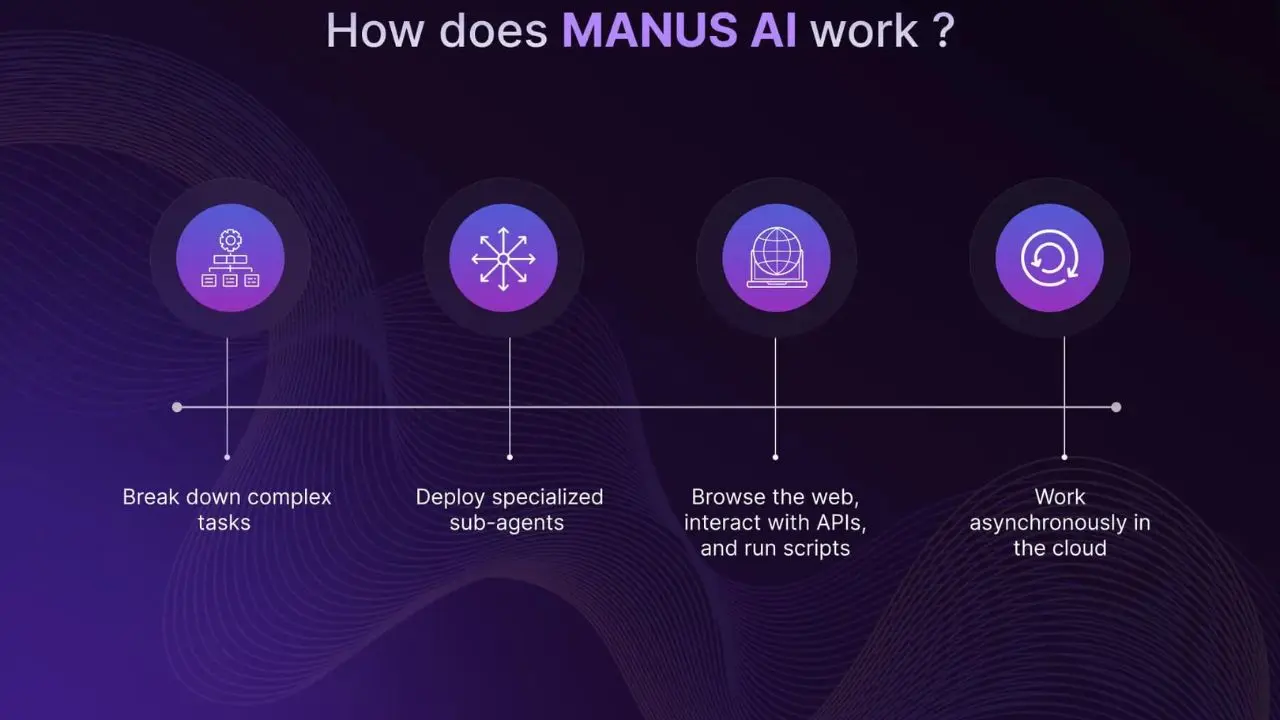
The workflow is more intuitive than the underlying technology suggests. Here’s exactly what happens from sign-up to finished deliverable.
Step 1: Create Your Account
Go to manus.im and sign up with your email or Google account. Since May 2025, Manus has been open to anyone; anyone can sign up and access the platform directly. The free tier activates immediately with 300 daily refresh credits and 1,000 starter credits, giving you enough to run several meaningful tasks before committing to a paid plan.
Step 2: Submit Your Goal
Describe your task in natural language, as specifically as possible. The quality of your task description directly influences the quality of Manus’s output.
A specific, bounded goal (“analyze the pricing and core features of five project management tools and produce a comparison table in a downloadable document”) produces more reliable results than a vague goal (“research project management tools”). The more clearly you define the expected deliverable, the more accurately Manus can target it.
Step 3: Review the Task Plan
Before executing anything, Manus displays its planned approach as a numbered sequence of steps. This transparency is one of Manus’s most practically useful design features.
You see exactly what the agent intends to do before it does it, which means you can catch misunderstandings, adjust the scope, or redirect the approach before any credits are consumed on execution. This pre-execution review stage is more developed in Manus than in most competing AI agents.
Step 4: Watch the Agent Execute
Manus works through its plan in real time, and you can observe every action as it happens, for instance, websites opening, data being read, files being created, code being written and run. The interface provides a visual log of the agent’s actions, which builds trust by making the autonomous process visible rather than opaque.
If a step fails, a website doesn’t load, a search returns irrelevant results, or code produces an error, Manus detects the problem and adjusts its approach without requiring your intervention. That self-correction capability is what makes the autonomous execution reliable across tasks with unpredictable intermediate steps.
Step 5: Receive and Download the Output
When the task is complete, Manus delivers a finished output (a .doc file, a spreadsheet, a coded project, or a structured report) that you can download directly. Unlike conversational AI tools that give you text you then need to format and compile yourself, Manus delivers production-ready files.
A research task completed during testing produced an 8-page market analysis with a price-comparison matrix and source references in approximately 15 minutes, delivered as a directly downloadable document. Review the output, and if refinement is needed, give Manus a follow-up instruction to adjust the existing output rather than restart.
Step 6: Assign Background Tasks and Disconnect
For longer tasks, you can submit the goal, close your browser or laptop, and return later to find the result complete. Manus continues working in its cloud environment after you disconnect, making it genuinely useful for time-intensive tasks you want completed without active monitoring.
Manus AI Key Features
Autonomous Web Research and Browsing
Manus autonomously browses the live web, visiting multiple sources, extracting relevant information, cross-referencing data across sites, and compiling findings into structured outputs. What makes this meaningfully different from ChatGPT’s browsing plugin is the autonomous chaining of web actions: Manus doesn’t just visit one site and report back; it navigates through multiple sources sequentially, reads and processes each one, compares the information, and synthesizes it into a coherent output, all within a single task execution. Because it reads current web pages rather than relying on training data, it handles time-sensitive research tasks, such as competitive analysis, market trends, and current pricing, significantly better than AI tools limited by training data cutoffs.
Code Writing, Execution, and Debugging
Manus writes code and executes it in its sandboxed environment, and that execution step is what separates it from conversational AI coding assistants. When ChatGPT or Claude writes code for you, it produces the code; you run it, and if it throws an error, you report it back and iterate.
Manus writes the code, runs it, encounters an error, fixes it, runs it again, and delivers working code. That autonomous debugging loop eliminates the back-and-forth iteration that makes AI-assisted coding time-consuming for non-developers. Consequently, tasks such as building a data-processing script, creating a functional web page, or automating a file-conversion workflow can be completed by Manus without you having to manage any part of the development process.
File Management and Document Creation
Manus creates, reads, edits, and organizes files in its workspace, producing formatted Word documents, Excel spreadsheets, PDFs, presentations, and structured data files as task outputs. These files are downloadable directly from the Manus interface as polished, ready-to-use deliverables rather than text you need to copy and format yourself. That distinction matters for professional use: a competitive analysis that returns as a formatted .doc file with headings, tables, and source citations is immediately usable; the same information delivered as plain chat text requires significant formatting before it becomes a shareable document.
Web App Builder (March 2026 Addition)
The Web App Builder represents Manus’s most ambitious capability expansion, generating full websites and functional web applications from a description, complete with a built-in database, Stripe payment integration, and an SEO-optimized structure. You describe the app you want (“a booking system for a small yoga studio with appointment scheduling and payment processing”), and Manus builds a functional prototype. The output quality is currently best suited for internal tools and prototypes rather than production deployments, but as a rapid prototyping capability for non-technical founders, it represents a significant step beyond what any conversational AI assistant offers.
Background and Asynchronous Execution
Manus can handle long tasks entirely in the background, gathering and analyzing large amounts of data, running multi-step research workflows, or building out a content structure, while you’re disconnected from the platform. You assign the task, close your laptop, and come back to a completed result.
The agent continues working in its cloud environment regardless of whether you’re actively connected. For professionals with recurring high-effort research tasks, this capability effectively converts a 3-hour manual workflow into a background process that requires 5 minutes of goal-setting and 20 minutes of output review.
Memory Across Sessions
Manus maintains context and preferences from previous sessions, allowing ongoing projects to build on earlier work. If you’re running a multi-week market research project, Manus remembers what you’ve already gathered, what format you prefer for outputs, and what scope parameters you’ve established.
You don’t re-explain the project context at the start of each session. This persistent memory makes Manus increasingly useful for extended projects as it accumulates context about your specific workflow and preferences over time.
Manus AI Pricing
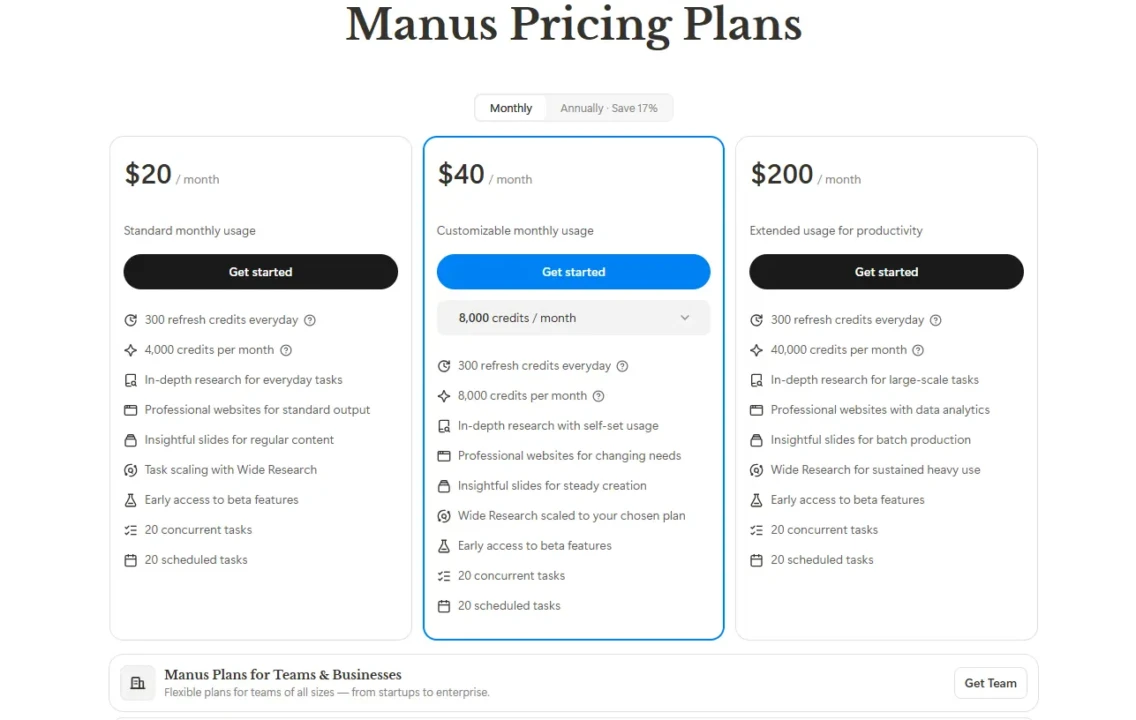
Plan | Monthly Cost | Credits | Best For |
Free | $0 | 300 daily refresh + 1,000 starter | Testing and light evaluation |
Basic | $20/month | 4,000 credits per month | Individual light use |
Plus | $40/month | 8,000 credits per month | Solo founders & moderate daily use |
Pro | $200/month | 40,000 credits per month | Startups, agencies, & heavy workflows |
Team | $39/seat/month | Substantial allocation | Teams with collaborative workflows |
The pricing structure requires an honest explanation because the credit system is where most users encounter unexpected costs. Every action Manus performs consumes credits, web searches, code executions, file creations, and API calls, all of which draw from your monthly allocation.
The critical detail is that complex multi-step tasks consume credits at a rate that most new users find surprising. A thorough competitive research task can consume 500–900 credits in a single session. A single Sora-level complex task can consume 1,000 credits. The free tier’s 300 daily refresh credits sound meaningful until a single demanding research task depletes most of the day’s allocation.
The practical implication is that credit consumption scales with task complexity in ways that are difficult to predict before you run a task. Manus provides no upfront estimate of how many credits a given task will consume. This unpredictability is the most significant practical friction for new users, and multiple user reports on Reddit and review platforms describe burning through Plus plan credits ($39) in minutes on tasks they expected to be straightforward.
Therefore, before committing to a higher plan, run several tasks on the Basic plan and track actual consumption to understand how your specific use cases translate into credit costs before scaling up. Always verify current pricing at manus.im, as the credit structure continues to evolve.
What Manus AI Is Genuinely Good At
Competitive Research and Analysis
This is where Manus consistently delivers its strongest results. Submitting a competitor analysis task, such as “research the top five CRM tools, compare pricing tiers, feature sets, and user sentiment, and deliver a formatted report with a recommendation,” and receiving a structured, sourced document back in 15–50 minutes is the use case where Manus’s autonomous web browsing and document creation capabilities combine most effectively. For knowledge workers who regularly produce this kind of research, the time savings are immediate and measurable.
Data Collection and Aggregation
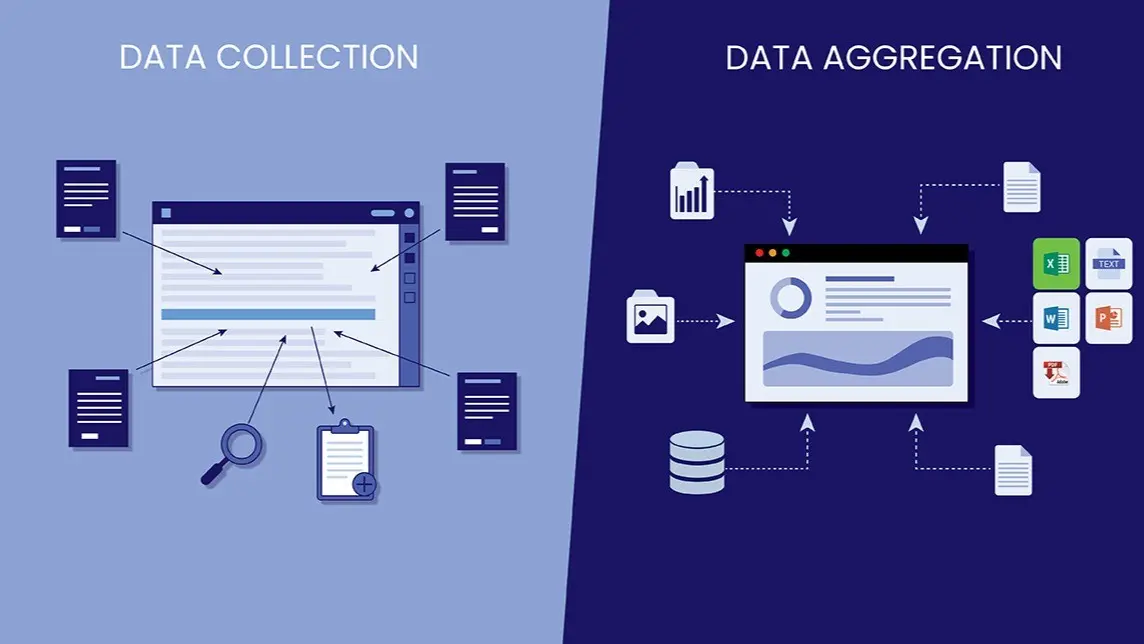
Data collection and aggregation from multiple web sources are equally strong. Manus gathers structured data from websites, compiles it into organized spreadsheets or databases, and delivers analysis-ready outputs that would otherwise take hours of manual copy-pasting. Additionally, code-based automation tasks, such as writing, running, and debugging scripts for data processing, file conversion, and API interactions, benefit significantly from Manus’s execution capability because the autonomous debugging loop eliminates the most time-consuming part of AI-assisted coding.
For comparison, Higgsfield AI adopts a similar “do the work for you” philosophy in the video-creation space; our review of Higgsfield AI covers how that autonomous generation model plays out in a creative context.
Manus AI Honest Limitations
Credit Consumption Unpredictability
This is the most significant practical limitation and the one most likely to cause frustration if you’re not prepared for it. Unlike a flat subscription where you pay a fixed amount for defined access, Manus’s credit model means a single unexpectedly complex task can consume a meaningful portion of your monthly allocation without warning.
The absence of pre-task credit estimates (you can’t know how many credits a task will cost before running it) makes budgeting genuinely difficult for heavy users. Therefore, set spending limits and monitor your usage dashboard regularly to prevent surprises from credit depletion.
Performance on Ambiguous Goals
Performance on ambiguous goals drops significantly from Manus’s performance on specific, bounded tasks. The quality of autonomous execution is directly proportional to the clarity of the initial goal.
Vague instructions like “research my industry” produce inconsistent, unfocused outputs, while specific instructions like “compile a list of 20 B2B SaaS companies in the HR tech space with their funding status and pricing model” produce reliable, usable results. Additionally, accuracy verification is always required before using Manus outputs in consequential professional contexts.
Additionally, autonomous execution doesn’t mean error-free execution. Manus can misinterpret data, draw incorrect inferences from web sources, or produce code with logical errors that go undetected during execution. Therefore, treat outputs as strong first drafts that require human review rather than as finished deliverables that require no verification.
App Building

App building is still unreliable for production use. The Web App Builder produces impressive prototypes, but the output quality is inconsistent for production deployment.
Stick to internal tools, prototypes, and proof-of-concept builds rather than customer-facing production applications. Furthermore, server availability may be limited during periods of high demand. Manus has experienced access restrictions historically due to demand, and complex tasks can slow significantly during peak usage times on lower-tier plans without priority processing.
Who Is Manus AI Best For?
Knowledge Workers and Consultants
Knowledge workers and consultants who regularly produce research reports, competitive analyses, market assessments, and data-driven documents are the clearest fit. Manus shifts their role from executing tedious research steps to reviewing finished outputs, a meaningful, time-saving professional transition, as those tasks currently consume several hours per project. The combination of live web research, multi-source synthesis, and formatted document delivery addresses exactly the workflow that knowledge workers spend the most time on.
Small Business Owners
Small business owners who need the output of a research assistant without the cost of hiring one benefit from Manus’s ability to autonomously handle competitive intelligence, market research, content briefs, and structured data collection tasks. Additionally, developers and technical professionals find genuine value in the code execution loop, particularly for automation scripting, data processing pipelines, and rapid prototyping workflows, where autonomous debugging capabilities save meaningful development time.
Who Should Look Elsewhere?

- Users who primarily need fast conversational AI assistance for quick questions and writing tasks: ChatGPT and Claude serve those needs more efficiently and at a lower cost per interaction.
- Users who need guaranteed error-free output without review; no AI agent currently meets this bar, and Manus’s autonomous execution makes errors less visible rather than less frequent.
- Users running simple, single-step tasks that don’t benefit from multi-step autonomous execution: the credit cost per simple task makes Manus poor value for work that a conversational AI handles just as well.
For real-time web research where you want sourced answers quickly, Perplexity remains the stronger dedicated tool. For understanding how Grok compares to ChatGPT in the conversational AI space, that comparison is covered separately.
FAQs
Yes. Manus offers a free tier with 300 daily refresh credits and 1,000 starter credits. That’s enough to run several moderate tasks and meaningfully evaluate the platform before committing to a paid plan. The free tier includes Chat Mode, 1 concurrent task, and access to Manus 1.6 Lite in Agent Mode. Paid plans start at $19/month for the Basic tier. Always verify current plan details at manus.im, as the credit structure continues to evolve.
ChatGPT is a conversational AI assistant. You prompt it, it responds, you prompt again. Every step of a workflow requires your active direction. However, Manus is an autonomous AI agent; you give it a goal, it builds a plan, executes each step sequentially, and delivers a finished output without requiring your involvement at any point. Manus can also run the code it writes, manage files, and operate asynchronously in the background after you disconnect, capabilities that ChatGPT doesn’t currently offer to the same degree.
Manus performs most consistently on competitive research and analysis, multi-source data collection and aggregation, code-based automation scripting, and formatted document production. Tasks that combine web research with structured output creation (competitor analyses, market reports, pricing comparisons, structured data collection) are where autonomous execution delivers the clearest time savings over manual workflows.
Manus operates in a sandboxed virtual environment, which means its browsing and code execution are isolated from your personal device and files. The platform has standard data privacy commitments. That said, be cautious about submitting highly sensitive business information or credentials in task descriptions; standard data hygiene practices apply to any cloud AI platform. For consequential professional outputs, always verify Manus’s results before using them.
Conclusion

Manus AI earns its reputation in the autonomous agent category by delivering on the core promise that most AI tools only gesture toward: genuinely completing complex, multi-step tasks without requiring you to manage each step. For knowledge workers who spend hours on competitive research, data aggregation, and document production, the time saving is real and immediately measurable. A task that costs 2–3 hours of manual effort becomes a 15–50-minute background process that delivers a formatted, downloadable output. The Meta acquisition, estimated at $2–3 billion, confirms that autonomous AI agents are a category with serious staying power, not just a viral moment. At $19/month for the Basic plan, the entry cost is low enough to evaluate the platform on your specific workflow before committing to higher tiers.
The limitations deserve equal weight in your evaluation decision. Credit consumption on complex tasks is genuinely unpredictable and can deplete monthly allocations faster than plan pricing implies, particularly for users running multi-step research tasks that involve extensive web browsing. Outputs always require human review before professional use, so Manus shifts your role from execution to review rather than eliminating your involvement entirely. And for simple, single-step tasks, conversational AI tools handle the work more efficiently per credit. Manus is not the right tool for every AI use case, but for the specific category of complex, multi-step knowledge work that currently eats hours of your week, it’s the most capable autonomous agent available to non-technical users.
At Your Tech Compass, we publish practical guides and honest tech reviews to help users make smarter decisions.