Cursor is the AI-first code editor built by Anysphere, a San Francisco startup founded in 2022 by four MIT classmates, and it has become the fastest-growing developer tool in software history. It crossed $100 million in ARR in January 2025 (the fastest any SaaS company has ever reached that milestone, without a single dollar spent on marketing), grew to $500 million in ARR by June 2025, and crossed $1 billion in ARR by November 2025. By late 2025, Anysphere had raised a total of $3.3 billion across four funding rounds, including a $2.3 billion Series D round that valued the company at $29.3 billion, with backing from Andreessen Horowitz, Thrive Capital, Accel, Google, and NVIDIA. Over half of Fortune 500 companies, including NVIDIA, Uber, and Adobe, use it in production.
What makes Cursor fundamentally different from GitHub Copilot and every other AI coding tool you may have tried is the architecture. Copilot is a plugin bolted onto your existing editor. Cursor IS the editor, a full fork of VS Code with AI woven into every layer of the interface, not added as an afterthought. That architectural difference is why developers who switch to Cursor rarely go back, and why it’s worth understanding in detail before you decide whether to make the move yourself.
What Is Cursor?
Cursor is an AI-native IDE built and maintained by Anysphere, Inc., founded in 2022 by Michael Truell (CEO), Sualeh Asif, Arvid Lunnemark, and Aman Sanger, four MIT students who first experimented with AI for mechanical engineering software before getting early access to GPT-4 and recognizing the bigger opportunity. It launched publicly in March 2023 and has been in continuous, rapid development ever since, shipping major releases roughly every four to six weeks. As of early 2026, it’s available on macOS, Windows, and Linux, used by over 1 million daily active developers, and generates approximately 1 billion lines of code per day across its user base.
The core philosophy behind Cursor is straightforward: AI assistance should be embedded at the editor level, with full awareness of your entire codebase, not limited to the single file you have open. That distinction (codebase-level context versus file-level context) is what makes Cursor feel qualitatively different from tools that add AI on top of an existing IDE. Beyond that, Cursor doesn’t lock you into one AI model. You choose which model powers each feature; currently, GPT-4.1, GPT-5.3, Claude Sonnet 4.5, Claude Opus 4.6, and Gemini 2.5 Pro are all available, depending on your plan, so you’re not at the mercy of one provider’s model-quality decisions.
How Cursor Works

When you first open Cursor, two things happen automatically. Your existing VS Code settings, extensions, themes, and keybindings import in a single click, so the transition from VS Code feels immediate and frictionless. Simultaneously, Cursor indexes your entire project (reading every file, understanding the structure, mapping dependencies and data flows) to build a semantic model of your codebase that it uses to generate contextually accurate suggestions. That indexing is what gives Cursor its main competitive advantage over plugin-based tools: it understands your project as a whole, not just whatever file happens to be open.
The @ symbol system is how you direct Cursor’s attention to specific context sources during a chat or editing session. Typing @file references a specific file; @folder points to a directory; @web pulls live information from the internet; @docs references indexed library documentation you’ve added; and @codebase runs a semantic search across your entire indexed project.
For a reader coming from basic IDE tools, this is worth understanding clearly. It means you can ask Cursor questions like “Where in my codebase does the authentication token get refreshed?” and get a precise, codebase-aware answer rather than a generic response.
For a broader foundation on coding concepts before diving into AI tools, our basic coding concepts guide is a useful starting point.
Cursor’s Key Features
Tab Autocomplete
Tab autocomplete is Cursor’s most-used feature and the one developers consistently describe as the best inline code completion available. It predicts not just the next line but multi-line edits; it understands where you’re going and pre-populates several lines ahead, and it learns your personal coding patterns over time through Anysphere’s acquisition of Supermaven, a high-speed context completion engine.
On all paid plans, Tab completions are unlimited and don’t count against your monthly credit allocation. However, they run on a separate fast inference path designed for sub-100ms response time.
Cursor Chat
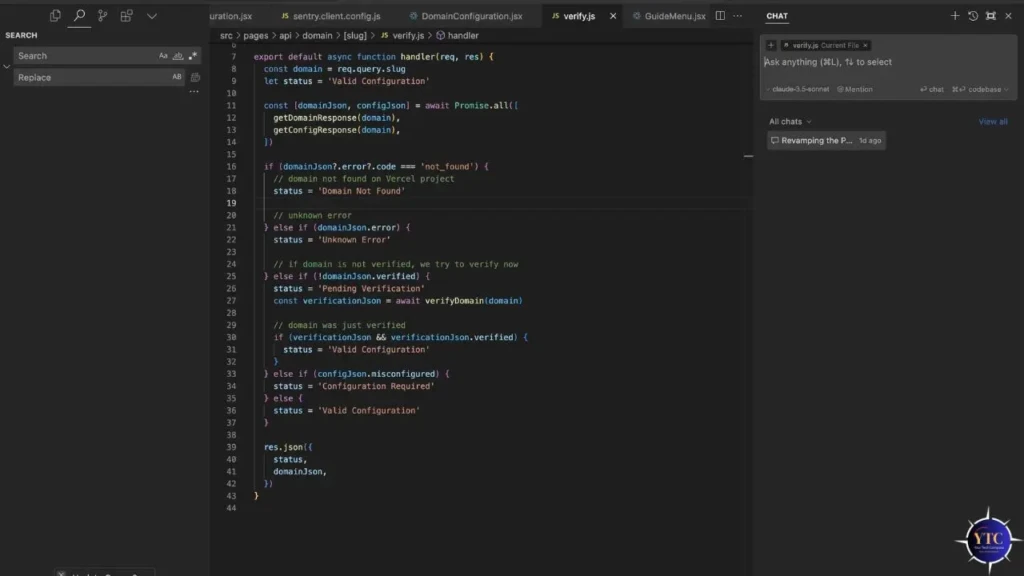
Cursor Chat is a conversational AI interface embedded directly in the IDE sidebar, connected to your full indexed codebase, not just your open file. You ask it questions about your code, request explanations of unfamiliar functions, ask it to find where a bug is introduced, or describe a change you want made, and it responds with full awareness of your entire project’s structure. Unlike GitHub Copilot Chat, which is aware only of open files, Cursor Chat can trace logic across dozens of files in a single response.
Composer and Agent Mode
Composer is Cursor’s most powerful feature, and the one most responsible for developers switching from competing tools.
You describe a task in natural language (“Add JWT authentication to the API with refresh token support”), and Cursor plans the implementation, creates and edits files across your entire project, runs terminal commands, reads error output, and iterates until the task is complete, all without you directing each individual step. Cursor 2.0 (October 2025) extended this further with multi-agent mode, letting you orchestrate up to eight AI agents working simultaneously on different tasks in parallel.
Cloud Agents
Cloud Agents, formerly known as Background Agents, launched in general availability in late 2025. They take Agent Mode a step further by running in cloud-based Ubuntu VMs that clone your repository, check out a branch, do the work, and open a pull request, completely independently of your local machine. You can trigger a Background Agent from the IDE, from Slack (via the @Cursor Slack bot), or from a web or mobile app, and receive a notification when it’s done or when it needs your input.
For teams managing multiple parallel tasks, this is the feature that most directly replaces the workflow of assigning tasks to a junior developer.
Inline Edit (Cmd+K)
Cmd+K is the fastest way to make a targeted change to a specific block of code. You select the lines you want changed, press Cmd+K, describe what you want, for instance, “rewrite this to use async/await instead of callbacks” or “add input validation to this function,” and Cursor rewrites the selected block inline, showing you a diff of the changes before you accept or reject them. This is the feature that’s most useful for focused, surgical edits where you don’t need the full planning capability of Agent Mode.
BugBot
Launched in July 2025 as an add-on at $40/user/month, BugBot integrates with GitHub and watches every code change (whether written by you or by a Cursor agent), flagging potential errors, regressions, and vulnerabilities automatically. It functions as a continuous code review layer that catches issues before they reach human reviewers.
Worth Noting: BugBot is priced separately from the core Cursor subscription, so factor that into your total cost if automated bug detection is a priority.
.cursorrules
.cursorrules is a project-level configuration file where you define persistent instructions for how Cursor should behave across your entire project. You specify your preferred language conventions, code style requirements, architectural patterns, testing standards, and any constraints specific to your codebase, and Cursor follows those rules consistently across every session without you restating them.
For teams, Team Rules (introduced in Cursor 1.7) extend this to organization-wide policies that apply across all projects.
Cursor Pricing and Plans
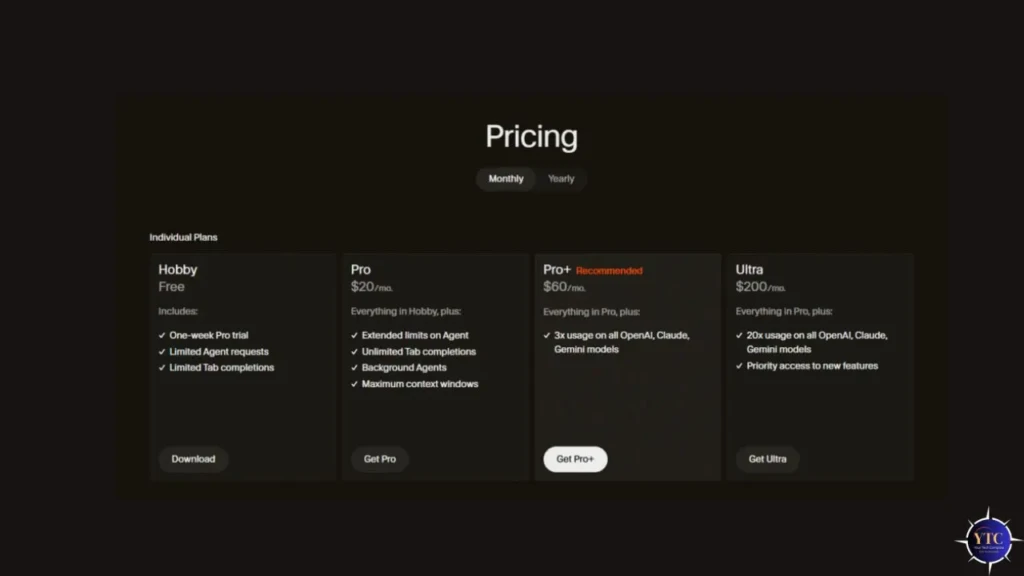
Plan | Price | Completions | Credits/Month | Best For |
Hobby (Free) | $0 | 2,000 | 50 premium | Evaluation, light use |
Pro+ | $60/month | Unlimited | 500 fast credits | Individual developers, daily use |
Ultra | $200/month | Unlimited | 20× Pro allocation | Power users, heavy Agent Mode |
Teams | $40/user/month | Unlimited | 500 fast/user | Evaluation, light use |
Enterprise | Custom | Unlimited | Custom | Large orgs, dedicated infra, SLA |
The most important thing to understand about Cursor’s pricing is the credit system, and it’s worth being direct about this because it was the source of significant user frustration in 2025. In July 2025, Anysphere switched the Pro plan from a flat 500 fast requests per month to a usage-metered credit system without adequate notice, triggering widespread backlash.
The CEO publicly apologized, issued refunds, and settled on the current hybrid model: a flat monthly fee plus a credit pool that resets every billing cycle, with usage resets every 5 hours for heavy users to prevent single-session overage. The practical implication for you is that heavy Agent Mode sessions consume credits faster than Chat or Tab completion. A single complex multi-file agent task can use 5 to 20 credits depending on context length and model, so monitor your usage during the first month before committing to a plan tier.
Cursor vs GitHub Copilot
Feature | Cursor Pro+ ($60/mo) | GitHub Copilot Pro ($10/mo) | GitHub Copilot Pro+ ($39/mo) |
Architecture | Full IDE (VS Code fork) | Plugin for existing IDE | Plugin for existing IDE |
Codebase Context | Full repo indexing | Open files only | Open files only |
Agent Mode | ✅ Multi-agent (8 parallel) | ✅ Single agent | ✅ Single agent |
Background Agents | ✅ Cloud VMs, PR generation | ❌ No | ❌ No |
Model Selection | ✅ You choose per session | ⚠️ Rotated by GitHub | ✅ More model options |
Tab Autocomplete | ✅ Multi-line; learns patterns | ✅ Strong | ✅ Strong |
Inline Edit (Cmd+K) | ✅ Native | ⚠️ Via Chat only | ⚠️ Via Chat only |
Zero Data Retention | ✅ Business tier only | ✅ Business tier | ✅ Business tier |
IDE Flexibility | ❌ Must use Cursor | ✅ Keep your current IDE | ✅ Keep your current IDE |
Price | $16–$20/month | $10/month | $39/month |
The comparison between Cursor and GitHub Copilot is the decision most developers evaluating Cursor are actually making, and the honest answer depends on one factor above everything else: whether you’re willing to replace your IDE.
If you need to stay in your current editor for compliance, team standardization, or personal preference, GitHub Copilot is the stronger choice, and our GitHub Copilot guide covers it in full detail. However, if you’re open to switching editors, Cursor’s full-repo indexing, multi-agent parallel execution, and Cloud Agents represent a meaningfully deeper AI coding experience than anything Copilot currently delivers at any price tier.
Cursor vs Other AI Code Editors
Tool | Price | Architecture | Agent Capability | Best For |
Cursor | $0-200/month | VS Code fork (local) | ⭐⭐⭐⭐⭐ Multi-agent + Background | Best all-around AI IDE |
Windsurf (Codeium) | Free / $15/month teams | VS Code fork (local) | ⭐⭐⭐⭐ Cascade AI agent | Free tier; budget-conscious teams |
Claude Code | ~$17/month (API) | CLI + VS Code extension | ⭐⭐⭐⭐⭐ Best-in-class agentic | Terminal-first developers; max reasoning |
GitHub Copilot | $10–$40/month | Plugin (any IDE) | ⭐⭐⭐ Single agent | Teams staying in the existing IDE |
Zed | Free / $20/month (AI) | Native Rust editor | ⭐⭐ Basic | Performance-first; minimal AI use |
Windsurf is Cursor’s most direct competitor, built on a similar VS Code fork architecture with its own Cascade AI agent, free for individual developers, and acquired by Google in 2025 for $2.4 billion (with the remaining team going to Cognition for $250 million). Therefore, if you want a Cursor-like experience at no cost, Windsurf is the first alternative to evaluate.
Claude Code is the strongest option in raw agentic coding capability. Its terminal-first CLI approach and access to Claude Opus 4.6 make it the preference of developers who want maximum reasoning quality on the most complex tasks. Our Claude AI guide covers the underlying model capabilities that power it in detail.
Zed is the right choice if performance is your absolute priority over AI features. Built in Rust with sub-50ms latency, it’s the fastest editor available, but its AI capabilities are intentionally lighter than Cursor’s.
For a deeper look at another AI coding assistant worth knowing about, our Blackbox AI review covers a tool that takes a different approach to AI-assisted development. And for the full landscape of AI tools beyond coding, specifically, our AI Unboxed category covers the broader ecosystem.
Real-World Use Cases
Building Features from Scratch
Building a feature from scratch is where Cursor’s Agent Mode delivers the greatest productivity gains. You describe the feature in Composer, for instance, “Build a user authentication system with JWT tokens, refresh token rotation, and rate limiting on login attempts,” and Cursor plans the implementation, scaffolds the necessary files, writes the logic, wires up the tests, and flags any integration issues it encounters along the way. What would take a developer several hours of focused work gets reduced to a planning and review task.
Debugging Complex Errors

Debugging a complex error across multiple files is one of the most time-consuming daily tasks in any codebase, and one where Cursor’s full-repo context pays off immediately. You paste the stack trace into Chat, ask Cursor to trace the error to its root cause across your codebase, and it returns not just the file and line but the chain of function calls, data transformations, and state mutations that produced the error. That’s a fundamentally different capability from an AI tool that can only see your currently open file.
Working in an Unfamiliar Codebase
Working in an unfamiliar codebase, such as onboarding to a new job, contributing to an open-source project, or inheriting legacy code, is where the @codebase context system is most valuable. You ask Cursor to explain the architecture, identify the files responsible for a specific system, and walk you through how data flows through a particular feature, and it answers with a real semantic understanding of your project rather than a generic explanation.
Additionally, writing comprehensive test suites for existing functions is one of Cursor’s most consistently strong capabilities. Ask it to generate unit tests, integration tests, and edge-case coverage for any function, and the output is production-ready with minimal editing.
Limitations and Honest Drawbacks
Credit System Is Opaque
The credit system remains opaque despite Anysphere’s July 2025 reforms. It’s genuinely difficult to predict how many credits a given Agent Mode session will consume before you start. This is because credit costs depend on the selected model, the number of files in context, the number of iterations required, and whether the agent issues terminal commands.
Data Privacy
Data privacy on lower tiers is a real consideration for professional use. Hobby and Pro plan users don’t have a zero data retention guarantee. Your code is sent to AI model providers (OpenAI, Anthropic, Google) for processing, and Cursor’s privacy policy on those tiers allows data use for product improvement.
Therefore, if you’re working with proprietary code, client code, or anything under NDA, the Teams plan at $40/user/month with explicit zero data retention is the appropriate tier, not Pro+. This is worth flagging clearly because it’s easy to miss in the pricing page.
Resource Usage
Resource usage is a legitimate practical complaint. As an Electron-based application that runs continuous AI background processes, Cursor uses noticeably more RAM and CPU than a lightweight editor like Zed or even standard VS Code. This is why users with older machines or less than 16GB of RAM report sluggishness during heavy Agent Mode sessions.
Code quality concerns are also documented: GitClear’s research analyzing over 153 million lines of AI-assisted code found AI tools linked to a 4x increase in code cloning and copy-paste patterns, meaning you need to review Agent Mode output actively rather than treating it as production-ready without inspection.
Is Cursor Worth It?

At $60/month for Pro+, Cursor is worth paying for if you write code daily and want the best full-IDE AI experience currently available. The combination of full-repo indexing, multi-agent parallel execution, Background Agents that open PRs independently, and model flexibility across GPT-5.3, Claude Opus 4.6, and Gemini 2.5 Pro represents more capability than any competing tool at an equivalent or lower price point. The productivity data supports this: Anysphere’s published figures show over 1 billion lines of code generated per day across its user base, and Fortune 500 adoption at 50%+ reflects enterprise-level validation that goes beyond individual developer enthusiasm.
The honest counterargument is equally worth considering. Some developers find continuous AI suggestions disruptive to their flow and prefer lighter tools. Therefore, if you code in focused, deep work sessions where you want minimal interruptions, Cursor’s aggressive AI presence can feel like more noise than signal.
For beginners, especially, the free tier is the right starting point. 2,000 completions and 50 premium credits per month let you evaluate whether the AI-first approach aligns with how you actually work before you spend anything. Therefore, if you regularly hit the free-tier limits, upgrading to Pro+ is a straightforward decision.
FAQs
Yes, the Hobby plan is free with 2,000 Tab completions and 50 premium credits per month. That’s enough to evaluate the product meaningfully, but too limited for daily professional use.
For most developers willing to switch IDEs, the answer is yes. Cursor’s full-repo context, multi-agent mode, Background Agents, and model flexibility deliver more capability at the same or lower price than Copilot Pro+. For developers who must stay in their current IDE, Copilot remains the stronger choice.
Yes, because Cursor is a VS Code fork, all your existing extensions, themes, and keybindings import automatically on first launch. The transition from VS Code requires no extension reinstallation or configuration work.
On the Teams plan ($40/user/month) and above, the answer is yes. This is because zero data retention is guaranteed, and your code is not used for model training. On Hobby and Pro+ plans, however, your code is sent to AI model providers for processing without a zero retention guarantee. Use Business or Enterprise for any code under NDA or proprietary classification.
Cursor currently supports GPT-4.1, GPT-5.3, Claude Sonnet 4.5, Claude Opus 4.6, and Gemini 2.5 Pro. You select which model powers each feature per session. Model availability varies by plan; the most capable models (Claude Opus 4.6, GPT-5.3) are available only with Pro or higher.
Conclusion

Cursor is the most capable AI coding environment available today, and the growth numbers reflect genuine developer conviction, not marketing spend. Full-repo codebase indexing, multi-agent parallel execution, Background Agents that clone repos and open PRs independently, model flexibility across the best frontier models, and a VS Code foundation that makes switching frictionless. That combination has no direct equivalent in any other tool at its price point. If you write code professionally and haven’t tried it yet, the free tier takes ten minutes to set up and requires no configuration beyond importing your existing VS Code settings.
The limitations (credit opacity, data privacy on lower tiers, resource usage, and code quality requiring active review) are real and worth building awareness around before you commit to a paid plan. Therefore, start on the free tier with your actual projects, not toy examples. Run a real feature through Agent Mode, use Chat to debug something that’s been frustrating you, and evaluate the output quality on code that matters to you. That week of real-world testing will tell you more than any benchmark or review article, including this one.
At YourTechCompass, every guide is written to give you accurate, practical information; no sponsored fluff, no vague advice. Explore more and find the answers you’re actually looking for.