Cloud services have become a core part of how we work, communicate, and store information. From personal backups to enterprise-grade applications, the cloud makes data accessible and scalable in ways traditional systems never could. However, that convenience also introduces new risks. Misconfigurations, weak access controls, and simple human error remain some of the biggest causes of cloud security incidents today.
In this guide, I’ll walk through practical, easy-to-understand cloud security tips that help protect your data and systems, whether you’re a small business owner, an IT professional, or an everyday user relying on cloud-based tools. I’ll explain what actually matters, why certain mistakes are so common, and how to build a stronger security mindset without overcomplicating things.
Why Cloud Security Matters
To begin with, cloud security matters because the cloud is no longer optional. Email platforms, file storage, websites, customer data, and even operating system updates rely heavily on cloud infrastructure. While cloud providers invest heavily in security, they cannot protect you from every mistake.
Many breaches happen not because of advanced hacking, but because:
- Storage buckets are left public
- Credentials are reused or leaked
- Access permissions are too broad
As cloud adoption grows, attackers increasingly look for these simple weaknesses. That’s why understanding your role in cloud security is critical.
Understand the Cloud Shared Responsibility Model
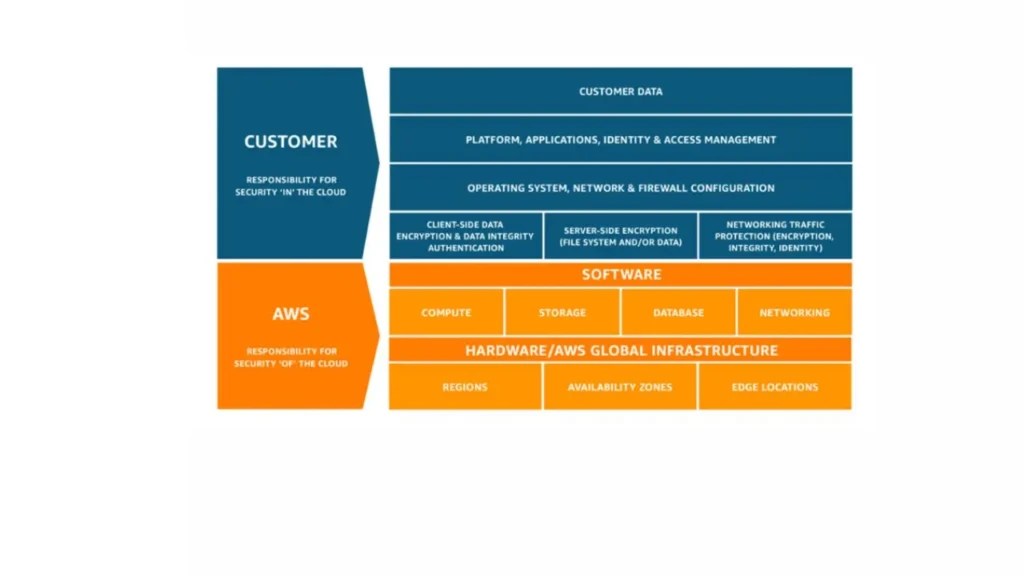
Before applying any cloud security tips, it’s essential to understand the shared responsibility model.
In simple terms:
- The cloud provider secures the infrastructure (data centers, physical servers, core networking).
- You, the customer, are responsible for securing what you put into the cloud.
This includes:
- User accounts and permissions
- Data protection and encryption
- Application configurations
- Compliance and monitoring
Misunderstanding this model is one of the most common causes of cloud security failures. Assuming “the cloud provider handles everything” often leads to exposed data and preventable incidents.
Cloud Security Tips for Identity and Access Management
Identity is the front door to your cloud environment. If attackers gain access to an account, everything behind it becomes vulnerable.
Use Strong Authentication & Multi-Factor Authentication
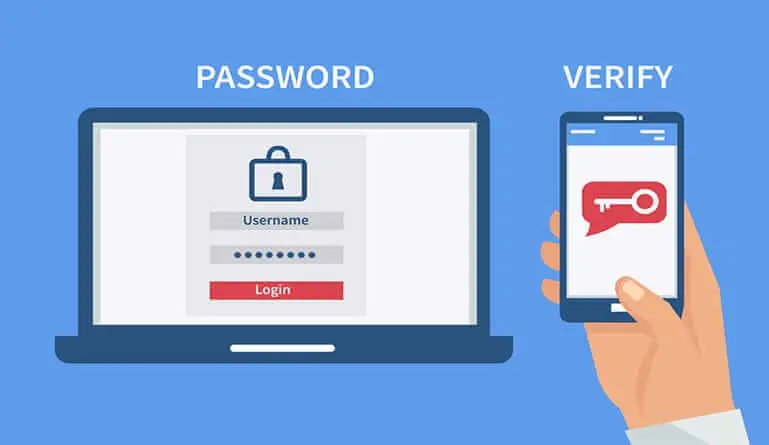
Strong authentication is non-negotiable. Password-only protection is no longer sufficient.
To improve account security:
- Use long, unique passwords for cloud accounts.
- Enable multi-factor authentication (MFA) wherever possible.
- Avoid sharing accounts between users or teams.
MFA alone can block a large percentage of account takeover attempts, even if passwords are compromised.
Apply Least Privilege Access
Another essential cloud security tip is limiting access.
Instead of giving users broad permissions:
- Assign only the access required for their role.
- Use role-based access control (RBAC).
- Review and remove unused accounts regularly.
By reducing unnecessary permissions, you limit the damage an attacker can cause if access is compromised.
Cloud Security Tips for Data Protection
Data is often the most valuable asset stored in the cloud, which makes it a prime target. To secure your data, here’s what you need to do.
Encrypt Data at Rest and in Transit
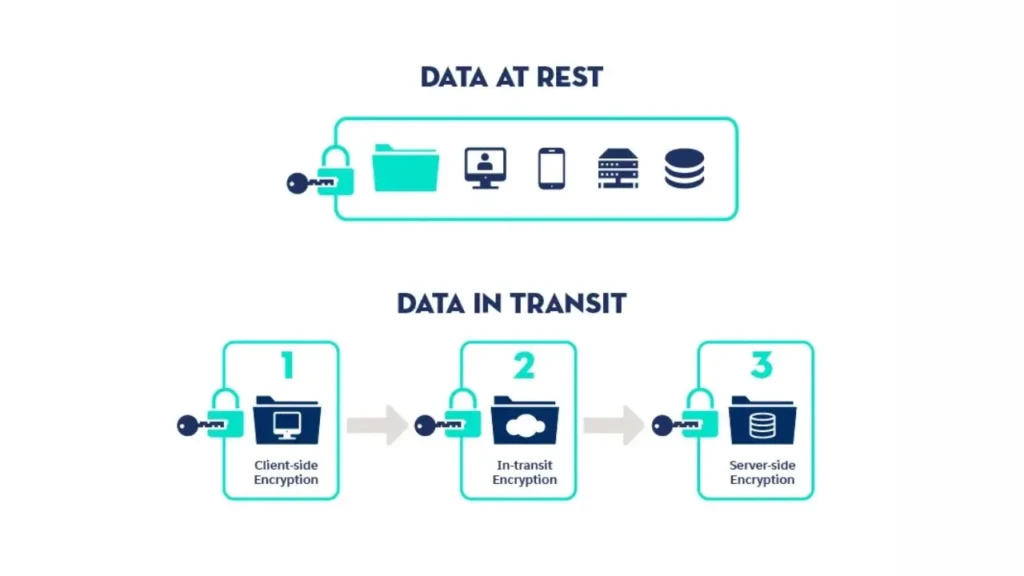
Encryption protects data even if it’s accessed improperly.
To secure data effectively:
- Enable encryption for stored data (data at rest).
- Use HTTPS and secure protocols for data transfers (data in transit).
- Rely on provider-native encryption tools when available.
Most major cloud platforms support encryption by default, but it must be enabled and configured correctly.
Implement Secure Backup and Recovery
Backups are critical, but they must also be protected.
Best practices include:
- Schedule automatic, regular backups.
- Store backups in separate locations or accounts.
- Restrict access to backup systems to prevent ransomware attacks.
Without secure backups, recovery from data loss or system failure becomes extremely difficult.
Cloud Security Tips for Network Protection
Network-level security controls help limit how and where cloud resources can be accessed.
To strengthen network security:
- Use firewalls and security groups to control inbound and outbound traffic.
- Restrict public access to services whenever possible.
- Segment networks so sensitive systems are isolated from public-facing components.
These steps reduce exposure and make it harder for attackers to move laterally within your environment.
Cloud Security Tips for Monitoring and Visibility
You can’t protect what you can’t see. Monitoring is a key pillar of cloud security.
To improve visibility:
- Enable logging and audit trails for user activity.
- Monitor login attempts, configuration changes, and data access.
- Set up alerts for unusual or suspicious behavior.
Early detection often makes the difference between a minor incident and a major breach.
Secure Cloud Configurations and Settings
Misconfigurations remain one of the biggest cloud security risks.
To reduce configuration errors:
- Review default settings before deploying services.
- Use security baselines or templates.
- Regularly audit configurations for changes or drift.
Configuration issues are often easy to fix once identified, which makes regular reviews especially valuable.
Cloud Security Tips for Compliance and Governance
Security and compliance often go hand in hand, particularly for businesses.
Key governance steps include:
- Document security policies and access rules.
- Enforce policies consistently across teams.
- Prepare for audits by maintaining logs and access records.
Strong governance not only improves security but also builds trust with customers and partners.
Cloud Security Tips for Employees and Teams
Technology alone cannot solve cloud security challenges. People play a major role.
To reduce human risk:
- Train employees to recognize phishing attempts.
- Encourage secure password practices.
- Promote safe remote access habits.
This approach aligns well with broader digital safety practices, as outlined in our guide to protecting your privacy online.
Common Cloud Security Mistakes to Avoid

Despite the best intentions, some mistakes keep recurring.
Avoid these common pitfalls:
- Leaving cloud storage publicly accessible
- Reusing credentials across platforms
- Ignoring security alerts or logs
- Assuming updates and patches are automatic
Even experienced teams can fall into these traps without regular reviews.
Cloud Security Best Practices Checklist
Here’s a quick checklist to summarize key cloud security tips:
Area | Best Practice |
Identity | MFA and least privilege access |
Data | Encryption and secure backups |
Network | Firewalls and restricted access |
Monitoring | Logs, alerts, and audits |
Governance | Policies and compliance controls |
This table can serve as a practical reference when reviewing your cloud environment.
How Cloud Security Connects to Broader Tech Use
Cloud security doesn’t exist in isolation. Software updates, device security, and online behavior all influence risk. For example, operating system updates, like those discussed in iOS 26.3 beta features, often include security patches that protect cloud-connected devices.
Similarly, choosing secure infrastructure partners matters. Services such as those covered in our Cloudflare Registrar review highlight how DNS and domain security help protect cloud-hosted websites.
Final Thoughts
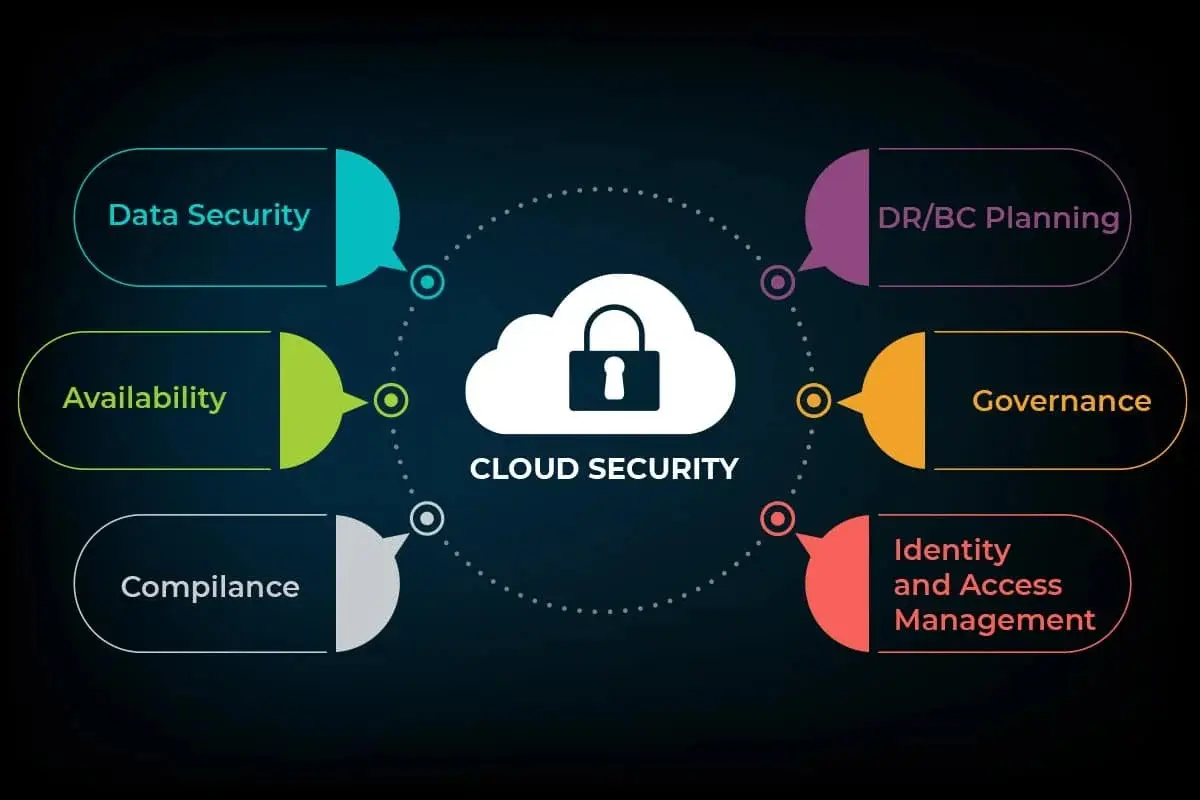
Cloud security is not about perfection; it’s about awareness, consistency, and continuous improvement. The most effective defenses come from combining good technology with smart processes and informed people.
By understanding your responsibilities, limiting access, protecting data, and staying vigilant, you significantly reduce your risk without making cloud usage more complex than it needs to be. From my perspective, the strongest cloud security strategies are those that fit naturally into daily workflows rather than feel like obstacles. When security becomes part of how you operate, not something you add later, you’re already ahead of most threats.
FAQs
Cloud platforms provide strong security tools, but users must configure them correctly. Security is shared, not automatic.
Misconfigured services and weak access controls are among the most common and dangerous risks.
Small businesses should focus on MFA, secure backups, and limiting user permissions to reduce risk.
It can be, but only when properly configured. Cloud security depends heavily on how responsibly services are managed.