Staying on top of tasks sounds simple until real life gets in the way. Between work deadlines, personal projects, recurring chores, and long-term goals, the right task manager can either bring clarity or add friction. That’s where tools like Todoist and Things 3 come in. Both are widely praised, both have loyal followings, and both promise to help you stay organized, but they approach productivity in very different ways.
This comparison breaks down Todoist vs Things 3 in a practical, no-nonsense way, focusing on how each app fits into daily routines rather than just listing features. From task organization and scheduling to platforms, pricing, and ideal use cases, the goal here is to help you choose the tool that genuinely matches how you work.
Todoist vs Things 3: Key Features at a Glance
Before exploring specific strengths and weaknesses, here’s a comparison of the core capabilities that define each task manager:
Feature | Todoist | Things 3 |
Platforms | Windows, macOS, iOS, Android, Web, Linux | macOS, iOS, iPadOS, Apple Watch |
Pricing Model | Free tier + subscription plans | One-time purchase per device |
Natural Language Input | Advanced | Basic |
Collaboration | Yes | No |
Integrations | Wide (calendar, email, Slack, Zapier) | Limited (primarily Apple ecosystem) |
Offline Support | Yes | Yes |
Visual Design | Functional | Minimalist & elegant |
This snapshot sets the stage: Todoist is feature-rich and versatile, while Things 3 emphasizes simplicity and a focused experience.
Task Organization and Workflow
When managing tasks and projects, both apps offer solid foundations but take different approaches:
Todoist
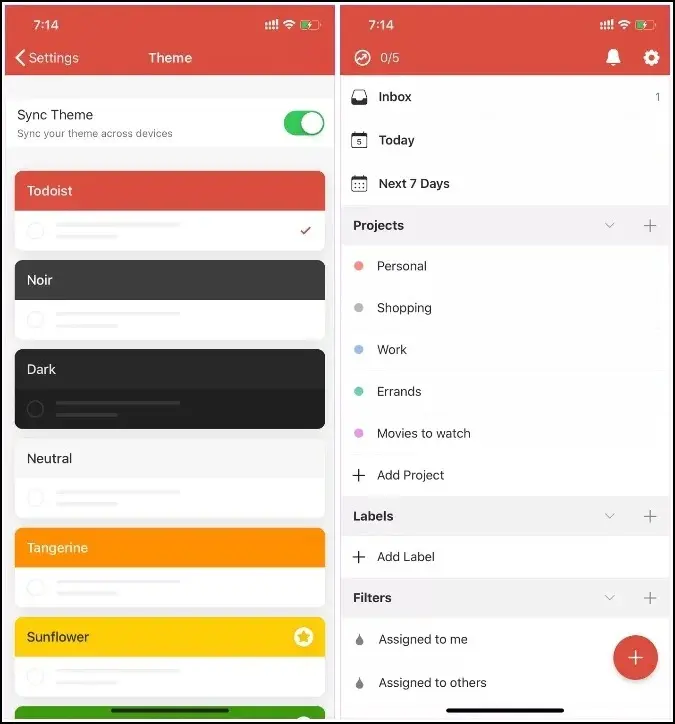
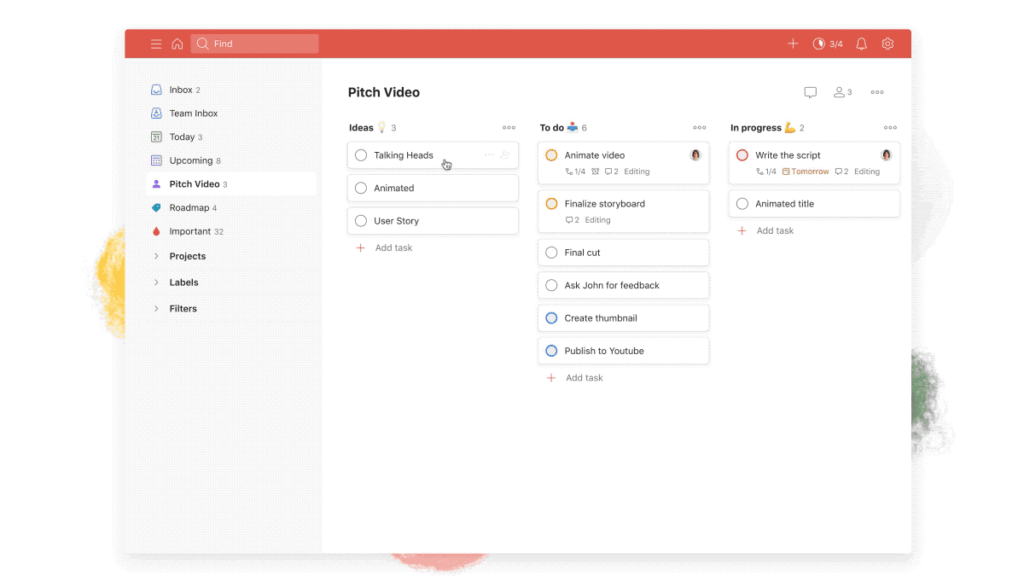
Todoist organizes tasks into projects and supports subtasks, labels, filters, and priority levels, letting you build a highly customized workflow. You can also use powerful natural language processing to add tasks quickly, typing something like “Call Alex tomorrow at 3 PM” automatically schedules the task.
This flexibility is especially valuable for users with complex task hierarchies and cross-project dependencies.
Things 3
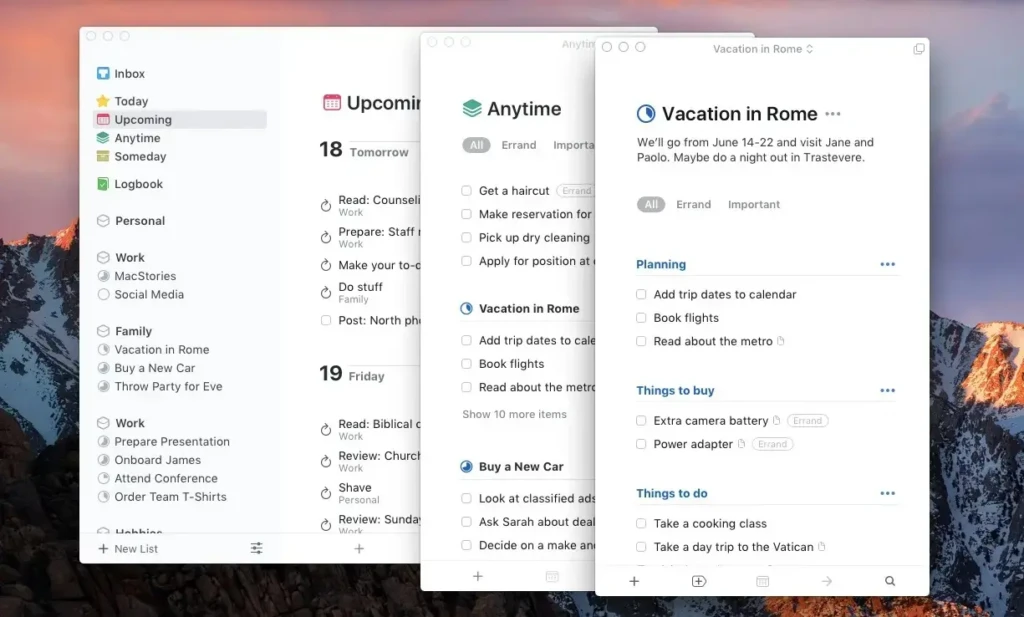
Things 3 follows a Getting Things Done (GTD)-inspired structure with Areas, Projects, and headings that help you segment work logically. Its UI emphasizes clarity: today’s tasks are separate from upcoming ones, existing alongside broader categories like “Anytime” and “Someday.”
This approach makes Things 3 feel less cluttered, but also intentionally limits complexity, which some users find liberating and others restrictive, especially if they thrive on custom filters and deep nesting.
User Interface and Ease of Use
User experience is a major differentiator between these tools:
Todoist
Todoist’s interface is functional and highly customizable. You’ll find features like filters, labels, and project views readily accessible, but these can feel busy for users who prefer minimalism. However, the ability to tailor how your tasks are shown makes Todoist powerful for heavy schedulers and experienced productivity users.
Things 3
Things 3 prioritizes a clean, calming interface with intuitive navigation and minimal visual noise. This design philosophy reflects its focus on solo productivity and clarity rather than collaborative or team scenarios.
If a serene, focused task view reduces friction in your workflow, Things 3 may feel more natural from day one.
Scheduling, Reminders, and Automation
Both apps support schedules and reminders, but with different strengths:
- Todoist includes flexible reminders, advanced recurring tasks, and natural-language due dates, which are helpful for busy users or those who rely on precise timing.
- Things 3 handles scheduling and reminders elegantly within its interface, with a clear distinction between “start date” and “deadline,” but it doesn’t match Todoist’s level of natural input sophistication.
Neither app is primarily an automation platform, but Todoist’s integrations and filters make it easier to pair with external automation tools like IFTTT and Zapier.
Platform Support and Integrations
Your choice here may depend on your devices:
- Todoist delivers truly cross-platform access, with native apps on Windows, macOS, iOS, Android, Linux, and web browsers. This means you can pick up your tasks wherever you are.
- Things 3 is exclusive to Apple devices, iPhone, iPad, Mac, and Apple Watch, making it ideal if you’re fully committed to Apple’s ecosystem.
In terms of integrations:
- Todoist integrates with calendars (Google, Outlook), email clients, productivity apps, and automation platforms.
- Things 3 focuses on deep internal usability and ecosystem consistency, but doesn’t offer the same breadth of third-party connections.
Collaboration and Team Use
If you work with others:
- Todoist allows project sharing, task assignments, and collaborative workflows, which are invaluable for team projects or shared personal goals.
- Things 3 does not support collaboration features; it is designed for solo task management, which suits individual planning but restricts team use.
Pricing, Plans, and Value for Money
Pricing models are fundamentally different:
Plan | Todoist | Things 3 |
Free Tier | Yes (limited) | No |
Subscription | Pro & Team plans | One-time purchase per Apple device |
Team Features | Business plan available | N/A |
Todoist’s subscription provides ongoing feature updates across all devices, while Things 3’s model lets you pay once per platform and own it forever, an appealing choice for long-term Apple users.
Pros and Cons Breakdown
Todoist
The Pros
- Cross-platform availability
- Collaborative features
- Powerful natural language input
- Flexible planning tools and filters
The Cons
- Subscription-based pricing
- Interface may feel complex for minimalists
Things 3
The Pros
- Elegant, intuitive user interface
- One-time purchase with no subscription
- Strong Apple ecosystem integration
The Cons
- Apple-only platform
- No team collaboration
- Limited third-party integrations
Todoist vs Things 3 for Different Users
Your ideal choice depends on how you work:
- Students & Personal Users: Things 3’s simplicity and focus can reduce overwhelm when managing personal tasks and goals.
- Professionals & Teams: Todoist’s collaboration, filters, and integrations make it better suited for work projects and shared lists.
- Cross-Platform Lifers: Todoist wins if you need access across varied devices.
- Apple-only Minimalists: Things 3 shines for those who want a clean design and a unified Apple experience.
This reflects patterns seen in other tool comparisons, such as Mint vs Rocket Money, and in productivity setups akin to those discussed in the Unclutter app review.
Comparison Table: Side-by-Side
Feature | Todoist | Things 3 |
Best For | Cross-platform task power | Apple-centric simplicity |
Collaboration | Yes | No |
Price Model | Subscription + free tier | One-time purchase |
Integrations | Extensive | Limited |
NLP Input | Advanced | Basic |
Team Use | Strong | None |
Final Thoughts
Todoist and Things 3 are both excellent task managers, but they are designed for different kinds of users. Todoist leans heavily into flexibility, collaboration, and cross-platform access, making it a strong choice for people juggling complex workflows or working across multiple devices. Things 3, on the other hand, focuses on simplicity, structure, and a calm experience, which feels especially well-suited to personal productivity within the Apple ecosystem.
In the end, the better choice comes down to how much control and flexibility you need versus how much you value focus and visual clarity. If you prefer powerful features and team support, Todoist makes more sense, while Things 3 shines if you want a beautifully simple system that stays out of your way.
At Your Tech Compass, we publish practical guides and honest tech reviews to help users make smarter decisions.