I want to start with the actual tension at the heart of this comparison, because it explains almost everything else: one of these apps wants to give you more control, and the other wants to take control away from you; in a good way. Todoist hands you filters, labels, priority levels, recurring task logic, and an AI assistant that breaks down complex tasks into steps. Things 3 hands you almost none of that, on purpose, and asks you to trust that Areas, Projects, and a simple Today/Upcoming/Anytime/Someday structure will be enough. Both philosophies work brilliantly for the right person and feel actively wrong for the other.
This comparison also landed at an interesting moment. Todoist raised its prices in December 2025, a real, noticeable jump that changes the long-term cost calculation against Things 3’s one-time purchase model. Todoist has also shipped genuine AI capabilities since most of the older comparisons were written, while Things 3 has stayed almost defiantly the same. I’ve rebuilt this comparison with the current 2026 numbers and features, so you’re deciding based on what these apps actually do and cost today, not what they did eighteen months ago.
A note before we begin: every YTC score is earned, never negotiated. If you want to understand exactly how we evaluate apps & tools and how we handle affiliate relationships, our Review Methodology lays it all out.
What Todoist Is and What Changed Recently
Todoist is the most popular cross-platform task manager in the world, used by more than 30 million people. It organizes tasks into projects and supports subtasks, labels, filters, and priority levels, letting you build a highly customized workflow, no matter how complex your work is. Its defining feature has always been natural language input: type “Submit report Friday 2 pm @Work #Marketing” and Todoist automatically extracts the due date, time, project, and label without you touching a single menu.
What’s genuinely new is the AI layer. Todoist’s 2025 updates brought Task Assist, an AI-powered task breakdown that suggests sub-tasks for complex items, rewrites vague task names into actionable steps, and surfaces relevant next actions, plus Ramble, a voice-to-tasks dictation tool that lets you talk through your to-dos and have them automatically captured and organized.
Neither feature makes Todoist a fully autonomous planner; you’re still confirming and adjusting the AI’s suggestions. But it’s a meaningful step beyond the natural-language parsing that defined Todoist for most of the last decade, and it’s the first real differentiator that sets Todoist’s 2026 feature set apart from where it stood when most comparisons of these two apps were last written.
What Things 3 Is and What Hasn’t Changed
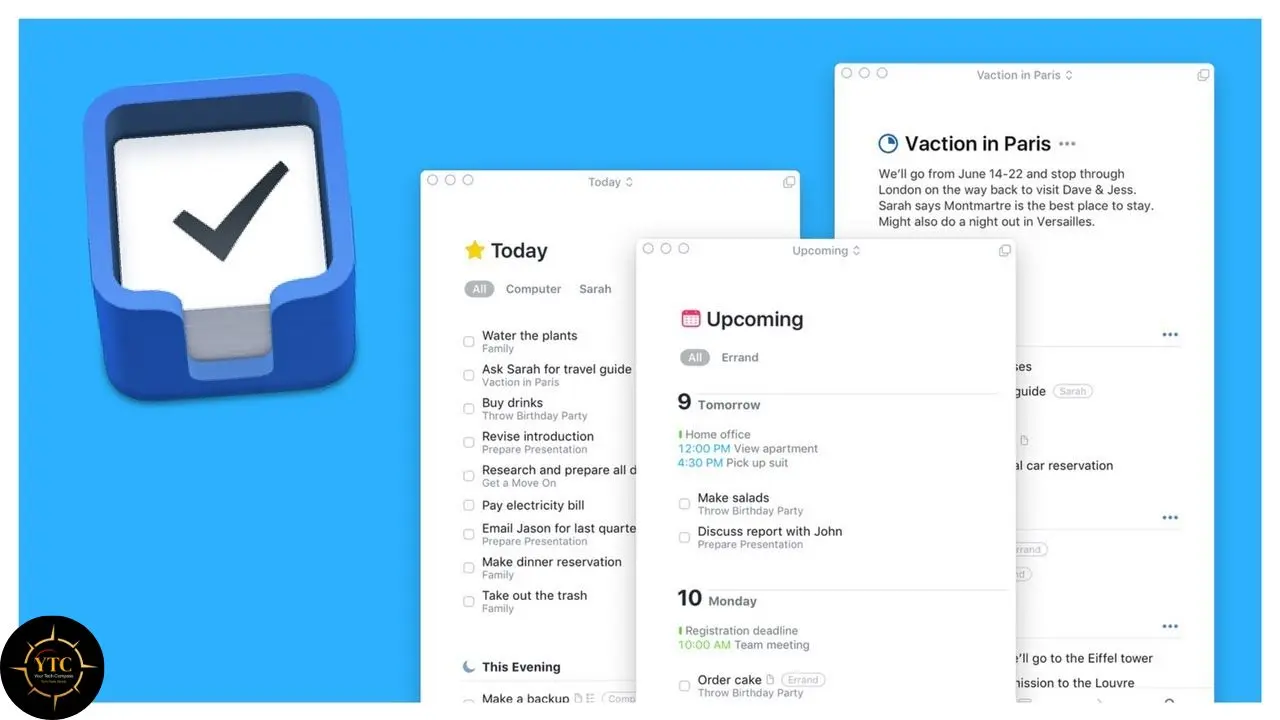
Things 3 follows a Getting Things Done (GTD)-inspired structure built around Areas, Projects, and Headings that help you segment your work logically without drowning in configuration options. Its interface draws a clear line between what needs your attention today, what’s coming up, and the looser “Anytime” and “Someday” buckets, a deliberate design choice that keeps the app feeling calm rather than comprehensive.
The honest thing to say about Things 3 in 2026 is that it has barely changed. It’s gotten polish updates, new icons, and better compatibility, but no major new features. Some users call that stability; others call it stagnation. Either way, it’s an accurate description of the product’s trajectory: Things 3 isn’t trying to keep pace with Todoist’s AI features, and that’s clearly a deliberate choice rather than an oversight. If you’re drawn to Things 3, you’re drawn to it precisely because it refuses to become more complicated.
Key Features at a Glance
Feature | Todoist | Things 3 |
Platforms | Windows, macOS, iOS, Android, Web, Linux | |
Pricing Model | Free tier + subscription | One-time purchase per device |
Natural Language Input | Advanced (full task detail parsing) | Basic (dates and reminders only) |
AI Features | Task Assist (breakdown), Ramble (voice-to-task) | None |
Collaboration | Yes | No |
Recurring Tasks | Handles complex patterns reliably | Simple patterns only; complex ones are frustrating |
Integrations | Calendar, email, Slack, Zapier, IFTTT | Apple ecosystem only |
Offline Support | Yes | Yes |
Visual Design | Functional, customizable | Minimalist, opinionated |
Task Organization and Workflow
Todoist’s Approach
Todoist organizes tasks into projects and supports subtasks, labels, filters, and priority levels, letting you build a workflow as elaborate as your actual work requires. The natural language input remains genuinely best-in-class: you can set due times, priorities, labels, projects, and even assign tasks to a collaborator, all from a single typed line, without ever touching a dropdown menu. This flexibility is especially valuable for users managing complex task hierarchies and cross-project dependencies, freelancers juggling multiple clients, project managers tracking dependent workstreams, or anyone whose to-do list genuinely needs more structure than a flat list can provide.
Things 3’s Approach
Things 3’s GTD-inspired structure segments work into Areas (broad life domains like “Health” or “Work”), Projects (specific outcomes within those areas), and Headings (sub-groupings within a project), creating a hierarchy that’s genuinely sophisticated without ever feeling like a database. Its interface emphasizes clarity above all else: today’s tasks are visually and conceptually separate from upcoming ones, sitting alongside the looser “Anytime” and “Someday” categories for things you’ll get to eventually.
This intentional limitation makes Things 3 feel less cluttered, but it’s a real trade-off, not just an aesthetic choice. Setting something like “every other Tuesday” in Things 3 can become an exercise in frustration, while Todoist parses it instantly. If your work genuinely requires complex recurring patterns or deep custom filtering, Things 3’s simplicity will eventually feel restrictive rather than liberating.
User Interface and Ease of Use
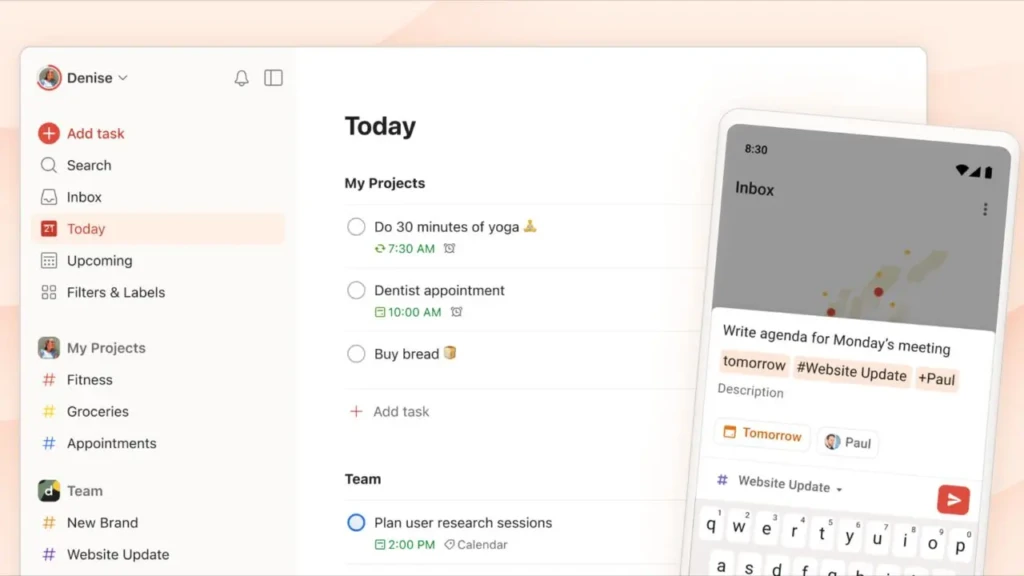
Todoist’s interface is functional and highly customizable: filters, labels, and project views are all readily accessible, but the sheer number of options can feel busy if you prefer minimalism. The genuine strength here is for heavy schedulers and experienced productivity users who want the ability to tailor exactly how their tasks are displayed and sorted.
Things 3 prioritizes a clean, calming interface with intuitive navigation and minimal visual noise, a design philosophy that reflects its focus on solo, individual productivity rather than collaborative or team scenarios. If a serene, uncluttered task view genuinely reduces friction in how you think through your day, Things 3 tends to feel natural from the very first session in a way that Todoist’s deeper feature set doesn’t always manage.
Scheduling, Reminders, and the AI Layer
Both apps support solid scheduling and reminders, but the gap has widened since Todoist’s 2025 AI investments. Todoist includes flexible reminders, advanced recurring tasks, and natural-language due dates, genuinely helpful for busy users managing precise timing across many commitments.
Task Assist adds another layer on top: ask it to break down a complex task, and it suggests concrete sub-steps, which is particularly useful for the kind of vague, intimidating to-do (“plan the product launch”) that tends to sit unstarted on a list for weeks. Ramble lets you talk through your task list out loud and have Todoist parse and organize what you say, which is useful for capturing tasks during a commute or a walk when typing isn’t practical.
Things 3 handles scheduling and reminders elegantly within its own interface, drawing a clear and genuinely useful distinction between a task’s “start date” and its “deadline,” a nuance that matters more than it sounds, since not every task you want to see today is actually due today. But it doesn’t match Todoist’s level of natural-language sophistication, and it has no AI assistance layer at all in 2026. Neither app functions as a true automation platform on its own, but Todoist’s integrations and filters make it considerably easier to pair with external automation tools like Zapier or IFTTT if you want your task manager to talk to the rest of your software stack.
Platform Support and Integrations
Your choice here may largely depend on which devices you actually own. Todoist delivers genuinely cross-platform access (native apps on Windows, macOS, iOS, Android, Linux, and the web), meaning you can pick up your tasks on literally any device you’re sitting in front of. Things 3 is exclusive to Apple hardware: iPhone, iPad, Mac, and Apple Watch.
Therefore, if you’re fully inside the Apple ecosystem and have no Windows or Android devices in your life, this exclusivity costs you nothing. And if you ever have to use a non-Apple device for work, it’s a hard deal-breaker, not a minor inconvenience.
On integrations, Todoist connects with Google and Outlook calendars, email clients, Slack, and automation platforms, including Zapier and IFTTT, a genuinely wide net that lets it sit at the center of a broader productivity stack. Things 3 focuses instead on deep internal usability and tight ecosystem consistency within Apple’s own apps, but it doesn’t offer the same breadth of third-party connections, and that’s clearly an intentional trade-off rather than a gap the developers are working to close.
Collaboration and Team Use
This is the most one-sided category in the entire comparison. Todoist supports project sharing, task assignments, and collaborative workflows that make it well-suited for team projects or shared personal goals, splitting a household’s chores, coordinating a small team’s sprint, or managing a shared family calendar of responsibilities.
Things 3 has no collaboration features whatsoever; it’s built specifically for solo task management, which suits focused individual planning well but rules it out completely the moment you need to share a list, assign a task to someone else, or collaborate on a project. If any part of your task management involves other people, this single factor may settle the decision before you weigh anything else.
Pricing: The Real 2026 Numbers
Todoist raised its Pro price in December 2025, moving from $4 to $5 per month on annual billing ($60/year, up from $48/year) and from $5 to $7 per month on monthly billing, a 25% annual increase that legacy subscribers who’d been paying since before 2022 were grandfathered out of, though they lose access to new features unless they upgrade to current pricing.
Todoist Pricing
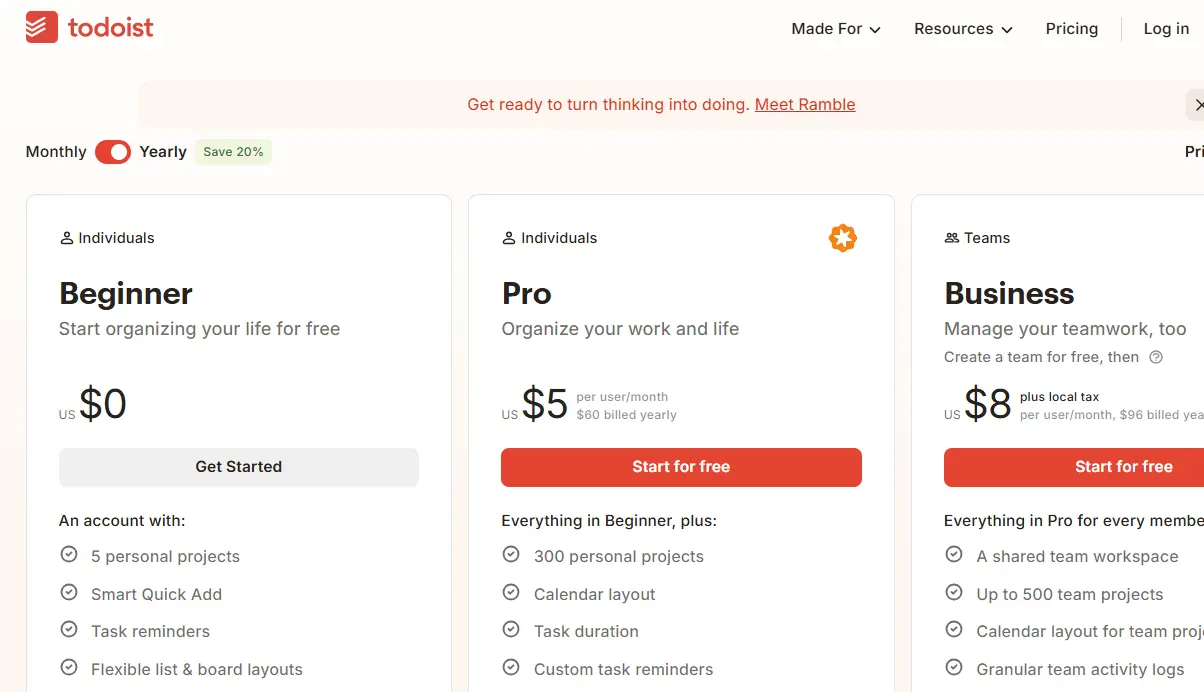
- Free: Capped at 5 projects with no reminders; workable for very simple personal task management, but restrictive enough that most working professionals outgrow it quickly.
- Pro: $5/month billed annually ($60/year) or $7/month billed monthly; unlocks 300 projects, 150 filters, calendar view, Task Assist AI, and unlimited activity history.
- Business: $8/user/month billed annually ($96/year per user) or $10/user/month billed monthly; adds team workspace, admin roles, and expanded team project limits
Things 3 Pricing
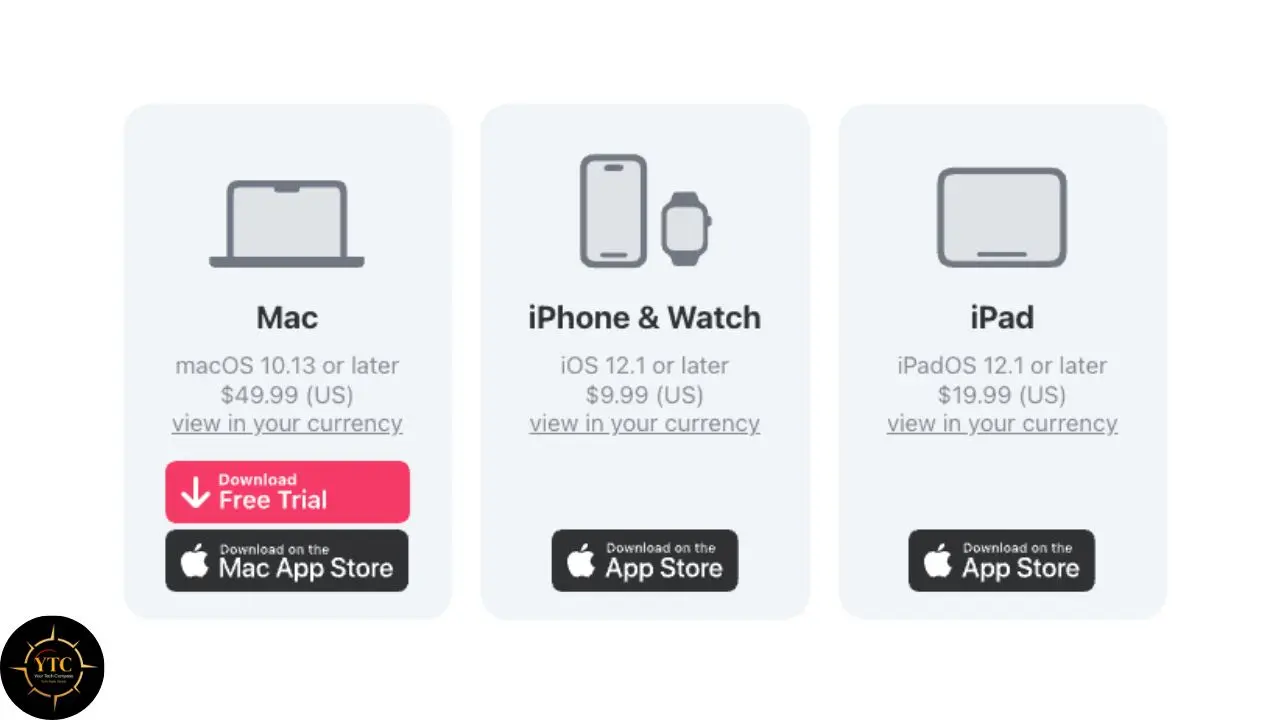
- No Free Tier: Things 3 requires a purchase to use at all, even for basic functionality.
- One-Time Purchase Per Platform: $50 for Mac, $10 for iPhone, $20 for iPad.
- Full Suite: $80 total for Mac + iPhone + iPad, or $60 if you skip the iPad app.
- No Subscription, Ever: You own what you’ve purchased indefinitely, with no recurring fees and no feature paywalls down the line.
The Five-Year Cost Comparison
Scenario | Todoist (Pro, Annual) | Things 3 (Full Suite) |
Year 1 | $60 | $80 (one-time) |
Year 3 | $180 | $80 |
Year 5 | $300 | $80 |
Ongoing After Year 5 | Continues at $60/year | $0 |
Over five years, a Todoist Pro subscription costs approximately $300 at current annual pricing, a real and genuinely ongoing financial commitment. Things 3’s one-time payment model means the full suite pays for itself against Todoist within roughly the first 16 months, and every year after that is pure savings. The one honest risk worth naming: there’s a non-trivial possibility that a future Things 4 release could require an additional purchase to access major new features, the way Things 2 to Things 3 did historically, so “pay once, own forever” applies to the current version, not necessarily to every future one.
Pros and Cons Breakdown
Todoist
The Pros:
- Genuinely cross-platform across every major operating system.
- Strong collaborative features for shared projects and teams.
- Best-in-class natural language input that handles complex task details in a single typed line.
- Task Assist and Ramble add real AI utility to the core experience.
- Flexible filters and views for power users with complex workflows.
The Cons:
- Subscription pricing increased by 25% in December 2025, with the meter continuing to run indefinitely.
- The interface can feel busy and over-equipped for users who genuinely just want a simple list.
- The free tier’s 5-project cap and the lack of reminders push most professionals to pay within weeks of starting.
Things 3
The Pros:
- Elegant, calming interface that requires almost no learning curve.
- One-time purchase with zero subscription, ever.
- Thoughtful start-date-versus-deadline distinction.
- Deep, native Apple ecosystem integration, including Apple Watch.
The Cons:
- Apple-only, with zero path to Windows, Android, or Linux.
- No collaboration or team features of any kind.
- Limited third-party integrations outside Apple’s own apps.
- No free tier at all, so you’re committing to a purchase before you’ve used the product.
- Complex recurring task patterns are noticeably harder to set up than in Todoist.
- No AI features as of 2026, while the competitive landscape moves toward AI-assisted planning.
Todoist vs Things 3 for Different Users

Your ideal choice depends heavily on how you actually work, not just on which app has more features on paper.
- Students and personal users often find that Things 3’s simplicity and visual calm genuinely reduce the feeling of overwhelm when managing personal tasks and long-term goals. There’s real value in a tool that doesn’t require any configuration before you can start using it.
- Professionals and teams working on shared projects need Todoist’s collaboration features, filters, and integrations. Things 3 simply isn’t an option once another person needs to see or be assigned a task.
- Cross-platform users (anyone with a mix of Windows, Android, and Apple devices in both their work and personal lives) have no real choice here. Todoist works everywhere; Things 3 works only inside Apple’s walled garden.
- Apple-only minimalists who want one clean, unified experience across iPhone, iPad, Mac, and Apple Watch, and who have no need to share tasks with anyone else, will likely find Things 3’s design philosophy and one-time pricing to be a more satisfying long-term fit.
This same surface-simplicity-versus-deep-power trade-off shows up elsewhere in productivity tooling; our Unclutter app review covers a similarly minimalist, Mac-native approach to a different productivity problem, and the budgeting space has its own version of this exact tension, explored in our Mint vs Rocket Money comparison.
FAQs
Todoist, without question. It allows project sharing, task assignments, and full collaborative workflows suitable for teams or shared personal projects. Things 3 has no collaboration features at all; it’s designed exclusively for solo task management, so if you need to share or assign tasks to others, Todoist is your only option.
Things 3 is entirely a one-time purchase with no subscription at any tier. The full suite costs $80 total ($50 for Mac, $10 for iPhone, and $20 for iPad) or $60 if you only need the Mac and iPhone apps. Once purchased, there are no recurring fees and no feature paywalls, though a future major version (a hypothetical Things 4) could require an additional purchase, based on how past major version transitions have worked.
In its 2025 updates, Todoist’s Task Assist suggests subtasks for complex items and rewrites vague tasks into actionable steps, while Ramble offers voice-to-task dictation for hands-free capture. Things 3 has no AI features as of 2026 and has shown no public indication that it’s planning to add any, consistent with its broader philosophy of deliberate simplicity over feature expansion.
No. Things 3 is exclusive to Apple hardware (macOS, iOS, iPadOS, and Apple Watch) with no Windows, Android, web, or Linux version available, and no public plans to change that. If you regularly use any non-Apple device, Todoist is the only viable option between these two, since it offers native apps for Windows, macOS, iOS, Android, Linux, and the web.
Todoist, clearly. It handles complex recurrence patterns, things like “every other Tuesday” or multi-condition repeating schedules, far more reliably than Things 3, which can turn similarly complex recurring patterns into a genuine exercise in frustration. For straightforward recurring tasks like “every Monday,” both apps work fine; the gap only appears once your scheduling needs get more elaborate.
Conclusion
Todoist and Things 3 are both excellent task managers, but they’re built for fundamentally different relationships between you and your to-do list. Todoist leans into flexibility, collaboration, AI-assisted planning, and genuinely universal cross-platform access, a strong choice for anyone juggling complex workflows, sharing projects with others, or moving between multiple operating systems throughout the day. Things 3, by contrast, commits fully to simplicity, structure, and a calm, unhurried experience, which feels especially well-suited to personal productivity for someone fully embedded in the Apple ecosystem who has no need to collaborate with anyone else inside the app itself.
The honest bottom line on cost: Todoist’s December 2025 price increase means a five-year subscription now runs roughly $300, while Things 3’s one-time $80 purchase pays for itself within about sixteen months and then costs nothing further, a genuinely significant difference if you’re committing to either tool for years rather than months. But price shouldn’t be the deciding factor on its own. If you need power, collaboration, and AI assistance and don’t mind an ongoing subscription, Todoist makes more sense. If you want a beautifully simple system that stays almost entirely out of your way and you’re fully inside Apple’s ecosystem, Things 3’s one-time cost and calm design are hard to beat.
At Your Tech Compass, we publish practical guides and honest tech reviews to help you make smarter decisions about the tools you use every day. For more comparisons like this one, head to YourTechCompass.com.