I want to start with the question that actually matters here, because most comparisons skip it: what are you trying to fix? Most people land on this comparison wanting one of three things: quick, frictionless corrections as they type; deep, structural feedback on a long manuscript; or AI assistance that goes beyond fixing sentences to actually help them write. Grammarly and ProWritingAid both do all three, but they weigh them so differently that picking the “better” tool without knowing your own answer first is close to meaningless. A novelist revising a 90,000-word manuscript and a marketer dashing off client emails are not shopping for the same thing, even though both might type “Grammarly vs ProWritingAid” into Google.
This comparison has also changed more in the past twelve months than in the previous five years combined. Both companies pushed major AI overhauls in late 2025 and early 2026; Grammarly’s parent company quietly rebranded, and the pricing structures both tools use today look meaningfully different from what older comparison articles still describe. I’ve rebuilt this comparison from the ground up based on the current 2026 reality: real prices, the actual AI agents each platform shipped, and an honest assessment of where each tool earns its subscription fee and where it doesn’t.
A note before we begin: every YTC score is earned, never negotiated. If you want to understand exactly how we evaluate apps & tools and how we handle affiliate relationships, our Review Methodology lays it all out.
What Grammarly Is and What Changed Recently
Grammarly launched in 2009 and has grown into one of the most widely used writing tools in the world, with more than 30 million people using it daily. It’s browser-first, with extensions for Chrome, Firefox, Safari, and Edge, plus integrations with Google Docs, Microsoft Word, Gmail, Slack, and effectively any text field across more than 500,000 supported apps. The core philosophy hasn’t changed since launch: real-time, low-friction suggestions that don’t interrupt your writing flow.
What has changed is the company itself. Grammarly’s parent company rebranded to Superhuman in October 2025, a significant move that repositions Grammarly as part of a broader AI productivity suite rather than a standalone grammar checker. That corporate shift coincided with Grammarly’s biggest product overhaul to date: the launch of eight specialized AI agents that go well beyond simple rewriting.
The Citation Finder agent pulls relevant evidence from credible sources and auto-formats citations in APA, MLA, or Chicago style. In addition, the AI Grader agent, also launched in 2026, evaluates papers against rubrics and provides structured feedback, a feature that’s uniquely valuable for students working on coursework, as it closely mirrors what an instructor’s marking process actually looks for.
Grammarly also launched an AI detector integrated directly with its plagiarism checker. It isn’t perfectly accurate, but it’s a genuinely useful signal for anyone checking whether AI-generated text reads as robotic before submitting it, a relevant concern now that so much first-draft writing originates from ChatGPT or Claude.
What ProWritingAid Is and What Changed Recently
ProWritingAid has been around since 2013 and has always positioned itself differently from Grammarly. While Grammarly targets anyone who writes, ProWritingAid targets people who write seriously: authors, journalists, academics, and content professionals working on long-form projects.
The difference shows up immediately in the feature set: where Grammarly gives you suggestions as you type, ProWritingAid gives you detailed analytical reports about your writing patterns. Think of it less as a spell-checker and more as a developmental editor in software form.
ProWritingAid’s 2026 evolution centers on its AI Sparks tool, which has expanded with new modes for generating sensory descriptions, dialogue variations, and emotional beats, making it function as a genuine creative partner rather than just an error-catcher. For fiction writers specifically, Manuscript Analysis and the Virtual Beta Reader feature deliver structural and pacing feedback that no other version of Grammarly offers. The Marketability Analysis report compares your manuscript against genre conventions and reader expectations, a feature category that no other grammar checker in this comparison offers at all.
ProWritingAid’s deeper integration story matters too: native Scrivener support remains a meaningful differentiator for novelists, since Grammarly has no equivalent integration with the writing software most fiction authors actually use to draft long manuscripts.
Key Features at a Glance
Feature | Grammarly | ProWritingAid |
Grammar & Spell Check | Excellent, real-time | Strong, plus detailed reports |
Style & Clarity | Fast, simple suggestions | Deep stylistic insights |
Report Types | Basic readability & tone | 25+ detailed writing reports |
AI Assistant | 8 specialized AI agents (2026) | AI Sparks: rewrites + creative generation |
Citation Support | Citation Finder agent (auto-formats APA/MLA/Chicago) | Academic report (formality, passive voice) |
Academic Grading | AI Grader agent (rubric-based feedback) | Not available |
Manuscript Tools | Not available | Manuscript Analysis, Virtual Beta Reader |
Plagiarism Checker | Included in Pro | Extra cost / higher tier |
Scrivener Integration | ❌ No | ✅ Yes |
Free Plan Word Limit | Unlimited checks | 500 words per check |
Lifetime Purchase | ❌ No | ✅ Yes ($399) |
Best For | Every day, cross-platform writing | Long-form, creative, and academic writing |
Accuracy and Writing Insight: How They Actually Differ
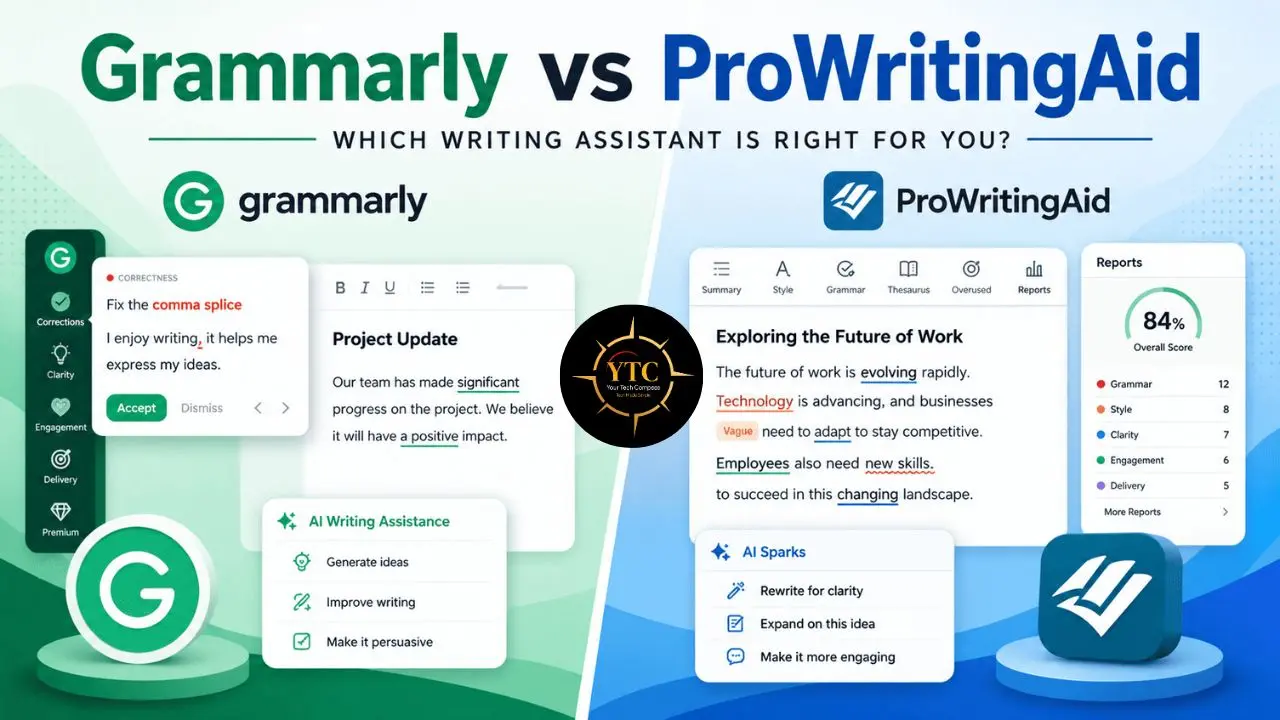
Both tools reliably catch grammar and spelling issues; that baseline competency is no longer a meaningful differentiator between them. They diverge in how they handle writing improvement, which is a fundamentally different problem from writing correction.
Grammarly focuses on clean, polished sentence structure and tone, with simple explanations and rewrite suggestions anyone can apply in seconds. ProWritingAid delivers deeper stylistic understanding through comprehensive reports that identify patterns, pacing problems, and stylistic redundancies, which are particularly valuable for long or structurally complex documents where a single sentence-level suggestion can’t capture what’s actually wrong.
For citation-heavy academic and research writing specifically, Grammarly holds a slight edge in citation and reference accuracy, largely due to the 2026 Citation Finder agent. For pacing, voice consistency, and narrative structure in fiction, ProWritingAid’s academic and creative reports surface issues that Grammarly’s real-time suggestion model simply isn’t designed to catch; it’s optimized for the sentence in front of you, not the chapter you wrote three days ago.
In practical terms, this means Grammarly helps you fix your writing quickly, while ProWritingAid helps you understand and improve your writing habits over time. Both AI-assistance layers have also gotten noticeably better at catching the robotic, repetitive patterns that AI-generated text tends to produce, which is relevant if you’re editing a ChatGPT or Claude first draft rather than writing from scratch.
User Experience and Interface
Grammarly is designed for immediacy, with an intuitive interface that works across virtually every platform you write on and requires essentially no learning curve. It’s streamlined for users who want suggestions as they type without digging through menus or settings panels.
ProWritingAid offers a considerably more feature-rich interface, with toolbars, detailed reports, and multiple analytical views of your document. This depth is genuinely valuable once you understand how to use it, but it can feel dense at first, particularly for users who only want quick corrections and have no interest in a 25-report breakdown of their sentence variety.
Integrations and Workflow
Both tools support browser extensions and major web editors, but their integration philosophies point in different directions. Grammarly offers broader integration with email clients, video conferencing apps, and team collaboration environments, reflecting its everyday, cross-platform design intent. ProWritingAid integrates deeply with desktop writing tools, including native Scrivener support and offline editors, which is particularly attractive to authors and academic writers who build large, structured documents over months rather than dashing off a quick email.
If you’re evaluating broader automation across your writing and content workflow (connecting either tool to your publishing pipeline), our Otter AI vs Notta comparison covers a similar surface-level convenience-versus-deep-analytical-power trade-off in the transcription space, which mirrors the dynamic at play here.
Pricing: The Real 2026 Numbers
This is where the original version of this comparison fell short: it described pricing as simply “moderate” versus “slightly lower.” Here are the actual figures.
Grammarly Pricing
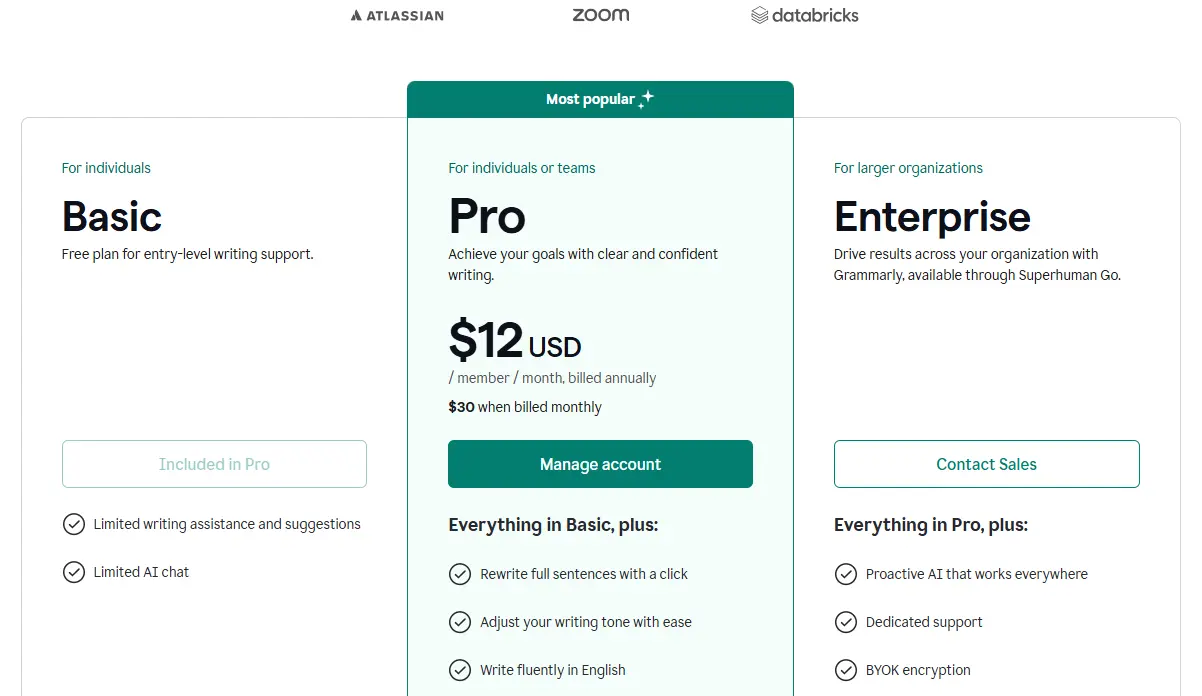
- Free: Unlimited basic grammar, spelling, and punctuation checks; no word limit.
- Pro: $12/month billed annually (or $30/month billed monthly); unlocks full-sentence rewrites, tone detection, clarity suggestions, vocabulary enhancement, and the eight specialized AI agents.
- Business/Enterprise: $15/member/month, billed annually; includes centralized billing, brand voice guidelines, style guides, and team analytics.
ProWritingAid Pricing
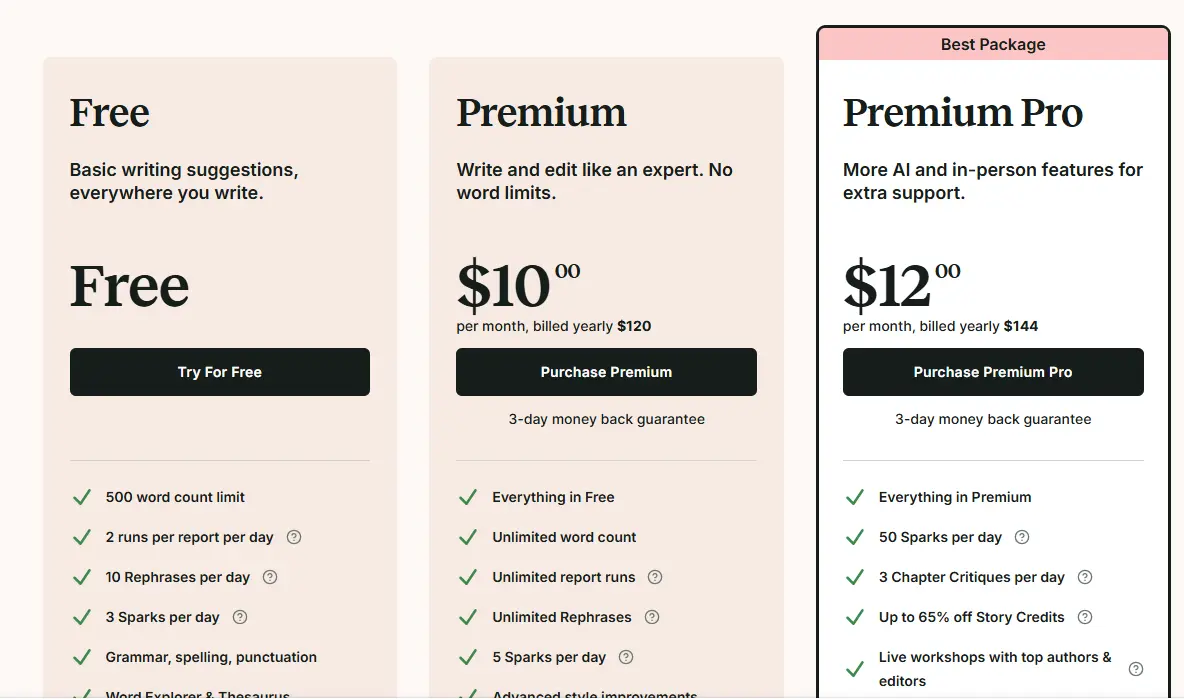
- Free: Limited to 500 words per check; sufficient for testing, not for serious use.
- Premium: $120/year (approximately $10/month equivalent).
- Premium Pro: $144/year; higher AI usage limits, relevant if you’re using AI Sparks heavily for fiction revision.
- Lifetime: $399 one-time payment; breaks even against the annual subscription at roughly year 3.3.
The Honest Pricing Comparison
Plan Type | Grammarly | ProWritingAid |
Free Tier | Unlimited checks, basic features | 500 words per check |
Standard Annual | $144/year ($12/month) | $120/year |
Higher AI Tier | Included in Pro | $144/year (Premium Pro) |
Lifetime Option | ❌ Not available | ✅ $399 |
Plagiarism Checker | Included in Pro | Extra cost |
The free plan comparison is the clearest gap in this entire pricing picture: Grammarly’s free plan offers no word limit, while ProWritingAid caps free checks at 500 words, meaning you’ll hit ProWritingAid’s free ceiling almost immediately on any document longer than a couple of paragraphs. At the paid tier, the annual prices are close enough that the decision shouldn’t be made on cost alone, but ProWritingAid’s lifetime option is a genuine differentiator for committed long-term users. Paying once and never again is a compelling offer that Grammarly simply doesn’t match at any tier.
For a mixed-mode writer who needs both everyday correction and deep manuscript feedback, running both tools costs roughly $22/month combined, less than the cost of a single professional developmental editing pass, which is worth keeping in perspective if you’re agonizing over which single tool to commit to.
Which Tool Is Right for You?
Your choice ultimately comes down to how you write, not just how often you write. Therefore:
Choose Grammarly If:
You write emails, web content, business reports, or any short-to-medium text where clarity and speed matter more than structural depth. It’s also the stronger choice if you need citation support for academic or research writing.
The 2026 Citation Finder and AI Grader agents are genuinely useful additions for coursework and structured academic deliverables. Teams maintaining a consistent brand voice across multiple writers will also find Grammarly’s broader integration footprint and team features more immediately useful.
Choose ProWritingAid If:
You’re working on a novel, a research thesis, a long-form blog series, or any project where understanding your own writing patterns over time matters more than instant correction. The combination of Manuscript Analysis, Virtual Beta Reader, native Scrivener integration, and the lifetime pricing option makes it a stronger long-term investment for serious creative and academic writers specifically.
Consider Using Both If:
Your work genuinely spans both modes, quick daily correspondence alongside long-form creative or academic projects. The combined cost is modest relative to professional editing rates, though be aware that running both simultaneously on the same document can create confusing, occasionally conflicting suggestions.
Honest Limitations of Each Tool

Grammarly’s Limitations
Depth of analysis is genuinely limited compared to ProWritingAid, with fewer report types and less granular style feedback for anyone serious about craft rather than correctness. There’s no Scrivener integration, a meaningful gap for fiction and long-form writers who draft within that ecosystem.
In addition, there’s no lifetime purchase option, so you’re committed to an ongoing subscription. And while the free plan is generous in terms of word count, the free AI prompt allowance is capped well below what a heavy daily user would need.
ProWritingAid’s Limitations
The sheer volume of reports and settings genuinely overwhelms new users in the first week or two. This isn’t a tool you can pick up and use intuitively the way Grammarly is.
The plagiarism checker requires an additional purchase or a higher tier, rather than being bundled as it is with Grammarly. And the free plan’s 500-word cap means you can’t meaningfully evaluate the tool on anything beyond a short excerpt before deciding whether to subscribe.
FAQs
Both are reliably accurate in core grammar, spelling, and punctuation; that baseline is no longer a meaningful differentiator. Grammarly holds a slight edge in citation accuracy for academic references, particularly with its 2026 Citation Finder agent. ProWritingAid’s strength isn’t raw grammatical accuracy but the depth of its stylistic and structural analysis across longer documents.
ProWritingAid, decisively. Its Manuscript Analysis, Virtual Beta Reader, Marketability Analysis report, and native Scrivener integration are purpose-built for long-form creative writing in ways that Grammarly doesn’t address. Grammarly is optimized for sentence-level correction across everyday writing, not chapter-level pacing and structural feedback.
Grammarly’s free plan is more generous for general use; it offers unlimited basic grammar and spelling checks with no word limit. ProWritingAid’s free plan caps checks at 500 words, which is restrictive for anything beyond testing the tool on a short sample. If you want to meaningfully evaluate either tool before paying, Grammarly’s free tier gives you more room to do so.
For committed long-term users, yes. The $399 one-time payment breaks even against the annual subscription cost at roughly year 3.3, after which it’s effectively free. This is a genuine differentiator Grammarly doesn’t offer at any tier, since Grammarly is subscription-only indefinitely. If you’re confident you’ll use ProWritingAid for several years, the lifetime option is the better long-term value.
Yes, and many serious writers do exactly that. Using both can improve overall accuracy by catching different categories of issues, though it can occasionally create confusion when both tools suggest conflicting edits to the same passage. For a mixed-mode writer handling both everyday correspondence and long-form projects, the combined monthly cost is modest relative to what a single professional editing pass would cost.
Conclusion
Grammarly and ProWritingAid are both excellent tools, but they’re solving genuinely different problems, and the 2026 AI overhauls on both sides have sharpened rather than blurred that distinction. Grammarly delivers fast, intuitive corrections with the broadest cross-platform integration available, now meaningfully extended by specialized AI agents for citations and academic grading, making it the stronger everyday choice for professionals, students, and anyone writing across dozens of different apps and contexts. ProWritingAid, meanwhile, offers unmatched depth for writers serious about refining craft, structure, and pacing in long-form work, with its Manuscript Analysis and Scrivener integration addressing problems Grammarly was never built to solve.
Put simply: Grammarly helps you write well right now, while ProWritingAid helps you write better over the course of months and years. Neither claim is a marketing exaggeration; it’s an accurate description of what each tool is actually optimized to do. If you’re still genuinely torn after reading this, both offer free access, so test them directly on your own writing before committing to a subscription. The 500-word cap on ProWritingAid’s free tier will quickly tell you whether the depth of its feedback is something you’ll actually use.
There’s a lot more to explore in the writing and productivity tool space, from AI-assisted drafting tools to the broader automation stack that surrounds your actual writing process. Head to YourTechCompass.com for honest, detail-driven comparisons that help you choose the tools that genuinely fit how you work.