I want to start with an honest confession. I spent the first week using Make, convinced I had made a mistake switching from Zapier. The interface felt unfamiliar, the terminology was different, and one of my first scenarios broke in a way I couldn’t immediately diagnose. Then something clicked. I figured out how routers work. And I built my first multi-branch workflow, the kind of conditional, intelligent automation that Zapier simply can’t do, and I realized I hadn’t made a mistake at all. I had just been underestimating what no-code automation could actually do. Make didn’t have a learning curve problem. I had a Zapier-shaped expectation problem.
This review is for you if you’re a freelancer drowning in repetitive tasks, a marketer manually copying data between tools, an agency owner managing client workflows at scale, or a business owner who has heard about automation but hasn’t yet found a tool that handles the complexity of real-world operations. I’ve tested Make across real workflows, researched its pricing structure in depth, and compared it honestly against its most important competitors. You’ll get a complete, no-hype picture of what Make does, what it costs, where it falls short, and whether it’s the right tool for your specific situation. Let’s get into it.
A note before we begin: every YTC score is earned, never negotiated. If you want to understand exactly how we evaluate apps & tools and how we handle affiliate relationships, our Review Methodology lays it all out.
What Is Make and Why Should You Care?
Make is a visual, no-code automation platform that connects your apps and automates the workflows between them, without writing a single line of code. Make (formerly Integromat) is a cloud-based, visual automation and integration platform that lets you connect over 3,000 apps and APIs and build multi-step workflows, called scenarios, without writing code. Consequently, if you’ve ever found yourself copying data from one tool to another, sending the same type of email every week, or manually triggering processes that could run on their own, Make is built to eliminate all of that.
The company originated in Prague, Czech Republic, as Integromat, a bootstrapped startup focused on giving non-developers powerful integration capabilities traditionally reserved for engineers. In 2020, Integromat was acquired by Celonis, the process mining and execution management company, and in 2022, the platform was rebranded as Make.
The name changed. The core idea and the serious technical depth behind it did not. Where Make sits in the automation landscape is important context for you.
Zapier is simpler and more beginner-friendly, but it builds automations in a linear, step-by-step model that quickly runs out of flexibility. n8n is more powerful for technical users but requires self-hosting to access the free tier. Make sits precisely between the two: more powerful and more visual than Zapier, more accessible than n8n, and significantly more affordable than either at comparable capabilities.
In 2026, as AI-native workflows become standard and OpenAI, Claude, and other AI tools become active participants in automation sequences, Make’s native AI integrations place it in a particularly strong position. 75% of new applications in 2026 will be built with low-code or no-code tools, according to Gartner, underscoring how mainstream the platform’s underlying proposition has become.
For a deeper look at the broader no-code tool landscape, our Apps and Tools section details the most relevant options.
How Make Works: The Visual Scenario Builder

This is where Make earns its reputation, and where it’s most different from anything you’ve used before. Let me walk you through the core concepts in plain language, because understanding the architecture is what separates people who get immediate value from Make from people who quit after the first session.
The Canvas
When you open Make, you’re presented with a visual canvas (a blank workspace where you build your automation by dragging, dropping, and connecting modules). Unlike Zapier’s list-based, text-heavy interface, Make’s canvas lets you see your entire workflow at once.
You can literally look at a scenario and understand what it does before reading a single label. Consequently, for complex workflows with multiple branches and conditions, Make’s visual approach is dramatically clearer than any text-based alternative.
Triggers, Modules, and the Building Blocks
Three module types drive everything in Make. Action Modules perform tasks, such as sending emails and creating documents. Search Modules queries data, finds contacts, and looks up records.
Trigger Modules watch for events, such as a new order being placed or a form being submitted, and kick off your scenario when those events occur. Furthermore, every scenario starts with exactly one trigger and can then chain as many modules as your workflow requires.
Routers, Filters, and Conditional Logic
This is where Make goes far beyond what Zapier can do. Routers branch workflows, filters add conditions, and iterators or aggregators handle arrays. Error handlers define what happens when steps fail, preventing workflows from stalling.
Moreover, iterators loop through lists of items (processing each row of a spreadsheet or each item in an order), while aggregators collect and combine the results into a single output. Together, these tools enable you to build genuinely intelligent, conditional workflows that respond differently to different inputs.
A Real-World Example
Here’s a practical scenario that illustrates how Make works end-to-end.
A new lead fills out a Typeform → Make checks whether the lead came from paid or organic traffic (filter) → if paid, it adds the lead to HubSpot CRM, sends a personalized welcome email via Gmail, and notifies the sales team in Slack → if organic, it routes to a different pipeline and triggers a different email sequence. Additionally, if the HubSpot module fails for any reason, Make routes the data to an error handler that logs the issue in a Google Sheet and sends an ops alert.
That entire workflow (conditional, multi-branch, error-handled) is the kind of social media automation scenario where a content manager loops through an Airtable, routes to the right social network based on filters, and updates the row with the live link. Zapier’s linear model simply cannot replicate this.
Make’s Key Features: What Makes It Worth Using
Let me walk you through the features that actually drive value in Make, with real-world implications for each.
3,000+ App Integrations
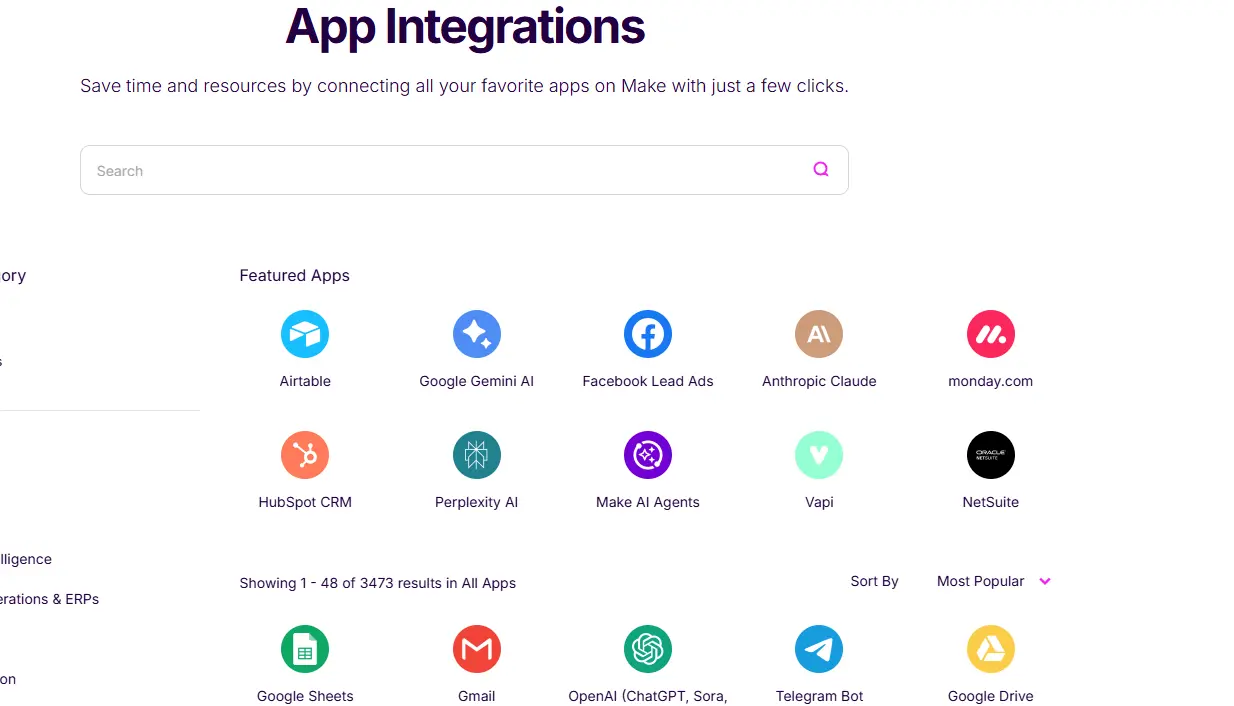
Make offers over 3,000 pre-built integrations, covering Google Workspace, Slack, Notion, Airtable, HubSpot, Shopify, Stripe, Typeform, OpenAI, Anthropic Claude, and hundreds more. Therefore, for apps not in the library, Make’s custom HTTP and webhook modules let you connect to any API, meaning the number of integrations is effectively unlimited.
However, Make offers fewer integrations than Zapier, but often provides deeper, more granular actions and triggers within each supported app. Consequently, even where both platforms cover the same tool, Make typically gives you more control over what you can do with it.
AI-Powered Automation
This is the frontier that defines Make’s 2026 positioning. Make has native integrations with OpenAI and Anthropic Claude, so you can add an AI module directly into any scenario to classify data, generate content, summarize documents, route decisions, or respond to inputs as part of an automated workflow. Furthermore, Make’s built-in AI Scenario Builder assistant lets you describe what you want in plain English, and Make drafts the scenario structure for you, dramatically lowering the barrier to entry for new workflows.
Custom HTTP and Webhook Modules
If an app isn’t in Make’s library, the HTTP module lets you make direct API calls (GET, POST, PUT, DELETE) from inside your scenario. Additionally, webhooks let external systems trigger your scenarios instantly, meaning any app that can send a webhook can kick off a Make automation in real time, without polling or scheduling delays. This is the feature that makes Make’s integration count effectively unlimited.
Data Transformation Tools
Make has a full library of built-in functions for manipulating data as it flows through your scenarios: string manipulation, date formatting, number calculations, and array operations. Moreover, you can apply these functions inline, inside module fields, without needing a separate coding step. This means you can take data from one app, reformat it exactly as the next app needs it, and pass it along (all without a developer).
Error Handling and Execution Logs
Make combines advanced flow control, rich data transformation, HTTP/webhooks, and optional code steps with enterprise-grade security and governance. Error handlers define what happens when steps fail: retry the operation, skip to the next item, log the error, or route to an entirely different path. Furthermore, Make’s execution history shows a full log of every scenario run, including the data passed through, what succeeded, and what failed.
Credits: The Pricing Unit You Need to Understand
Operations were renamed to credits in August 2025 at a 1:1 conversion rate. AI modules may consume multiple credits per action. Every module execution consumes one credit. A 10-module scenario, run 1,000 times per month, consumes 10,000 credits. Consequently, this is the most important pricing concept to understand before choosing a plan.
Make Pricing: What You’ll Actually Pay
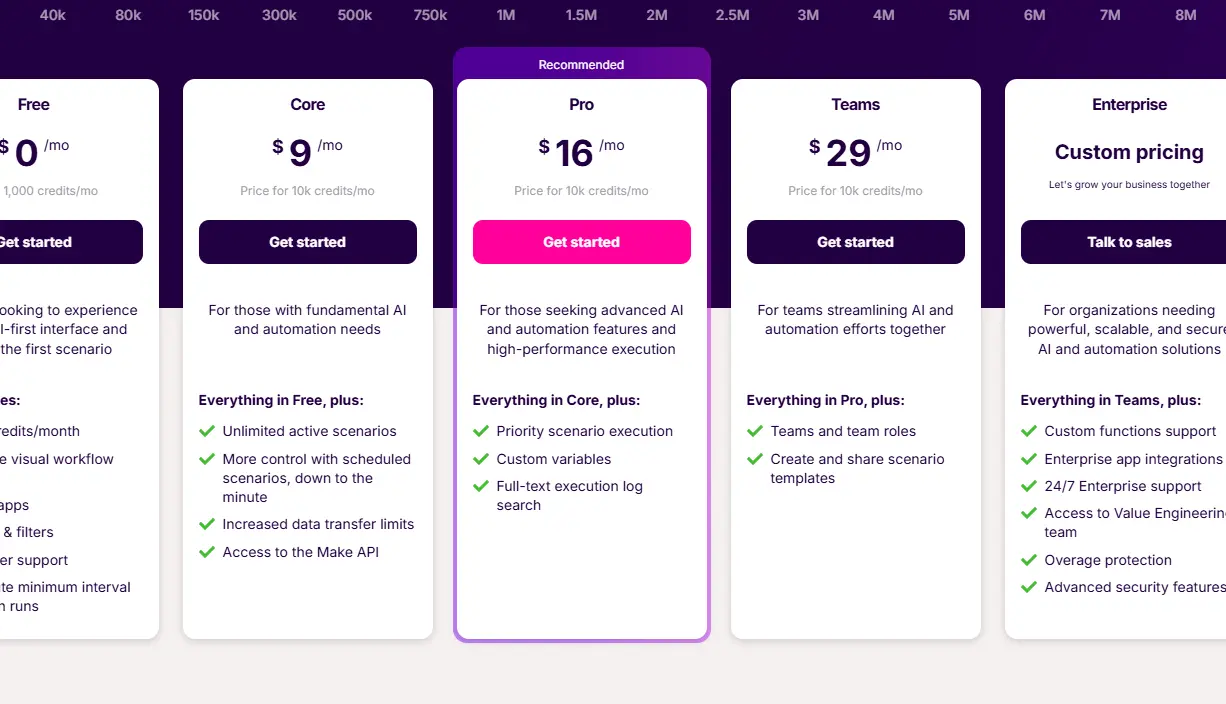
Make offers a free plan with up to 1,000 credits per month and basic functionality. Paid plans are priced by tier: Core starts at $9/month for 10,000 credits, Pro at $16/month for 10,000 credits, and Teams at $29/month for 10,000 credits. Enterprise plans are custom-priced and include advanced security, governance, on-prem agents, and 24/7 support.
Here’s what each tier actually means for you in practice.
- The free plan gives you 1,000 credits per month and two active scenarios. Make’s free plan is more generous and easier to use than Zapier’s free tier, which limits you to 100 tasks. Think of the free plan as a genuine evaluation tool, not a sustainable working tier for real business workflows.
- Core ($9/month) unlocks unlimited active scenarios and 10,000 credits (the minimum viable tier for anyone using Make seriously). For a freelancer running five to ten automations with a few hundred executions each per month, Core is typically sufficient.
- Pro ($16/month) adds full execution history, priority support, and access to advanced features, including custom variables and advanced scenario settings. If you’re running mission-critical workflows where debugging visibility matters, Pro is the right tier.
- Teams ($29/month) add multiple users, role-based permissions, and shared scenario libraries, essential for agencies or businesses where more than one person builds or manages automations.
The Credits Math You Need to Do
Before choosing a plan, estimate your monthly credit consumption. A 15-step scenario, run 1,000 times, costs 15,000 operations, not 1,000. That’s the calculation most new users miss. Take your most complex scenario, count the modules, and multiply by the monthly run frequency. Add up across all active scenarios. Budget conservatively until you’ve established actual consumption patterns.
Make vs. Zapier Pricing at a Glance
Plan | Make | Zapier Equivalent | Make Advantage |
Free | 1,000 credits/month | 100 tasks/month | 10x more free usage |
Entry Paid | $9/month (10,000 credits) | $19.99/month (750 tasks) | 13x more tasks at half the price |
Mid Tier | $16/month (10,000 credits) | $49/month (2,000 tasks) | 5x more tasks at 1/3 the price |
Team | $29/month (10,000 credits) | $69/month (2,000 tasks) | Significant cost advantage |
Make vs Zapier: The Honest Head-to-Head
This is the comparison you’re already thinking about. Let me give you the direct answer.
The core of the Make vs. Zapier debate comes down to their approach. Zapier offers a simple, linear, step-by-step builder ideal for beginners and quick automations. Make provides a powerful, visual, drag-and-drop canvas that excels at handling complex, multi-step workflows.
Ease of Use
Zapier wins for pure beginners. If you’ve never built an automation and need something running in 10 minutes between two popular apps, Zapier’s guided setup is faster. Make’s visual builder requires time for orientation. However, once you’ve invested that orientation time, which most serious users report as a few hours to a few days, Make becomes faster to work in for anything complex.
Power and Flexibility
Make wins, and it’s not close. For intricate workflows requiring advanced logic, branching paths via routers, looping via iterators, and detailed data manipulation, Make is the more robust and flexible platform. Zapier’s linear model cannot replicate the conditional branching that Make offers.
App Integrations
Zapier is the undisputed leader in quantity, boasting over 7,000 app integrations. Make offers fewer (around 2,400), but they often provide deeper, more granular actions and triggers within each supported app. Zapier wins on breadth; Make wins on depth. Furthermore, Make’s custom HTTP module closes most of the gap for any app with a public API.
Error Handling
Make wins clearly. Dedicated error routes, auto-retry logic, and detailed execution logs give you far more control than Zapier’s basic error notifications. And, for production workflows where data integrity matters, this difference is significant.
You can read the full Zapier review on YourTechCompass for a more comprehensive standalone assessment. Additionally, if you’re weighing the developer-grade option, our n8n review covers where self-hosted automation makes more sense.
Make vs. Zapier Head-to-Head
Criteria | Make | Zapier | Winner |
Ease of Use for Beginners | Moderate learning curve | Simple, guided setup | Zapier |
Visual Workflow Builder | ✅ Canvas-based, drag-and-drop | ❌ Linear, list-based | Make |
Conditional Branching | ✅ Routers, filters, iterators | ❌ Limited | Make |
App Integrations | 2,400+ (deeper actions) | 7,000+ (broader library) | Zapier (qty) / Make (depth) |
Pricing Value | $9/month (10,000 credits) | $19.99/month (750 tasks) | Make |
Error Handling | ✅ Dedicated routes + full logs | ⚠️ Basic notifications | Make |
AI Automation | ✅ Native OpenAI + Claude | ✅ AI features | Make (more mature) |
Free Plan Generosity | 1,000 credits, 2 scenarios | 100 tasks | Make |
Best For | Complex, multi-branch workflows | Simple, quick automations | Depends on use case |
Real-World Use Cases: What You Can Actually Automate
Here’s where Make stops being abstract and starts being immediately useful.
Freelancers and Solopreneurs

You’re running a one-person business, which means every hour spent on admin is an hour not spent on client work. Make can auto-send onboarding email sequences as soon as a new contract is signed. It can sync every new Stripe invoice to a Google Sheets tracker without you having to touch a spreadsheet.
Furthermore, it can automatically post new blog articles to LinkedIn, Twitter, and Instagram simultaneously, with captions reformatted per platform using Make’s data transformation tools. The time to payback for three or four well-built scenarios is typically measured in weeks, not months.
Marketing Teams
Marketing has more data flowing across more tools than almost any other function, and most of it is still moved manually. Make changes that are entirely.
You can build a scenario that captures leads from Facebook and Google Ads, enriches them with company data, pushes qualified leads to HubSpot with the right pipeline stage and tags, and triggers a personalized email sequence, all without a human touching the data. Additionally, weekly performance reports from Google Analytics can be automatically compiled and posted to a Slack channel every Monday morning, with no reporting task on anyone’s to-do list.
E-Commerce Businesses
Shopify-based businesses have a particularly dense set of repetitive workflows that Make handles well. Auto-tag and segment new customers by their first-purchase category.
Automatically create a Zendesk support ticket when a customer leaves a one- or two-star review. Moreover, trigger a personalized win-back email sequence in Klaviyo when a customer hasn’t purchased in 90 days, using real-time order data rather than a scheduled batch export.
Operations and Project Management
Convert completed Typeform client intake submissions into fully populated Notion database entries, complete with assigned owner, due date, and linked project folder. Automatically escalate overdue Asana tasks via a direct Slack message to the task owner and their manager. Furthermore, generate and deliver monthly client invoices using a Google Sheets template, pulling the right line items from a project tracker, without anyone manually building a PDF.
AI-Powered Workflows
This is the category that defines Make’s 2026 positioning. Route every inbound customer support email through Claude for intent and sentiment classification, then tag it in your CRM with the right category and urgency level before a human ever reads it.
Auto-generate social captions for new blog posts with GPT, adapt them to each platform’s length and tone, and stage them in your scheduling tool for review. Consequently, Make becomes not just an automation layer but an AI orchestration layer, connecting intelligent models to the business data and tools where their outputs actually matter.
For a broader view of AI productivity tools that complement Make’s capabilities, our best AI productivity apps guide is worth your time.
Make’s Limitations: The Honest Assessment

No credible review skips this section.
The Learning Curve Is Real
Make’s limitations include a steep learning curve, pricing that can be confusing for new users, and reviews noting mixed support and unclear error handling. Plan for a genuine orientation period.
Most users report needing a few hours of experimentation and tutorial work before they can build confidently. The payback is real, but the upfront investment is also real.
Credits Burn Faster Than You Expect in Complex Scenarios
AI modules may consume multiple credits per action, meaning a scenario that processes 100 items through an AI classification module can consume significantly more than 100 credits per run. Budget conservatively until you’ve established your actual consumption patterns.
Debugging Isn’t Always Obvious
When a scenario fails mid-execution, execution logs provide visibility, but tracing the exact failure point in a complex multi-branch scenario still takes time. Some connections don’t work properly, and maintenance could be better (a fair criticism from long-term users).
n8n Is Cheaper at Scale for Developer Teams
n8n charges per workflow execution. That same 15-step scenario, run 1,000 times, costs 1,000 executions in n8n versus 15,000 credits in Make.
Therefore, for developer teams pursuing serious automation, the pricing model alone can justify the n8n learning curve. Make is the right call for most non-developer use cases, but it’s an honest limitation worth naming.
Who Should Use Make and Who Shouldn’t

Use Make if you’re a freelancer, marketer, or operator who wants to automate complex, multi-step workflows without writing code. It’s for you if you’ve hit the ceiling of what Zapier can do, specifically if you need conditional logic, data transformation, or multi-branch flows. Furthermore, it’s for agencies that need to build and manage automations for multiple clients under a single account, and for anyone who wants to build AI-powered workflows using GPT or Claude as active participants.
Consider alternatives if you’re a complete beginner and need a single automation between two popular apps. Zapier will get you there faster.
If your team consists of developers building high-frequency, complex automations where per-execution pricing matters, n8n is the best free alternative if you’re comfortable with self-hosting. It offers unlimited workflows and operations on the free tier, but requires you to deploy it yourself on a server. Additionally, if you need integrations with very niche tools not covered by Make’s library, Zapier’s breadth of 7,000+ integrations may justify its premium price.
FAQs
Make is used to automate repetitive workflows between apps, without writing code. You build scenarios that connect triggers (a new form submission, a new order, a scheduled time) to actions (sending an email, updating a spreadsheet, running an AI classification). It’s used by freelancers, marketing teams, agencies, e-commerce businesses, and operations teams to eliminate manual data transfer, automate notifications, and build AI-powered workflows that connect tools that don’t natively integrate.
For complex workflows, yes. Make App is more powerful, more flexible, and significantly cheaper per operation. Its visual canvas, conditional routing, iterators, and native AI integrations go well beyond Zapier’s linear model. For simple, quick automations between two popular apps, Zapier is faster to get started with. If you’ve outgrown Zapier or know you’ll need conditional logic and multi-branch flows, Make is the upgrade worth making.
Yes. Make has a free plan that includes 1,000 credits per month and two active scenarios. That’s 10x the free usage compared to Zapier’s 100-task free tier. However, the free plan is more of an evaluation tool than a sustainable tier for working. Most users running real workflows will need the Core plan at $9/month, which includes 10,000 credits and unlimited active scenarios.
Yes. Make is a no-code platform designed for non-developers. The visual scenario builder uses drag-and-drop modules, and Make’s AI Scenario Builder lets you describe what you want in plain English before generating a scenario draft. That said, Make has a steeper learning curve than Zapier. You don’t need to code, but you do need to invest a few hours in understanding how triggers, modules, routers, and filters work before building with confidence.
A credit (formerly called an “operation” before August 2025) is consumed each time a module executes inside a scenario. Every action, search, or trigger module that runs counts as one credit. A scenario with 10 modules that runs 500 times per month consumes 5,000 credits. Consequently, credit consumption scales with both the complexity of your scenarios and the frequency of their execution, which is why estimating monthly usage before choosing a plan matters.
Yes. Make has native integrations with OpenAI (including GPT-4o) and Anthropic Claude. You can add an AI module directly into any scenario to generate content, classify data, summarize documents, make routing decisions, or respond to inputs as part of an automated workflow. Additionally, Make’s built-in AI Scenario Builder uses AI to help you draft scenario structures from a plain-English description, making it easier to quickly get complex automations up and running.
Conclusion

Make is the automation platform that rewards investment. The first few hours with it are genuinely harder than the first few hours with Zapier; the canvas is unfamiliar, the terminology is different, and the depth of what’s possible can feel overwhelming before it feels empowering. But that investment compounds. Every hour you spend learning Make’s routing logic, data transformation tools, and error handling architecture translates directly into automations you can build that competitors simply can’t replicate. Furthermore, at $9 per month for 10,000 credits and unlimited active scenarios, Make delivers more automation power per dollar than any comparable platform in its category, and the pricing advantage over Zapier at every tier is real, consistent, and significant enough to affect the total cost calculation for any serious user.
The limitations are real, too, for instance, the learning curve, credit consumption in complex scenarios, and debugging friction, and I haven’t soft-pedaled any of them. But here’s the honest bottom line: if you’re doing anything beyond simple two-app automations, Make is the tool you graduate to. It’s not just more powerful than Zapier. It’s a different category of tool entirely, one that, once you understand it, makes going back feel like being asked to build with one hand tied behind your back. Additionally, with AI-native workflows becoming standard practice in 2026, Make’s native OpenAI and Claude integrations mean it’s not just keeping pace with where automation is going; it’s one of the platforms helping define it.
Curious about what else the tech world has to offer? YourTechCompass.com is your guide to making smarter tech decisions, one honest review at a time.