If you’re spending hours every week copying data between apps, chasing status updates, or triggering the same manual processes on repeat, you already know the problem. The tools you use don’t talk to each other, and the gap between them costs you real time and real money. That’s exactly the problem n8n was built to solve. N8n is a fair-code workflow automation platform that connects your apps, automates your processes, and gives you a level of control that most tools in this space simply don’t offer.
What makes n8n different from other automation platforms isn’t just the feature list. It’s the philosophy. You can self-host it on your own servers for free, write actual JavaScript or Python inside your workflows, and build AI-powered automations that connect to models like Claude, GPT-4, and Gemini, all without giving up control of your data. Consequently, n8n has grown from a niche developer tool into a platform serving over 230,000 active users, including enterprise customers like Vodafone and Delivery Hero. This review gives you an honest, ground-level look at what n8n actually does, what it costs, where it excels, and where it falls short.
A note before we begin: every YTC score is earned, never negotiated. If you want to understand exactly how we evaluate apps & tools and how we handle affiliate relationships, our Review Methodology lays it all out.
What is n8n?
n8n (short for “nodemation”) is an open-source workflow automation platform founded in 2019 by Jan Oberhauser in Berlin, Germany. It operates under a fair code license, meaning the source code is publicly available and you can self-host the full platform for free, but commercial use of the hosted version requires a license. That distinction matters, and it’s worth understanding before you commit.
At its core, n8n lets you build automated workflows by connecting “nodes” on a visual drag-and-drop canvas. Each node represents a trigger, an action, or a piece of logic. You connect those nodes, define the data flow between them, and the platform handles the rest. Furthermore, n8n currently offers over 400 native integrations, more than 1,300 core nodes, and roughly 5,800 community-built nodes, giving you an enormous range of tools out of the box.
How n8n Works: Nodes, Triggers, and Workflows
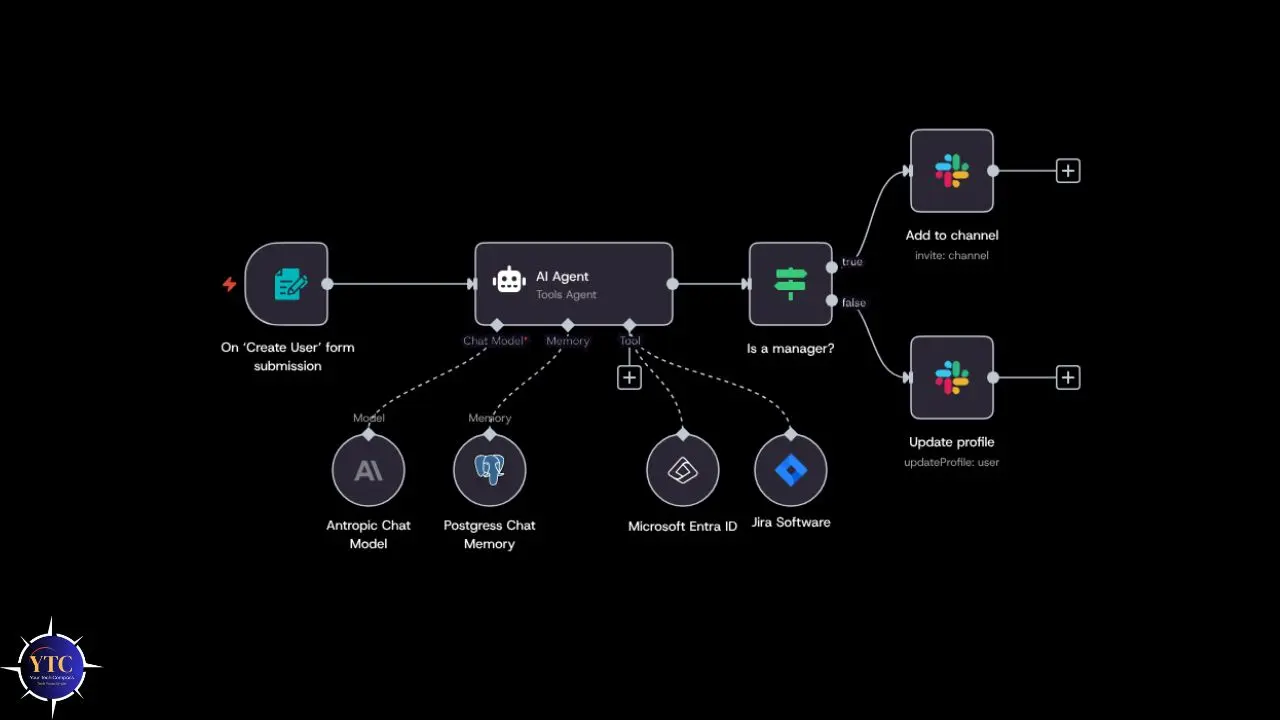
Before diving into features, it’s worth understanding the fundamental building blocks. N8n’s entire system is built around three concepts: nodes, triggers, and workflows. Once you understand how they connect, the rest of the platform makes intuitive sense.
The Node System
Every single step in an n8n workflow is a node. A node can be a trigger (the event that starts a workflow), an action (something n8n does in response), a logic step (like an IF condition or a data transformation), or a code block where you write custom JavaScript or Python. Notably, each node shows its outputs right next to its settings as you build, so you see exactly what data is flowing through at every step. That real-time feedback loop is one of the most practical things about working in n8n, because it dramatically cuts down the time you spend debugging.
Triggers and Execution Modes
N8n supports three main types of triggers: webhook triggers (triggered by an external event), scheduled triggers (which run at a set interval), and app-event triggers (which fire when a specific event occurs within a connected tool). Beyond that, you can also start a workflow from another workflow, enabling modular, nested automation systems that are easy to maintain. Consequently, for high-volume deployments, n8n’s queue mode lets you run multiple instances simultaneously, and a single instance can handle up to 220 workflow executions per second.
Code When You Need It
This is where n8n separates itself from most no-code tools. You can write JavaScript or Python directly inside any node, without leaving the canvas. That means you don’t have to choose between a visual builder and a code environment; you get both.
Additionally, if you need functionality not available in the built-in library, you can build custom nodes and publish them to the community. That extensibility is exactly why technical teams keep choosing n8n over simpler alternatives.
n8n’s AI Capabilities
AI is no longer a bonus feature in workflow automation; it’s becoming the core use case for many teams. Consequently, n8n has invested heavily in this area, and its AI capabilities go deeper than those of most comparable tools.
n8n’s AI nodes are powered by LangChain under the hood, which means you’re not just calling a single API; you can build genuinely complex AI systems. Additionally, you can connect to OpenAI, Anthropic Claude, Google Gemini, or even a locally hosted model if data privacy is a requirement. Moreover, n8n supports RAG (retrieval-augmented generation) pipelines with native integrations for vector databases, allowing you to ground your AI agents in your own business data rather than relying solely on a base model.
One of the standout additions in recent releases is the human-in-the-loop approval system. You can place a manual review checkpoint anywhere in a workflow so that an AI agent can propose an action, but a human must approve it before it executes. That’s critical for high-stakes operations like writing to production databases, sending client-facing emails, or deleting records. In n8n 2.0, this capability was significantly improved: parent workflows now correctly pause and wait for sub-workflows to complete, which previously caused timeout errors that made human-in-the-loop setups unreliable.
n8n also supports the Model Context Protocol (MCP), so your n8n workflows can be invoked directly by AI platforms such as Claude and Lovable. That turns your automations into tools that AI agents can invoke on demand, a genuinely powerful capability for teams building AI-first systems. That said, there is an honest limitation here: n8n’s AI agents are stateless by default.
Once a workflow ends, conversation memory is wiped. If you need persistent context across sessions, for example, in a customer support chatbot, you’ll need to wire in an external database like PostgreSQL. It works, but it adds complexity.
If you’re exploring how AI-powered automation tools compare beyond n8n’s native capabilities, Botpress is worth a look. It’s a dedicated AI chatbot builder with built-in memory and conversation management, handling stateful interactions natively.
n8n Integrations
Four hundred native integrations is a solid number, but it’s worth understanding what that means in practice. n8n connects natively to the tools most technical teams already use: Slack, HubSpot, Google Workspace, Shopify, Stripe, Notion, GitHub, PostgreSQL, and hundreds more. For anything without a dedicated node, the HTTP Request node lets you connect to any API by importing a curl command directly (no documentation hunting required).
n8n is also SOC 2 audited, which matters for enterprise teams handling sensitive data. Security features include secrets management via AWS Secrets Manager, Azure Key Vault, Google Cloud Platform, HashiCorp Vault, and Infisical, ensuring that API keys and credentials are never stored directly in n8n. Additionally, the platform supports role-based access control (RBAC), SSO/SAML, and LDAP for team environments, giving administrators fine-grained control over who can access what.
That said, 400 integrations are noticeably fewer than Zapier’s 8,000+. But, for most developer teams, the HTTP Request node bridges that gap. However, if your workflows depend on obscure or niche tools that don’t have a dedicated node, you may need to build a custom connection, which is doable but takes time.
For a deeper look at how AI productivity tools can extend what’s possible inside your workflows, our best AI productivity apps guide covers a strong range of options worth pairing with n8n.
n8n Pricing Breakdown
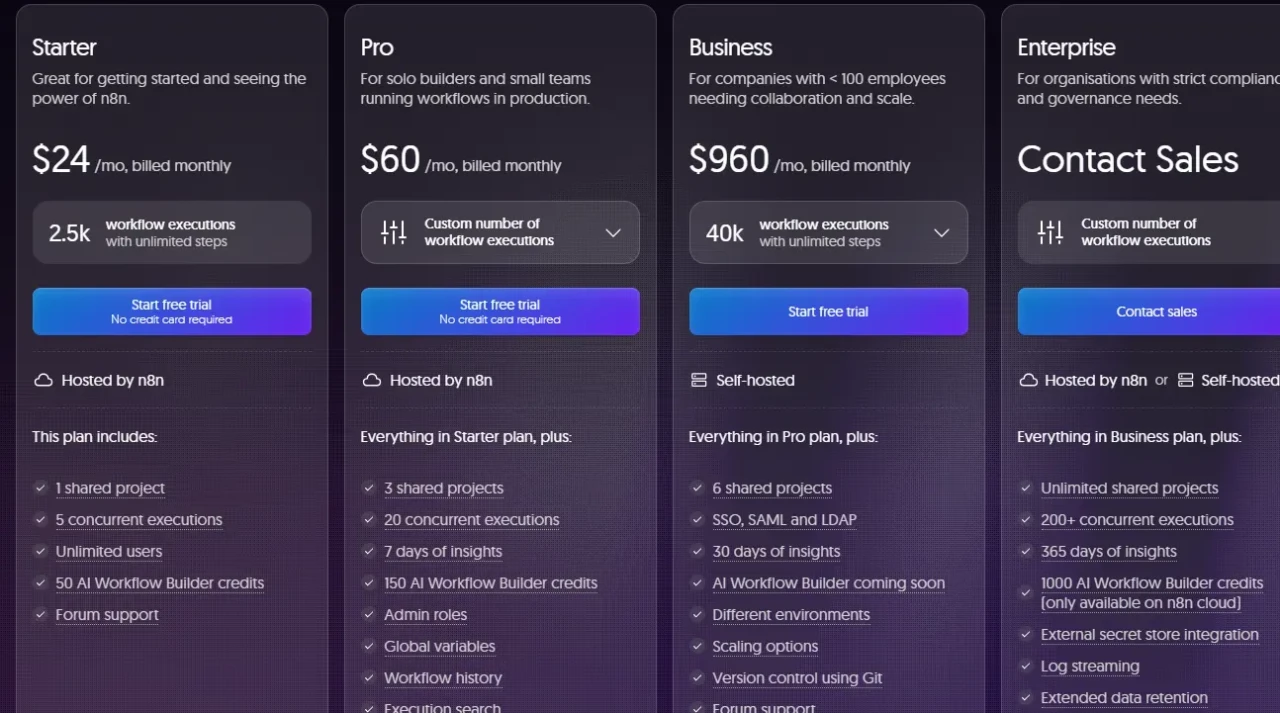
Pricing is one of the most important things to get right when evaluating n8n, because the model is genuinely different from most automation tools. Instead of charging per task or per step, n8n charges per workflow execution, meaning one complete workflow run counts as one execution, regardless of how many steps it contains. A 20-step workflow costs the same as a 2-step workflow.
n8n Plans at a Glance
Plan | Monthly Cost | Executions | Best For |
Community (Self-Hosted) | Free | Unlimited | Developers, indie builders |
Starter (Cloud) | $24/month | 2,500 | Freelancers, light automation |
Pro (Cloud) | $60/month | 10,000 | Small teams, production workflows |
Business (Self-Hosted) | $960/month | 40,000 | Mid-size companies needing SSO, Git, RBAC |
Enterprise | Custom pricing | Unlimited | Large orgs, compliance-heavy workloads |
The most significant pricing change came in August 2025, when n8n removed the limit on active workflows across all plans. Now, every plan, from Starter to Enterprise, includes unlimited workflows, steps, and users. Consequently, the only variable that scales your cost is how many executions you run.
Before you celebrate the Starter plan at $24/month, there’s a critical nuance you need to understand. A polling trigger (one that checks for new data at regular intervals) uses roughly 8,640 executions per month on its own if it runs every 5 minutes. That’s already over three times the Starter plan’s 2,500 monthly limit.
So if you’re building polling-heavy workflows, Starter will feel very tight very quickly. Event-driven, webhook-triggered workflows use executions far more efficiently.
The Pro plan at $60/month comfortably handles most growing teams, with 10,000 executions and better concurrent workflow limits. For context, n8n’s execution-based model makes it 75–80% cheaper than Zapier for complex, multi-step workflows because Zapier charges per task, and a 10-step workflow on Zapier burns 10 tasks per run. The same workflow on n8n burns one execution.
The self-hosted Community Edition is genuinely free and includes unlimited executions. However, you need to factor in what “free honestly” actually costs: a PostgreSQL database, Docker configuration, SSL, server maintenance, and DevOps time. Realistically, that amounts to around $100/month for infrastructure, plus ongoing engineering hours.
n8n vs. Zapier vs. Make
Choosing between these three tools isn’t about which one has the most features. It’s about matching the tool’s design philosophy to your team’s actual capabilities. Here’s a clear breakdown.
Feature Comparison: n8n vs. Zapier vs. Make
Feature | n8n | Zapier | Make |
Pricing Model | Per execution | Per task/step | Per operation |
Self-hosting | Yes (free Community Edition) | No | No |
Custom Code | JavaScript + Python | Limited | Limited |
AI-Native | Yes (LangChain, 70+ AI nodes) | Partial | Partial |
Native Integrations | 400+ | 8,000+ | 2,000+ |
Open Source | Fair-code | No | No |
Data Control | Full (self-host) | Cloud only | Cloud only |
Learning Curve | Steep | Easy | Moderate |
Where n8n Wins
If you need data privacy, developer flexibility, custom code, or complex AI workflows, n8n is the clear leader. The execution-based pricing model also makes it dramatically cheaper at scale for complex multi-step processes. Moreover, the self-hosting option gives you complete control over where your data lives, which is non-negotiable for regulated industries.
Where n8n Loses
Zapier connects to over 8,000 apps out of the box and can be set up by a non-technical user in minutes. If your team doesn’t have developer resources and your workflows are straightforward, Zapier’s speed-to-first-automation advantage is real. Additionally, n8n’s documentation has gaps that can make troubleshooting frustrating, especially when you’re building something non-standard.
What You Should Pick
- Zapier is ideal for non-technical teams that need a quick, plug-and-play solution with minimal setup and maximum app coverage. However, the premium price is the trade-off for that convenience.
- Make is ideal for teams that want more visual power than Zapier without the full developer complexity of n8n. This is because Make’s canvas-based interface handles complex branching logic elegantly and costs significantly less than Zapier at scale.
- N8n is great for developers, technical ops teams, agencies, and any organization that needs self-hosting, custom code, or deep AI integration. As a result, n8n is particularly well-suited for teams that already manage their own infrastructure and want to automate within it.
Real-World n8n Use Cases
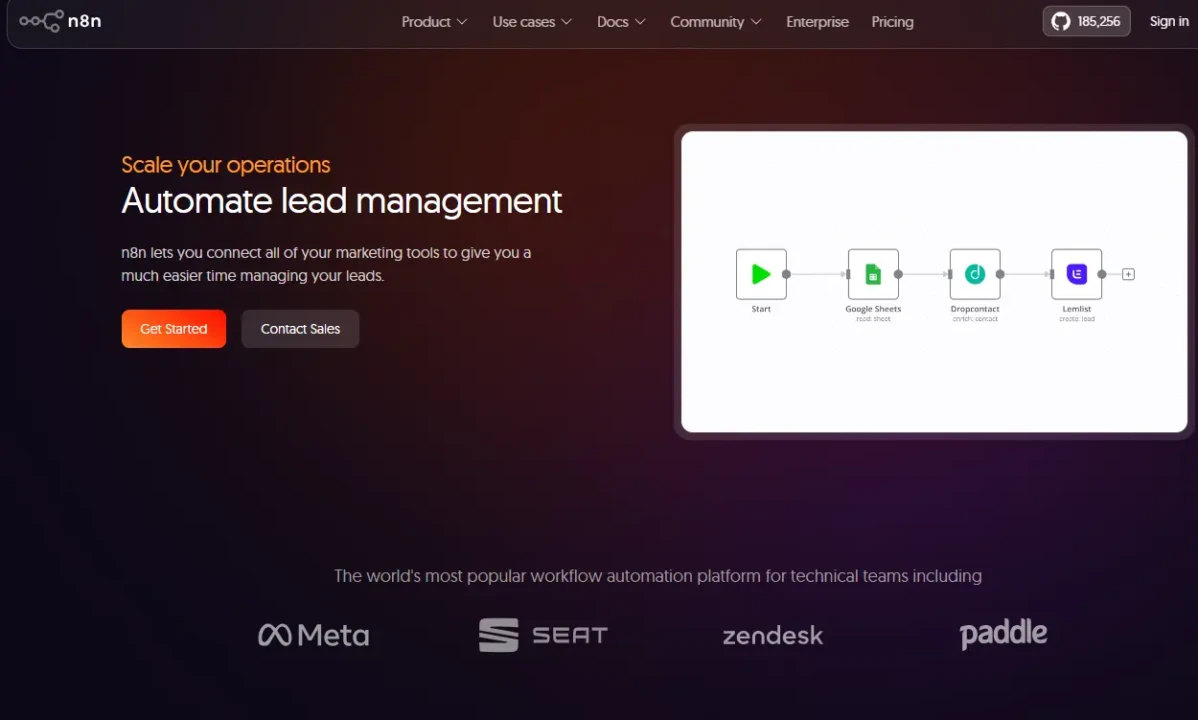
The best way to understand what n8n can do is to look at what organizations are actually building with it. The results are remarkable in some cases.
Vodafone UK deployed 33 n8n workflows for cybersecurity operations starting in August 2024. The outcome was £2.2 million in cost avoidance, 5,000 person-days saved, and approximately £300,000 per month in ongoing savings. Meanwhile, Delivery Hero, the global food delivery platform, saved over 200 hours per month from a single IT operations workflow. Beyond that, StepStone (a major European recruiting platform) now completes data integrations 25 times faster than before; tasks that previously took two weeks now take hours.
On a smaller scale, Koralplay automated 70% of its payment support tickets using n8n, dramatically reducing the manual workload on its support team. Another company reduced data entry time by 97%, cutting individual operations from 4–5 minutes down to just 10–20 seconds each.
The common thread across all of these is that n8n handled workflows with significant complexity: multiple steps, conditional logic, API connections, and real business stakes. That’s exactly where n8n’s architecture shines.
For simpler, more conversational AI use cases that require an intelligent agent rather than process automation, OpenClaw is worth exploring as a complementary tool.
Who Should Use n8n and Who Shouldn’t
N8n is not a one-size-fits-all tool. Being clear about who it’s for and who it’s not for will save you significant time and frustration.
N8n is an excellent fit if you are a developer, a technical operations team, an agency managing automations for multiple clients, or a mid-size company that needs SSO, Git-based version control, and production-grade security without paying Enterprise pricing. It’s also the right call if data privacy is a genuine concern for your organization, since self-hosting gives you complete control over your data environment.
N8n is not the right fit for a non-technical user who wants a plug-and-play experience with zero setup overhead. The initial configuration is real work, and the learning curve is steeper than Zapier or Make. Furthermore, if you need hands-on enterprise onboarding, live chat support, or guided implementation, n8n’s current support model, even on Business, may leave you relying heavily on the community forum. The community is active and genuinely helpful (over 45,000 members), but it’s not the same as dedicated support.
One more honest note: n8n’s documentation could use improvement. Troubleshooting non-standard setups can send you down rabbit holes that well-documented platforms would resolve in minutes. That’s worth factoring into your timeline if you’re building something novel.
FAQs
The Community Edition is free forever when self-hosted. You get unlimited workflows and unlimited executions. However, you’re responsible for the infrastructure, including the server, database, SSL, and ongoing maintenance. Cloud plans start at €24/month.
One execution equals one full workflow run from start to finish, regardless of the number of steps it contains. Both a 2-step and a 50-step workflow count as a single execution. That’s the key reason n8n is significantly cheaper than Zapier for complex automations.
Yes, but the learning curve is steeper than Zapier or Make. The visual canvas is intuitive once you understand how nodes connect, but concepts like JSON data structures and HTTP requests come up quickly. Some technical comfort makes a real difference.
n8n has native LangChain integration and supports 70+ AI nodes across LLMs, embeddings, vector databases, speech, OCR, and image models. You can connect to OpenAI, Anthropic Claude, Google Gemini, or a self-hosted model. Moreover, you can build RAG pipelines, multi-step AI agents, and human-in-the-loop approval systems, all without leaving the n8n canvas.
Self-hosting gives you complete control over data residency. Cloud plans store data in Frankfurt, Germany (EU servers). The platform is SOC 2-audited, supports secrets management from major providers, and, with n8n 2.0, introduced isolated code execution environments by default, meaning a misbehaving code node can no longer take down your entire instance.
The Business plan (€800/month) is self-serve and designed for mid-size companies. It includes SSO/SAML, Git-based version control, RBAC, and up to 40,000 executions. Enterprise is custom-priced and includes unlimited executions, dedicated support with guaranteed response SLAs, advanced compliance features, and a more hands-on relationship with the n8n team.
Conclusion
n8n is one of the most capable automation platforms available today, and it’s built for people who want genuine control, not just convenience. The execution-based pricing model rewards complexity. The self-hosting option rewards technical teams who value data sovereignty. The LangChain-powered AI nodes reward anyone building the next generation of AI-driven workflows. Taken together, these elements make n8n a serious long-term investment for the right team.
That said, it’s not a tool you pick up in an afternoon. The setup is real, the learning curve is real, and the documentation gaps are real. If you’re a non-technical user looking for something running in five minutes, Zapier will serve you better, at least in the short term. But if you’re a developer, a technical team, or an organization that needs automation at scale without spiraling costs, n8n consistently delivers. The enterprise case studies speak for themselves: millions saved, hundreds of hours recovered, and processes that once took weeks are now completed in hours. That’s what the right automation platform looks like when it’s actually being used.
Smart automation starts with the right information, and every platform, tool, and AI model worth your time gets an honest, thorough breakdown at YourTechCompass.com, where we cut through the noise so your decisions are always built on what actually works.