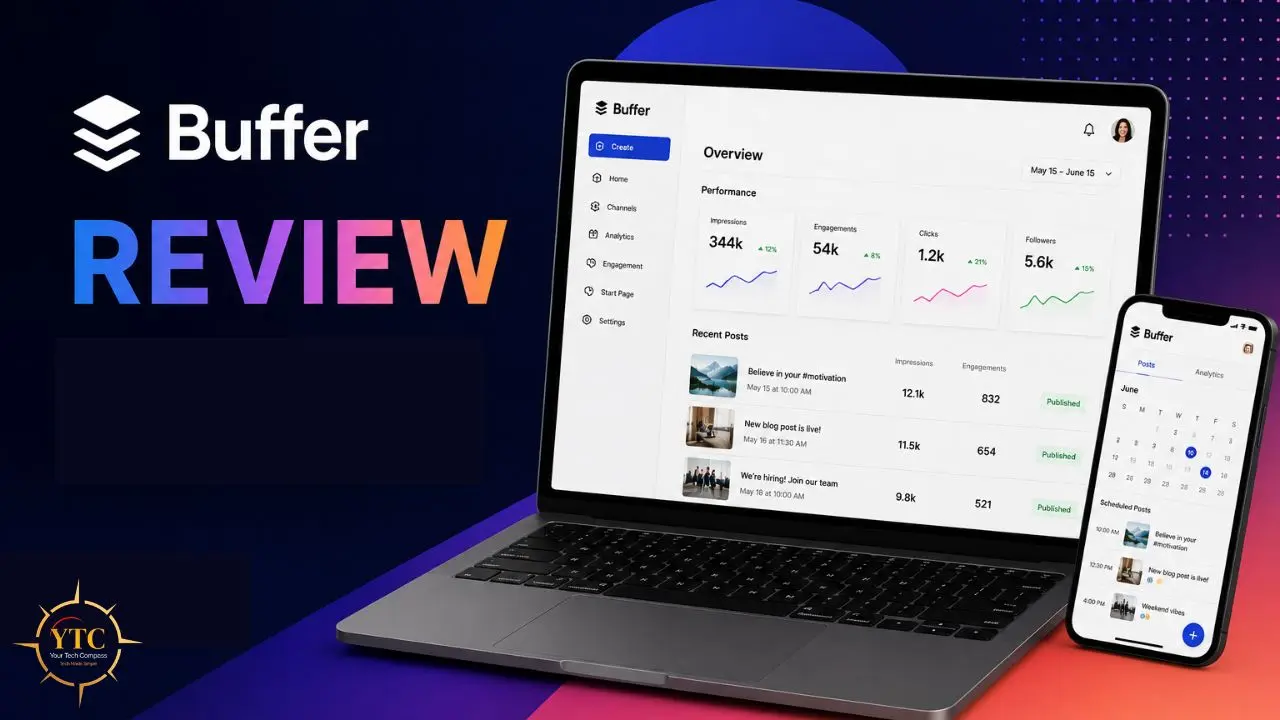
Most social media management tools are overbuilt for the people who actually need them. You sign up expecting a simple scheduler, and instead you’re greeted by a dashboard packed with features you’ll never use, a pricing model that requires a spreadsheet to decode, and an onboarding process that takes the better part of a week to navigate. I’ve been through that cycle with multiple tools, and the frustration is real, especially when all you actually need is a reliable way to keep your social media accounts active without logging into five different apps every single day. That’s the problem Buffer was originally built to solve, and it’s a problem the platform still solves better than almost anything else in this category.
Buffer is a social media scheduling and management platform founded in 2010, currently serving over 140,000 customers and generating $23.3 million in annual revenue as of late 2025, all without venture capital dominating its direction or turning the product into something unrecognizable in pursuit of enterprise feature bloat. This review gives you the complete, honest picture: what Buffer does well, what it doesn’t do at all, exactly what it costs at your scale, and how it compares to Hootsuite, Later, and Sprout Social. By the end, you’ll know whether Buffer is the right tool for how you actually work.
A note before we begin: every YTC score is earned, never negotiated. If you want to understand exactly how we evaluate apps & tools and how we handle affiliate relationships, our Review Methodology lays it all out.
What Is Buffer?
Buffer started in the most unassuming way possible. In October 2010, Joel Gascoigne, a developer working out of a small apartment in Birmingham, United Kingdom, had a simple problem: he wanted to spread his tweets throughout the day rather than post them all at once. He couldn’t find a tool that did exactly what he needed, so he built one.
Joel launched a basic landing page to test the idea, reached a critical mass of sign-ups, and built the first version of Buffer over seven weeks. On November 30, 2010, Buffer went live. Four days later, it had its first paying customer. Within nine months, it had 100,000 users.
Founded in 2010 and headquartered in San Francisco, California, Buffer is an intuitive, streamlined social media management platform trusted by brands, businesses, agencies, and individuals to help drive meaningful engagement and results on social media. What makes Buffer’s story genuinely interesting and relevant to whether you should trust the product is what came after the early growth.
Rather than chasing venture funding and engineering a feature arms race with competitors, Buffer took a different path entirely. Today, Buffer sits at a new all-time high, with $25.1M in ARR and a team of 73 people working remotely across 15 countries. The company has practiced radical transparency for years, publishing salaries, revenue, and equity publicly (a value commitment that shapes the product just as much as it shapes the culture).
Buffer currently supports 11 platforms: Instagram (Business, Creator, and Personal accounts), Facebook Pages and Groups, X (formerly Twitter), LinkedIn Personal and Company Pages, TikTok, Pinterest, YouTube, Google Business Profile, Mastodon, and Threads. That’s a meaningful range, and it covers the platforms that most small businesses and creators actually care about. Additionally, Buffer is rated the most user-friendly social media scheduling tool in independent comparisons, with an 89% user satisfaction rating based on over 3,755 reviews across recognized software review platforms.
How Buffer Works: The Queue System Explained

Before getting into individual features, it’s worth understanding the core mechanic that sets Buffer apart from most social media tools, because once you grasp the queue, everything else makes sense.
The queue is Buffer’s heartbeat. Instead of scheduling every post individually for a specific date and time, you create a posting schedule (for example, Monday, Wednesday, and Friday at 9 am on LinkedIn) and then simply add posts to the queue.
Buffer automatically slots them into your next available times. That means you can sit down on a Monday morning, write a week’s worth of content in 30 minutes, add it all to the queue, and then not think about social media again until the following week. Buffer handles the rest.
Beyond the basic queue, Buffer gives you several ways to control exactly how and when content goes out. You can publish a post immediately when you need to share something time-sensitive. Additionally, you can schedule a post for a specific date and time when you’re planning around a product launch or campaign.
And you can view everything in a calendar layout that shows your entire week of scheduled content across all connected channels at a glance, with drag-and-drop rescheduling if something needs to move. That visual calendar is one of the features I find most immediately useful: you see holes in your schedule, duplicated efforts, and platform gaps in seconds, rather than having to reconstruct your content plan in your head.
The mobile app (available for iOS and Android) lets you add, edit, and reorder queue posts while you’re away from your desk. And the browser extension lets you add content to your queue directly from any website you’re reading, which is genuinely useful for sharing curated third-party content without switching apps.
One honest limitation worth flagging upfront: Buffer does not support bulk CSV scheduling. If you’re the type of person who manages content in a spreadsheet and wants to import 50 posts at once, that workflow doesn’t exist here. For high-volume operations, that’s a real gap.
Buffer’s Key Features: What You Actually Get
AI Assistant: Included Free on Every Plan
This is the feature I’d lead with if someone asked me to describe what’s changed most about Buffer in the last two years. Most competitors in this space charge extra for AI features, restrict them to higher-tier plans, or impose usage limits that make them feel like bait rather than tools. Buffer does none of that.
The AI Assistant is available on every plan, including the free tier, with no usage limits. You can use it as many times as you want. In practice, here’s how it works: you paste in a blog post URL, or type a topic, and ask Buffer to generate five caption variations.
The AI produces drafts in different tones (professional, casual, playful) that you can edit, select, or discard. You can also paste an existing caption and ask it to rewrite it for a different platform. A LinkedIn post and an Instagram caption serve different audiences and carry different expectations; the AI handles that translation in seconds.
The honest limitation is that the AI Assistant is text-only. It doesn’t create images, design graphics, or generate video. For visual content, you’ll need a separate tool; Buffer integrates with Canva, which covers most creators’ needs.
If you’re curious how AI content tools are evolving across the broader landscape, our AI Unboxed section tracks new releases and capability updates worth knowing about.
Scheduling and Publishing

Scheduling is Buffer’s strongest suit, and the area where independent testing consistently places it at the top. Across head-to-head comparisons, Buffer is rated the most reliable social media scheduler. Posts go out when you schedule them, without the missed triggers, delayed publishing, and silent failures that sometimes show up in competitor tools.
When you write a post for multiple platforms, Buffer lets you customize the copy for each channel before scheduling. That matters more than it might sound. A LinkedIn post that performs well is typically longer, more professional, and includes a call to action that invites career-oriented conversation.
An Instagram caption is visual, concise, and benefit-driven. A tweet is punchy. If your tool posts identical text across multiple platforms, you’re almost certainly underperforming. Buffer prevents that.
Additionally, Buffer includes best-time-to-post suggestions based on your actual historical engagement data (not generic industry averages) but on your specific audience’s behavior patterns. First comment scheduling on Instagram lets you add your full hashtag set in the first comment rather than cluttering the main caption.
Threads support has been available since 2023. YouTube scheduling covers both Shorts and standard video uploads. Notably, Instagram Story scheduling is handled via push notifications rather than direct publishing (a limitation of Instagram’s own API for non-business accounts, not a Buffer shortcoming).
Analytics and Reporting
Buffer’s analytics are clean, readable, and immediately useful, and I want to be honest about both sides of that description. On the clean and useful side: for each post, you see reach, impressions, likes, comments, shares, saves, clicks, and engagement rate.
At the channel level, you see follower growth trends, your top-performing posts, and engagement rates across 7-, 14-, 30-, or 90-day windows. The best time to post recommendations is generated from your real data. Boosted Facebook and Instagram post performance is visible alongside organic content.
Honest Limitation
Buffer’s analytics don’t include competitor benchmarking. You can see your own performance, but you can’t compare it against industry averages or analyze what a competitor is doing differently. There’s also no social listening.
Buffer doesn’t monitor brand mentions, hashtag conversations, or keyword activity in real time. Consequently, if you’re a growing brand that needs to know what people are saying about you across platforms, Buffer’s analytics dashboard won’t tell you. For that level of intelligence, tools like Hootsuite or Sprout Social are where you’d need to look.
Engagement: Reply to Comments from One Place

Buffer’s engagement tool lets you reply to comments on Instagram, Facebook, and LinkedIn from a single, unified inbox, rather than jumping between platform apps. For small teams and solo operators, this saves meaningful time over the course of a week. You’re not missing comments because you forgot to check a platform; everything is in one place.
That said, I want to be clear about what this tool is and what it isn’t. It’s a comment reply inbox, not a full social CRM. There’s no conversation history beyond the current thread, no sentiment tagging, no contact records, and no assignment workflows.
Therefore, if you manage a high-volume community where dozens of comments need to be routed to different team members and tracked to resolution, you’ve outgrown Buffer’s engagement tool. Also worth noting: this feature is only available on the Team plan, not on Essentials or Free.
Start Page: Link-in-Bio Built Right In
Every Buffer plan, including the free tier, includes Start Page, a link-in-bio landing page builder. You add links, buttons, social profile links, and embedded content, and Buffer generates a clean, mobile-optimized page at a custom URL. If you’re currently paying for Linktree, this is worth knowing: Buffer’s Start Page does the same job at no additional cost and integrates directly with Buffer’s analytics, so you can see exactly which links are driving clicks.
Honest Limitation
The customization depth is a limitation. Start Page covers the essential link-in-bio use case well, but if you want deep visual brand customization (custom fonts, complex layout control, advanced color theming), dedicated tools have more flexibility. For most creators, though, Start Page is sufficient and free.
Team Collaboration
The Team plan unlocks collaboration features that make Buffer viable for small agencies and marketing teams. Unlimited users can access connected accounts, meaning you pay for channels, not for headcount. Post-approval workflows let team members submit drafts that require a designated approver to sign off before publication.
Notes and feedback can be left on drafts at any point in the workflow. Permission levels are customizable: some users can create drafts only, others can approve, and others can publish directly.
Honest Limitation
Workflow complexity is a limitation here. Buffer’s approval process is a straightforward two-step system: draft submitted, approval granted or rejected, and post published.
That effectively covers most small-team workflows. However, if you need multi-level approval chains (a junior copywriter submits, a senior editor reviews, a client approves, a social manager publishes), that level of routing doesn’t available in Buffer. For that, you’d need Hootsuite, Sprout Social, or a dedicated project management workflow layered on top.
Buffer Pricing: Understanding the Per-Channel Model
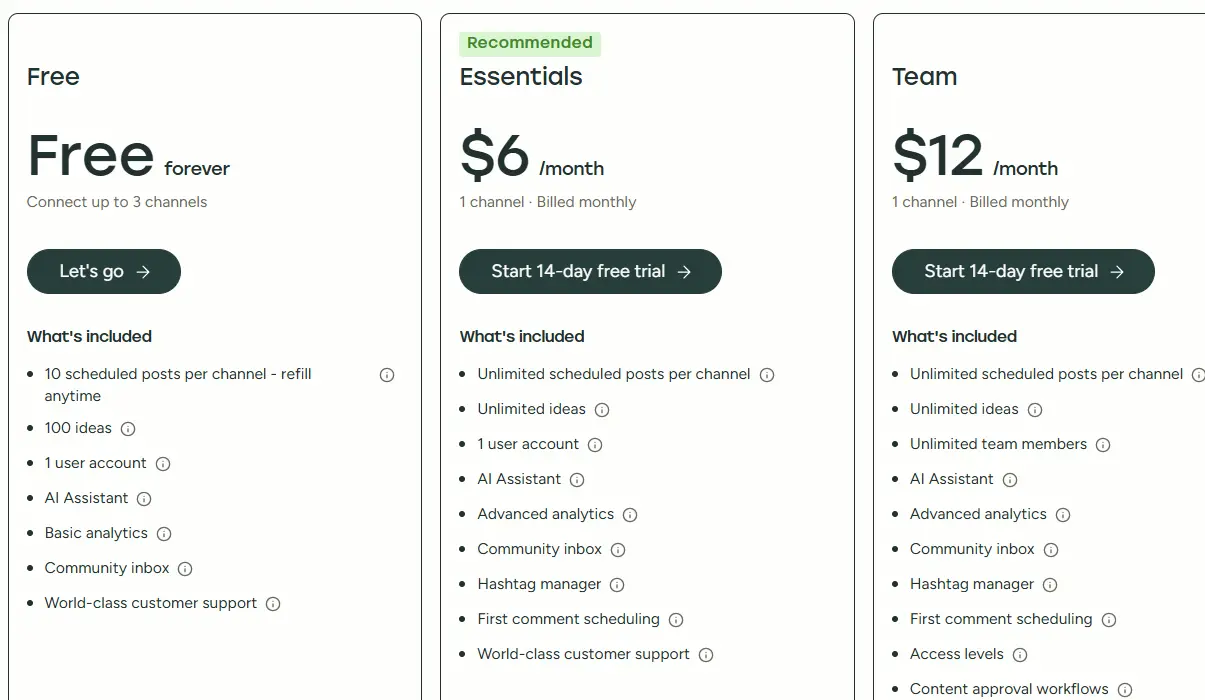
Buffer’s pricing model differs from most competitors’, and understanding it before you sign up will save you from a surprise on your first bill. Most social media tools charge per user. Buffer charges per channel, meaning you pay for each social media account you connect, not for each person accessing those accounts.
💳 Buffer Plans at a Glance
Plan | Cost | Channels | Users | Scheduled Posts | Key Standout Features | Verdict |
Free | $0 | Up to 3 | 1 | 10 per channel | Scheduling, AI Assistant, Start Page | ✅ Genuinely useful for starters |
Essentials | $6/channel/month (annual) | Unlimited | 1 | Unlimited | Analytics, AI Assistant, Start Page | ✅ Best for solo creators |
Team | $12/channel/month (annual) | Unlimited | Unlimited | Unlimited | + Approval workflows, engagement inbox, unlimited users | ✅ Best for small teams |
Annual billing rates shown. Monthly billing is approximately 25% higher. Nonprofit organizations receive 50% off any paid plan.
The Real Cost Math You Need to Know
The per-channel model works brilliantly for small operations but can quickly become expensive as you scale. Here’s what I mean in real numbers:
- If you’re a solo creator with 3–5 channels on Essentials: You’re paying $18–$30 per month. That’s extremely competitive, significantly cheaper than Hootsuite’s $99/month starting price and Sprout Social’s $249/seat/month entry point.
- If you’re a small team managing 8 channels on Team: You’re paying $96/month for unlimited users. That’s still reasonable for a team environment where multiple people need access.
- If you’re a small agency managing 5 clients, 3 channels each (15 channels on Team): You’re paying $180/month. At this scale, Hootsuite’s flat-rate structure starts becoming worth comparing on a per-feature basis.
The break-even point, where Buffer’s per-channel pricing stops being a clear advantage, is roughly 10 channels on the Team plan; at $120/month, flat-rate competitors begin to offer competitive value, especially if you also need social listening or advanced analytics that Buffer doesn’t provide. Furthermore, the free plan’s cap of 10 scheduled posts per channel at any given time is worth understanding: this doesn’t mean 10 posts per month.
It means 10 posts can be in your queue at once. As soon as a scheduled post goes live, a slot opens for a new one. For someone posting 3–4 times per week, this is manageable. For anyone posting daily across multiple platforms, it quickly becomes a constraint.
Buffer vs The Competition: An Honest Side-by-Side
Choosing between social media scheduling tools ultimately comes down to matching the tool’s design philosophy to your actual workflow. Here’s how Buffer genuinely compares.
⚔️ Buffer vs Hootsuite vs Later vs Sprout Social

Feature | ||||
Free Plan | ✅ 3 channels, 10 posts | ✅ Very limited | ✅ 1 channel | ❌ No |
Pricing Model | Per channel | Per user | Per user | Per user |
Starting Paid Price | $6/channel/month | $99/month | $25/month | $249/seat/month |
AI Assistant | ✅ All plans, unlimited use | ✅ OwlyWriter (limited free) | ✅ Basic | ✅ Advanced |
Social Listening | ❌ No | ✅ Yes | ❌ No | ✅ Advanced |
Unified Inbox | ⚠️ Basic (Team plan only) | ✅ Full CRM inbox | ⚠️ Limited | ✅ Full social CRM |
Analytics Depth | ⚠️ Basic | ✅ Advanced | ⚠️ Moderate (Instagram-heavy) | ✅ Best in class |
Bulk CSV Import | ❌ No | ✅ Yes | ✅ Yes | ✅ Yes |
Ease of Use | ✅ Easiest rated | ⚠️ Moderate learning curve | ✅ Easy | ⚠️ Complex |
Platforms Supported | 11 | 35+ | 6 | 9 |
Posting Reliability | ✅ Highest rated | ✅ Strong | ✅ Strong | ✅ Strong |
Where Buffer Clearly Wins
Buffer is the easiest social media scheduling tool to learn and use, and it is consistently rated higher than all competitors in this regard. Its free plan is the most generous in the category.
The AI Assistant is included on every tier with no limits, a feature no major competitor offers at the free level. Posting reliability is rated highest independently. And for anyone managing 1–5 channels, Buffer is almost always the most affordable option by a significant margin.
Where Buffer Loses Ground
The most significant gaps are social listening and analytics depth. If you need to know when someone mentions your brand across social platforms, Buffer cannot tell you.
However, if you need competitor benchmarking, exportable reports, or board-level analytics for stakeholder presentations, Buffer’s dashboard won’t provide them. Additionally, the absence of bulk CSV import is a genuine workflow limitation for high-volume content teams.
Who Should Pick Hootsuite
Teams managing 10+ channels who need social listening, advanced analytics, competitor benchmarking, and a full CRM-style unified inbox. Hootsuite’s base price is significantly higher than Buffer’s, but at scale, particularly for agencies or marketing departments, the depth of features justifies the investment. If you want to dig deeper into automation tools that can extend Hootsuite or Buffer workflows, our Make app review covers one of the strongest workflow automation platforms on the market.
Who Should Pick Later

Visually-focused brands and Instagram-first creators who want a drag-and-drop visual content calendar where you can see exactly how your grid will look before anything is published. Later is historically stronger for Instagram-specific workflows and visual planning. Its Instagram analytics are also more granular than Buffer’s.
Who Should Pick Sprout Social
Enterprise marketing teams with budgets that match Sprout Social’s $249+/seat/month price tag. Sprout offers the deepest analytics of any tool in this category, a full social CRM for tracking customer interactions across every touchpoint, and the most mature team governance and approval workflows available. It’s not a tool for small teams; it’s a tool for organizations where social media is a business-critical function with dedicated headcount.
For a broader look at apps and productivity tools to pair with your social media workflow, our Apps and Tools section covers the full landscape of tools worth knowing about.
Real-World Use Cases: Who Uses Buffer and How
Understanding who Buffer works for in practice, not just in theory, is the best way to know whether it fits your specific situation.
The Solo Content Creator
You run a personal brand across Instagram, LinkedIn, and X. You post 3–5 times per week across all three platforms. Buffer’s free plan covers this entirely: three channels, ten scheduled posts per channel in the queue, AI Assistant for caption generation, and Start Page for your link-in-bio.
Your entire content workflow costs $0 per month. When you grow past 10 queued posts per channel or need analytics to guide your strategy, the Essentials plan at $6/channel/month is a natural and affordable next step.
The Small Business Owner

You run a local restaurant, boutique, or service business with accounts on Instagram, Facebook, and Google Business Profile. You don’t have a social media manager; you’re doing it yourself, on top of everything else.
Buffer’s queue system means you can sit down for 30 minutes on Sunday and schedule the entire week’s content across all three platforms. Buffer handles the posting. You focus on the business.
The Freelance Social Media Manager
You manage accounts for three to five clients, each with two or three active platforms. Buffer’s Team plan lets you connect all channels, gives clients or senior reviewers access to approve posts before they go live, and delivers clean per-channel analytics you can screenshot and include in monthly reports. The per-channel pricing scales predictably with your client base, and the approval workflow removes the “client posted something off-brand” problem from your life.
The Startup Marketing Team
You have two to four people involved in social media: someone creating content, someone reviewing it, and someone hitting publish. Buffer’s Team plan covers that workflow: drafts submitted, reviewed, approved, and published, all without leaving the platform. You pay for the channels you need, not per person on the team.
The Nonprofit
Buffer’s 50% nonprofit discount makes the Team plan accessible for organizations operating on restricted marketing budgets. For a nonprofit managing four channels with two staff members needing access, the Team plan drops from $12/channel to $6/channel, for a total of $24/month. That’s genuinely affordable for an organization managing multiple platforms with a lean team.
Who Should Use Buffer
Buffer is the right choice if you:
- Are a solo creator or solopreneur managing one to five social channels who wants reliable, simple scheduling without complexity or a steep learning curve.
- Are starting out and want to test social media scheduling without committing any budget. Buffer’s free plan, with three channels and access to the AI Assistant, is among the best zero-cost entry points in this category.
- Want an AI Assistant included everywhere with no usage caps or hidden upgrade gates.
- Run a small team where a clean two-step approval workflow covers your collaboration needs.
- Operate a nonprofit that qualifies for the 50% plan discount and needs to stretch every dollar in a marketing budget.
- Value a tool that publishes your content reliably, every time, without drama.
Who Shouldn’t Use Buffer

Buffer is not the right fit if you:
- Need social listening. Monitoring brand mentions, keywords, trending conversations, or competitor activity in real time is not part of Buffer’s offerings.
- Manage more than 10 channels and need the most cost-efficient tool available. At that scale, per-channel pricing begins to compete with flat-rate tools that also offer more advanced features.
- Require the kind of analytics used in board-level reports or stakeholder presentations, with exportable charts and competitor benchmarking.
- Run a large agency with dozens of client accounts that need white-label reporting, client-specific dashboards, and multi-level approval chains.
- Depend on bulk CSV imports to efficiently schedule high volumes of pre-written content.
One honest, practical note: If you’re currently managing your passwords and business accounts with a strong security tool alongside your marketing stack, which I’d strongly recommend, our 1Password review covers the password manager I consider the strongest option for exactly that combination of individual and team use.
FAQs
Yes, and it’s one of the most genuinely usable free plans in this category. Buffer’s free tier gives you up to three connected channels, ten scheduled posts per channel in the queue at any given time, access to the AI Assistant with no usage limits, and the Start Page link-in-bio tool. You don’t need a credit card to sign up. For someone just starting out managing one to three social accounts, the free plan covers the core need (consistent, scheduled publishing) without asking for anything in return.
Instead of charging per user (as most competitors do), Buffer charges per social media account you connect. The Essentials plan costs $6 per channel per month on an annual billing plan. Connect three channels, and you pay $18/month. Connect eight channels, and you pay $48/month. The Team plan costs $12 per channel per month and includes unlimited users, so the moment you need more than one person in your Buffer account, Team is the right call. Volume discounts apply to channels with more than 10.
Yes. Buffer is consistently rated as the best social media scheduling tool specifically for Instagram in independent comparisons. It supports direct publishing to Instagram Business and Creator accounts, first-comment scheduling (for adding hashtags without cluttering the main caption), Story scheduling via push notifications, and Instagram-specific analytics, including reach, impressions, saves, and follower growth trends.
The AI Assistant generates captions from a topic or URL, rewrites existing copy in different tones (professional, casual, punchy), creates platform-specific variations of a single post, and suggests relevant hashtags. Unlike most competitors that restrict AI features to paid tiers or impose usage limits, Buffer includes the AI Assistant on all plans, including the free plan, with no cap on usage.
The two most important differences are users and collaboration. Essentials is for one user and includes unlimited scheduling and analytics. Team unlocks unlimited users (multiple people can access connected accounts), post approval workflows (drafts need sign-off before going live), and the engagement inbox (reply to comments across platforms from one place). As soon as you want a second person on your Buffer account, the Team plan is the right choice.
It depends entirely on your agency’s scale. For freelancers and small agencies managing three to eight client accounts with a simple approval workflow and clean per-channel analytics, Buffer’s Team plan is a solid, affordable option. For larger agencies managing 15+ client accounts that need white-label reporting, complex multi-client dashboards, multi-level approval chains, and social listening, tools like Hootsuite, Sprout Social, or Agorapulse are more appropriate.
Conclusion

Buffer has maintained its position as the most recommended social media scheduling tool for small teams and independent creators for over a decade, not by adding features faster than competitors, but by doing a smaller set of things exceptionally well. The queue system is elegant and practical. The AI Assistant is genuinely available everywhere, without limits. The posting reliability is independently verified as the strongest in the category. And the free plan remains one of the most honest entry points in any SaaS tool I’ve reviewed: it works, it doesn’t nag you to upgrade, and it covers the core job better than most paid tools at competing platforms. For most creators and small businesses, Buffer is the most direct, most affordable path to a consistent social media presence.
The honest bottom line by user type: if you need social listening, enterprise analytics, bulk CSV scheduling, or agency-scale account management, Buffer isn’t the right tool, and I’d recommend looking at Hootsuite or Sprout Social for those use cases. But if you’re a creator, solopreneur, small business owner, freelance social media manager, or small marketing team that wants a reliable, simple, affordable scheduling tool that publishes your content on time every time, Buffer is the one I’d reach for first.
Every app review, tool comparison, and honest breakdown of the social media and productivity software worth your time lives at YourTechCompass.com because the right tool at the right price makes every part of running your business a little bit easier.