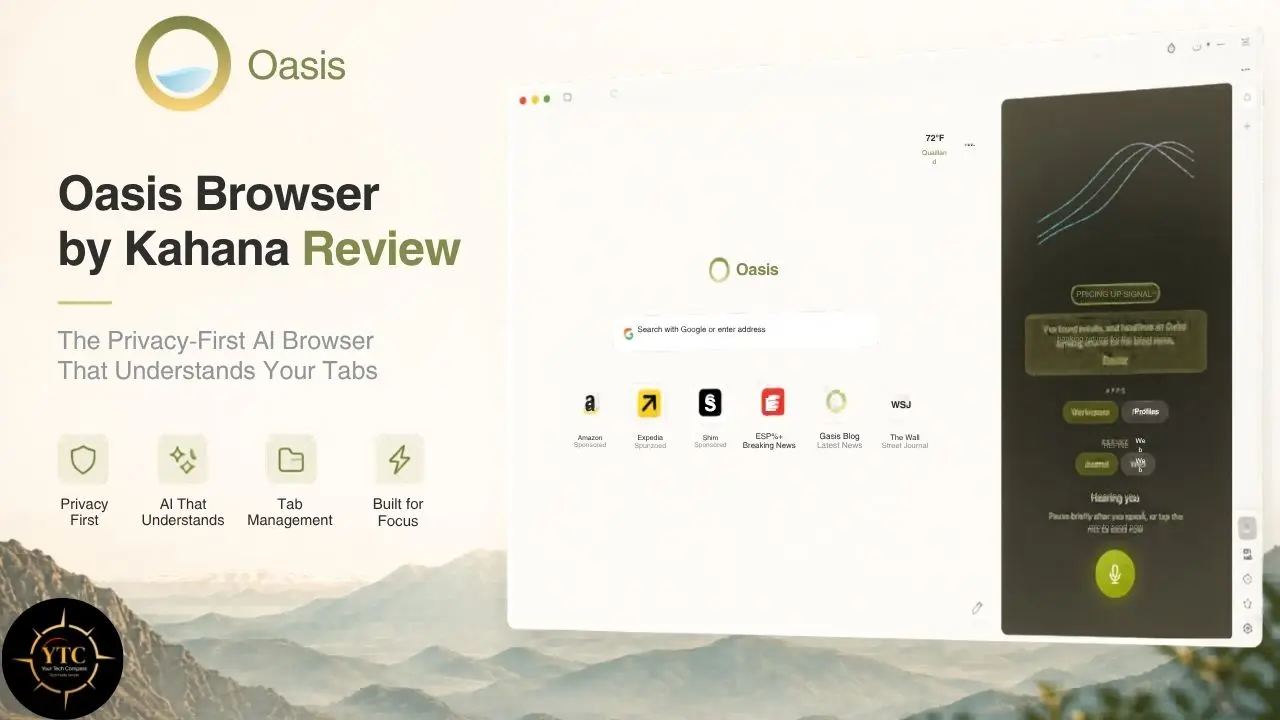
Most browsers with AI bolted on have one thing in common: the AI doesn’t actually know what you’re doing. It sits in a sidebar, disconnected from your open tabs, your browsing history, and the specific page you’re currently reading. You still have to copy and paste. You still have to explain the context again. The AI is capable in theory and frustrating in practice. Oasis Browser by Kahana is built on the exact opposite premise: the AI assistant is grounded in your real browser context (your open tabs, your history, and the page you’re currently viewing), which changes what “AI in your browser” actually means on a daily basis. Instead of a smart chatbot sitting beside your browsing, Oasis gives you an AI that can see what you see, find what you half-remember, and act on your tabs through plain-language commands.
This is a full, honest review of Oasis Browser, a product from Kahana Group Inc. that currently serves 7,000+ users across 108 countries, is available on macOS (both Apple Silicon and Intel Macs), has a Windows build in its final stages before public release, and is built around a privacy philosophy that is more verifiable than most competitors’ promises. I want to be clear from the start: Oasis is a genuinely interesting browser with a strong architectural identity, and it’s also a product that’s actively maturing. Some features are working and polished. Others are explicitly on the roadmap. I’ll tell you which is which, because understanding what Oasis does today versus what it’s building toward matters enormously for whether it’s the right browser for your workflow right now.
A note before we begin: every YTC score is earned, never negotiated. If you want to understand exactly how we evaluate apps & tools and how we handle affiliate relationships, our Review Methodology lays it all out.
What Is the Oasis Browser? Kahana’s Vision Explained
Kahana Group Inc. describes Oasis as your “online refuge,” a browser where your privacy is paramount, your focus is protected, and your data remains yours. That’s a positioning statement, but it’s also a genuine product philosophy that shapes every design decision, from privacy settings to AI architecture. The founder and CEO, Adam Kershner, puts it plainly: Kahana collects only what is absolutely necessary to improve the AI assistant experience, and he assures users that it is as private and anonymous as it gets.
Oasis is built on the Firefox core, Mozilla’s open-source, privacy-first browser engine, rather than Google’s Chromium. That choice is deliberate and architecturally meaningful: Mozilla’s foundation is aligned with user privacy in a way that Chromium, owned by an advertising company, fundamentally is not.
Web compatibility is strong, Firefox-based extensions work, and you’re building on an engine whose parent organization has privacy as its stated mission rather than its constraint. Kahana is also maintaining a separate Chromium-based build on a waitlist for users whose workflows depend specifically on Chromium compatibility, but the current released version runs on Firefox core. What Kahana has built on top of that foundation is where the differentiation lives: a browser-grounded AI assistant, a privacy architecture that’s genuinely transparent, and a design sensibility aimed at calm rather than stimulation.
There are two distinct products under the Oasis name, and understanding the difference matters:
- Oasis Browser (Personal): This is the product reviewed in this article, built for individual users who want an AI assistant integrated into their actual browsing experience, with privacy-first defaults and a free tier that requires no credit card.
- Oasis Enterprise Browser: This is a separate, more advanced product for organizations that adds SSO integration, centralized admin controls, security policy enforcement, data leakage prevention, a Zero Trust security architecture, and dedicated compliance infrastructure. Kahana serves clients across manufacturing, healthcare, finance, government, and professional services through the enterprise product. SOC 2 certification is currently in progress.
This review focuses on the personal browser, but the enterprise foundation is worth noting as a signal of how seriously Kahana is taking the development of the underlying security layer.
Core Features: What Oasis Browser Actually Does
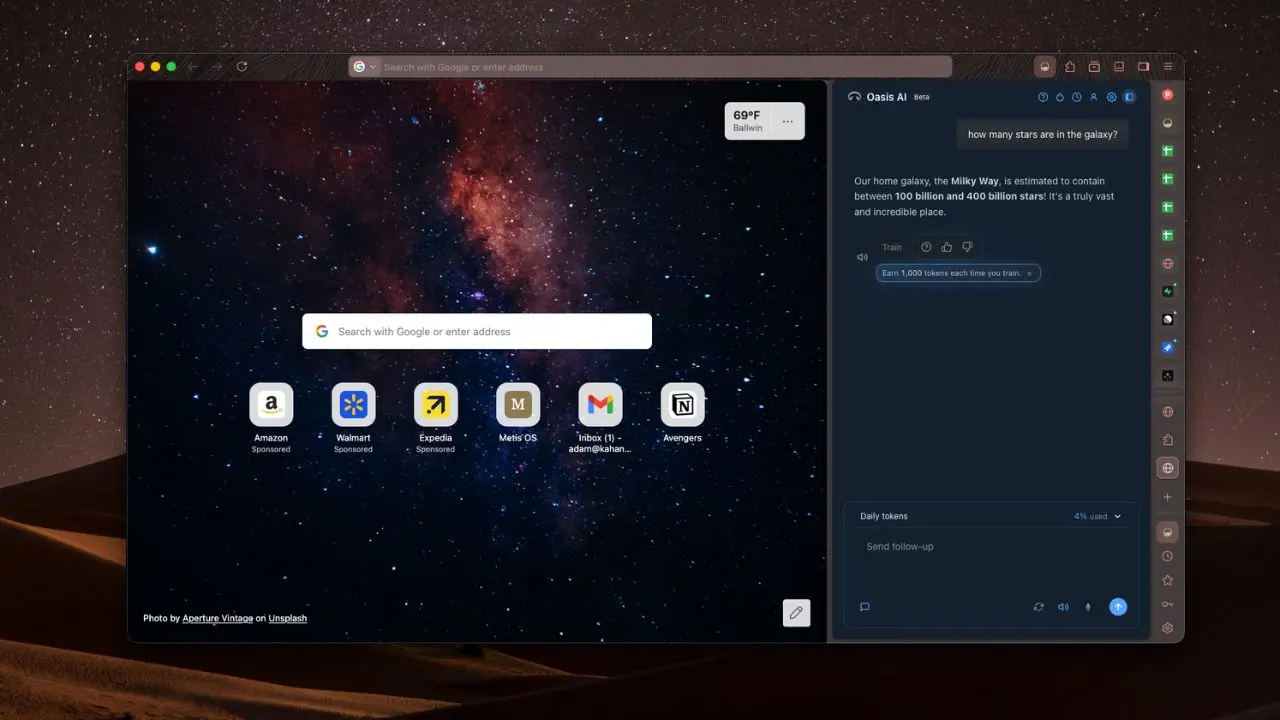
The AI Assistant: Grounded in Your Real Browser Context
This is the central feature, and I want to explain precisely what “grounded in real browser context” actually means, because it’s the difference between a genuinely useful tool and a demo that impresses for five minutes.
Most AI browser features are AI chat interfaces that happen to be open next to your browser. The AI doesn’t know what tabs you have open, what you read last Tuesday, or what article you’re currently viewing.
You provide that context manually every time. Oasis’s assistant, by contrast, has access to your actual browsing environment (your open tabs, your browsing history, and the content of the pages you’re viewing) and can act on them directly through plain-language instructions.
The assistant panel itself is clean: a chat timeline, a composer labeled “Ask Oasis…”, read-aloud playback on the latest AI response, and visible status messages when a tool is running (“Summarizing page…” so you always know what’s happening). Here’s what the assistant can specifically do, organized by capability category:
Tab and Window Management
You can list, open, close, move, and organize your tabs and windows through conversation. “What tabs do I have open?” is a real command that returns your actual list of open tabs. “Close the tab about the quarterly report” closes it. For anyone who regularly ends up with 20+ tabs and no idea what half of them are, this is immediately practical. You can move quickly through your browsing without hunting through a crowded tab bar.
Tab Groups
Create, rename, and manage tab groups through the assistant. “Add this tab to my research group” or “Rename my group to Client Briefs” are the kinds of commands that would normally require several manual steps. The assistant handles them with a single instruction.
Bookmarks
Oasis treats bookmark folders as first-class objects. You can list all your bookmark folders, create new ones, add the current tab to a specific folder, and open every saved page in a folder at once. “Open everything in my reading folder” is a real command that retrieves and opens all saved pages in that folder, genuinely useful for research workflows.
Semantic History Search
This is the feature I find most compelling. Instead of searching your history with exact keywords you hope match what you remember, you can ask in plain language: “Find that article about supply chain disruption I read last week,” and the assistant searches by meaning rather than exact text match. “What did I read about AI regulation last month?” works even when you can’t remember the site, the title, or the exact date.
This solves a genuinely real problem that no standard browser history search addresses. For research-heavy workflows (journalism, consulting, academic work, legal research), this capability alone justifies trying the free plan.
Summarization and Page Understanding
“Summarize this page” or “What are the main points?” generates an answer grounded in the content of the page you’re currently viewing, not a generic web search response, but a direct summary of the specific article or document in front of you. The answer arrives in the assistant panel without you having to copy, paste, or switch tabs.
Memory-Style Lookup
“Have I visited this site before?” or “Find X in my saved stuff” searching across what the assistant can access, including previously visited and saved context.
Confirmations for Sensitive Actions
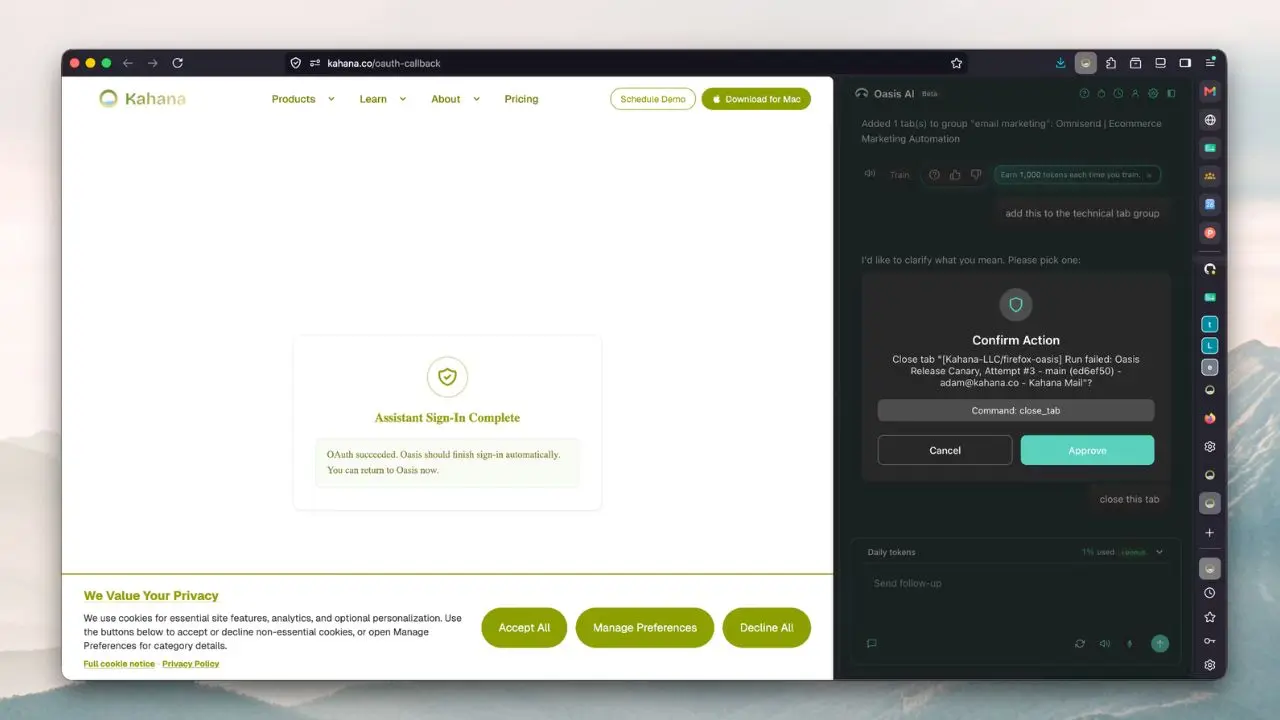
When a command would change your browsing state in a meaningful way, such as closing a tab, Oasis shows a plain-language confirmation modal that displays the exact command before executing it: “close tab ‘Quarterly report.'” You see precisely what will happen and confirm it before it does. That’s a small design decision that carries real practical weight when you’re giving an AI permission to manage your browser.
Voice Input: When Speaking Is Faster Than Typing
Voice input in Oasis opens a focused, dedicated session — a cinematic overlay with an aura visualization that makes it clear you’re in voice mode. Two capture options are available: Continuous (the assistant keeps listening and processes a flowing stream of speech) and Precise (you speak a command, pause, and the assistant sends it).
Replies can be delivered either spoken aloud or streamed into the chat thread, depending on the context. Critically, voice and typing share the same assistant thread, so you can switch between speaking and typing mid-conversation without losing context or starting over.
One note from the product page, honestly, is worth sharing: voice is available only in supported builds, and in unsupported builds it displays a clear in-product message explaining this. It’s not a missing feature that leaves you confused; it’s a build-dependent capability with transparent communication.
The Amplifier: Training the AI on Your Feedback
The Amplifier is Oasis’s planned feedback loop, and I want to be completely clear about its current status: the product page is admirably transparent; it is a roadmap feature, not a current release. Kahana explicitly states this is “a roadmap, not a promise of ship dates.”
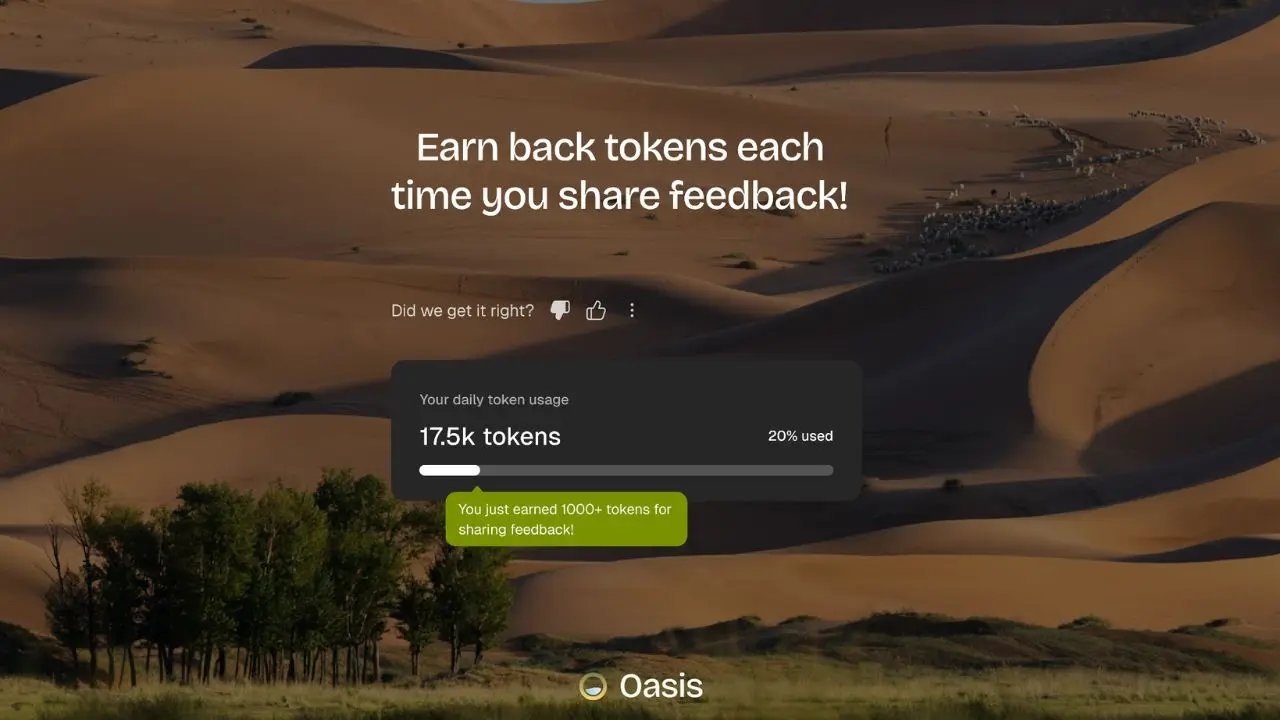
The concept is compelling: instead of a one-size-fits-all AI assistant, Amplifier would let you rate responses, add notes, apply tags, and provide explicit feedback on specific replies, building a training signal that steers the assistant’s quality toward your specific working patterns over time. Qualifying training interactions would earn bonus tokens toward your daily balance.
Two future modes are planned: anonymous training (feedback is uploaded without your identity attached) and personalized training (feedback carries your identity so the assistant can learn your specific preferences). The founder is also asking users a genuinely important question right now: “If you could wave a magic wand and change the Oasis we have today into a superpowered version that can automate any workflows for you, what workflows would you like it to handle for you?”
That question is an invitation. Oasis is actively building based on early user input, which means your feedback during this period shapes what the product becomes. If workflow automation is something you care about, this is the time to use and report on it.
Browser Import: Switching Without Starting Over
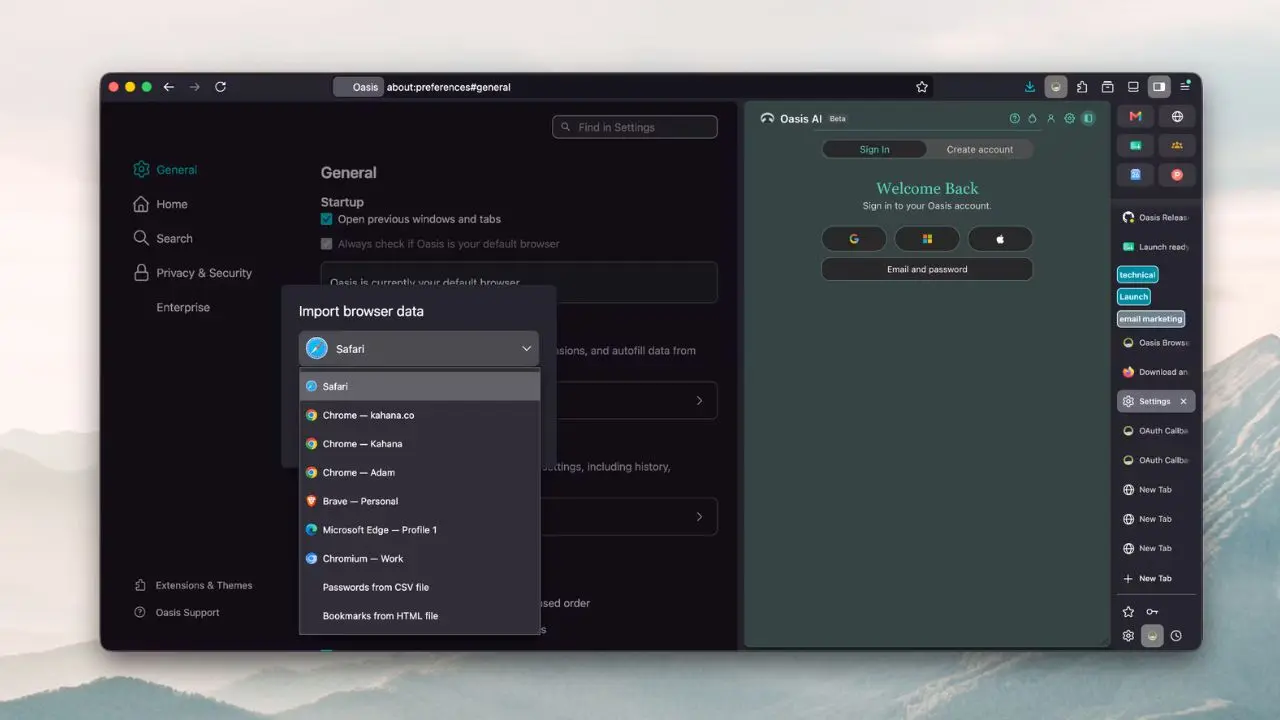
Oasis uses a guided migration wizard that makes switching from your existing browser as low-friction as possible. The wizard handles bookmarks, passwords, browsing history, form autofill data, payment methods (where supported), and extensions (where the platform can transfer them). Supported browsers include Chrome (multiple profiles), Brave, Safari, Microsoft Edge, and Chromium.
The import experience is designed around a principle that most browser migrations ignore: OS permission prompts appear only when actually needed, and the guided flow is structured to take seconds rather than requiring you to manually rebuild your digital environment. According to Kahana’s documentation, switching typically takes seconds, not a weekend. The full import guide is available at kahana.co/docs/import-from-other-browsers for anyone who wants to verify the specific steps before committing.
Privacy: The Part That Actually Matters
Privacy is the word that appears in every browser’s marketing. What makes Oasis different isn’t the claim; it’s the verifiability. Kahana publishes exact, real-shaped JSON payloads showing precisely what data leaves your browser when you use the AI assistant. That’s not a privacy policy in legal language. That’s the actual data structure, publicly documented, so you can see exactly what fields are sent and under what conditions.
Here’s what the documentation at Kahana.co/docs/technical-and-interaction-data shows:
- By default (anonymized mode; the standard for all users): The payload includes your OS, platform, browser name and version, your prompt text, prompt language, token counts, the active tab URL and title, response text, latency, and a session ID and interaction ID. No email. No user ID. No account identifier. The session is anonymous at the account level.
- When you opt in to personalization (not the default): The same payload plus a user object containing your email, user ID, locale, account role, and the explicit opt_in_data_collection_use: true flag. This is off by default and requires a deliberate action in Settings → Privacy to enable
According to documentation, training feedback (when you rate a response) is handled separately from the interaction payload. Anonymous training still uploads on submit, but does not attach your user ID to that training record unless you’ve opted in to personalization.
The founder’s own statement is worth including here: Kahana does not collect any data beyond what is absolutely necessary to improve the AI assistant experience. When you are using the AI assistant or training, it simply will not know who you are unless you choose to tell it. That’s not a marketing claim.
The JSON payload published at their documentation URL is the proof. Compared to browsers like Chrome, which quietly collect broad behavioral signals (including location, searches, purchases, and interests) in the background, Oasis collects only what is described in its public documentation and is explicit about all of it.
Additionally, Oasis does not sell your browsing data, as stated explicitly and backed by an architecture that collects no ad-relevant behavioral profile in the first place. The built-in ad blocker with 100% ad-blocking controls ensures that browsing sessions that do generate interaction data aren’t polluted by the tracking infrastructure most browsers allow by default. 👉 Learn more about enhanced tracking protection.
Kahana also runs the Data Leakage Consortium, a privacy-first community hosted on an encrypted Signal group, focused on preventing data leakage through AI tools. The consortium hosts events, shares research, and develops practical solutions to the documented problem that only 17% of companies have technical controls to prevent employees from uploading confidential data to public AI tools. That initiative signals where the company’s values and priorities lie beyond the product itself.
For remote teams and distributed workforces, thinking through exactly this kind of data exposure, our best productivity apps for remote workers guide covers the broader productivity stack worth knowing about.
Oasis Pricing: Free Plan, Zen Plan, and Enterprise
💳 Oasis Browser Plans at a Glance
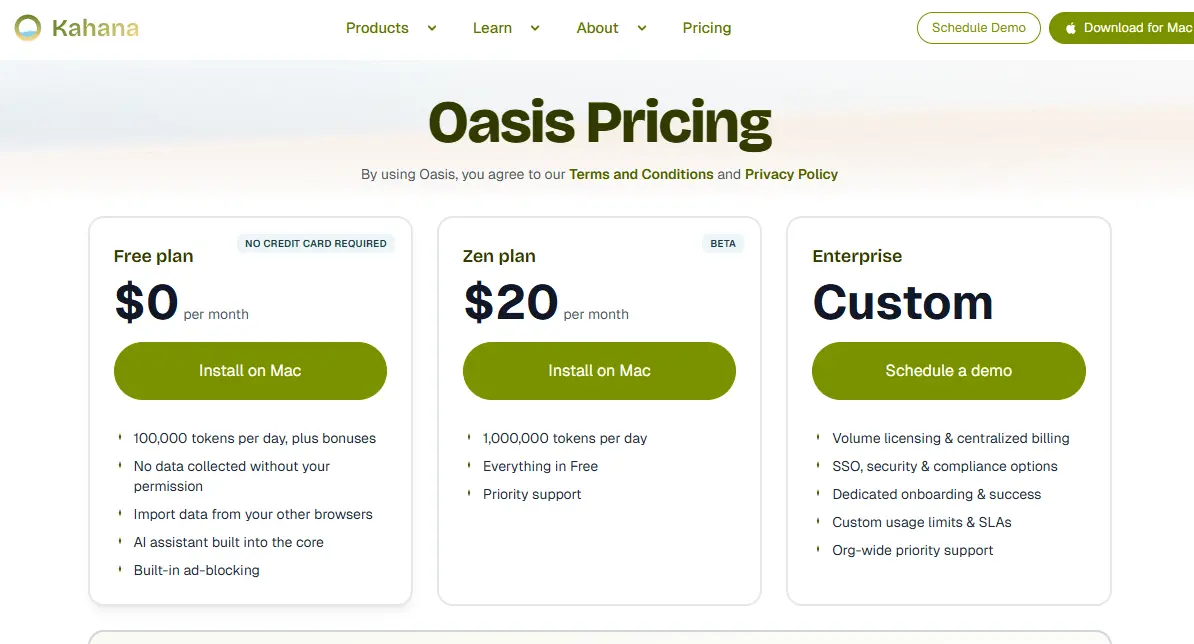
Plan | Monthly Cost | Daily AI Tokens | Key Inclusions | Best For | Verdict |
Free | $0 | 100,000/day (resets daily) | AI assistant, ad-blocking, browser import, no data without permission | Anyone evaluating Oasis | ✅ Genuinely usable (no credit card) |
Zen (Beta) | $20/month | 1,000,000/day (resets daily) | Everything in Free + priority support | Power users, research-heavy daily use | ✅ 10× token ceiling for heavy AI use |
Enterprise | Custom | Custom | SSO, compliance, centralized billing, dedicated onboarding, custom SLAs | IT teams and organizations | ✅ Serious enterprise security layer |
Understanding How Tokens Work
Before you commit to any plan, you need to understand the token system. “Tokens” may sound technical, but the practical reality is simpler than it sounds.
Your workspace access, content navigation, and basic browsing are completely free. No tokens required for browsing itself.
Tokens are consumed only when you interact with the AI assistant; each chat message, tab command, semantic history search, page summarization, and automated workflow draws from your daily token balance. The balance resets every day, not every month, so a heavy AI-use day doesn’t penalize the rest of the month.
The Free plan’s 100,000 daily tokens is meaningful headroom for most individual users. A typical page summarization consumes roughly 2,000–3,000 tokens. A semantic history search is comparable. Most individual users who do a handful of AI interactions per browsing session will sit well within the free limit.
The token cap exists because the AI assistant is powered by Gemini, which carries API costs; token limits keep the free plan economically viable while still providing genuine value. The profile that genuinely needs the Zen plan is someone running multiple research sessions daily: researchers, writers, consultants, or analysts who are regularly using page summarization, semantic history search, and tab management commands throughout an intensive workday.
One honest note on the Zen plan: it’s currently listed as Beta, which means the pricing or specific terms may change as the product matures. If you’re evaluating on a budget, the free plan is a genuinely risk-free entry point: no credit card required, full access to features, and 100,000 tokens per day from day one.
Enterprise pricing is custom and requires a demo. If your organization needs SSO, data leakage controls, centralized billing, or compliance documentation, the enterprise track is the right conversation to have.
Oasis Enterprise Browser: A Separate Product for Organizations
The enterprise edition deserves its own section because it’s not just the personal browser with extra settings; it’s a purpose-built product for a fundamentally different audience. IT teams evaluating enterprise browser solutions face a specific set of requirements that consumer browsers don’t address: policy enforcement across a fleet of devices, centralized admin visibility, SSO integration with identity providers, data leakage prevention for AI tools, and compliance documentation for regulated industries.
Oasis Enterprise Browser addresses each of these directly. Use cases include SaaS and web app security, remote workforce protection, merger integration for managing secure access across newly combined organizations, external workforce access for contractors and partners, VDI reduction (replacing expensive virtual desktop infrastructure with a secure browser layer), Zero Trust security implementation, privileged user management, and general secure web browsing. Markets served span manufacturing, healthcare, finance, government, professional services, retail, technology, education, energy, and utilities.
For organizations evaluating whether an enterprise browser is a practical alternative to MDM-enforced Chrome or VDI infrastructure, Kahana’s Enterprise Browser Buyer Guide provides a comprehensive framework to inform that decision.
Oasis vs. Other AI Browsers: Honest Side-by-Side
⚔️ Oasis Browser vs. Arc vs. Brave vs. Chrome

Feature | Oasis Browser | Arc Browser | Brave Browser | Chrome + AI |
AI Grounded In Real Tabs + History | ✅ Yes | ⚠️ Partial | ❌ No | ❌ No |
Semantic History Search | ✅ Yes | ❌ No | ❌ No | ❌ No |
Tab Management via AI Commands | ✅ Yes | ❌ No | ❌ No | ❌ No |
Built-In Ad Blocking | ✅ Yes | ✅ Yes | ✅ Yes | ❌ No |
Privacy-First by Default | ✅ Anonymized payload | ⚠️ Moderate | ✅ Yes | ❌ No |
Verified Data Transparency Docs | ✅ Published JSON payload | ❌ No | ❌ No | ❌ No |
Voice AI Input | ✅ Yes | ❌ No | ❌ No | ❌ No |
Data Sold to Advertisers | ❌ No | ❌ No | ❌ No | ✅ Yes |
Cross-Platform Availability | ⚠️ macOS (Intel + Apple Silicon); Windows imminent; Linux waitlist | ✅ All platforms | ✅ All platforms | ✅ All platforms |
Free AI Tier | ✅ 100K tokens/day | ✅ Basic | ❌ No | ⚠️ Limited |
Enterprise Edition | ✅ Full enterprise product | ❌ No | ❌ No | ✅ Google Workspace |
Browser Engine | ✅ Firefox core (Mozilla) | Chromium | Chromium | Chromium |
Where Oasis Clearly Wins
Browser-grounded AI that acts on your real tabs and history, not a generic sidebar. Semantic history search is a unique capability. The published JSON payload documentation means transparency is verifiable, not just promised.
Voice input in an AI browser is rare. The privacy architecture is built at the infrastructure level, not just stated in terms of a service document.
Where Oasis Loses Ground Currently
The Windows build is in the final packaging and signing stages; it will be available in days or weeks, but it has not been released yet. Linux remains on a waitlist. The product is actively maturing, which means some roadmap features (Amplifier, workflow automation) aren’t in the current release.
The user base of 7,000+ is an encouraging early audience, but not the established ecosystem of Arc or Brave. In addition, the Zen plan at $20/month is competitive with other AI-first tools but is meaningfully higher than free alternatives for users who regularly exceed the token cap.
Who Should Choose Oasis Over Arc?
Choose Oasis if browser-grounded AI context and verified privacy architecture are your primary priorities. Go for Arc if you want a more design-forward, multi-platform browser with mature feature depth and a larger community ecosystem.
Who Should Choose Oasis Over Brave?
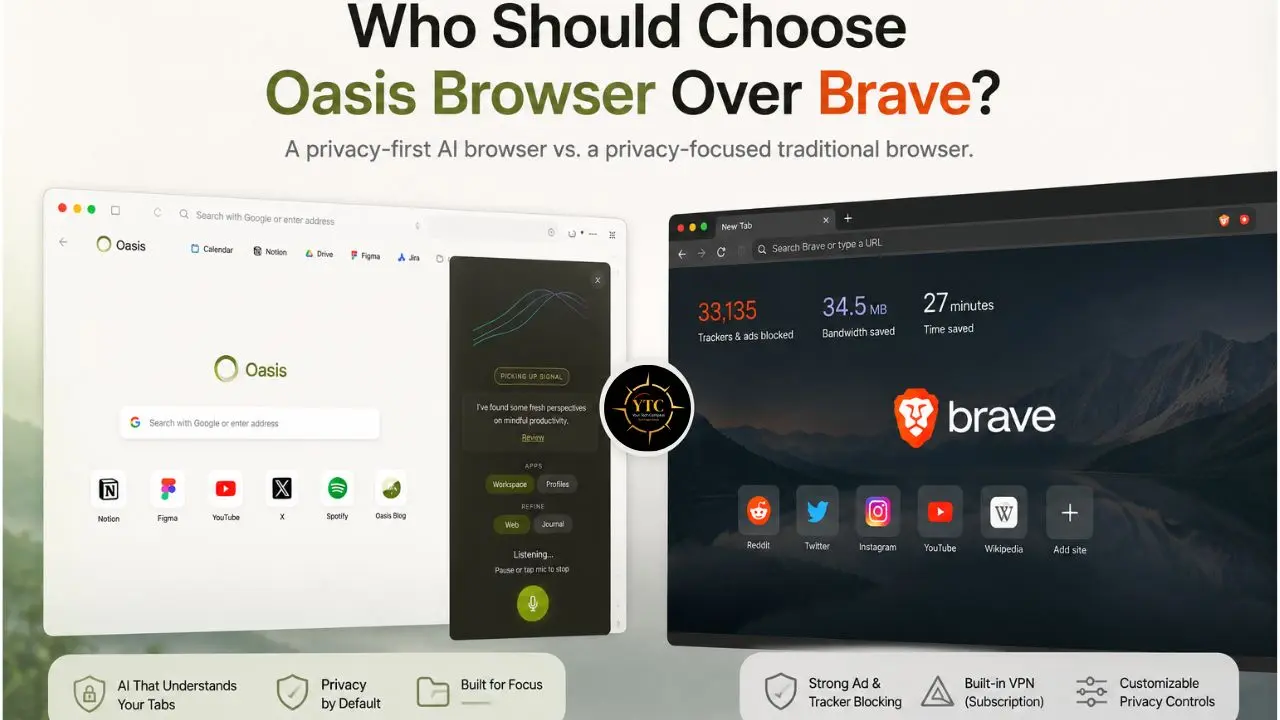
Choose Oasis if you want an AI assistant that actually understands your browsing session, built on strong privacy defaults. And choose Brave if you want maximum privacy, zero AI involvement, and cross-platform availability today.
Who Should Choose Chrome?
Honestly, choose Chrome if you’re deeply embedded in Google’s ecosystem, and AI data privacy isn’t a priority. The two products operate on opposing philosophies of your data, so the right choice depends on which philosophy you want your browser to embody.
For Mac-specific browser and productivity tool recommendations beyond this comparison, our best productivity apps for Mac guide covers the broader Mac productivity stack in depth. And if you’re interested in how AI tools are evolving more broadly in the productivity space, our AI Unboxed section tracks new releases and developments across the AI productivity landscape as they happen.
Who Should Use Oasis Browser
Oasis Browser is the right choice if you:
- Are a Mac user, on either Apple Silicon or Intel, who regularly loses track of tabs and wants to manage your browsing session through conversation rather than manual tab hunting.
- Do research-intensive work (journalism, consulting, legal research, academic writing), where finding something you read three days ago without remembering the URL is a daily friction point.
- Handle sensitive work in your browser and want data architecture that is verified by published JSON payloads, not just asserted in a privacy policy.
- Want to try a serious AI browser without any financial commitment. The free plan’s 100,000 daily tokens and full access to features make it genuinely risk-free.
- Are an early-adopter type who wants to shape a product during its formative period. The founder is actively asking users what workflow automations they want, and that input is directly shaping decisions on the development roadmap.
Who Shouldn’t Use Oasis Browser
Oasis Browser is not the right fit if you:
- Need Windows today. The Windows build is in its final packaging and signing stage and could ship within days or weeks, but it isn’t available yet. If Windows support is your dealbreaker, add yourself to the waitlist and revisit shortly.
- Need a fully mature AI browser with a complete, stable AI feature set from day one. Oasis is actively being built, and some of its most interesting planned features (Amplifier, workflow automation) are on the roadmap.
- Rely on a specific Chrome extension ecosystem. Oasis runs on Firefox core, so Chrome extensions won’t transfer directly; a Chromium-compatible build is available on a separate waitlist.
- Want a large, established community of users and third-party tutorials before committing to a new browser.
Our best productivity apps that actually save time and our best AI productivity apps guides cover a wider range of tools that may serve different productivity needs, alongside or instead of a browser switch. For teams that also automate client workflows and invoicing with AI tools, our ChatGPT and Zapier invoice automation guide covers a practical workflow worth knowing about as you evaluate your AI productivity stack.
And for readers interested in how AI tools are transforming workflows beyond the productivity software category, including in sectors like agriculture, our AI in agriculture in Africa analysis illustrates how broadly the AI infrastructure conversation extends. In addition, our Apps and Tools section comprehensively covers the full range of apps and tools across categories.
FAQs
Oasis Browser is a privacy-first, AI-powered browser built by Kahana Group Inc. It’s available on macOS (both Apple Silicon and Intel), built on Mozilla’s Firefox core engine, and its AI assistant is grounded in your actual browser context: your open tabs, browsing history, and the page you’re currently viewing. That context-awareness is what separates it from generic AI sidebars. It serves 7,000+ users across 108+ countries and is free to download and use without a credit card. A Chromium-compatible build is available on a separate waitlist for users who need it.
Yes. The Free plan costs $0, requires no credit card, and includes 100,000 AI tokens per day, built-in ad blocking, browser data import, and the full AI assistant. The Zen plan at $20/month (currently in beta) increases the daily token ceiling to 1,000,000 tokens and adds priority support. Both plans reset token allowances daily, not monthly.
Oasis collects minimal, anonymized interaction data by default (no email, no user ID, no account identifier) unless you explicitly opt in to personalization in Settings. Kahana publishes the exact JSON payload that leaves your browser when you interact with the assistant, so you can verify precisely what data is sent rather than reading a privacy policy. Oasis does not collect, sell, or build advertising profiles from personal interaction or browsing data. The founder states directly: when you’re using the AI assistant or training, they will not know who you are.
Tokens are the unit of AI usage. Basic browsing, workspace navigation, and content organization are free and do not consume tokens. Tokens are used for AI interactions, including chat, tab commands, semantic searches, page summaries, and automated workflows. The Free plan includes 100,000 tokens per day; Zen includes 1,000,000 tokens per day. Allowances reset every day. Most individual users who have a handful of AI interactions per session comfortably stay within the free limit. The token cap exists because the AI assistant is currently powered by Gemini (Google’s AI model), which has associated API costs. Prompts are executed in part by Gemini, though this happens anonymously; your queries handled with Gemini are not tied to your identity.
The current Oasis AI assistant is powered by Gemini, Google’s large language model. Your prompts are processed by Gemini as part of executing each assistant interaction. Critically, this happens anonymously by default; your queries are not linked to your identity or account. For users who want even greater privacy, Kahana has partnered with OpsCompanion to make local AI models available as an alternative. “The high-level idea is that OpsCompanion is a sovereign intelligence lab that specializes in AI governance and AI control for privacy-centric inference. Oasis is a privacy-centric browser. We will ensure that the inference sent to providers is secure and that users can control what they would like sent. Over time, we will develop this into a localized inference layer for them that we can bake into the browser itself.”
— Kenneth Eversole, Founder @ OpsCompanion.
Running the AI locally on your own device would mean your prompts never leave your machine, a meaningfully higher level of privacy than even the current anonymized cloud model. No specific launch date has been announced, but it is on the active roadmap.
Yes. Oasis includes a guided migration wizard that imports bookmarks, passwords, browsing history, form autofill data, payment methods (where supported), and extensions (where the platform can transfer them) from Chrome, Brave, Safari, Microsoft Edge, and Chromium. The process is designed to take seconds rather than requiring manual rebuilding.
Oasis Enterprise Browser is a separate product for organizations, not an upgrade to the personal browser. It adds SSO integration, centralized admin controls, security policy enforcement, data leakage prevention, Zero Trust security, and compliance infrastructure for regulated industries. SOC 2 certification is currently in progress. Enterprise pricing is custom and requires a demo via kahana.co/schedule-demo.
Conclusion
Oasis Browser is one of the most architecturally interesting browsers I’ve reviewed, and I mean that in a specific, product-level sense. The idea of building a browser in which the AI assistant genuinely understands your tab context, history, and the current page isn’t new. The execution of doing it with a verifiable privacy architecture, a published JSON payload showing exactly what data leaves your machine, and a free plan that doesn’t require a credit card is significantly rarer. Semantic history search (finding what you read by meaning rather than by exact keywords) is the single feature I’d highlight to any researcher, journalist, or consultant who has lost 20 minutes searching their browser history for something they half-remember reading. That feature alone justifies downloading the free plan and spending a week with it.
The honest bottom line is this: Oasis is a browser with a clear philosophical identity and a feature set that’s genuinely strong in some areas and explicitly still under development in others. If you’re a Mac user who does research-intensive work and values a browser that protects your data at the architecture level rather than just the policy level, Oasis is the most compelling option in this space right now, and the free plan removes every practical reason not to try it. If you’re on Windows or Linux, add yourself to the waitlist and revisit when the platform ships. In addition, if you want to be involved in shaping what Oasis becomes (specifically, what workflow automations you’d want it to handle), the product is actively collecting that feedback from early users right now, and this is the window when that input carries the most weight.
Every browser review, AI productivity tool breakdown, and honest software recommendation worth your time lives at YourTechCompass.com, where we give you the information you need to make smarter decisions about the technology you use every single day.