
Every content creator hits the same wall eventually. You need a track for your reel, your podcast intro, or your brand video, and you don’t have a composer on retainer. Stock music libraries can add up quickly, and even decent licensing options often feel generic or repetitive. Suno set out to close that gap entirely, and I want to walk you through how well it actually does that, because the honest answer is more layered than the headline hype suggests.
That said, this review will give you the complete picture, not just the highlight reel. Suno genuinely delivers on its core promise: a full song, vocals and all, from a text prompt in under a minute, and the quality is often strong enough to impress on first pass. However, its newest workflow features are still maturing, the pricing has more moving parts than the headline numbers suggest, and the legal ground it stands on is more complicated than a quick glance at its popularity would imply. By the end of this article, you’ll know what Suno does well, what it actually costs at your usage level, whether you can legally use what it makes, how it stacks up against alternatives, and whether it fits your workflow.
A note before we begin: every YTC score is earned, never negotiated. If you want to understand exactly how we evaluate apps & tools and how we handle affiliate relationships, our Review Methodology lays it all out.
Quick Verdict
Best For: Content creators, podcasters, and lean marketing teams who need fast background music with commercial-use options and minimal production overhead.
Skip It If: You need a polished, professional editing environment today, or you need airtight legal certainty before using AI-generated audio commercially.
Bottom Line: Suno is one of the best tools in its category for getting a usable track in under a minute. It is not yet the finished production platform its Studio marketing suggests, and its legal footing, while improved, isn’t fully settled.
What Is Suno AI?
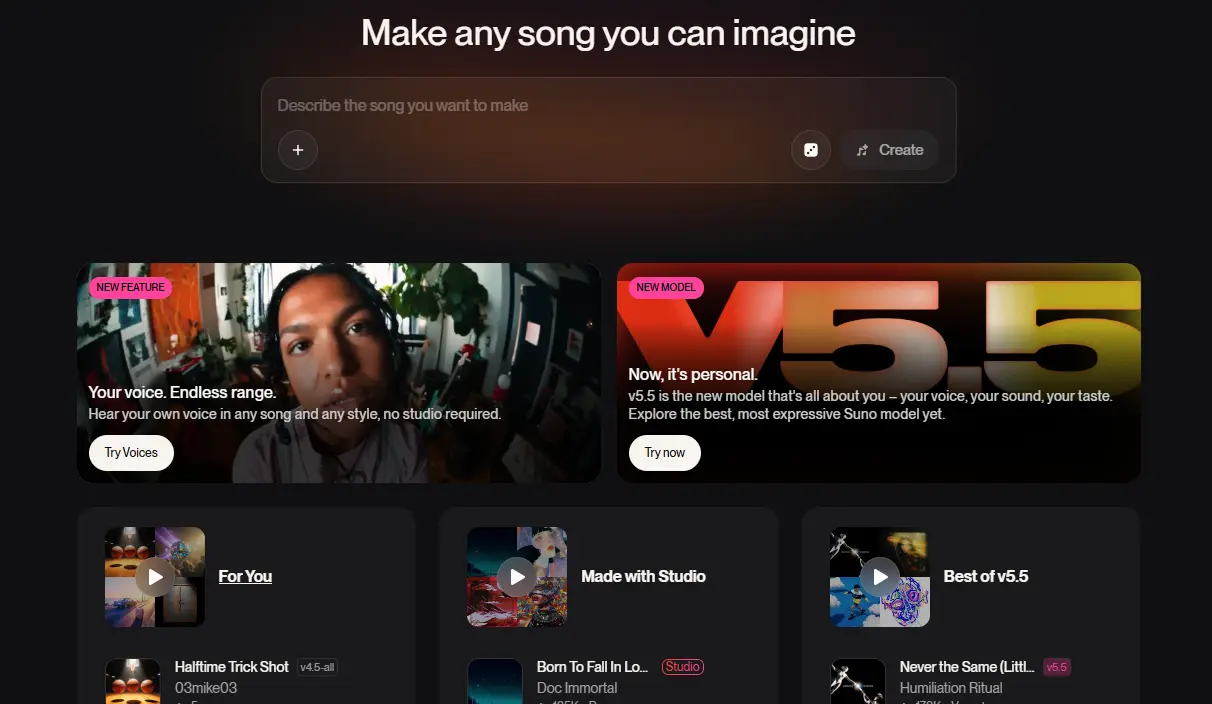
Suno is a generative audio platform that turns a text prompt into a complete song, including vocals, lyrics, and instrumentation. That single capability, executed well, is what made it one of the most recognizable names in AI music today. You type a description, Suno interprets it, and within about a minute you have a finished track rather than a rough sketch you still need to build out.
The scale numbers back up how far this has traveled in a short time. Suno has been reported to be valued at $5.4 billion following a $400 million Series D, and it has been described as one of the largest consumer AI platforms in the category. Those aren’t hobbyist-app numbers, and they put Suno in the same conversation as the major AI platforms covered across our AI Unboxed coverage, even though it’s competing in audio generation rather than text or image generation.
Beyond the product itself, Suno has made one genuinely transparent move worth naming: it publishes Bark, its open-source text-to-audio model, on GitHub for anyone to inspect, fork, or build upon.
How Suno AI Works: Prompts, Models, and Versions
Building a Song
Getting a track out of Suno is deliberately simple, and that simplicity is the entire point. You type a style description, add mood or genre tags, and either write your own lyrics or let Suno generate them for you based on a theme or a few keywords. From there, generation usually takes under a minute for a complete track, and that speed is one of the biggest reasons the platform has scaled so quickly.
Your plan affects which models and features you can access, and that distinction matters more than many first-time users realize before they hit a wall. Paid subscribers generally get access to the latest flagship experience and greater control over version selection, while free users are on a more limited tier.
That version gap isn’t cosmetic, and I want to flag it plainly because it trips people up all the time. If you tried Suno’s free tier once, found the vocals a little flat or robotic, and walked away unimpressed, you may have been judging a tier that doesn’t reflect the full paid experience today.
Model Version History
Suno’s release cadence shows a company shipping quickly, not standing still. V3 arrived in spring 2024, V4 in November 2024, V4.5 in May 2025, V5 in September 2025, and v5.5 in March 2026. That pattern suggests steady iteration rather than a single early breakthrough followed by silence.
Suno says v5.5 is its “best and most personal model yet,” and the release centers on richer arrangements, sharper vocals, and new features like Voices, Custom Models, and My Taste. In subjective listening, the biggest gains are in vocal realism and expressive delivery, though more demanding performances can still expose rough edges.
New in 2025–2026: Suno Studio, Voices, and Hooks
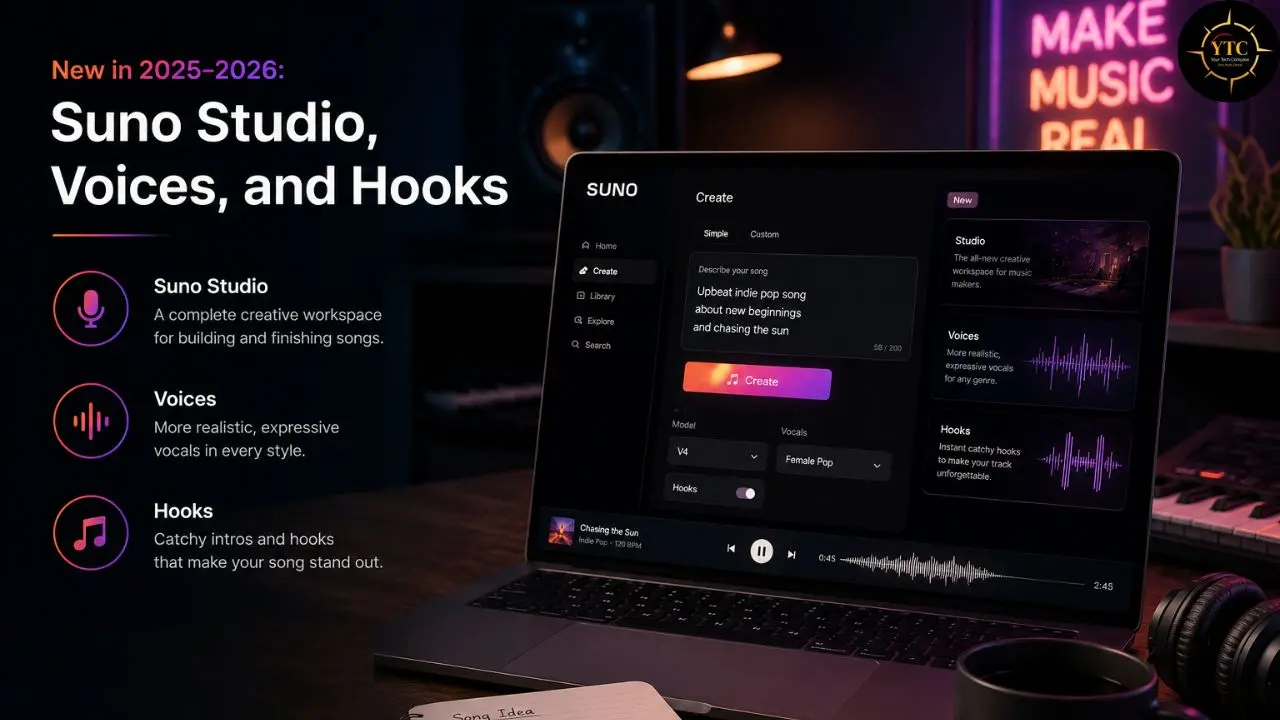
Three additions define where Suno is headed beyond pure one-shot generation, and each one deserves individual attention rather than a passing mention. Suno Studio, launched in September 2025, is an in-browser generative audio workstation built directly on top of generated tracks rather than treating generation as the finished product.
Voices, meanwhile, point to a deeper personalization layer in Suno’s v5.5-era feature set, alongside Custom Models and My Taste. Suno’s own release materials describe these additions as part of a more expressive, more personal creation experience, though the exact enrollment and verification flow should be sourced carefully before being stated as fact.
Hooks rounds out the trio as a short-form music-video feature, not a full standalone video generator. Suno describes it as a way to combine music and video into short-form content for the Suno community, and its official hub page frames Hooks as a tool for creating viral short videos for TikTok, Reels, and Shorts.
Together, these three features signal a platform trying to become a fuller creative ecosystem rather than a generation tool people visit once, download a file from, and never return to. Whether Studio is ready to carry that ambition yet is a separate question, and it deserves an honest, standalone answer rather than a marketing-adjacent gloss.
Suno Studio: The Ambition and the Honest Limitations
I want to slow down here, because Studio is the feature Suno is pushing hardest, and it’s also the place where the marketing can get meaningfully ahead of the current product. Studio’s pitch is straightforward: instead of generating a track and downloading it as-is, you get stems, mixing controls, and arrangement tools inside the browser, turning Suno from a one-shot generator into something closer to a production environment. That is a genuinely different value proposition than “type a prompt, get a file.”
That pitch matters more than it might sound like on paper. Studio is unusual in that it brings DAW-like editing into the same environment as Suno’s generative engine, and Suno’s own framing makes clear that it is meant to “supercharge” an existing workflow rather than replace a traditional DAW. Still, the current build does not yet look like a full replacement for Logic, Ableton, or even GarageBand, based on how reviewers describe it in practice.
However, the current build doesn’t fully match that ambition yet, and I’d rather say that plainly now than have you sign up for Premier expecting a polished DAW and find something closer to an early-stage editor. Outside reviews consistently point to useful creative features alongside clunky workflows, imperfect editing precision, and a learning curve that makes Studio feel more experimental than production-ready once you go beyond basic stem work.
My Honest Take
If Studio specifically is the reason you’re considering Premier over Pro, wait a few release cycles. Use Pro in the meantime, and revisit Premier once reviews from serious producers start sounding more confident about the workflow.
None of this means Studio is worthless right now. For light editing tasks, like stem separation, MIDI export, or quick arrangement tweaks, it can be genuinely useful. It’s the deeper production workflows, the kind a working musician or a serious content studio would rely on daily, where the gap between promise and delivery still shows.
Compared to a real DAW: If you already own Logic Pro, Ableton, or even GarageBand, Studio isn’t going to replace your workflow yet. Treat it as a fast first draft you export and finish elsewhere, not a destination in itself.
Suno AI Pricing: What You’ll Actually Pay

Free Tier
Suno’s free tier renews 50 credits daily, which is genuinely generous compared to many freemium AI tools that ration access much more tightly. The catch, and it’s a significant one, is that free-tier output comes with no commercial use rights. If you’re planning to use anything you generate in monetized content, whether that’s a YouTube video with ads, a client project, or a product you’re selling, this tier isn’t the right option.
Pro Plan
The Pro plan is $8 per month with annual billing, or $10 per month if you’d rather pay monthly instead of committing for a year upfront. Pro includes 2,500 credits per month, supports commercial use for new songs made, and unlocks Suno’s best and most personal v5.5 model along with advanced editing tools and stem separation.
Commercial rights are included at this tier, which makes Pro the realistic entry point for anyone planning to use Suno-generated music in anything public-facing or monetized. If you only take one recommendation from this entire review, make it this one: start at Pro, not Premier.
Premier Plan
Premier is $24 per month on annual billing, or $30 per month. It bumps your allotment to 10,000 credits per month, includes access to Suno Studio, and keeps the commercial-use rights that come with the paid tiers. Given Studio’s current maturity, I’d only recommend Premier if you specifically want that editing environment and you’re genuinely comfortable working around its rough edges rather than expecting a finished product.
💳 Suno AI Plans at a Glance
Plan | Monthly Cost (Annual) | Credits/Month | Songs/Month | Commercial Rights | Studio Access | Best For |
Free | $0 | 50/day (renewing) | Limited | ❌ Not included | ❌ No | Testing quality, hobbyists |
Pro | ~$8/month | 2,500 | ~500* | ✅ Included | ❌ No | Solo creators, monetized content |
Premier | ~$24/month | 10,000 | ~2,000* | ✅ Included | ✅ Included | High-volume creators, Studio users |
Prices reflect annual billing; monthly billing is $10 for Pro and $30 for Premier, which is about 20% higher on both paid tiers. Always verify current figures directly on Suno’s official pricing page before making a purchasing decision, since generative AI pricing shifts frequently.
*The songs/month figures are rough credit conversions, not official hard caps.
The Real Cost Math
Here’s where the pricing conversation becomes genuinely useful, rather than just repeating numbers from a pricing page. At Pro-tier volume, your effective cost per generated track drops to a fraction of a cent when you spread the subscription across the monthly song allotment, which compares favorably with traditional stock music licenses that often cost $15 to $50 per track. For creators publishing several videos a week, that is not a small saving; it changes the economics of the entire production pipeline.
That said, Suno’s credit system does come with friction worth understanding before committing to an annual plan. The public pricing materials emphasize monthly credit allocations, so unused capacity may not carry forward. Top-up credit rules should be checked carefully before you rely on them for burst usage.
One more gap worth naming directly, because it will matter if your operation grows: Suno’s public pricing page currently highlights individual plans rather than a visible team or enterprise tier. If you’re running a studio or agency, centralized billing and multi-seat management are less straightforward than in most SaaS tools.
Is Suno AI Legal? The Copyright Reality

This is the section most reviews either skip entirely or oversimplify into a single reassuring sentence, and it’s the one I think matters most if you’re planning to build anything commercial around this tool long-term. Suno’s legal position has improved over the past year, but it has not been fully resolved, and those are two very different things.
Warner Music Group settled its copyright dispute with Suno in November 2025 and moved into a licensing relationship that gave the platform a real legitimacy signal. However, Sony and Universal did not join that settlement, and the broader copyright fight continued into 2026. The central legal question (whether training an AI model on copyrighted recordings without a license can qualify as fair use) remains unresolved.
It’s also important to separate product rights from legal finality. Suno’s paid-tier commercial rights are real in practice, but they sit on top of a training-data dispute that has not gone away just because one major label reached a deal.
Independent-rightsholder claims also remain part of the picture, alongside the major-label litigation. That means even a favorable settlement with one label would not automatically settle every other claim against the company.
None of this is legal advice, and anyone with significant commercial exposure should consult an IP lawyer rather than rely on this review. The most accurate summary is that Suno is more commercially usable than it was a year ago, but the underlying copyright risk remains active and unresolved.
Suno AI vs. Alternatives
Choosing between Suno and its closest competitor comes down to how each platform is currently positioned legally and commercially, not just which one sounds marginally better in a blind listening test.
⚡ Suno vs. Udio vs. Traditional Stock Music: Side-by-Side
Dimension | Suno AI | Udio | Traditional Stock Music |
Input Method | Text prompt | Text prompt | Pre-made library, no generation |
Commercial Rights | Paid plans include commercial use rights for tracks made while subscribed. | In licensing transitions following major-label settlements, verify current terms before commercial use. | Per-track licensing with usage rights defined by the library and license type. |
Litigation Status | Warner settled in Nov. 2025; other litigation continued into 2026. | Not applicable | |
Editing Depth | Basic-to-moderate editing tools and iterative generation features. | Platform details are changing; verify current product capabilities. | N/A |
Cost Model | Subscription plus monthly credits. | Subscription-based or transitioning; verify current terms. | Often $15–$50 per track, depending on library and license scope. |
Team/Enterprise Tier | Public pricing emphasizes individual plans; no clearly advertised enterprise tier. | Verify directly. | Varies by library |
Best For | Fast, commercially usable tracks today. | Watching for its next licensed-stage rollout. | One-off licensing needs with conventional rights clarity. |
Where Suno Wins

Suno is the safer choice if you need to ship music this week, because it currently looks like the more stable, immediately usable product with paid commercial rights already available under its existing plan structure. Udio, by contrast, is still in a more visible transition toward a licensed model, which makes it the more interesting platform to watch over 2026 but the less predictable one to build on right now.
The version cadence and Studio work also suggest Suno is continuing to invest in product depth, not just defending the current release. If your priority is reliable output, lower operational uncertainty, and a tool you can use immediately, Suno has the edge.
Compared to Udio right now, I’d pick Suno for anything you need to ship this week. Udio is the one to watch for 2026, not necessarily the one to build on today.
Where Udio Might Win Later
Udio’s situation is worth understanding on its own terms, because it is moving in almost the opposite direction from Suno. Universal Music Group settled with Udio in October 2025, Warner Music Group followed in November 2025, and Udio said it would transition from its current closed system to a fully licensed platform in 2026, with participating artists and songwriters credited and paid.
If full label licensing and direct artist compensation matter more to you than what is available right now, Udio’s 2026 relaunch is worth watching closely once it actually ships and proves itself. Sony, however, has continued to litigate against Udio, including a new lawsuit in July 2026, so neither platform has a clean legal slate. Don’t mistake one label’s settlement for a clean bill of health.
This is a fast-moving legal and product landscape on both sides, and it’s the kind of shifting ground we track closely across our broader Tech Guides coverage, just as we track version and pricing shifts across text-based AI tools, like the comparisons in our GPT-5.5 vs. Claude Opus 4.8 breakdown.
Real-World Use Cases for Suno AI
The best way to understand where Suno genuinely earns its position is to look at what people are actually building with it day to day, rather than the demo use case everyone leads with.
Short-Form Content Scoring
Content creators who produce Reels, TikToks, and YouTube Shorts are a natural fit for Suno’s core strength. A creator can generate a genre-matched background track in under a minute, use it commercially under a paid plan’s current terms, and move straight into editing without waiting on a composer or browsing a stock library for something that feels overused.
Podcast Intros and Branded Audio
Podcasters and small media brands use Suno to generate consistent intro and outro music that matches their show’s tone without paying per-episode composition fees. Because the effective cost per track is low when spread across a subscription, a weekly show can refresh its audio branding periodically without the licensing math getting complicated.
Musician Demo Work
Independent musicians use Suno’s generation tools to quickly sketch song ideas, testing a melody or arrangement concept before committing studio time and money to a full recording. This isn’t a replacement for a real production process, but as a fast idea-testing layer, it shortens the distance between “I have a concept” and “I can hear roughly what it sounds like.”
Marketing and Brand Audio
Small marketing teams and SaaS or fintech founders producing branded video content use Suno to avoid the overhead of traditional music sourcing for everyday content. This is especially relevant for lean teams, because it reduces both budget pressure and the friction of paying for conventional stock music in foreign currency.
Who Should Use Suno AI
Suno AI is genuinely the right choice if you:
- Need fast, commercially licensed background music for short-form video, podcasts, or marketing content on a limited budget.
- Want to test song or arrangement ideas quickly before investing in a full studio production.
- Are comfortable with an evolving legal landscape and plan to stay informed as the Sony litigation progresses.
- Value speed and per-track cost efficiency over deep, professional-grade editing control.
Who Shouldn’t Use Suno AI
Suno AI is not the right fit if you:
- Need team or enterprise-level billing for a studio or agency with multiple seats, since public pricing materials emphasize individual plans.
- Require a fully mature, professional editing environment today rather than an early-stage one.
- Need absolute legal certainty for a large commercial operation before the copyright disputes are resolved.
- Are working in a low-connectivity environment and need offline-capable software.
An Honest Note on the Review Landscape
Suno’s App Store ratings paint a picture of very strong satisfaction among casual users who want to generate short, catchy tracks quickly. The iOS app currently has a 4.9 rating with roughly 308K reviews, a strong signal for the platform’s core consumer use case.
Look past the star rating, though, and a different story appears in deeper community discussions, especially around Studio and other advanced workflows. The recurring complaint is not that Suno’s core generation is weak; it is that the platform’s more ambitious editing tools still feel less polished than the generation engine underneath them.
Figure out which group you belong to before you buy, because your experience will differ a lot depending on whether you want quick generation or deeper production control.
Suno AI in Africa: Accessibility and Practical Realities

Pricing in African Market Context
Suno’s public pricing is USD-based, which creates real forex and payment friction for many African creators. The free tier is a useful entry point, letting hobbyists, students, and small creators test the platform before committing to recurring USD billing.
Connectivity Considerations
Suno is a cloud-based tool, so you need a stable internet connection to generate and manage music workflows. If you work in an area with inconsistent connectivity, factor that into your process before relying on the platform for time-sensitive work.
African Creator Ecosystem Fit
Suno fits best where African creators need fast, low-cost music for short-form content, podcasts, and branded video. Paid plans include commercial-use rights for new songs created on Pro and Premier, making the tool practical for creators who need usable output quickly without paying traditional stock-music licensing fees every time. That cost advantage matters even more for African fintech and SaaS marketers producing branded audio content on a limited budget, a use case directly relevant to the founders we cover across our AI in Africa category.
If you’re weighing AI tools generally for a resource-constrained team, that same cost-per-output logic applies whether you’re comparing Suno against stock music licensing or comparing a text-based assistant against its alternatives. Our deep dives into Claude AI, Claude Opus 4.7, and ChatGPT 5.4 all use the same value-for-money lens for text-based generative tools, and the underlying evaluation framework carries over well to audio generation as well.
FAQs
Yes, Suno offers a free tier with daily-renewing credits, but output from the free tier does not include commercial use rights. If you plan to publish or monetize anything you generate, you’ll need to upgrade to Pro or Premier first.
Paid tiers include commercial use rights for new songs made as part of the subscription. That said, Suno has faced ongoing copyright litigation, so “covered by a paid plan” and “fully free of legal risk” are not the same thing.
Pro costs about $8 per month on an annual billing plan or $10 per month, and it includes 2,500 credits plus commercial use rights. Premier costs about $24 per month on annual billing or $30 monthly, raises the credit allotment to 10,000, and adds access to Suno Studio, Suno’s in-browser editing environment.
Studio is Suno’s in-browser production workspace, letting you edit stems and arrangements on top of generated tracks instead of treating the raw output as the final file. It’s an ambitious feature, but it still feels more useful for light editing than for fully serious production work.
Yes. Suno has been involved in copyright litigation, and that legal backdrop is part of the broader conversation around using AI music tools commercially.
Voices is a voice-personalization feature for eligible paid subscribers that lets them work with their own singing voice. The exact access rules and verification flow should be checked against Suno’s current product documentation before being described in too much detail.
It depends on what you need. Suno is the safer choice if you want a more established commercial workflow today, while Udio may appeal more if you’re comparing output style, features, or product direction.
Final Thoughts

Suno earns its position near the top of the AI music platform market for real, substantive reasons, not just first-mover luck. The core promise (a complete song with vocals in under a minute) works well in practice, and v5.5’s vocal quality is strong enough to sound convincing on first listen across many genres. The Warner Music Group settlement is a meaningful legitimacy signal rather than just a headline, and the cost-per-track math against traditional stock music licensing can be compelling enough to change how a content creator or small marketing team budgets for audio production.
Going in without the full picture, though, is where the disappointment tends to live, and I’d rather you hear this from me now than find out the hard way. Suno Studio is not yet the finished production workstation its marketing can imply, and treating Premier as a mature DAW subscription today will probably leave you frustrated rather than delighted. Sony’s ongoing litigation against Suno means the platform’s legal footing, while improved, is not fully settled, and anyone building a real commercial operation around AI-generated music should weigh that risk carefully instead of assuming one label’s settlement closes the question for good. My take: If you need fast, affordable, commercially licensed background music today, buy Pro and move on. If you’re betting a business on this category’s long-term legal clarity, keep watching closely before you commit beyond a monthly subscription.
Your next great tool recommendation, backed by the same honest scrutiny, is one click away at YourTechCompass.com.