Here’s the specific question JetBrains forces you to answer: you already pay for a JetBrains IDE (IntelliJ IDEA, PyCharm, WebStorm, GoLand, Rider, CLion, or one of the others). You use it every day. The AI tooling built into it was designed by the same team that built the IDE’s code‑intelligence engine: the same static analysis, type‑system awareness, and call‑graph knowledge that powers every smart refactoring and every red underline you’ve come to rely on. Theoretically, that should mean deeper contextual awareness and less friction than a third‑party plugin that reads the same code through a generic text API. The honest question is whether “built by the same team” actually translates into better outcomes than GitHub Copilot or Cursor, or whether it’s mainly a positioning story that sounds better than the benchmarks support.
I’ve examined JetBrains AI’s feature set, model options, pricing, and real‑world workflow implications to give you the answer that depends on who you are and what you build. The JetBrains AI Assistant has evolved significantly since its initial release; it now offers multi‑model choices (cloud and local), integrated coding agents, and deeper project awareness. Whether the subscription fee for the AI tier is worth adding to your existing IDE license is the question this review answers, and the answer will be specific rather than universal.
A note before we begin: every YTC score is earned, never negotiated. If you want to understand exactly how we evaluate apps & tools and how we handle affiliate relationships, our Review Methodology lays it all out.
What Is JetBrains AI?
JetBrains is a Prague-based software development tools company founded in 2000. If you’ve used IntelliJ IDEA, PyCharm, WebStorm, GoLand, Rider, CLion, DataGrip, or RubyMine, you already know the company, even if you haven’t paid much attention to the brand. JetBrains IDEs are widely used by professional Java, Kotlin, Python, and .NET developers, especially in enterprise and large-team environments.
JetBrains AI Assistant launched in 2023 as an integrated AI layer for JetBrains IDEs, not as a separate standalone app. Its feature set includes inline code completion, an AI chat panel, context-aware help with refactoring, documentation generation, test generation, commit message generation, and code explanation, with later 2025 updates adding more agent-like, multi-step workflows across files.
The Multi-Model Strategy

The most strategically interesting aspect of JetBrains AI is that it does not rely on a single underlying model. Instead, it offers a multi-model setup that combines JetBrains’ own Mellum completion model with cloud model options for chat and code tasks, including providers such as OpenAI and Google Gemini.
Mellum is JetBrains’ proprietary code-completion model, optimized for low latency and designed for code-focused suggestions, while Gemini support shows that JetBrains is willing to route parts of the experience through frontier third-party models when that better fits the task. This makes JetBrains AI less like a single chatbot and more like an orchestration layer inside the IDE. That is a real strategic advantage if you care about task-specific routing, IDE context, and enterprise deployment flexibility, but the exact model lineup can change by release, task, and subscription tier.
Our Claude AI Explained guide covers what makes Claude’s approach to code generation distinct, and our Claude Opus 4.7 Explained guide provides context on the model family JetBrains is drawing from.
JetBrains AI Features: What It Actually Does
AI Code Completion Powered by Mellum
Mellum is where JetBrains AI’s most defensible technical advantage lives, so it deserves the most careful attention. Unlike the frontier models in the chat panel, Mellum is JetBrains’ proprietary completion model, designed specifically for contextual code completion inside the IDE.
The integration goes deeper than a typical third-party plugin can usually reach. JetBrains’ completion can leverage IDE context, such as the current file, nearby code, and project structure, giving it stronger semantic grounding than a generic text-based assistant.
When Mellum suggests a method implementation, it is working from code-aware signals about your project rather than just the visible lines on screen. That makes the completion experience especially strong in JetBrains’ best-supported languages and environments, where the IDE’s own analysis is already very rich.
Completion speed is genuinely fast. JetBrains says Mellum was built to reduce latency and keep suggestions immediate enough to fit natural typing flow, which is exactly what you want from inline completion.
AI Chat Panel
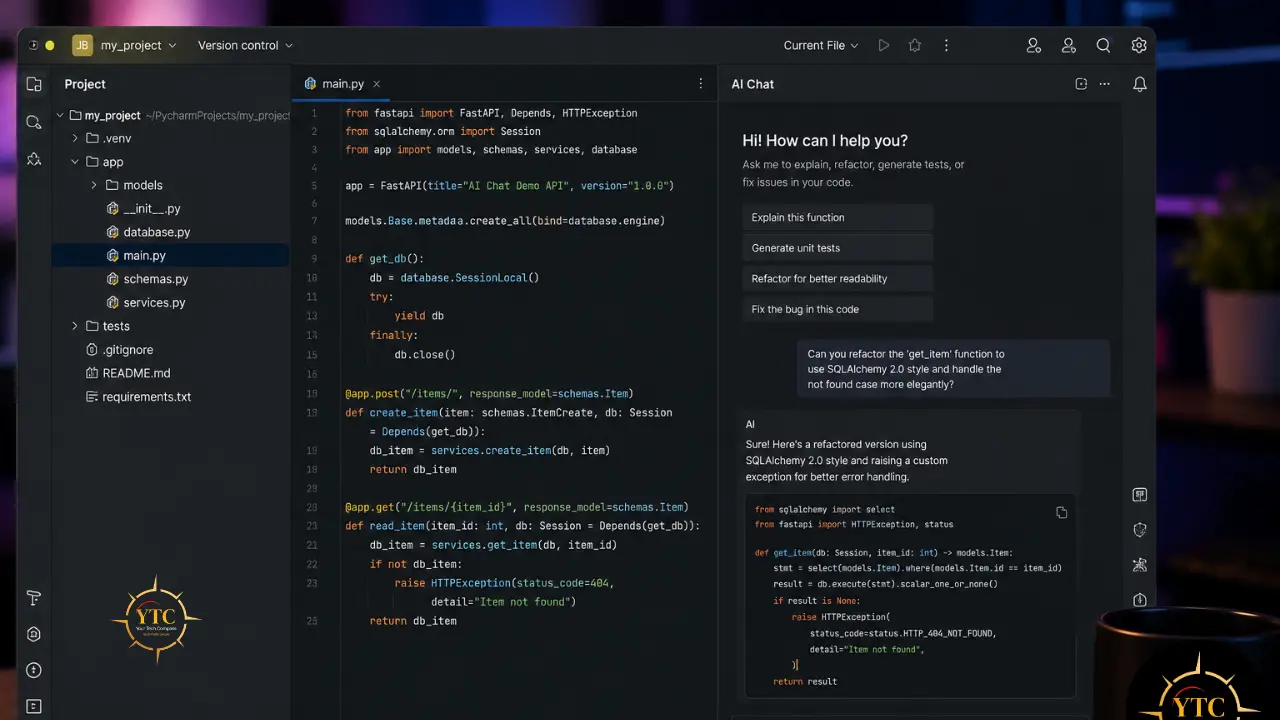
The embedded chat panel inside the IDE is where JetBrains’ multi-model strategy becomes practical. You can choose the model for the task, then use the chat to ask questions, generate code, or work through multi-step development tasks without leaving your IDE.
Context handling is one of the chat’s biggest strengths. JetBrains lets you attach project files, folders, symbols, and other relevant context, so you’re not copying and pasting snippets into a separate browser window; the conversation stays connected to the code you’re actually working on.
That makes the chat feel like part of the development environment rather than a bolt-on chatbot. For developers who live in their IDE all day, that integration is a real workflow improvement over browser-based AI tools.
Code Explanation and Documentation
Select any code block, right-click, and choose “Explain Code”; the AI provides a natural-language explanation in the chat panel. For developers inheriting undocumented codebases, this can meaningfully accelerate onboarding.
Documentation generation is also built in: JetBrains AI can generate documentation for selected code items, including language-appropriate doc comments such as JavaDoc, docstrings, JSDoc, or XML-style comments depending on the language and IDE conventions. Because it can use IDE and project context rather than only raw text, the output is often more grounded in the actual code structure than a generic chat response would be.
Refactoring Assistance
JetBrains AI suggests refactoring operations based on detected code quality issues or explicit requests. The key advantage is that these suggestions live inside the JetBrains workflow, where you can review the proposed changes before applying them.
When the AI suggests renaming a variable or extracting a method, the result is more semantically grounded than a plain-text rewrite because it operates within an IDE that already understands symbols, usages, and project structure. That makes it more reliable than a tool that only returns a replacement snippet, even though you should still review the diff before accepting it. This is best thought of as AI-assisted refactoring inside a strong native refactoring environment, rather than the AI fully replacing JetBrains’ refactoring engine.
Test Generation
JetBrains AI generates unit tests for selected code and can take the current project context into account, so the results are usually better aligned with the codebase than those from a generic template. In C#, JetBrains explicitly supports common frameworks such as NUnit, xUnit, and MSTest, and it adapts the generated test setup to the framework already used in the project.
Test generation quality still varies by language and codebase complexity, as it does across all AI coding tools, but IDE-aware context usually makes the output more practical out of the box than context-free generation.
Commit Message Generation
The commit message generation analyzes your staged diff and produces a structured, meaningful commit message. The quality here is solid: the AI usually captures the gist of the change rather than merely listing modified lines, and you can refine the prompt if you want output that follows a specific convention, such as Conventional Commits.
Agentic Mode: The 2025 Addition
The most significant addition in JetBrains’ 2025 agentic update cycle is multi-step task execution inside the IDE. You describe a goal, and JetBrains AI can analyze the project, propose a plan, edit multiple files, work with terminal output, and iterate on the task with approval checkpoints along the way.
To be honest about the competitive landscape, JetBrains’ agentic capabilities are strong but still feel more conservative than the most mature agent-first tools. For complex, multi-file refactoring or more autonomous feature work, Cursor and Devin Desktop may still feel ahead in how much they let the agent drive the workflow, though JetBrains is closing that gap quickly. Our Devin Desktop and Cursor AI reviews both cover what mature agentic coding looks like in practice, providing useful comparative context for evaluating JetBrains AI’s current agentic implementation.
That said, JetBrains AI’s agentic mode, working within the IDE’s existing context (with access to the same project indexing and code intelligence that power the rest of the feature set), has structural advantages for certain agentic tasks over tools that operate through the IDE’s text API alone.
JetBrains AI Pricing: The Complete 2026 Picture
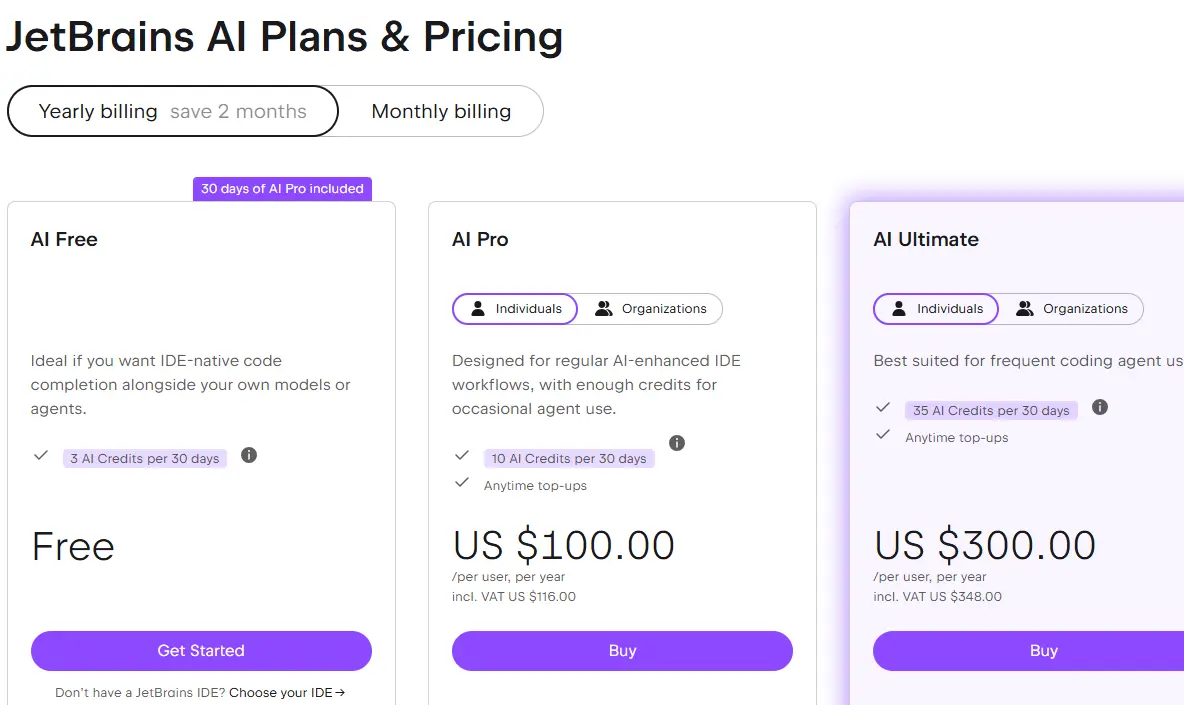
The pricing structure requires careful explanation because JetBrains AI is sold as a separate subscription layer on top of JetBrains IDEs.
AI Pro Subscription
AI Pro is the entry-level paid tier and is currently listed at $100 per user per year on JetBrains’ pricing page, with a free trial and credit-based usage model. It unlocks broader AI use in the IDE, including chat and completion features, with the exact model access and quotas depending on the current plan details.
Free Tier
JetBrains also offers a free tier with limited AI credits, allowing evaluation without an immediate purchase. The free tier is useful for trying the product, but it does not provide the same level of access as the paid plans.
The Honest Pricing Calculation
Here’s the math that determines whether JetBrains AI makes financial sense for you. A developer on the All Products Pack currently pays about $29.90/month in year one ($299/year), $19.92/month in year two ($239/year), and $14.92/month from year three onward ($179/year). Adding AI Pro at $100/year increases that total meaningfully, especially in year three and beyond.
The alternative worth pricing out is GitHub Copilot inside JetBrains IDEs via the Copilot plugin. For some developers, Copilot may be the better value if they prioritize agentic workflows and model quality over IDE-native integration; for others, JetBrains AI may be worth it for its tighter IDE context and JetBrains-specific workflows.
For pricing comparison, check our GitHub Copilot Explained guide, which covers Copilot’s current tier structure and feature set in detail. Our GPT-5.5 vs Claude Opus 4.8 comparison provides useful context on the frontier models JetBrains AI draws from for its chat functionality.
Enterprise Pricing
JetBrains’ enterprise AI offering adds organization-level management, centralized billing, usage visibility, and security controls to the IDE experience. For regulated industries such as financial services, healthcare, and government, the most important differentiator is JetBrains’ ability to support approved corporate model providers and company data sources within an enterprise-managed setup.
That makes JetBrains AI a viable option for teams that need stronger control over where code and prompts are processed. The better claim is not that every competitor lacks enterprise options, but that JetBrains offers a particularly IDE-native path to governance and deployment control.
The Deep IDE Integration Advantage: What “Native” Actually Means
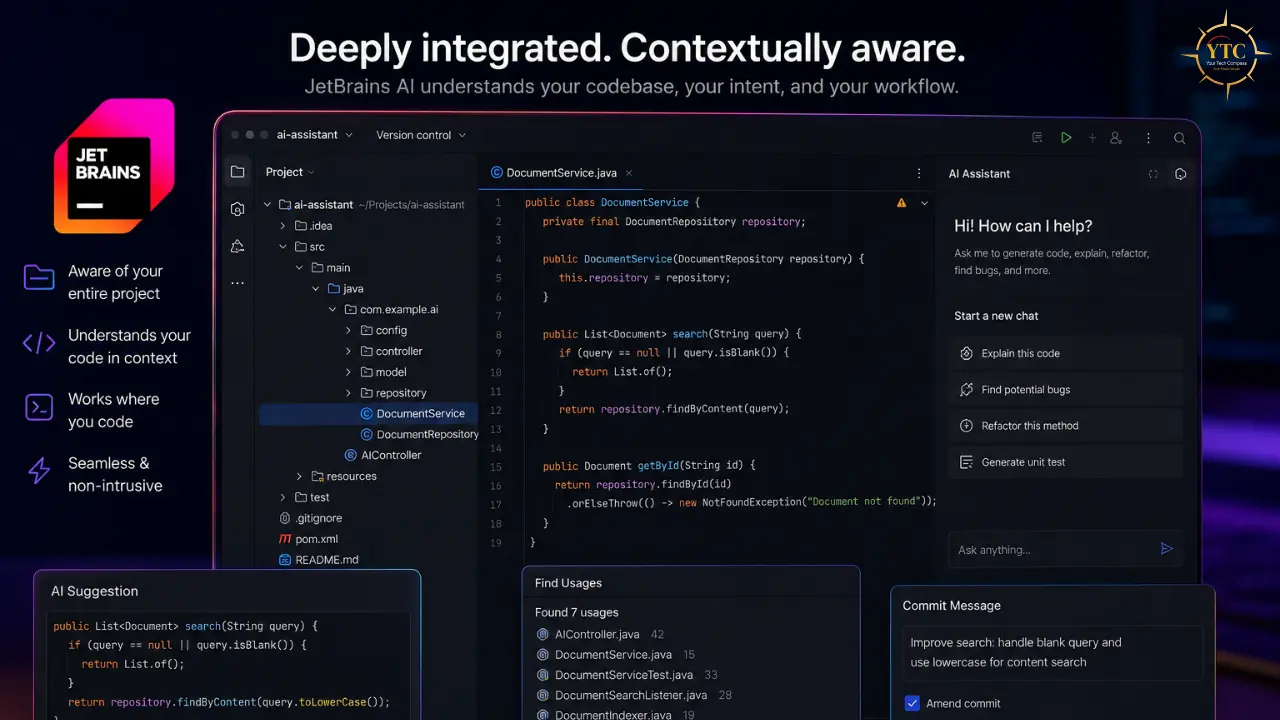
This is the core claimed advantage of JetBrains AI, and it deserves genuine scrutiny rather than either dismissal or uncritical acceptance.
What Native Integration Actually Provides
JetBrains IDEs are built around a sophisticated internal code model: a rich, continuously updated representation of your project that tracks types, usages, inheritance, navigation, inspections, and refactoring relationships. That is what makes JetBrains’ smart completion, semantic refactoring, and precise error highlighting feel so strong.
Third-party plugins like GitHub Copilot run inside JetBrains IDEs, but they are not first-party features and generally do not get the same depth of native IDE intelligence by default. They can still provide useful assistance, and some newer integrations expose richer context than a simple text box, but they are usually working with a thinner slice of the IDE than JetBrains’ own tools.
JetBrains AI, as a native feature, is built to leverage that first-party context. In practice, that means the assistant can work with project-aware signals that make its suggestions feel more grounded than a generic editor plugin, even though it is still best described as IDE-aware rather than magically omniscient.
Where the Advantage Is Real and Measurable
For Java and Kotlin development in IntelliJ IDEA, the semantic integration advantage is strongest. JetBrains is especially good at JVM languages, and its AI tools benefit from the same project-aware code intelligence that powers completion, navigation, inspections, and refactoring.
When JetBrains AI suggests an interface implementation or generates a test, it can lean on the IDE’s understanding of signatures, usages, and project structure. That usually produces results that are more grounded than text-only generation, although output quality still depends on the codebase and the prompt.
For documentation generation, access to type information can improve accuracy because the IDE knows parameter types, return values, and many structural details directly from the code. And for refactoring, the ability to review and apply AI-suggested changes inside JetBrains’ native refactoring workflow is a real practical advantage, even if it is harder to quantify than completion quality.
Where the Advantage Is Smaller Than Claimed
For generative tasks such as writing new code from a natural-language description, model quality matters more than the depth of IDE integration. Because of that, JetBrains AI is less uniquely advantaged here than it is in refactoring or code understanding, and the gap versus other assistants depends heavily on which models and workflows you compare.
For less widely used languages, the integration advantage can narrow significantly. JetBrains still helps, but the difference between a native assistant and a plugin-based alternative is often smaller in languages with thinner IDE support than it is in Java or Kotlin.
For agentic multi-file tasks, Cursor and Devin Desktop may feel more mature and more autonomous in practice. JetBrains is improving quickly, but its strongest advantage is still IDE-native precision rather than being the most aggressive autonomous agent. Our guide on using Claude AI for coding covers the workflow patterns where agentic coding is most valuable, providing useful context for assessing where JetBrains AI’s current agentic implementation falls short.
JetBrains AI vs GitHub Copilot vs Cursor
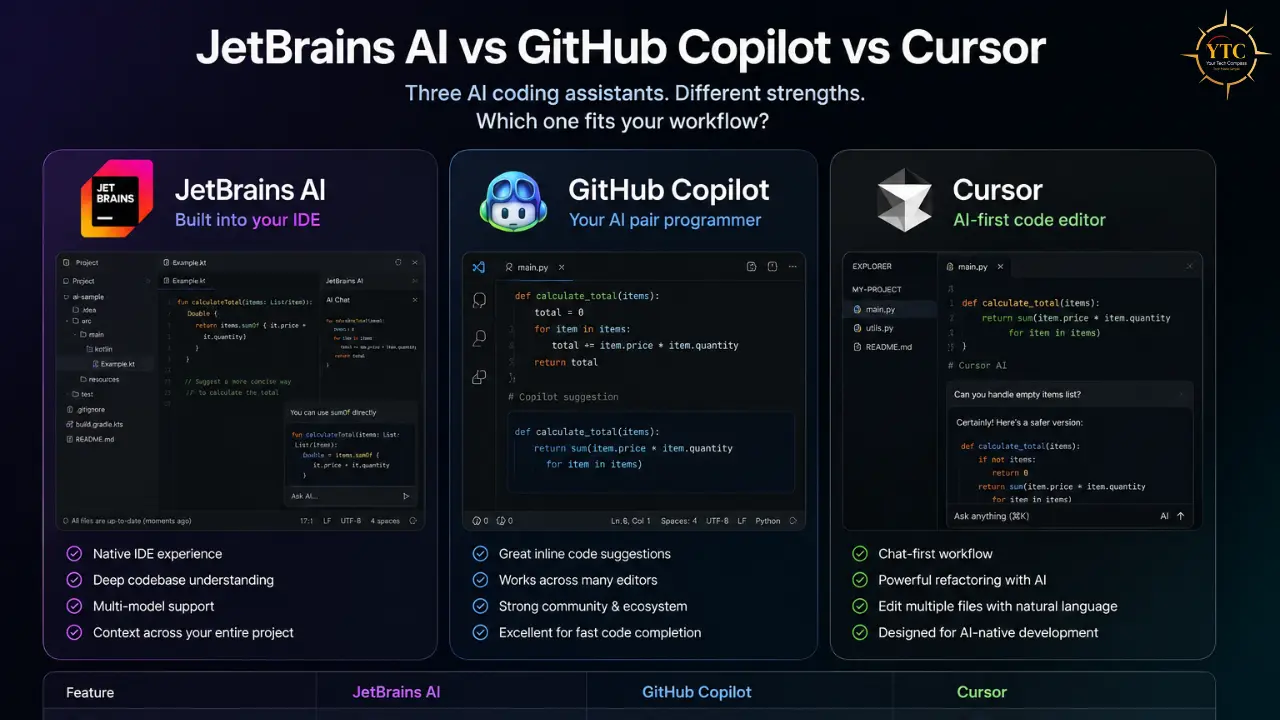
Dimension | JetBrains AI | GitHub Copilot | Cursor |
Integration Type | Native in JetBrains IDEs | Plugin/integration across multiple editors | Native AI editor based on the VS Code ecosystem |
Primary Environment | JetBrains IDEs | VS Code, JetBrains IDEs, and other supported editors | Cursor editor |
Completion Model | Mellum for inline completion; model availability can vary by task and tier | Multiple models/routing depending on plan and feature | Cursor’s own product stack; model routing can vary by task and plan |
Chat Models | Mixed model support, including OpenAI, Anthropic, and Google options depending on current availability | Mixed model support, including OpenAI and Anthropic options depending on current availability | Mixed model support, with available models depending on current plan and product state |
Agentic Mode | Present, but more controlled/approval-based | Present and improving, with agent workflows available | Generally, the most agent-forward of the three |
Semantic IDE Integration | Strongest inside JetBrains IDEs | Good, but less native than JetBrains AI in JetBrains IDEs | Strong codebase context, but optimized around Cursor’s own editor workflow |
Price (Individual) | AI Pro is currently listed at about $100/year, with higher tiers available | Pricing varies by plan; confirm current individual pricing before publishing a fixed figure | Pricing varies by plan; confirm current entry pricing before publishing a fixed figure |
Free Tier | Yes, with limited usage | Yes, with limited usage | Yes, with limited usage |
On-Premise / Private Option | Stronger enterprise/private deployment story than most consumer-first tools | Enterprise controls available, but not the same native private-deployment story | Privacy and enterprise options exist, but not a broad on-premise completion story |
Multi-IDE Portability | No, JetBrains ecosystem only | Yes, broadest portability | No, Cursor ecosystem only |
Multi-Model Choice | Yes | Yes | Yes |
Who Should Choose Which
Choose JetBrains AI If:
You are a professional Java, Kotlin, Python, or .NET developer already committed to the JetBrains ecosystem, and you want the strongest native pairing between AI assistance and IDE code intelligence. It is also a good fit if your organization cares about controlled deployment, private AI options, or tighter enterprise governance. If you value multiple model choices inside the IDE, JetBrains AI is also attractive.
Choose GitHub Copilot If:

You work across multiple development environments, want the broadest editor portability, or need a tool that can fit mixed IDE teams more easily. It is the safest default for organizations that do not want to standardize on a single IDE or AI-native editor. Our GitHub Copilot Explained guide covers this option in full detail.
Choose Cursor If:
Your primary goal is an AI-first development workflow, and you want an editor built around agentic editing, fast iteration, and codebase-wide changes. It is the strongest option when the editor itself is part of the AI workflow, rather than just a host for it. Full coverage in our Cursor AI review.
Our Devin Desktop review covers the agentic coding frontier, providing context on where the category is heading and useful background for understanding how JetBrains AI’s current agentic implementation stacks up against more mature alternatives. All significant AI coding tool developments are tracked in our AI Unboxed section and Tech Guides category.
Mellum: JetBrains’ Own AI Model
Mellum deserves specific attention because it’s the most genuinely distinctive element of JetBrains AI, not available in any competing product, and represents a genuine technical investment rather than a rebranding of an existing model.
What Mellum Is and Why Architecture Matters
Mellum is the most distinctive part of JetBrains AI because it is JetBrains’ own code-completion model, built specifically for interactive use inside the IDE rather than adapted from a general-purpose chatbot. JetBrains describes it as a small, fast, task-focused model designed for code completion and low-latency suggestions.
What matters about Mellum is not just that it is proprietary, but that it is optimized for the completion problem JetBrains cares about most: producing relevant suggestions quickly in the context of the open file and project. That specialization is what makes it meaningfully different from the larger models used for chat and broader generation tasks.
JetBrains has reported strong latency and user-acceptance results for Mellum, supporting the case that a focused completion model can be highly effective in real-world IDE workflows. The caveat is that a specialized model is not always the best tool for every hard or unusual coding task, where larger frontier models may still be preferable.
The Privacy Advantage That Matters for Enterprise
Mellum’s most commercially significant characteristic is its deployment flexibility. JetBrains supports running Mellum within an organization’s own infrastructure, including on-premises and air-gapped setups, enabling regulated teams to keep code and prompts within their environment.
For organizations in banking, healthcare, government, or defense that can make JetBrains AI a practical option where external code processing is a nonstarter. The stronger claim is not that every competitor lacks enterprise privacy controls, but that JetBrains offers a particularly strong combination of IDE integration and self-hosted deployment options.
The model family context from Claude AI Explained and our ChatGPT 5.4 Explained guide on YourTechCompass provides useful background on the frontier models JetBrains AI uses for its chat functionality, helping you understand the full capability picture of the AI panel that Mellum complements.
JetBrains AI in Africa: Accessibility and Practical Realities

Any honest review of a professional development tool needs to address its accessibility in African markets specifically, where pricing, connectivity, and ecosystem context create a different practical reality than in the markets where these tools are usually priced and reviewed.
Pricing in African Market Context
JetBrains subscriptions are denominated in USD and can be a significant expense relative to purchasing power in many African markets. The current All Products Pack is priced at $299 in year one, $239 in year two, and $179 from year three onward, while AI Pro is priced at $100 per user per year.
That makes the combined IDE-plus-AI cost material even for developers at established companies in African tech hubs. For many independent developers, the real question is not whether JetBrains AI is useful, but whether they qualify for lower-cost access paths such as JetBrains’ education and open-source programs.
JetBrains AI Free is also relevant because it gives active JetBrains IDE users limited access to AI features without paying for AI Pro. For African developers who cannot justify a paid subscription, that free tier can be the difference between trying JetBrains AI and skipping it entirely.
Connectivity Considerations
Mellum is designed for low-latency code completion, which makes it more practical than cloud-only chat workflows in environments with inconsistent connectivity. In parts of Sub-Saharan Africa where latency and intermittent access are real operational constraints, that matters more than it would in a well-connected office network.
The chat panel features rely on cloud model access, so they are naturally more sensitive to connectivity problems than inline completion. For developers in these conditions, Mellum-powered completion is the more dependable part of the product, while chat is something you use when the network allows it.
African Developer Ecosystem Fit
JetBrains IDEs are especially strong for Java, Kotlin, Python, and JavaScript, which makes them relevant in African fintech, backend, and Android development. Android is particularly important because Java and Kotlin remain central to mobile app work across many African markets.
For African fintech teams building Android apps, IntelliJ IDEA with JetBrains AI’s Java/Kotlin depth is a strong fit when the stack is JVM-heavy. That advantage is most meaningful in exactly the kind of enterprise and startup environments where reliability, code quality, and developer productivity matter at scale.
For African banks, healthcare providers, and government teams, JetBrains’ enterprise AI options are most relevant when data sovereignty and compliance are non-negotiable. The important point is not that every competitor lacks privacy controls, but that JetBrains offers a particularly strong combination of IDE-native assistance and organization-controlled deployment.
FAQs
JetBrains AI includes a free tier for users with an active JetBrains IDE license, which provides unlimited code completion and a limited cloud quota for chat and agent features. Paid plans add more quota and broader AI capabilities, and JetBrains also offers education and open-source access paths for some users.
JetBrains AI combines its own Mellum completion model with third-party cloud models for chat and generation, and the exact mix can change over time. In practice, the product is built around a dedicated completion model plus selectable cloud models for broader tasks.
It depends on your workflow. JetBrains AI is strongest when you want first-party integration inside JetBrains IDEs, while GitHub Copilot is often the better choice if you work across multiple editors and want broader portability.
Mellum is JetBrains’ proprietary code-completion model, designed specifically for fast, IDE-native completion. It is optimized for low-latency suggestions and can also be deployed in enterprise-controlled environments.
JetBrains AI is broadly available across the JetBrains IDE family, but the exact feature set can vary by product and subscription type. It is best to say it works across JetBrains IDEs rather than implying every feature appears identically in every IDE.
Yes, in enterprise-controlled setups, JetBrains supports on-premises deployment options for Mellum and other organization-managed AI configurations. For chat and broader cloud-model features, however, cloud access is still part of the experience.
Conclusion

JetBrains AI is a genuinely capable, well-integrated AI coding assistant with a clear advantage inside the JetBrains IDE ecosystem. Mellum, the JetBrains-built completion model, first-party IDE integration, and enterprise-controlled deployment options are genuine differentiators, not just branding. For developers already working in JetBrains IDEs, especially those doing Java, Kotlin, Android, and other JVM-heavy work, JetBrains AI is a strong fit because it turns the IDE’s existing code intelligence into a more AI-aware workflow. For privacy-sensitive organizations, the enterprise deployment model is especially important because it gives teams more control over where code and prompts are processed.
The honest close: JetBrains AI is not the best choice for everyone. If your primary environment is VS Code, if you want the broadest editor portability, or if your priority is the most aggressive agent-first workflow, other tools may fit better; but if you already live in the JetBrains world, JetBrains AI is the assistant most directly aligned with the platform you have already invested in.
For more honest, tested reviews of AI coding tools, developer productivity software, and the tools reshaping how software gets built, head to YourTechCompass.com.