
It’s 4 p.m. on a Thursday, and your quarterly social media report is due in 48 hours. You manage five brand accounts across four platforms; your content calendar lives in a shared Google Sheet that nobody updates; approvals happen in Slack threads that scroll into oblivion; and your “reporting workflow” involves screenshots, four native analytics dashboards, and a prayer. If that scenario feels uncomfortably specific, you’ve already lived the problem Sprout Social was built to solve, and you’ve probably wondered whether one platform can genuinely replace the chaos or just relocate it behind a login.
I’ve spent time digging through Sprout Social’s 2026 pricing pages, G2 and Trustpilot review data, and competitor matrices so you don’t have to. This review covers the publishing engine, the Smart Inbox, the analytics suite that justifies the price for some teams, and the AI features that are gated behind expensive tiers (AI publishing assists start on Standard; advanced AI sentiment and care/listening analytics live on Advanced or as add‑ons). I’ll walk through the real per‑seat math at teams of 1, 3, 5, and 10 using current annual rates (Essentials $79, Standard $199, Professional $299, and Advanced $399 per seat/month) and compare it honestly against Buffer, Hootsuite, and Later. I’ll also examine the Africa accessibility reality (USD pricing, no local payment rails, and a 30‑day trial as the main on‑ramp), plus the one billing gotcha that burns teams who skip the fine print: annual contracts with auto‑renewal and strict 30‑day cancellation notice requirements that dominate Trustpilot complaints.
A note before we begin: every YTC score is earned, never negotiated. If you want to understand exactly how we evaluate apps & tools and how we handle affiliate relationships, our Review Methodology lays it all out.
Quick Verdict
- Best For: Mid‑market marketing teams and agencies managing multiple brand accounts, reporting social ROI to leadership or clients, and needing unified engagement with competitive benchmarking.
- Skip It If: You’re a solo creator, small business, or African team where per‑seat pricing at $79-$399/month (annual) or up to $499/month (monthly) scales faster than your revenue, or you only need scheduling without enterprise analytics and listening.
- Bottom Line: Sprout Social is the most polished enterprise social media management platform on the market in 2026. The analytics and Smart Inbox are genuinely best‑in‑class, but per‑seat pricing, annual contracts, and paid add‑ons for features many buyers expect at mid‑tier (premium analytics & social listening) make it an investment that only pays off for teams who use the full depth.
What Is Sprout Social, and Why Does It Exist?
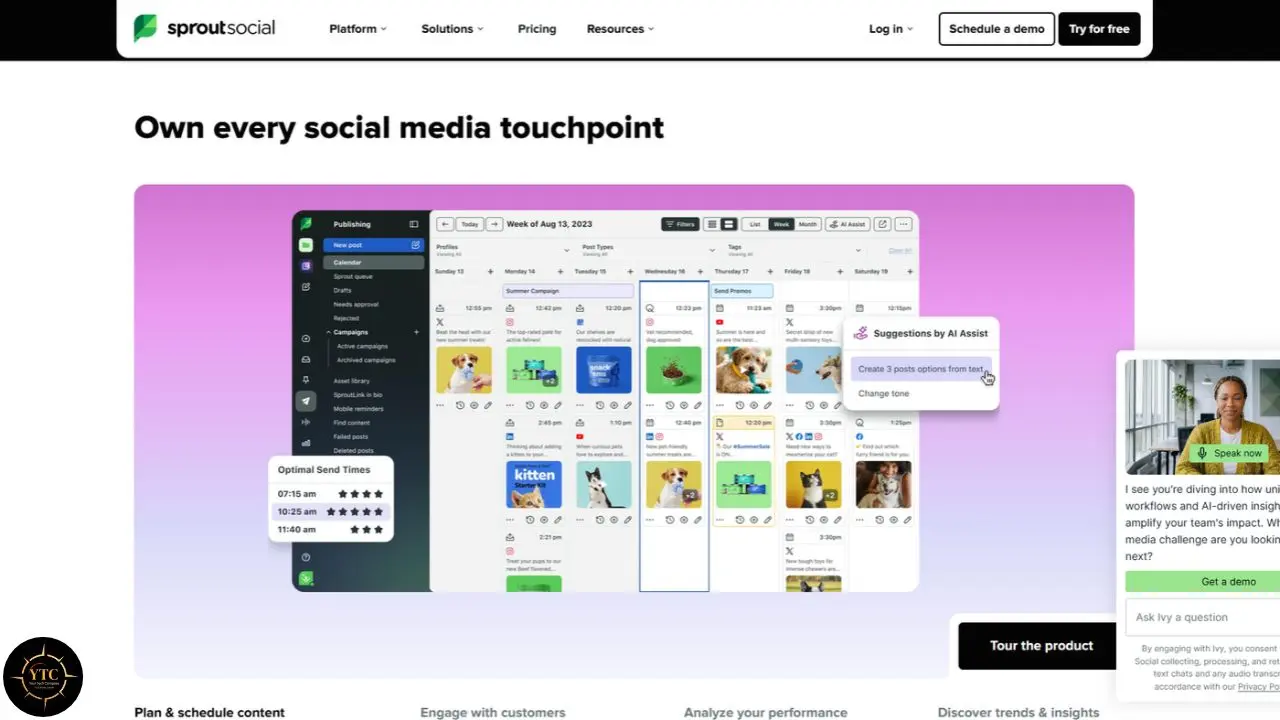
Sprout Social was founded in 2010 in Chicago by Justyn Howard, Aaron Rankin, Gil Lara, and Peter Soung, with a mission to solve what Howard called the “spreadsheet and screenshot” era of social media management. The idea was simple: brands were treating social as a side chore, and the tools reflected that.
Sixteen years later, that tidy publishing tool has evolved into a full enterprise platform competing head-to-head with Hootsuite and Sprinklr. Today, Sprout Social bundles publishing and scheduling; a unified Smart Inbox for engagement, analytics, and reporting; social listening (as a paid add-on); and AI-assisted content features, supporting X, Instagram, LinkedIn, TikTok, Facebook, Threads, Pinterest, WhatsApp, and YouTube analytics under one roof.
The “so what” matters here. With 6,800+ G2 reviews and a #1 ranking in 40 of G2’s 2026 Winter Reports, including Social Listening and Enterprise Social Media Analytics, this is not a niche scheduler. It’s an enterprise platform priced like one, and the rest of this review keeps returning to that tension.
How It Works and What’s Actually New in 2026
The Core Workflow
Getting started is straightforward: you connect your social profiles, compose once, and publish or schedule across every network from a single calendar. The ViralPost feature picks optimal send times based on when your specific audience is active, which quietly lifts engagement without extra effort on your end.
From there, the Smart Inbox becomes your daily home. It pulls every message, mention, comment, and review from all connected accounts into one stream, and your team can triage engagement, assign items as tasks, and filter by network or message type. For anyone who’s lost a customer complaint in an Instagram DM folder, this consolidation alone feels like a promotion.
Reporting rounds out the loop with clean, presentation‑ready dashboards covering audience growth, engagement, post performance, and competitor comparison. If you spring for the Premium Analytics add‑on, you also get deeper ROI‑style charts and executive‑grade benchmarking on top of the standard reports.
AI Features in 2026: Trellis Changes the Conversation
The biggest freshness signal in 2026 is Trellis, Sprout’s AI agent that launched in November 2025 and reached full availability across plans in July 2026. Trellis is designed to analyze social listening data and turn it into actionable insights; early enterprise feedback is mixed, with one user praising its guest-feedback categorization while another reported it sometimes returns information that doesn’t answer the question asked. That’s worth knowing before you budget around it.
Beyond Trellis, the AI toolkit breaks down like this:
- AI Assist (Enhance Post): Rewrites and improves draft posts. Gated to Professional ($299/seat/mo) and up.
- AI Reply Suggestions (Enhance Reply): Generates response suggestions inside the inbox. Gated to Advanced ($399/seat/mo).
- AI Alt Text: Unlimited AI-generated alt text for images, available from Standard up.
- AI in Listening: Sentiment analysis and smart categorization inside the Social Listening add-on (with basic sentiment also included on Advanced).
Every seat on every tier includes 100 AI agent credits per month. If you need more, Trellis Plus extends your allowance for $28 per user per month on annual billing or $35 month-to-month, though Sprout doesn’t publish what the new ceiling actually is, describing it only as “extended credits subject to fair use.”
The Add-Ons Nobody Quotes Up Front
Here’s the detail that reshapes most buying decisions. Social Listening, Premium Analytics, and Employee Advocacy are all paid extras on top of the seat price, with quote-only pricing that Sprout doesn’t publish. Listening is frequently the exact reason teams want Sprout in the first place, and it’s not inside any seat price you see on the pricing page.
The result is predictable: the headline rate is never the real rate. Before you commit, budget for add-ons as a separate line item. This is because a team buying Standard at $199/seat/mo will discover during implementation that the listening and premium reporting they assumed were included cost extra.
One more product deserves a clean boundary. Sprout Social also operates a separate Influencer Marketing platform reported starting around $1,599 per user per month with a 12-month contract, and notably, it doesn’t require a Sprout plan at all. This review covers the core social media management platform; that $1,599 price point is irrelevant for most social media managers comparing scheduling tools, and I’ll leave it there.
The Standout Features, Explained Honestly
The Smart Inbox
The Smart Inbox is Sprout Social’s flagship, and in my opinion it’s the feature that most justifies the platform’s reputation. It pulls DMs, mentions, comments, and reviews from every connected platform into one unified stream, so you stop hopping between Instagram, X, LinkedIn, and Facebook just to answer people. Task assignment, message-type filtering, and team collaboration tools keep high-volume accounts manageable in ways that simpler tools simply can’t match.
Compared to Buffer right now: Buffer’s engagement tools cover comments only, with no unified DMs or mentions. If answering customers across platforms is core to your job, Sprout’s inbox is categorically stronger.
That said, honesty requires caution. On very high-volume accounts, the inbox can still feel busy, and teams report a learning curve in setting up filters that actually tame it. The tooling is capable; your configuration determines whether it feels like a command center or a firehose.
Analytics and Reporting
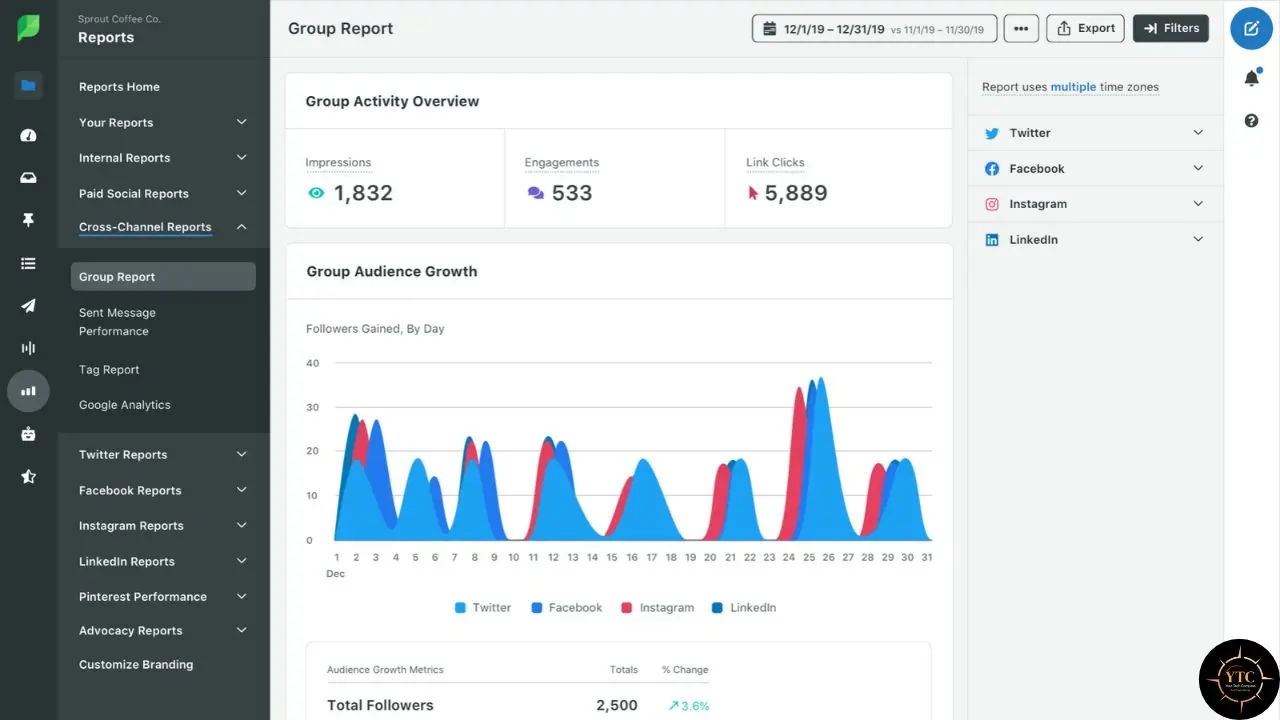
If the Smart Inbox is the flagship, analytics is where Sprout earns its keep. The reports are clean, presentation-ready, and exportable as PDF (with scheduled PDF delivery), built for client decks and leadership meetings, not just internal dashboards. Competitor comparison comes built in, and the Premium Analytics add-on layers on ROI charts, custom dashboards, and benchmarking that CFOs actually read.
The “so what” is blunt: if you regularly report social results to clients or leadership, this is the single biggest reason to choose Sprout over Buffer or Later. If nobody ever asks you to prove social ROI, you’re paying for a strength you’ll never use.
Publishing, Scheduling, and Team Workflows
Day-to-day publishing is smooth and reliable: compose once, schedule everywhere, and let ViralPost handle timing. Queues let you batch content without touching individual post times, which turns a morning of scheduling into twenty minutes.
Team features are where tier-gating bites, though. Approval workflows unlock at Professional, but external approvers (stakeholders reviewing content without a login) only unlock at Advanced, so a Standard team at $199/seat/mo cannot set up content approvals without upgrading, and agencies that need client sign-off effectively need Advanced. For agencies with client sign-off loops, that effectively makes Professional or Advanced the real entry point, a hidden cost the pricing page never foregrounds.
Honest Limitations: Where the Flagship Cracks
The Pricing Page Deception
Sprout Social’s pricing page displays annual rates prominently, and as of September 2026, also shows monthly rates on the cards ($199 billed annually / $249 billed monthly, 299/399, 399/499; Essentials 79/99). The prominently displayed $199, $299, and $399 figures are annual-commitment prices; the FAQ further down the page confirms that monthly billing costs ~25% more.
The result is a predictable pattern of buyer’s remorse. Many teams see $199, assume it’s the monthly price, and only discover at checkout that it requires paying $2,388 upfront for a year.
My view: a pricing page that requires an FAQ to reveal its real math is telling you something about the sales culture behind it.
Add-Ons That Should Be Included
Social Listening, Premium Analytics, and Employee Advocacy are all paid extras, priced by quote. Trellis Plus costs $28/seat/mo (annual) or $35 monthly and is described only as “extended credits subject to fair use,” with no published ceiling. Taken together, these aren’t hidden exactly; they’re spread across the page in a way that makes the seat grid look like the whole bill when it’s really the floor.
The Trustpilot Sentiment Gap
Here sits one of the widest rating gaps in the category. Sprout Social holds a 4.4/5 G2 rating across roughly 6,800 reviews, yet sits at about 2/5 on Trustpilot (≈86 reviews), where complaints cluster around auto‑renewal traps, cancellation friction, slow refund processing, and difficulty reaching a human when it matters. One 2026 G2 reviewer, while rating the product, still warned, “It’s very expensive, has poor usability, hides advertised features behind paywalls, delivers questionable ROI, and provides terrible customer service.”
The pattern is consistent: users who buy for the analytics and use it daily love the product, while users who hit billing or support issues describe a very different company. G2 measures product quality; Trustpilot measures what happens when something goes wrong. You should weigh both.
Profile Caps on Lower Tiers
Essentials and Standard both cap you at 5 social profiles. For an agency managing three clients with three profiles each, that’s nine profiles, forcing an upgrade to Professional ($299/seat/mo) purely for headroom. It’s a quiet cost driver, and it’s the kind of detail you only discover after you’re already invested.
Pricing Breakdown: The Real Cost Math
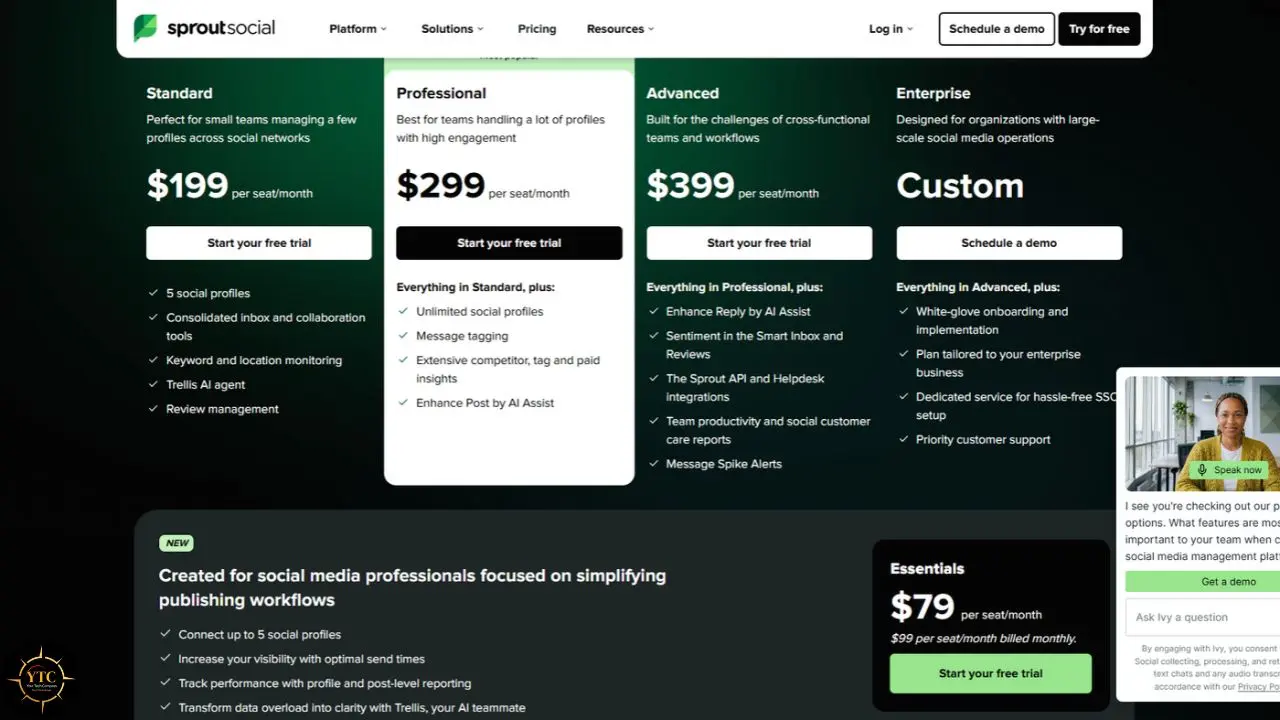
Plan Comparison (September 2026)
Plan | Annual (per seat/mo) | Monthly (per seat/mo) | Social Profiles | Key Features |
Essentials | $79 | $99 | 5 | Publishing, content calendar, basic analytics, SproutLink |
Standard | $199 | $249 | 5 | Smart Inbox, keyword monitoring, review management |
Professional | $299 | $399 | Unlimited | AI Assist, approval workflows, competitor reports |
Advanced | $399 | $499 | Unlimited | AI replies, inbox sentiment, Sprout API, helpdesk integrations |
Enterprise | Custom | Custom | Unlimited | SSO, white-glove onboarding, priority support |
What Teams Actually Pay
Let’s make the per-seat math concrete, because this is where most reviews stay vague.
- Solo Creator, 3 Profiles: Essentials at $79/month (annual) comes to $948/year. But Buffer’s free plan covers 3 channels with 10 scheduled posts each, so if scheduling is all you need, Sprout costs infinitely more than the alternative.
- Small Team, 3 People, 5 Profiles: Standard at $199 × 3 seats = $597/month, or $7,164/year before add-ons with unpublished pricing.
- Agency, 5 People, 15 Profiles: Professional at $299 × 5 seats = $1,495/month, or $17,940/year. Unlimited profiles matter here, and approval workflows are the real draw.
- Enterprise Team, 10 People: Advanced at $399 × 10 seats = $3,990/month, or $47,880/year before add-ons, before API negotiations, before anything.
One quirk deserves its warning: the Sprout API is gated to Advanced. If your stack requires programmatic access, the decision is already made for you: there’s exactly one self-serve tier that sells it, and it’s the most expensive one.
Nonprofit Pricing and the Trial
Sprout does offer genuine nonprofit discounts for qualifying US 501(c)(3) organizations committing to at least two annual seats: Professional drops to $239/seat/mo and Advanced to $299/seat/mo. That’s a real $60–$100 per seat off, and it’s the only place the list price moves without a sales call.
On the trial side, Sprout runs a 30‑day free trial of Professional with no credit card required, legitimately one of the better evaluation windows in the category. Just know there’s no free plan: when the trial ends, the floor is Essentials at $99/month month‑to‑month or $79/month on an annual commitment.
Sprout Social vs. the Competition
Head-to-Head Comparison
Dimension | Sprout Social | Buffer | Hootsuite | Later |
Starting Price | $79/seat/mo (annual) | Free; $6/mo (Starter) | ~$99+/mo (tiered) | ~$18.75-25/mo (Starter) |
Pricing Model | Per seat | Per channel | Tiered per user | Tiered plans |
Free Plan | No (30-day trial) | Yes (3 channels, 10 posts) | No (trial-based) | 14‑day trial only (no meaningful free plan in 2026) |
Unified Inbox | Best-in-class | Comments only | Strong | Limited |
Analytics Depth | Excellent (premium = add-on) | Solid basics | Strong | Good (IG-centric) |
Social Listening | Paid add-on | Not available | Higher tiers | Limited |
AI Features | AI Assist (Prof+), replies (Adv+), Trellis | AI Assistant (all plans) | AI-supported | Some AI tools |
Approval Workflows | Professional+ | Team plan ($12/channel) | Available | Available |
Best For | Enterprise analytics & reporting | Creators, lean teams | Broad enterprise suite | Instagram‑first brands |
Compared to Buffer right now: Buffer starts free and scales at roughly $6 per channel per month. A single user managing five channels pays about $30/month on Buffer versus $99/month on Sprout Essentials, and Buffer’s Team plan at $12/channel includes unlimited users, so a five-person agency on ten channels pays roughly $120/month total. The same team on Sprout Professional, where approval workflows live, starts at $1,995/month. The trade-off is real: Buffer has no listening, no unified DM inbox, and weaker analytics. If you need to prove social ROI, Sprout justifies the premium; if you just need to schedule, Buffer wins by an order of magnitude.
Compared to Hootsuite right now: Hootsuite is Sprout’s closest direct rival, with comparable enterprise breadth and a larger app ecosystem. Sprout generally wins on cleaner reporting and a more refined interface; Hootsuite wins on integrations and flexibility. Pricing converges at the enterprise level, so the decision usually comes down to interface preference and your specific stack.
Compared to Later right now: Later is the budget‑friendly, visual‑first choice for Instagram‑centric brands, with link‑in‑bio tools and creator‑economy features at a fraction of Sprout’s price. The trade‑off: narrower listening, a more limited inbox, and narrower analytics. For aesthetic‑first brands that don’t need enterprise reporting, Later is the obvious alternative. For a broader look at tools like these, our Apps and Tools category covers the full landscape.
Real-World Use Cases
The Mid-Market Team Reporting to Leadership

Picture a four-person marketing team at a B2B SaaS company running LinkedIn, X, and Facebook. They pay $1,196/month for Sprout Professional, and in exchange they get the Smart Inbox, approval workflows, and quarterly reports that go straight into the board deck. The analytics demonstrate social ROI to the CMO, which is precisely what keeps the budget alive.
Run the counterfactual, and the value sharpens. Without Sprout, reporting means manual pulls from three native dashboards and Excel wrangling, roughly 8 hours of analyst time monthly. At $1,196/month, Sprout is cheaper than half an analyst’s salary, and it never takes vacation.
The Agency Managing Client Accounts
Now consider a social agency juggling 12 client accounts across Instagram, TikTok, and LinkedIn. They need unlimited profiles, team workspaces, client-ready reports, and competitive benchmarking, so they land on Advanced at $399 × 6 team members = $2,394/month, plus the Premium Analytics add‑on (quote‑only pricing). The unified inbox and task assignment mean no message falls through the cracks across 30+ profiles, and the cost folds neatly into client retainers.
The Small Business That Hits the Profile Cap
The cautionary tale looks like this: a boutique consultancy signs up for Standard, grows to six profiles, and gets told they need Professional at $299/seat/mo for just one more profile. The $100-per-seat jump for a single profile is a genuine frustration, and the pricing page gave no warning.
The Solo Creator Who Overbought
Finally, the solo YouTuber who signs up for Essentials at $79/month chasing “professional” tools. Three months later, they realize they schedule eight posts a week across three channels, a workflow Buffer’s free plan covers at $0. Switching saves $948 a year with zero feature loss for their use case.
Who Should Use It and Who Shouldn’t
Best for:
- Mid-market marketing teams and agencies reporting social ROI to leadership or clients.
- Teams managing 10+ profiles who need unified engagement and task assignment.
- Organizations where competitive benchmarking and listening are core workflows.
- Teams with annual budgets that absorb per-seat pricing without negotiation.
- Regulated industries requiring approval workflows and brand-safety controls.
Skip it if:
- You’re a solo creator or small business with fewer than five profiles.
- Your need is scheduling and basic analytics; Buffer or Later covers it at a fraction of the cost.
- You’re in Africa and can’t justify $199-$499 per seat in USD with no local payment rails.
- You need month-to-month flexibility, because annual contracts and 30-day cancellation windows create real lock-in.
- You need listening and premium analytics but can’t stomach quote‑only add‑on pricing (available from Standard up).
The Review Landscape: Power Users vs. Everyone Else
The sentiment split around Sprout Social is genuinely unusual. On G2, where daily users live, it holds 4.4/5 across roughly 6,800 reviews, and the praise is consistent: “Exhaustive list of features and integration with major social media platforms,” one user writes, while another credits social listening with “a path to more in-depth insights than you can get on the majority of platforms.”
Trustpilot tells the other half of the story, at roughly 2/5. There, the complaints repeat like a refrain: auto-renewal traps, cancellation difficulty, refund delays stretching to four weeks, and one reviewer describing a 24-month contract signed on the assurance that cancellation would be possible at any time. Another received a renewal notice mid-vacation with a 14-day opt-out window.
My read of the data: Sprout’s G2 score reflects product quality, and its Trustpilot score reflects customer experience, and the two have diverged. Buy it for the analytics, but negotiate your renewal terms in writing before you sign anything.
Africa Accessibility: The Honest Picture

Let me be direct about this section, because generic “global tool” reviews usually skip it. Sprout Social’s per-seat pricing ($199–$499/mo) is prohibitive for most African SMBs, agencies, and startups. For context, $399 a month roughly matches a junior social media manager’s salary in Nairobi or Lagos. This platform is priced for Fortune 500 budgets, not emerging-market realities.
Payment infrastructure makes it harder. Billing is USD-only by credit card, with no M-Pesa, Paystack, Flutterwave, or mobile-money integration. The mobile money landscape in Africa has processed billions of transactions, yet Sprout, like most US enterprise SaaS, hasn’t plugged into local payment rails. The evolution of mobile money shows what happens when fintech meets local needs; Sprout is still playing catch-up, and the African fintech ecosystem it could integrate with keeps moving without it.
Infrastructure and localization don’t help either. There are no African data centers or edge nodes, which matters for teams on limited bandwidth, and there’s no African language UI support; Sprout’s interface is available in English, Spanish, French, Italian, and Brazilian Portuguese, but not Swahili, Yoruba, Hausa, or Zulu.
So what’s the practical path? For most African teams, a hybrid workflow (native platform scheduling via Meta Business Suite and LinkedIn, Google Sheets for reporting, and Canva for design) costs $0 and often serves SMBs better than any $399/seat platform. Tools covered in our African tech coverage, including developments in AI in Africa, point toward locally-priced alternatives emerging fast. And if you’re exploring how AI agents automate content workflows more broadly, our LangChain guide is worth a read alongside tools like Trellis.
The 30‑day no‑card trial of Professional remains the one genuinely accessible on‑ramp. Beyond it, though, scaling means international cards and a 12‑month dollar‑denominated commitment, with no local recourse if a billing dispute arises. For broader tool guidance, our Tech Guides category covers workable setups at African price points, and AI Unboxed tracks the AI features Sprout gates behind its top tiers.
FAQs
Essentials starts at $79 per seat per month on annual billing ($99 monthly), Standard is $199 ($249 monthly), Professional is $299 ($399 monthly), and Advanced is $399 ($499 monthly). Social Listening, Premium Analytics, and Employee Advocacy are paid add-ons on top of the seat price, quoted separately.
No. Sprout Social offers no free plan, only a 30‑day free trial of Professional with no credit card required. After the trial, the lowest entry point is Essentials at $99 per seat per month on monthly billing.
Both are enterprise social media management suites with broad overlap. Sprout generally wins on cleaner reporting, a more refined interface, and deeper analytics, while Hootsuite wins on breadth of integrations and app ecosystem. Pricing is comparable at the enterprise level; note that Hootsuite includes basic listening on paid plans, with deep listening gated to higher tiers.
No. Social Listening is a paid add-on available from the Standard plan up, with quote-only pricing. Many buyers assume it’s bundled and discover the extra cost during implementation, so confirm the number before signing.
Generally, no. Essentials at $79/seat/mo caps you at five profiles with no approval workflows and basic analytics only, and the pricing page’s annual-by-default display obscures the real commitment. Most small businesses are better served by Buffer’s free plan or Later’s lower tiers.
Monthly plans can be canceled month-to-month, but annual contracts require at least 30 days’ notice before renewal, or you’re billed for another year. Trustpilot and G2 reviews document recurring complaints about auto-renewal, cancellation friction, and slow refunds; get your terms in writing.
Let Your Tech Compass Point at the Workflow, Not the Logo

Sprout Social is, without exaggeration, the most polished enterprise social media management platform available in 2026, and this review lands there deliberately. The Smart Inbox, the analytics depth, and the reporting pipeline are genuinely best-in-class for teams that must prove social ROI, and the 4.4/5 across 6,400+ G2 reviews isn’t marketing fluff. But the per-seat math scales brutally; the annual contracts and 30-day cancellation windows create real lock-in, and the add-on pricing means the headline rate is never the real rate. For the right mid-market team or agency, it’s a force multiplier; for solo creators, small businesses, and African markets, the compass points firmly elsewhere.
So treat this as a team-size and reporting-depth decision, not a brand decision. If your social strategy demands competitive benchmarking, executive-ready reports, and unified engagement across double-digit profiles, Sprout Social earns its seat at the table; negotiate the renewal terms, confirm the add-on quotes, and commit with open eyes. If your workflow is “write post, schedule post, check likes,” you’re paying enterprise prices for a scheduling job that cheaper tools cover happily. African teams face a steeper cliff still, though the 30‑day professional trial at least offers an honest evaluation window before the dollar‑denominated reality sets in.
If this breakdown helped you separate enterprise hype from actual workflow, there’s plenty more where it came from. Set your bearings at YourTechCompass.com for deep dives on the tools and platforms shaping how Africa markets, creates, and grows.