
Every time you need to collect information from someone, whether it is a client intake, an event RSVP, a product order, or a simple survey, you face the same tired choice. Google Forms is free and functional, but it looks like it was designed in 2008 and can’t handle money. Typeform is beautiful and polished, but the free tier chokes after ten responses, and the paid plans climb fast enough to make a solo creator wince. Jotform can do almost anything, yet its interface feels like a control panel from a different decade, and its pricing tiers multiply quickly once you need the features that actually matter. You have been stuck between “too cheap to be credible” and “too expensive to justify,” and that gap is exactly where Tally Forms decided to plant its flag. Tally arrived as a third option that looked like Notion and priced itself like a startup trying to earn your loyalty rather than extract it, and that combination is exactly why it’s built a genuinely devoted following in a short amount of time.
This review will give you the complete picture, not just the highlight reel. Tally genuinely delivers on a promise that sounds almost too good to be true: unlimited forms, unlimited responses, and Stripe payment collection on a free tier with no additional Tally platform fees (you still pay standard card processing fees). However, its block-based, Notion-like editor has a learning curve if you’re coming from traditional drag-and-drop builders; its conditional logic is thinner than the marketing screenshots suggest, handling basic show/hide and branching well but struggling with complex scoring and multi-outcome routing without workarounds; and its Africa-facing payment limitations are real enough to kill the value proposition for local businesses in markets where Stripe isn’t supported or doesn’t offer local payment methods like M‑Pesa. By the end of this article, you will know what Tally does well, what it actually costs at your usage level, how it stacks up against named alternatives, and whether it fits your specific workflow.
A note before we begin: every YTC score is earned, never negotiated. If you want to understand exactly how we evaluate apps & tools and how we handle affiliate relationships, our Review Methodology lays it all out.
Quick Verdict
- Best For: Solo creators, small agencies, coaches, and lean startups who need beautiful, payment-ready forms without per-response fees or restrictive free-tier limits.
- Skip It If: You need enterprise-grade conditional branching, deep native CRM integrations (not just Zapier/Make), dedicated account management, or integration with African local payment gateways.
- Bottom Line: Tally Forms is the most generous free form builder in its category and the most logical upgrade path from Google Forms. It is not yet the enterprise replacement for Jotform or Typeform at scale, though it’s closing the gap for small and mid-sized teams, and its Africa-facing payment limitations are a genuine barrier for local businesses.
What Is Tally Forms?
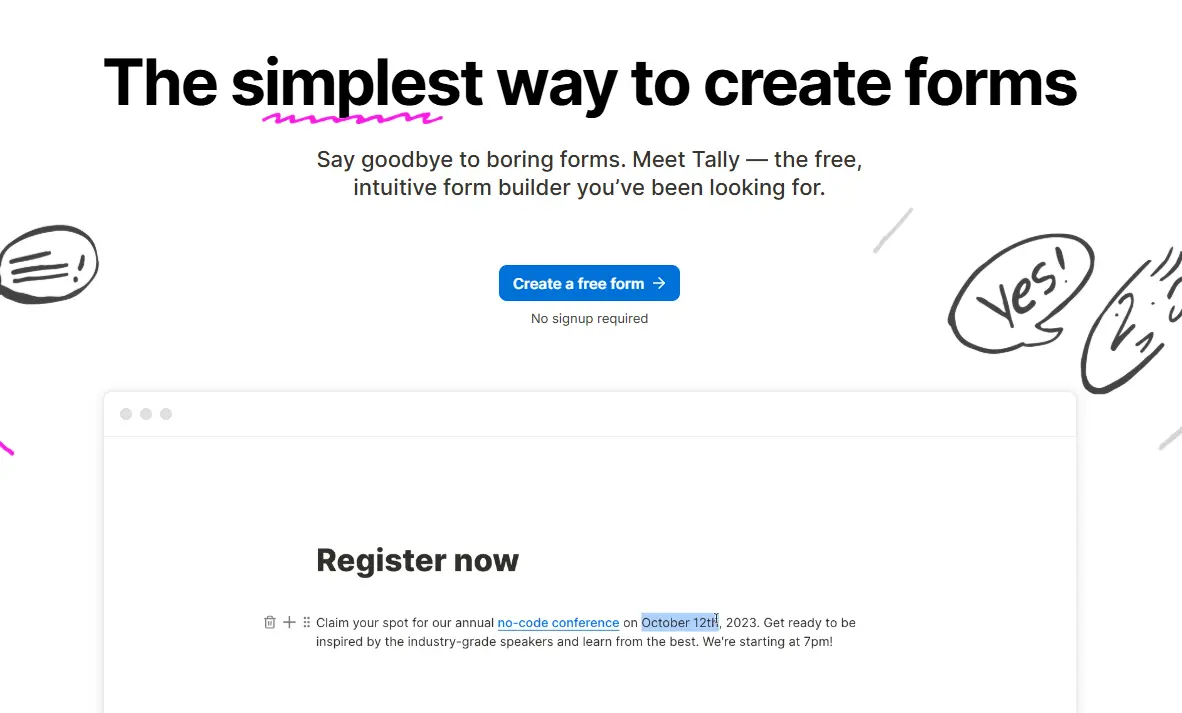
Tally was built by a bootstrapped, Belgium-based team, and the company has been consistently transparent about its founding motivation: existing form builders were priced out of reach for what a small team actually needed, so they built their own. That origin story matters here for a specific reason, because it explains the pricing philosophy running through every tier this article covers, rather than reading as a marketing footnote you can skip past.
Tally Forms was founded in 2020 in Ghent, Belgium, by Filip Minev and Marie Martens. The platform turns the traditional form-building experience on its head by replacing rigid field templates with a Notion-inspired slash-command editor where you type / to drop in text blocks, multiple-choice questions, payment collectors, file uploads, signatures, and more. That single UX decision (treating form creation like document editing rather than database configuration) is what separates Tally from the legacy players it is now competing against.
The company has grown from a bootstrapped side project into a scaled, still bootstrapped operation serving hundreds of thousands of users, and it sits squarely in the no-code productivity stack we track across our Apps and Tools coverage. Tally’s core promise is deceptively simple: unlimited forms, unlimited responses, and zero platform fees on payment collection (you still pay standard card processing fees), all without writing a single line of code. Whether that promise holds up under real-world pressure depends on what you are actually trying to build, and this review will unpack that section by section.
How Tally Forms Work: Blocks, Logic, and Versions
Building a Form in Tally
Creating a form in Tally starts with a blank canvas and a blinking cursor. You type / and a menu appears with block options: short answer, long answer, multiple choice, checkboxes, dropdown, date picker, file upload, payment, signature, rating, and more. Each block drops into the form like a paragraph in a document, and you reorder them by dragging and dropping. Consequently, the learning curve is very short if you already use Notion, Craft, or any modern block-based editor.
The editor itself is effectively a live preview, so what you see as you build is what your respondents will see. Furthermore, Tally supports embedding forms directly into Notion pages, Webflow sites, WordPress posts, and standard iframes, which means the form lives where your audience already is rather than forcing them to a separate tab. Publishing is instant: toggle from draft to live, copy the link, or grab the embed code.
Conditional Logic and Calculations
Conditional logic in Tally works through show-and-hide rules attached to specific blocks. You set a condition, for example, “if answer to Question 2 equals ‘Yes,’ then show Question 3,” and the form adapts in real time as the respondent answers. Additionally, calculator blocks let you perform math operations on form responses, enabling dynamic pricing, quiz scoring, and order totals without external tools.
That said, the logic system is linear rather than deeply nested. You can chain simple conditionals together, but you cannot build the complex branching trees and multi-outcome workflows that Typeform or Jotform support as easily.
For roughly eighty percent of real-world use cases (lead qualification, event registration, simple order forms), Tally’s logic is more than sufficient. However, if you need multi-layered decision trees with dozens of branches, you will hit the ceiling faster here than with enterprise-focused competitors.
Version History and Recent Updates

Tally ships updates at a steady, visible pace, and naming the recent ones matters here as a real freshness signal rather than a generic claim. Foundational updates in Tally 2.0 (launched in 2023) overhauled the payment block so that submission is triggered only by clicking Next or Submit, replacing an earlier flow in which a separate Pay button caused incomplete submissions for some users. Alongside that, Tally added two-factor authentication for account security and a command menu, triggered by Cmd or Ctrl+K, for faster navigation within the builder. More recently, the platform introduced nested folder organization up to ten levels deep for Pro users managing many forms across workspaces.
More recently, Tally introduced automatic content-table navigation for any form containing twelve or more fields, giving editors a structured overview of pages and fields on longer forms, and rolled out mobile-friendly editing improvements in an April 2026 update aimed specifically at builders managing forms on the go. Tally was also named to G2’s Best Software 2026 list in the Fastest Growing category, a recognition based on customer reviews and growth during the evaluation period, which is a meaningful third-party signal of momentum worth noting alongside the feature updates themselves.
Standout Features (and the Honest Limitations Behind Them)
Payment Collection Without a Separate Store
Tally integrates directly with Stripe to collect one-time and recurring payments inside your forms. That means you can sell digital products, take event deposits, collect membership dues, or accept donations without building a separate storefront or checkout flow. The respondent never leaves the form, and the payment experience is visually consistent with the rest of your branding.
Stripe handles the transaction processing, and Tally’s fee structure depends on your plan. On Pro and Business plans, Tally charges no additional platform fee beyond Stripe’s standard rates; on the free plan, Tally adds a 5% fee to each payment. Consequently, the economics are straightforward: on Pro, you pay Stripe’s processing fee (typically 2.9% plus thirty cents per transaction in supported markets), and Tally takes nothing beyond your subscription cost; on Free, you pay Stripe’s fee plus 5% to Tally. For creators who have been paying Gumroad or Payhip commissions on top of payment processing, Tally Pro’s fee structure is genuinely different.
The Free Tier That Doesn’t Feel Like a Trial
Tally’s free tier is one of the most generous in the form-builder category, and that is not marketing hyperbole. You get unlimited forms, unlimited responses, unlimited file uploads (with a ten-megabyte per-file cap and one gigabyte total storage), payment collection via Stripe, conditional logic, custom thank-you pages, email notifications, and access to the full template library. Most competitors gate either response volume, form count, or payment collection behind a paywall.
Typeform’s free plan limits you to ten responses per month. Jotform’s free plan caps you at five forms and one hundred monthly submissions. Google Forms offers unlimited responses but provides no payment collection, no conditional logic beyond basic branching, and no meaningful customization. In contrast, Tally’s free tier is functionally complete for a solo operator running a small service business or content operation.
Notion-Style Editing and Embeds
The block-based editor is Tally’s signature UX advantage, and it will feel immediately familiar if you already write in Notion. You format text with Markdown shortcuts, insert dividers and images with slash commands, and nest sections logically rather than scrolling through dropdown menus. Furthermore, the native Notion embed means you can drop a fully functional payment form directly into a Notion page without any iframe hacking.
That workflow matters to creators and teams who use Notion as their primary operating system. As our Notion vs. Obsidian for Mac comparison shows, the block-based approach has become the dominant paradigm in modern productivity software, and Tally rides that wave rather than fighting it. The embed quality is crisp on both desktop and mobile, a feature not every third-party Notion integration can claim.
Honest Limitations of the Flagship Features

I want to slow down here, because the marketing around Tally’s free tier and payment collection can obscure the gaps that matter once you are building at scale. Payment collection requires a Stripe account. Therefore, if your business operates in a country where Stripe has not launched, Tally’s payment feature is effectively a dead block on your form.
Additionally, file upload storage on the free tier is capped at one gigabyte total, which fills faster than you might expect if you are collecting portfolios, resumes, or high-resolution images. Custom domains and branding removal are paywalled, which is standard industry practice but still represents a real cost if you need white-labeled client-facing forms. Beyond this, conditional logic itself is genuinely sufficient for roughly 80% of common use cases: simple surveys, lead qualification, basic quizzes, but it hits a ceiling noticeably sooner than Jotform’s more elaborate branching system does once your logic needs get complex.
Compared to Typeform right now: Tally matches Typeform on visual polish for simple-to-moderate forms and beats it decisively on pricing. However, Typeform’s logic branching, analytics dashboards, and native CRM integrations remain deeper for power users who need enterprise-grade workflows.
Tally Forms Pricing: What You’ll Actually Pay
Free Tier
Tally’s free tier costs zero dollars and includes unlimited forms, unlimited responses, payment collection via Stripe (Stripe fees still apply), conditional logic, email notifications, custom thank-you pages, and access to the full template library. The limitations are specific: your forms live on a Tally subdomain (yourname.tally.so), Tally branding appears on your forms, file uploads are capped at 10 megabytes per file and 1 gigabyte of total storage, and you do not get custom CSS or script injection.
For personal projects, internal team surveys, or early-stage business validation, this tier is genuinely sufficient. I believe most solo creators will not need to upgrade until they are either collecting files at volume or need a custom domain for client-facing work.
Pro Plan
The Pro plan runs at ~$29 per month on monthly billing, or ~$25 per month when billed annually at ~$290 per year. Pro unlocks custom domains, removes Tally branding, removes per-file upload size limits, adds post‑submission redirects, enables custom CSS and custom script injection (on custom domains), and expands workspace collaboration with shared team workspaces.
Consequently, Pro is the realistic entry point for anyone running a client-facing business where branding matters. If you are a consultant, coach, or agency sending intake forms to paying customers, the custom domain alone justifies the cost. The annual discount is meaningful, saving about forty-eight dollars per year, so if you are confident you will use Tally for more than a few months, the yearly commitment pays for itself quickly.
Business Plan
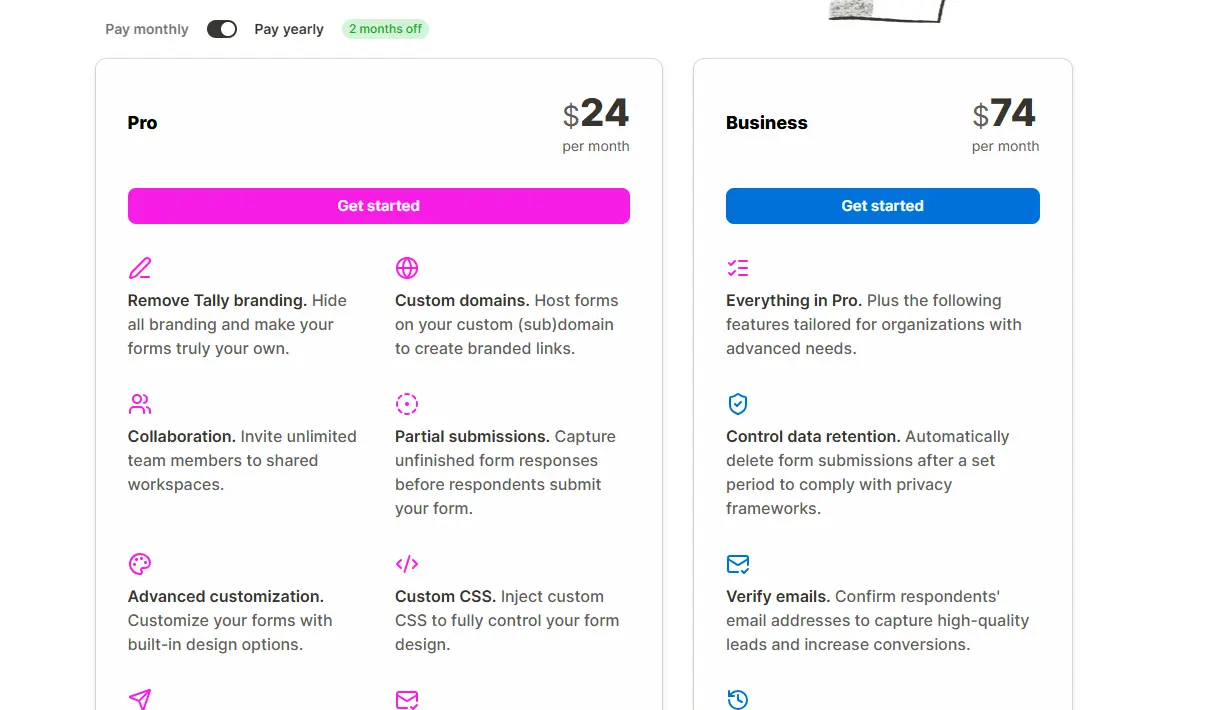
The Business Plan is ~$89 per month on a monthly billing plan, or ~$74 per month when billed annually at ~$890 per year. It includes everything in Pro plus advanced team features: email verification for respondents, data retention controls, 90‑day form version history, and workspace‑level custom branding.
This tier targets agencies and mid-sized teams that need centralized form management and stronger compliance controls. That said, the feature gap between Pro and Business is narrower than the price jump suggests; Business mainly adds email verification, data retention, and extended version history, so most teams under ten people should start at Pro and only migrate to Business once those features become non-negotiable compliance requirements.
💳 Tally Forms Plans at a Glance
Plan | Monthly Cost (Annual) | Forms | Responses | Custom Domain | File Uploads | Best For |
Free | $0 | Unlimited | Unlimited | ❌ No | 10MB/file, 1GB total | Testing, personal projects, early validation |
Pro | ~$25/month (~$290/yr) | Unlimited | Unlimited | ✅ Yes | Unlimited | Solo creators, client-facing businesses |
Business | ~$74/month (~$890/yr) | Unlimited | Unlimited | ✅ Yes + workspace branding | Unlimited | Agencies, teams needing SSO and audit logs |
Prices reflect annual billing; monthly billing is ~$29 for Pro and ~$89 for Business. Always verify current figures directly on Tally’s official pricing page before making a purchasing decision, since SaaS pricing shifts frequently.
The Real Cost Math
Here is where the pricing conversation becomes genuinely useful, rather than just repeating numbers from a pricing page. At Pro-tier volume, your effective platform cost per form approaches zero when you run multiple active forms simultaneously.
For instance, a consultant with three intake forms, two feedback surveys, and one payment collection form pays ~$24 monthly (on annual billing) for six unlimited-response forms. That same setup on Typeform’s Plus plan (around $50–$60/month, with a 1,000‑response monthly cap) would cost more per form and hit response limits that Tally’s plans do not impose. Jotform’s Bronze plan (~$34–$39/month on annual billing) caps you at around 1,000 submissions and 25 forms, whereas Tally’s Pro plan has no such response or form-count limits.
However, you must factor in Stripe’s transaction fees on top of Tally’s subscription. On a fifty-dollar sale, Stripe typically takes roughly $1.75 to $1.95 in many markets (exact rates vary by country and card type). Over a hundred transactions monthly, that is $175 to $195 in processing fees alone. Tally does not add a platform commission, keeping it cheaper than Gumroad or Payhip on a per-sale basis, but Stripe fees are real and unavoidable.
One more gap worth naming directly: Tally does not publicly advertise a dedicated enterprise or custom pricing tier; its highest listed plan is Business. If you are running a large organization with procurement requirements, volume discounts, or dedicated support needs, you will likely need to contact Tally directly. That’s not unique; Typeform and Jotform also route large-scale enterprise deals through sales, but Tally’s pricing page is more minimal and doesn’t spell out an enterprise upgrade path the way those competitors do.
Is Tally Forms Safe? Privacy, GDPR, and Data Handling

Tally hosts all form data within the European Union, which means GDPR compliance is built into the platform by default rather than bolted on as an enterprise add-on. Data is encrypted both in transit and at rest, and Tally Forms states plainly that users retain full control over the information they collect through their forms. A data processing agreement is available for teams that need one formally in place for their own compliance requirements.
I want to be straightforward about one gap here rather than assume a certification that hasn’t been publicly confirmed: I couldn’t find a public SOC 2 certification listed for Tally at the time of writing, which is worth verifying directly with their team if that specific compliance standard matters for your organization’s procurement requirements.
It’s also worth noting that Tally remains a smaller, leaner team than an Anthropic-, Google-, or Microsoft-scale operation, which carries a non‑zero business continuity risk, as with any specialized SaaS vendor, but more pronounced than with large, diversified providers. That risk isn’t alarming given the company’s growth trajectory and G2 recognition, but it’s a fair, honest data point for anyone weighing a small vendor against a larger, more established one.
Tally Forms vs. Alternatives
Choosing between Tally and its competitors comes down to how each platform balances generosity against depth, and where your specific workflow sits on that spectrum.
⚡ Tally vs. Typeform vs. Google Forms vs. Jotform vs. Fillout: Side-by-Side
Dimension | Tally Forms | Typeform | Google Forms | Jotform | Fillout |
Free Tier Limits | Unlimited forms & responses | 10 responses/month | Unlimited forms & responses | 5 forms, 100 submissions/mo | Generous (unlimited forms) |
Payment Collection | Stripe only | Native + Stripe | ❌ None | 30+ gateways including PayPal | Stripe + PayPal |
Conditional Logic | Moderate (show/hide, calculators) | Advanced branching | Basic (go to section) | Very advanced | Moderate |
Custom Branding | Pro tier (~$24/mo annual) | Plus tier (~$50/mo+) | Workspace branding only | Paid tiers | Free tier partial |
Mobile UX | Strong, responsive | Strong, responsive | Functional | Strong | Strong |
Team/Enterprise | Business tier with SSO | Enterprise plans | Workspace sharing | Enterprise tier | Team plans |
AI Features | Form builder, translation, analysis | AI question generation | ❌ None | Form builder (Jotform AI) | Limited |
Best For | Cost-conscious creators | Brand experience & depth | Internal quick forms | Enterprise complexity | Notion-native users |
Where Tally Wins

Tally’s primary advantage is its price-to-value ratio across all tiers. No other major form builder offers unlimited responses and payment collection on a free plan. Additionally, the speed of form creation for simple-to-moderate complexity is unmatched; you can build a functional payment form in under ten minutes if you know which questions to ask.
The version cadence and feature additions also suggest a product team shipping quickly, rather than defending a static feature set. If your priority is getting forms live fast, collecting money without platform fees, and paying as little as possible for the privilege, Tally has the clearest edge.
Where Typeform Still Leads
Typeform remains the benchmark for respondent experience in high-complexity scenarios. Its conversational interface (one question at a time, with smooth transitions) creates a polished feel that Tally’s scrollable block layout does not quite replicate for long surveys.
Furthermore, Typeform’s analytics dashboard, native integrations with HubSpot and Salesforce, and enterprise sales support are still deeper than what Tally offers. If you are running large-scale customer research, tracking NPS across thousands of respondents, or using forms that need to feed directly into a CRM pipeline with native integrations (HubSpot, Salesforce) rather than relying solely on Zapier, Typeform is the safer bet.
Where Jotform Still Leads
Jotform‘s template library contains thousands of industry-specific forms, from HIPAA-compliant medical intake forms to construction site inspection forms. That depth matters if you operate in a regulated industry or need widgets that Tally does not natively support, such as electronic signatures with audit trails, appointment scheduling, or PDF auto-generation.
Moreover, Jotform supports over 30 payment gateways, including PayPal, Square, and Authorize.net, making it the only option on this list for users who cannot or will not use Stripe. If your form needs to connect to a broader database workflow, our Airtable review covers why spreadsheet-based databases still outpace form builders for relational data management.
Compared to Google Forms: Tally is the upgrade path when you need payments, custom branding, or a modern UX. Google Forms wins only when you are already locked into Google Workspace and do not care about branding, logic, or monetization.
Compared to Fillout: Fillout is Tally’s closest spiritual competitor, also block-based, also generous, also Notion-friendly. Tally has the more mature product, simpler native Stripe payments, and broader brand recognition; Fillout has deeper native database integrations (Airtable, Notion, HubSpot) and more advanced workflow and payment features (discount codes, subscriptions, free trials). The choice between them is narrower than most people realize, and both undercut Typeform on price.
Real-World Use Cases for Tally Forms

The best way to understand where Tally genuinely earns its position is to look at what people are actually building with it day-to-day, rather than the demo use case everyone leads with.
Client Intake and Onboarding
Client intake and onboarding are a natural fit for service businesses. A consultant can build a branded intake form that collects project details, budget ranges, and contract signatures, then routes the data directly into a Notion database or Airtable base via automation. For connecting Tally to broader workflows, our Make app review covers the automation layer that sits beneath tools like this.
Event Registration
Event registration with deposits works well because the Stripe integration handles payment collection without a separate checkout page. A workshop host can collect attendee details, dietary preferences, and a fifty-dollar deposit in a single form. The calculator block even adjusts the total dynamically if someone selects an add-on session.
Digital Product Sales
Digital product sales are viable for creators selling templates, ebooks, or courses. Tally handles the order collection, Stripe processes the payment, and a custom thank-you page delivers the download link. It is not a full e-commerce platform, but for single-product sellers, it eliminates the need for Shopify or Gumroad.
Feedback and NPS Surveys
Feedback and NPS surveys replace Typeform for recurring research needs. Since responses are unlimited, a SaaS founder can run monthly customer satisfaction surveys without watching a submission counter. Beyond simple feedback, our Gumloop review explores the deeper no-code automation that can extend what Tally collects into actionable workflows.
Job Applications
Job applications with file uploads work for small teams hiring without an ATS. Candidates submit resumes, cover letters, and portfolio links via a branded form, and the responses are collected in a structured spreadsheet. The ten-megabyte file cap on the free tier handles most PDF resumes, though design portfolios may require the Pro upgrade.
Who Should Use Tally Forms
- Freelancers and consultants who need branded intake forms without agency-level budgets
- Small e-commerce operators selling digital products or services via Stripe
- Content creators collecting audience data, running paid newsletters, or selling memberships
- Educators and coaches taking course registrations and deposits
- Non-profits taking donations through Stripe in supported markets
- Startup founders validating ideas through landing-page forms before building full products
Who Shouldn’t Use Tally Forms

- Enterprises needing SAML SSO, SCIM provisioning, or detailed audit logs at scale (Business tier offers SAML, but implementation support is lighter than Jotform Enterprise)
- Users requiring non-Stripe payment gateways such as PayPal, M-Pesa, Paystack, or Flutterwave
- Teams needing deep CRM-native integrations beyond Zapier, Make, or webhook connections
- Users in highly regulated industries requiring HIPAA compliance out of the box
- Organizations that need dedicated account managers or 24/7 phone support
An Honest Note on the Review Landscape
The gap between early-adopter enthusiasm and long-term user sentiment is worth naming directly. Tally receives significant praise on Twitter and Product Hunt for its free tier and visual design, and that praise is largely deserved. However, Reddit threads and community forums surface a different pattern: some users hit logical or workflow limits after six months, especially when they need complex branching, heavy calculations, or deep analytics that Tally doesn’t yet match, or they struggle with the lack of phone support, or they run into quirks like Notion embeds behaving oddly on mobile (especially in the Notion iOS app), where some embeds act read-only or require opening in a browser.
Tally’s support is responsive but email-only for most users. Pro and Business users get priority support, though “priority” in this context means faster email responses rather than access to phone or chat support. That asynchronous model works fine for non-urgent issues, but if your payment form breaks during a launch, waiting hours or even a day for an email reply is a genuine operational risk.
Additionally, the template library, while growing, is not as deep as Jotform’s or Typeform’s. You will likely build most forms from scratch rather than customizing a near-perfect starting point. That is not a dealbreaker for most users, but it adds setup time that the marketing does not always acknowledge.
Tally Forms in Africa: Accessibility and Practical Realities
Pricing in African Market Context
Tally Forms bills in US dollars or euros, with no local currency support for Nigerian naira, Kenyan shillings, South African rand, or Egyptian pounds. At the time of writing, Pro costs approximately ₦399,000/year, KSh 37,550/year, or around R4,700/year at current exchange rates. Those amounts are manageable for established businesses earning in hard currency but represent a meaningful expense for solo creators and early-stage startups on the continent earning primarily in local currency.
Consequently, the free tier is not just attractive for African users; it is often the only viable tier until revenue justifies the upgrade. The good news is that Tally’s free tier is complete enough to run a small business without paying. The bad news is that custom domains and branding removal (critical for professional credibility) are locked behind that foreign-currency paywall.
Connectivity and Mobile Considerations

Tally forms are lightweight and mobile-responsive by design, which matters enormously on African networks where data costs remain high and connectivity fluctuates. The forms load quickly even on slower 3G and 4G connections, and the respondent experience does not require heavy JavaScript or large asset downloads. Furthermore, the mobile editor works well enough that you can build or edit forms from a smartphone browser in a pinch, though the desktop experience remains superior for complex builds.
That said, the Stripe payment layer introduces a dependency that does not always resolve cleanly on African networks. Stripe’s checkout flow requires a stable connection, and 3D Secure authentication (commonly triggered for cross-border transactions and many African-issued cards) can fail on slower connections or with outdated browsers on older devices. That friction is Stripe’s, not Tally’s, but it still affects the end-to-end experience.
Payment and Local Ecosystem Fit
This is the section where I want to be most precise, because vague claims about “limited African support” undersell how specific the actual gap is. Stripe lists exactly five African countries under its ‘extended network’: Côte d’Ivoire, Ghana, Kenya, Nigeria, and South Africa.
There are no African countries in Stripe’s core ‘direct support’ list. This extended network is materially different from direct Stripe access: you cannot log into a standard Stripe dashboard from these countries using that extended-network status; you’d be using Paystack’s own separate platform, dashboard, and fee structure instead, and Tally’s native payment block is built around Stripe specifically, not Paystack.
Beyond that, Stripe’s 2020 acquisition of Paystack created what’s called an “extended network” covering Ghana, Kenya, Nigeria, South Africa, and Côte d’Ivoire, but this is materially different from direct access to Stripe. You cannot log into a standard Stripe dashboard from Ghana, Kenya, Nigeria, or Côte d’Ivoire using that extended-network status; you’d be using Paystack’s own separate platform, dashboard, and fee structure instead, and Tally’s native payment block is built around Stripe specifically, not Paystack.
Practically, this means a founder in Lagos, Nairobi, or most of the rest of the continent outside South Africa cannot simply connect Stripe to a Tally form and start collecting payments the way a founder in the United States or United Kingdom can. There’s no native Paystack, Flutterwave, or M-Pesa integration built into Tally directly; all payments flow through Stripe’s infrastructure, even in extended-network countries where Stripe is powered by Paystack. That’s a genuine structural gap, not a minor inconvenience, for anyone building a payment-dependent workflow in most African markets. Realistic workarounds include using a manual payment confirmation field paired with a separate Paystack or Flutterwave payment link, or a redirect-after-submission flow that sends respondents to complete payment on a different platform before their submission is considered final.
The broader context of Fintech on the continent is something we track closely across our African Fintech coverage. If local payment integration is non-negotiable for your workflow, Jotform or a regional builder may serve you better despite higher costs or steeper learning curves.
Diaspora and Cross-Border Use Cases

Where Tally shines for African users is in diaspora and cross-border contexts. A Nigerian founder serving US or UK customers can use Tally with Stripe to collect payments in dollars or pounds while operating from Lagos or Abuja. An African consultant working with European clients can send branded intake forms that match the professionalism of any Western agency.
In those scenarios, the currency mismatch works in the creator’s favor: earning in hard currency while paying Tally’s subscription in the same currency. However, for purely local African businesses serving local customers with local payment methods, the Stripe-only constraint remains a hard ceiling.
FAQs
Yes. Tally’s free tier includes unlimited forms and unlimited responses with no monthly submission cap. The limitations are branding, subdomain hosting, file upload size caps, and the absence of custom domains and advanced team features.
Tally beats Typeform on pricing and free-tier generosity, while Typeform leads on respondent experience polish, advanced logic branching, and enterprise integrations. For simple-to-moderate forms, Tally is the better value. For large-scale research or complex routing, Typeform offers deeper capabilities.
Yes, through direct Stripe integration. Tally charges no platform fee beyond your subscription, but Stripe’s standard transaction processing fees apply. Tally does not support PayPal, M-Pesa, Paystack, Flutterwave, or other non-Stripe gateways.
Yes. Tally supports show-and-hide conditional logic and calculator blocks for dynamic pricing and scoring. However, the logic is linear and does not support the deeply nested branching trees available in Jotform or Typeform.
Yes. Tally is GDPR-compliant by default, hosts all form data in the European Union, and encrypts data in transit and at rest. A Data Processing Agreement (DPA) is available for teams that need it for regulatory documentation. Tally does not publicly advertise SOC 2 Type II certification; if you require formal SOC 2 evidence, contact Tally’s security/compliance team directly.
Partially. Tally works well for form creation and data collection across Africa, but payment collection requires Stripe, which is only available in select African markets and does not natively support local methods like M-Pesa or Paystack. For local payment integration, you may need workarounds or alternative platforms.
Final Thoughts

Tally has carved out a genuinely rare position in the form-builder category: a tool that’s authentically free to start, straightforward to use once you’re comfortable with its block-based editor, and capable of handling real money through built-in Stripe payment collection. That combination is harder to find than the broader no-code marketing ecosystem tends to suggest, and for anyone who’s outgrown Google Forms without wanting to justify Typeform’s pricing tiers, it’s a genuinely compelling next step.
However, Tally is not the most comprehensive tool, nor the safest bet for every African payment context or enterprise workflow. Its conditional logic hits a ceiling before Jotform and Typeform do; its team features are still maturing, and its Africa-facing payment limitations are real barriers for local businesses that require gateways like M-Pesa, Paystack, or Flutterwave. If you need local gateway support, complex enterprise routing, or white-glove support, you will need to look elsewhere or pay significantly more.
If this guide helped you cut through the form-builder noise, bookmark YourTechCompass.com before your next tool decision, because the right tool at the wrong price is still the wrong tool.