You’ve been there. You hand a beautifully polished Figma file to a developer, wait two weeks, and get back a website that technically matches the mockup, except the spacing is off, the hover states are gone, and every “quick fix” now needs a developer ticket and a Slack thread you’ll chase for days. I built my first few sites exactly that way, watching the gap between design intent and shipped reality grow wider with every handoff. That gap is precisely what Webflow was built to close.
In this review, I’ll walk you through how Webflow’s visual canvas generates real HTML, CSS, and JavaScript instead of a black‑box template; what its CMS, ecommerce, and AI Site Builder do well (and where they fall short); the real cost math behind its two‑layer Workspace‑plus‑Site pricing; where the platform shows cracks, including a significant 2026 restructuring tied to an AI‑driven strategy shift that every prospective buyer should know about; and how it stacks up against WordPress, Framer, and Squarespace. Everything below is grounded in verified pricing pages, official documentation, and 2026 reporting, with my own opinions clearly flagged as opinions.
A note before we begin: every YTC score is earned, never negotiated. If you want to understand exactly how we evaluate apps & tools and how we handle affiliate relationships, our Review Methodology lays it all out.
Quick Verdict
- Best For: Designers, agencies, and marketing teams who want pixel-level design control and a real CMS without hiring a developer for every content change.
- Skip It If: You need a predictable flat monthly bill, deep e-commerce at scale, or you’re not ready to invest real hours in learning how it works.
- Bottom Line: Webflow remains the strongest visual builder for design-led, CMS-powered websites, but its billing complexity, steep learning curve, and a significant 2026 AI‑driven restructuring mean you should go in with your eyes open, not just your Figma file.
What Is Webflow, and How Does It Work?
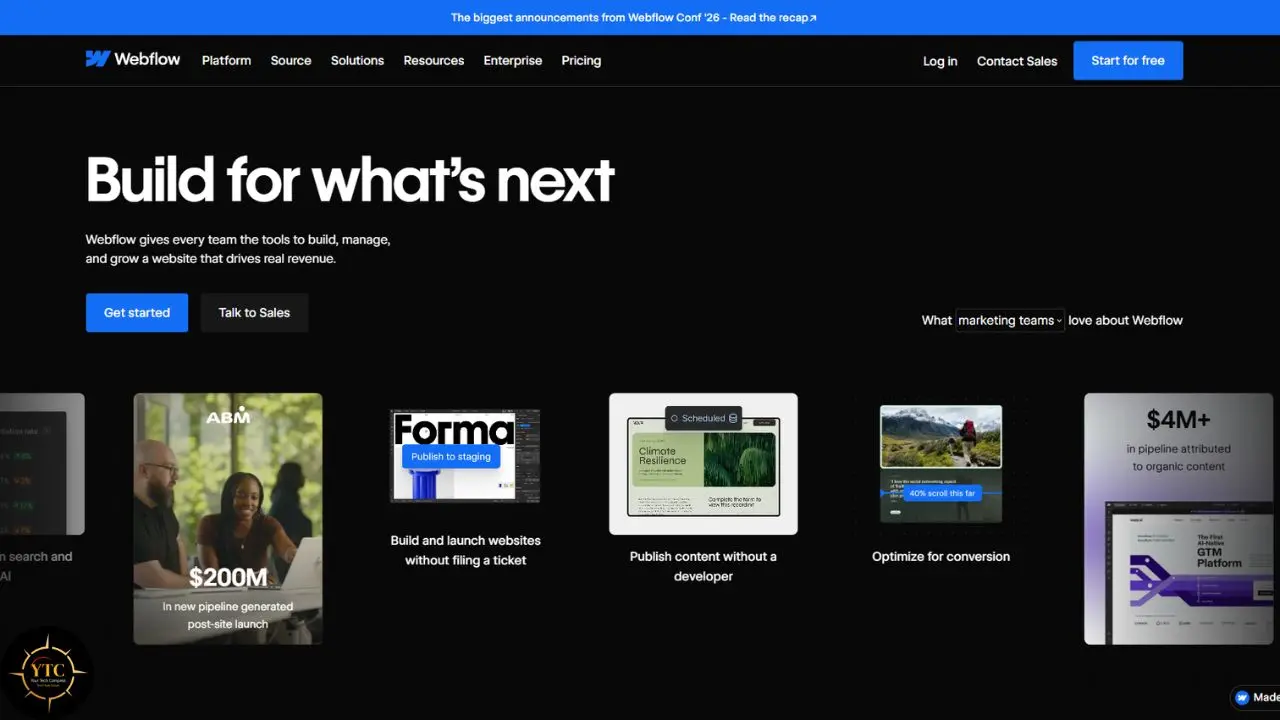
Webflow is a visual web design platform that lets you build real websites (not templates you’re stuck inside) by manipulating the box model, flexbox, and CSS Grid through a drag-and-drop canvas. Unlike simpler site builders, what you see in the Designer is what gets shipped: clean, semantic HTML/CSS/JS, not a proprietary rendering layer. That distinction is the entire reason developers respect Webflow in a category most of them otherwise avoid.
Founded in 2013, Webflow has grown well beyond a design tool. As of 2026, it powers roughly 0.8% of all websites on the internet, and the company has repositioned itself as an “AI-native website experience platform” built around three pillars: the visual Designer, a relational CMS called Collections, and a growing suite of AI and Answer Engine Optimization tools aimed at how content shows up in ChatGPT, Perplexity, and Google AI Overviews. In practice, that means Webflow in 2026 is doing double duty, serving designers who want manual control and marketing teams who want AI to do the first draft.
There’s a real structural wrinkle worth understanding early, though, because it shapes everything from pricing to who should use this platform. In May 2026, Webflow’s CEO announced a company-wide restructuring toward what she called an “agentic web marketing platform,” and the move came with layoffs, deprecated features, and a pricing overhaul, all of which I’ll unpack honestly as we go. If you want to see how other AI-native builders and app platforms compare on stability and direction, our Apps and Tools category tracks that shift across the whole no-code space, including tools like our Bubble review for teams building full web apps rather than marketing sites.
Standout Features (and Where They Fall Short)
The Designer Canvas: The Flagship
The Designer is Webflow’s core differentiator, and it’s genuinely unlike any other builder in this category. You’re working directly with box model properties, flexbox, and CSS Grid on a visual canvas, which means the site you design is the site that ships, no translation layer, no “close enough” rendering.
Now, the honest limitation, and it’s a real one. Webflow requires a solid understanding of web design fundamentals; reviewers consistently note that users without prior design or development experience struggle with the interface, as it is closer to professional design software than to a simple drag-and-drop tool. My opinion: if you already think in terms of padding, margins, and breakpoints, this is the most powerful visual tool you’ll find. If you don’t, budget real time for Webflow University before you touch a live project.
The CMS and Collections
Webflow’s CMS lets you build structured, relational content (blog posts, team directories, product catalogs) using Collections that dynamically reference and filter each other. This is where Webflow pulls ahead of simpler builders because it behaves more like a lightweight database than a static content field. If you’re already comfortable managing structured data, the underlying logic will feel familiar; our Airtable review covers a similar relational-data mindset applied to a different kind of workspace.
The trade-off shows up at scale. Even on the newest Premium plan (which replaced the old CMS and Business tiers in May 2026), you’re capped at 20,000 CMS items and 40 Collections, which comfortably cover most marketing sites but become a real ceiling for large content operations or media-heavy publishers.
Webflow AI Site Builder and AI Assistant
Webflow’s AI Site Builder generates a multi-page draft (sitemap, layout, and on-brand copy) from a text prompt describing your business and audience, and it has reportedly been used to publish over 60,000 sites. Paired with the AI Assistant inside the Designer, it genuinely speeds up the blank-page problem, generating semantic HTML with real, niche-relevant copy rather than placeholder text.
Here’s the honest limitation, though, and it matters more than the demo videos suggest. Reviewers consistently frame it as a strong prototyping tool, not a hands-off builder, because brand voice, accessibility, performance, and real information architecture still need human work before a generated site is ready to ship. If you’re the kind of team that wants AI to draft and a human to finish, as our Devin Desktop review frames agentic coding assistance, this is exactly that pattern, applied to websites rather than software.
E-Commerce
Webflow’s built-in store functionality covers product pages, cart, checkout, and inventory without leaving the platform, which is genuinely convenient for small-to-medium catalogs. It works cleanly for straightforward product lines.
Where it falls short is complexity and scale. The Basic e-commerce tier carries a 2% transaction fee, and removing it means jumping from $29 to $74 a month, a real cost most beginners don’t anticipate. For subscriptions, multi-currency, or advanced inventory logic, reviewers consistently point to Shopify or WooCommerce instead, since Webflow’s plugin and app ecosystem is thinner than either’s.
Integrations and Automation
Webflow doesn’t natively connect to most CRMs, marketing tools, or internal databases out of the box, which surprises teams expecting an all-in-one platform. In practice, this gap is exactly where automation tools earn their keep, connecting form submissions, CMS updates, or e-commerce events to the rest of your stack. Our Zapier review and n8n review both cover how to bridge that gap, whether you want a no-code hosted option or a self-hosted, more technical alternative.
Pricing: The Real Cost Math
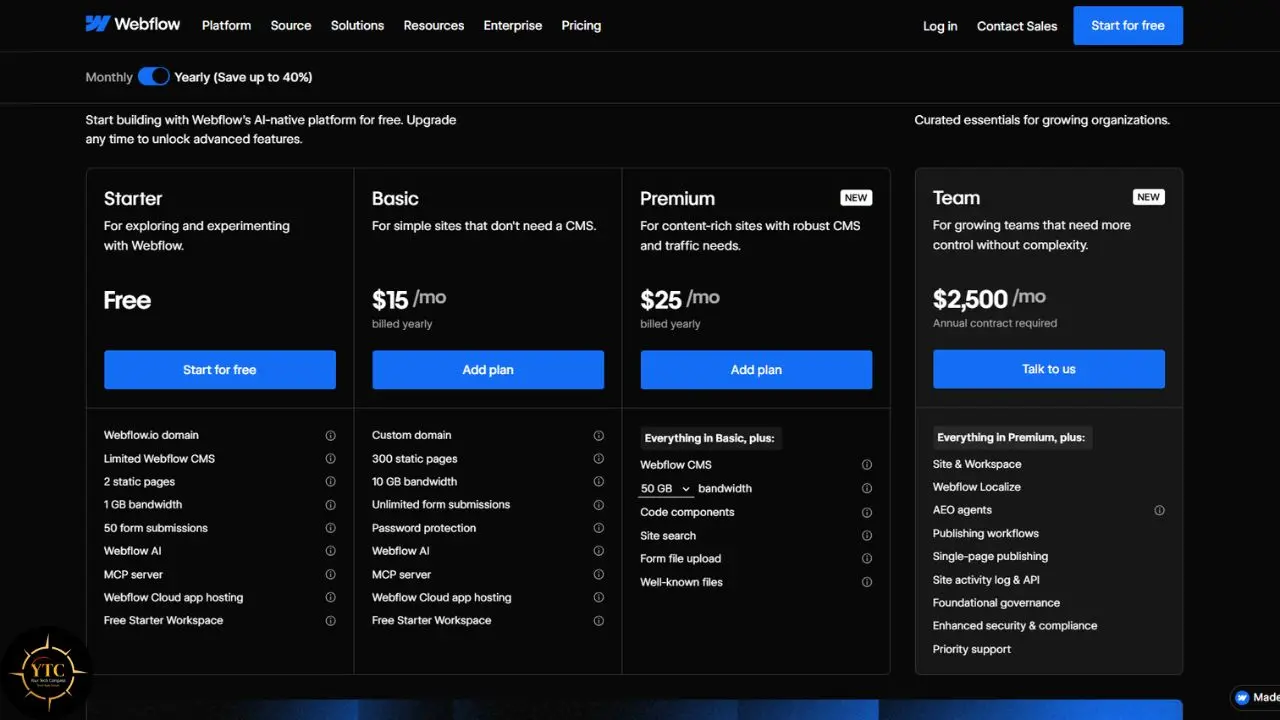
Webflow’s pricing is, without exaggeration, the single most confusing part of evaluating this platform, so let’s walk through it carefully. As of the May 2026 update, Webflow bills you on two separate axes: a Site plan for each individual published website and a Workspace plan for your team’s seats and building tools, and nearly every new user underestimates that they need both.
Layer | What It Covers | Starting Price (Annual Billing) | Example Tier Detail |
Site Plan | Custom domain, hosting, CMS/ecommerce capacity per website | Free (Starter) / $15/mo (Basic) / $25/mo (Premium) | Premium: 20,000 CMS items, 40 Collections, 50GB bandwidth |
Workspace Plan | Seats, collaboration, staging sites, code export, AI credits | Free (Starter) / $19/mo (Core) / $49/mo (Growth), per seat | Core: 10 staging sites, 300 AI credits/month, code export unlocked |
Ecommerce Plan | Online store functionality layered on top of a Site plan | $29/mo (Standard) / $74/mo (Plus) / $212/mo (Advanced) | Standard carries a 2% transaction fee; Plus removes it |
Here’s why that split trips people up. A Workspace plan alone lets you design and stage a site on a free .webflow.io domain, but you can’t connect a custom domain or collaborate meaningfully without also paying for a Site plan, so the “$15/mo” headline price you’ll see advertised almost never reflects what a real team actually pays. A realistic B2B marketing team setup, once you add a Workspace seat and a CMS-capable Site plan, typically runs $113–$128 a month on annual billing, not the sticker price alone.
The May 2026 update did simplify one genuine pain point: Webflow retired the separate CMS and Business Site plans and merged them into a single Premium plan at $25/month, which is a real win for anyone who found the old five-tier lineup impossible to parse. Just know that if you’re on month-to-month billing instead of annual, the same plans jump significantly: Basic goes from $15 to $25, and Premium from $25 to $39, roughly 55-65% more for the flexibility of not committing to an annual plan.
My Honest Advice: Before you commit, map out exactly which Site plan and which Workspace plan you actually need, add them together, and compare that real number (not the homepage price) against WordPress plus hosting, or against Squarespace’s flatter, all-in-one pricing.
Legal, Privacy, and Risk Considerations
Every SaaS website builder comes with a data-ownership question, and Webflow’s answer is more nuanced than “you own your content.” Code export exists on paid Workspace plans, letting you take static HTML/CSS/JS elsewhere, but that export does not carry your live CMS data or e-commerce functionality with it, meaning full migration off Webflow is a genuinely harder project than it sounds on a sales page.
There’s also a company-stability risk worth naming plainly, because it’s directly relevant to anyone building a business on this platform for the long term. On May 27, 2026, Webflow’s CEO announced a restructuring tied to an ‘agentic web’ pivot, and the company laid off an estimated 140 employees, following an earlier ~8% workforce reduction in 2024, though the exact 2026 figure was never officially disclosed. This was Webflow’s second round of layoffs in under two years, and it followed two major feature sunsets (Logic and User Accounts) that forced existing customers to migrate to third-party solutions.
None of this means Webflow is at risk of shutting down; the company reported $213 million in 2024 revenue, up 66% year over year, and a reported $4 billion valuation, which points to real financial stability. But two layoffs, two pricing restructures, and two feature sunsets inside two years are a pattern, not a one-off, and it’s worth factoring into any decision to build a business-critical site on a platform that’s still figuring out its own direction.
Webflow vs. the Alternatives

The website-builder space has genuinely narrowed in 2026, with Framer closing much of the design gap and WordPress’s block editor barely resembling its older self. Here’s the honest, side-by-side comparison.
Platform | Starting Cost | Creative Control | Learning Curve | CMS Depth | Hosting Model | Best For | Weakest At |
Webflow | Free to build; Site $15–25/mo + Workspace $19–49/mo (billed separately) | High (visual CSS/HTML) | Steep | Strong (up to 20,000 items on Premium) | Bundled, locked‑in | Design‑led marketing sites, agencies | Two‑layer billing; e‑commerce at scale |
WordPress | “Free” software + self‑hosting (costs vary by host, theme, plugins) | High, plugin‑dependent | Moderate to high (ongoing maintenance) | Excellent; largest ecosystem | Self‑hosted, your choice | Content‑heavy sites, full data ownership | Security and maintenance overhead |
Framer | Free tier; paid plans from ~$10/mo (typically below Webflow’s entry pricing) | High, especially for motion | Moderate (gentler than Webflow) | Thinner than Webflow (lower caps, fewer relations) | Bundled | Portfolios, fast AI‑generated landing pages | SEO depth; complex CMS structures |
Squarespace | Roughly $16–49/mo (higher for advanced commerce), all‑in‑one | Medium (template + Fluid Engine) | Low | Moderate | Bundled | Non‑technical founders who want polish fast | Deep customization; relational content |
The pattern that emerges is simple: Webflow and WordPress sit at the “maximum control” end of the spectrum, while Framer and Squarespace trade some of that control for a gentler learning curve.
Compared to Framer right now: Framer leans harder into AI‑generated, animation‑rich landing pages and gets you to a polished result faster. Webflow gives you deeper CMS logic and more granular design control once your site grows past a handful of pages. Speed versus depth is the real trade‑off here.
Compared to WordPress right now: WordPress still powers a massive share of the content web and gives you full data ownership through self‑hosting. Webflow trades that ownership for a maintenance‑free, all‑in‑one hosting model. You’re choosing between control and convenience, not better versus worse.
Webflow’s AI Site Builder also fits into the broader conversation with other AI-first builders reshaping how non-developers ship software; if you’re comparing that philosophy to a chat-driven app builder rather than a visual website canvas, our Bubble review is the natural next read.
Real-World Use Cases
Picture a small design agency onboarding a new client. Instead of building a custom WordPress theme from scratch, the team starts from a Webflow CMS Collection structure, drops in the client’s brand colors and copy, and hands off an Editor-only login so the client can update blog posts without ever touching the Designer. What used to be a multi-week build shrinks to days, and ongoing content changes no longer generate support tickets.
Now consider a startup marketing team publishing weekly landing pages for paid campaigns. They lean on the AI Site Builder for a first draft of each page, then a designer refines spacing, interactions, and copy before launch. The real value here isn’t the AI doing the whole job; it’s the marketing team no longer waiting on engineering for every new page.
A solo consultant tells a similar story from the other direction. They use Webflow’s CMS to power a simple directory-style site (case studies, testimonials, a filterable services page) and connect it to their email list via Zapier, so every new lead syncs automatically without any custom backend work. It’s the kind of structured-but-small use case where Webflow’s relational CMS is worth the cost.
Honest Limitations

Beyond the flagship canvas’s learning curve, several structural issues surface once you go beyond the demo stage in Webflow. The billing complexity is the most consistently cited frustration: the Site‑plan‑plus‑Workspace‑plan split, layered with optional add‑ons like Optimize and Localize, means most teams pay meaningfully more than the advertised entry price, and that gap catches new buyers off guard almost every time.
Native experimentation is thinner than you’d expect from a platform this mature. Webflow does offer its own A/B testing via Optimize, but it’s limited to Webflow sites, lacks multivariate and server‑side testing, and remains relatively basic, pushing teams toward external experimentation tools for anything beyond simple variants, adding both cost and integration overhead to a platform that markets itself as all‑in‑one.
Two recently deprecated features deserve a direct mention because they affect existing customers, not just prospective ones. Webflow sunset its native Logic feature in mid‑2025 (disabled June 27, 2025) and its User Accounts (Memberships) feature in early 2026 (shut down January 29, 2026), forcing organizations that relied on either to migrate to third‑party tools. If you’re evaluating Webflow today, ask directly what happens if a feature you depend on gets deprecated next. The platform’s recent history suggests this isn’t hypothetical.
The 2026 restructuring adds a layer of platform‑direction risk that’s hard to quantify but impossible to ignore. A pivot toward an “agentic web marketing platform” aimed at enterprise teams could mean less roadmap attention for solo designers, freelancers, and small agencies, the exact users who built Webflow’s early reputation. My opinion, based on this pattern across independent reporting rather than firsthand testing, is that none of this makes Webflow a bad choice today, but it does mean conservative teams should budget for the possibility of migrating within a few years, rather than assume the current feature set is permanent.
One smaller but real limitation: bandwidth. Default bandwidth on paid plans dropped from 100GB to 50GB during the May 2026 restructuring (notably for sites moving from the old Business plan to the new Premium plan), which acts as a quiet tax on the very high‑traffic, media‑rich sites that represent Webflow’s biggest success stories.
Who Should Use Webflow (and Who Shouldn’t)
Use it if you:
- Already understand web design fundamentals (box model, flexbox, responsive layout) or are willing to invest real hours learning them.
- Need a real CMS for structured content like blogs, case studies, or directories.
- Want design control without hiring a developer for every layout change.
- Can budget for the true combined cost of a Site plan plus a Workspace plan, not just the homepage price.
Skip it if you:
- Need predictable, simple flat-rate pricing with no billing surprises.
- Run e-commerce at real scale, with subscriptions, multi-currency, or complex inventory.
- Want a platform you’re confident will look the same in three years, given the recent pivot and feature sunsets.
- Have zero design background and no interest in acquiring one, Framer or Squarespace will get you there faster.
The Review Landscape: An Honest Note
You deserve the full picture here, not just the highlight reel. Webflow’s coverage over the past year splits cleanly into two camps: designers and agencies who still praise its unmatched visual control and clean code output, and a growing body of reporting focused on billing complexity, feature deprecations, and the abrupt, no-notice way the May 2026 layoffs were handled, including reports of employees being locked out of company laptops with no prior warning.
Both perspectives are accurate, and the gap between them tells you something real: Webflow, the product, is still excellent for the use case it was built for, while Webflow, the company, is mid-transition in a way that adds genuine uncertainty. If you’re building something business-critical, that distinction between “great tool” and “stable long-term partner” is worth sitting with before you commit.
Webflow in Africa: The Accessibility Check

For African users, Webflow’s biggest accessibility gap isn’t the learning curve; it’s payments. Webflow’s native checkout and billing run through Stripe, which historically has offered limited or no direct support across most African countries, and Webflow’s own community is full of long‑running requests from South African, Nigerian, and Rwandan users asking for native support for local African fintech providers such as Paystack, Flutterwave, or PayFast.
The workaround exists, but it adds friction that most builders in wealthier markets never have to think about. Third‑party plugins from providers like Stitch or Foxy.io can bridge the gap for e‑commerce checkout specifically, allowing South African sellers to accept cards, Apple Pay, and local rails like Capitec Pay, but this requires an additional integration step and often an additional monthly fee on top of Webflow’s own pricing. For agency work and design services in general, though, Webflow itself remains fully usable; the friction appears specifically when accepting local payment methods, not at the design or hosting layer.
Set against that friction, the design and AI tooling genuinely travel well. Webflow’s AI Site Builder doesn’t require any special access for African users, and it’s part of the same broader wave our AI in Africa coverage tracks: AI‑native tools lowering the skill floor for people building digital businesses across the continent, even when the payment rails underneath them still lag. If you’re tracking how the wider African tech ecosystem is adapting to these tools, our African tech category follows that story closely.
FAQs
Not particularly, no. Webflow requires an understanding of web design fundamentals, such as the box model and responsive layouts, and users without prior design or development experience consistently report a steep learning curve. Framer or Squarespace is a gentler starting point if you’re brand new.
More than the advertised $15 headline price in most real cases. Once you add a Workspace plan for collaboration and features like code export, a realistic small business setup typically ranges from $34 to $128 a month, depending on your CMS needs and team size, and that’s before any e-commerce or add-ons.
It depends on what you’re optimizing for. WordPress wins on full data ownership, content scale, and its plugin ecosystem; Webflow wins on design control and a maintenance-free hosting model, trading some ownership for convenience.
Partially. Code export on paid Workspace plans gives you static HTML/CSS/JS, but your live CMS data and e-commerce functionality don’t migrate with it, which makes a full move off Webflow a genuinely bigger project than a simple export.
For small-to-medium product catalogs, yes. For subscriptions, multi-currency, or complex inventory at scale, most reviewers point toward Shopify or WooCommerce instead, since Webflow’s e-commerce app ecosystem remains thinner.
Financially, the company looks stable, with reported 2024 revenue of $213 million. Strategically, it’s mid-pivot following a May 2026 restructuring and layoffs tied to an “agentic web” direction, so conservative teams should budget for potential change over the next few years rather than assuming today’s feature set is permanent.
Where the Compass Points From Here

Webflow earns its reputation the hard way, by actually outputting clean, production-ready code from a visual canvas, not by faking that promise with a proprietary rendering layer underneath. The Designer and CMS remain genuinely best-in-class for design-led marketing sites, and the AI Site Builder is a legitimately useful starting point rather than empty hype. But 2026 has been a turbulent year for the company behind the product, and that turbulence (the billing restructure, the feature sunsets, the layoffs) deserves equal weight in your decision, not a footnote.
The practical takeaway is this: if you have the design fundamentals or the budget to hire someone who does, and your project genuinely needs a real CMS, Webflow still outperforms the alternatives on pure capability. If you’re risk-averse about platform direction, or you just need something simple and predictable, weigh that against Framer’s gentler curve or WordPress’s full ownership before you build your business on a platform mid-pivot. Either way, map your true monthly cost before you commit, not just the number on the pricing page.
Your website shouldn’t need a compass of its own. Start building somewhere you can trust the direction, at YourTechCompass.com.